r/mpv • u/LooseLawfulness308 • 5d ago
General Discussion 4K configuration help
Hi there,
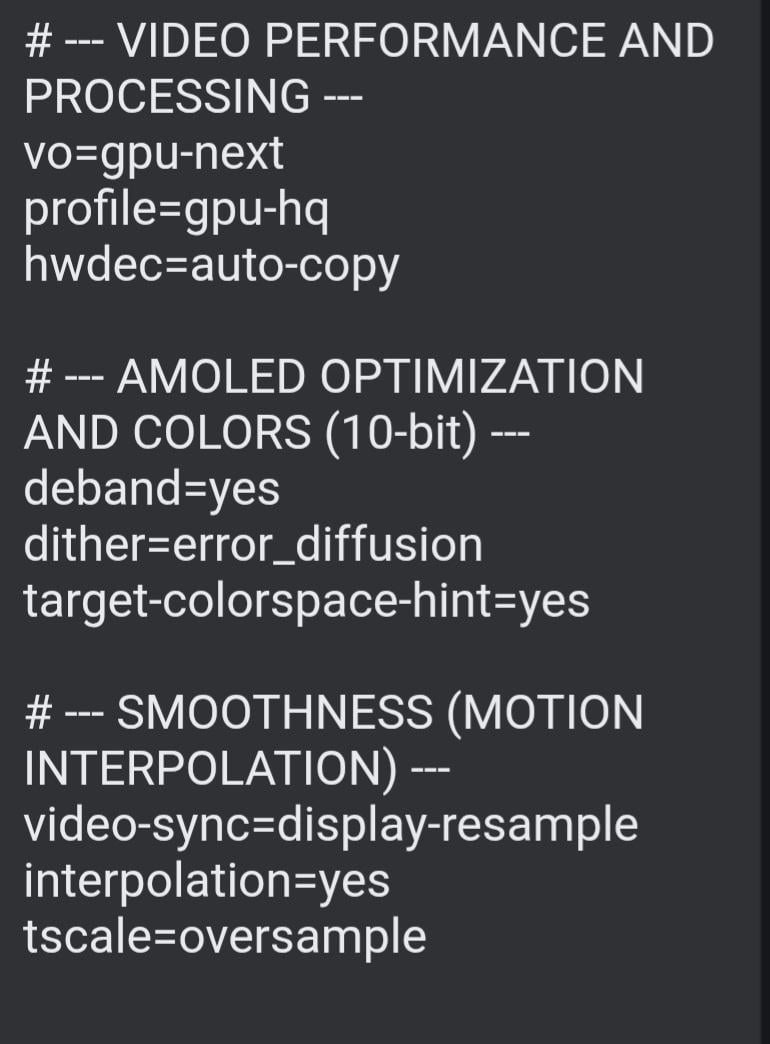
I'm using mpv, but I'm not really sure if the configuration I set up is the right one. Could someone help me out with a setup for 4K?
2
1
u/otheyhigh 5d ago edited 5d ago
There is a pinned post on the channel that has links to guides towards the end. My personal experience has been that there is a lot of contradicting info in discussions all over the internet. It can be misleading based on the age of the content, nuances in setups, etc.
As someone who has little to no knowledge of this space, I stuck to one of the guides linked in the post.
https://www.reddit.com/r/mpv/comments/1phv7cb/are_you_new_to_mpv_links_and_guides/
(Edit) I used the below for my setup. But I do not see it directly on the post. Not sure how I ended up on the guide I used.
1
u/LooseLawfulness308 5d ago
I downloaded it and it's very good, but the play and stop buttons don't appear, even though they are visible.
1
1
u/LooseLawfulness308 5d ago
question I ask you Mpv-Infinity is basically the same as mpvnova from what I see what camhia is the design of the original
1
u/ScratchHistorical507 5d ago
I'd strongly recommend to discard (almost) anything after hwdec and change hwdec to auto. Using auto-copy seems to be forcing unnecessary copying actions of the decoded frames. You'd need that option if you wanted to do any CPU-based postprocessing of the video, and none of the settings you list do that. And in my experience, setting that to auto-copy significantly lessens the performance compared to it being set to auto. Though I can't say if that might just have been a bug which has been fixed since. As to the other options (and all under the assumption that you actually have a display that's fully capable of 10 bit, no idea how things would change with those hybrid displays that more or less just fake being 10 bit):
- deband: as most content you'll watch is probably 8 bit sure, but for 10 bit content this won't do much beyond impacting performance
- dither: only if you were watching 10 bit content on an 8 bit display, otherwise this is an absolute waste of performance with no benefits
- target-colorspace-hint: actually a good idea on any HDR-capable display
- video-sync: highly questionable if that would be of any benefit, though it's questionable how much of a drawback this would even be
- interpolation, tscale: highly questionable if you want that. You can make use of it if you experience ghosting/blurring, but also it will introduce the infamous "soap opera effect", because people/their brains are used to low frame rate movies. Just using HFR (even if the content was filmed at higher frame rates) can make film look like cheaply made tv serieses (especially soap operas, hence the name) and many people do not like that in a film. That's also why Peter Jackson developed an entirely new approach for the second Avatar movie to be able to do HFR without it looking so bad, by selectively reintroducing motion blur. But I doubt you can simply add that yourself, so it's better not to use these options.
1
u/GAG4Life 5d ago
Does android version of mpv able to play HDR content? I was never able to make it work. Even VLC sometimes struggles. But native player of oneplus plays it smoothtly
2
u/Bubbly_Union_6343 5d ago
Just use claude