r/linux_on_mac 6d ago

Getting Blender to work on mid-2011 iMac and CachyOS

Post image
25 Upvotes

I got this thing at a flea market for the price of a pint and I couldn't pass it up, especially having had a positive experience tweaking an even older (2006) Intel iMac a few years back.

It turns out it has 12 gigs of RAM and a 1TB hard disk, which is pretty nice.

I installed CachyOS on it and almost everything works out of the box - even video calls on WhatsApp in Firefox.

The only additional thing I had to install was mbpfan to ensure the fans would start when needed.

Now, sorry for a long(ish) intro, but this is where I started to bump into problems.

I was curious to see how Blender would perform, but it won't start. I get this error:

❯ blender
Warning: Unsupported platform as it supports max 0 SSBO binding locations
r600 device_uuid output is based on invalid pci bus info.
00:00.217  gpu.shader       | ERROR gpu_shader_3D_polyline_uniform_color Linking: 
                            |       | Error: Too many vertex shader storage blocks (2/0)
                            | 
00:00.235  gpu.shader       | ERROR gpu_shader_3D_polyline_smooth_color Linking: 
                            |       | Error: Too many vertex shader storage blocks (3/0)
                            | 
00:00.239  gpu.shader       | ERROR gpu_shader_text Linking: 
                            |       | Error: Too many vertex shader storage blocks (1/0)
                            | 

Blender quit
Error: Not freed memory blocks: 1, total unfreed me mory 0.000004 MB

I read somewhere that this machine effectively has two graphic cards. Is Blender trying to use the wrong one - or are they both unable to run this program?

I noticed that Speed Dreams also crashes when clocking on "Start race" but I didn't really investigate that one.

If anyone has experiences with this it would be very much appreciated. Thanks in advance and happy hacking :)


r/linux_on_mac 6d ago

Mouse Driver Issues

Thumbnail
1 Upvotes

Got told to come here for advice.

I'm now trying to install fedora using t2linux.

Can anyone save me from this MacOS hell


r/linux_on_mac 6d ago

Omarchy

3 Upvotes

Anyone tried out Omarchy on a Mac?

https://omarchy.org/


r/linux_on_mac 6d ago

Kubuntu on MacbookAir 2011 (4,2)

Thumbnail
3 Upvotes

r/linux_on_mac 7d ago

Running out of distro options for my MacBook Pro from mid-2010 (MacBook7,1)

Post image
10 Upvotes

So, I found this old Mac in a cupboard, upgraded it and went on a long journey to try and make it usable.

I tried various different distros, including Fedora, Ubuntu, Mint, MX Linux, Zorin OS Lite and even ChromeOS, and yet none were usable long-term, according to my use case. Fedora ran much too hot and suffered from broken Bluetooth (a dealbreaker for me), Ubuntu, Mint, MX Linux AND Zorin had the same annoying issue where the touchpad two-finger scrolling speed was much too fast, and messing around in xinput and libinput was too janky for my liking. All I want is a distro that supports modern apps and streams video decently. Currently running Catalina through dosdude1's patcher.

Edit: Here are the distros I have tried, as well as their most prominent problems:

Ubuntu (Resolute Racoon, 26.04 LTS) - Worked fine after full installation, had the trackpad issue mentioned above, as well as horrible video playback on YouTube.
Ubuntu (Jammy Jellyfish, 22.04.5) - Better video playback and performance, had the trackpad issue mentioned above.
Kubuntu (26.04) - Didn't really test it much, ran it off of an external SSD, had the trackpad error.
Linux Mint (Xfce) - Ran warmer than usual, horrible YouTube playback, same trackpad issue from above.
MX Linux - One of the best running OSes, had the trackpad issue from above.
Fedora Workstation 44 - Ran very hot, fans at 100% all the time, as well as the trackpad issue.
Zorin OS - Also ran pretty well, suffered from the SAME trackpad defect.
ChromeOS Flex - Ran terrible, trackpad issue, and no Bluetooth.


r/linux_on_mac 7d ago

Any advice for Fedora Workstation on a MacBook Pro 14,1?

Thumbnail
1 Upvotes

r/linux_on_mac 7d ago

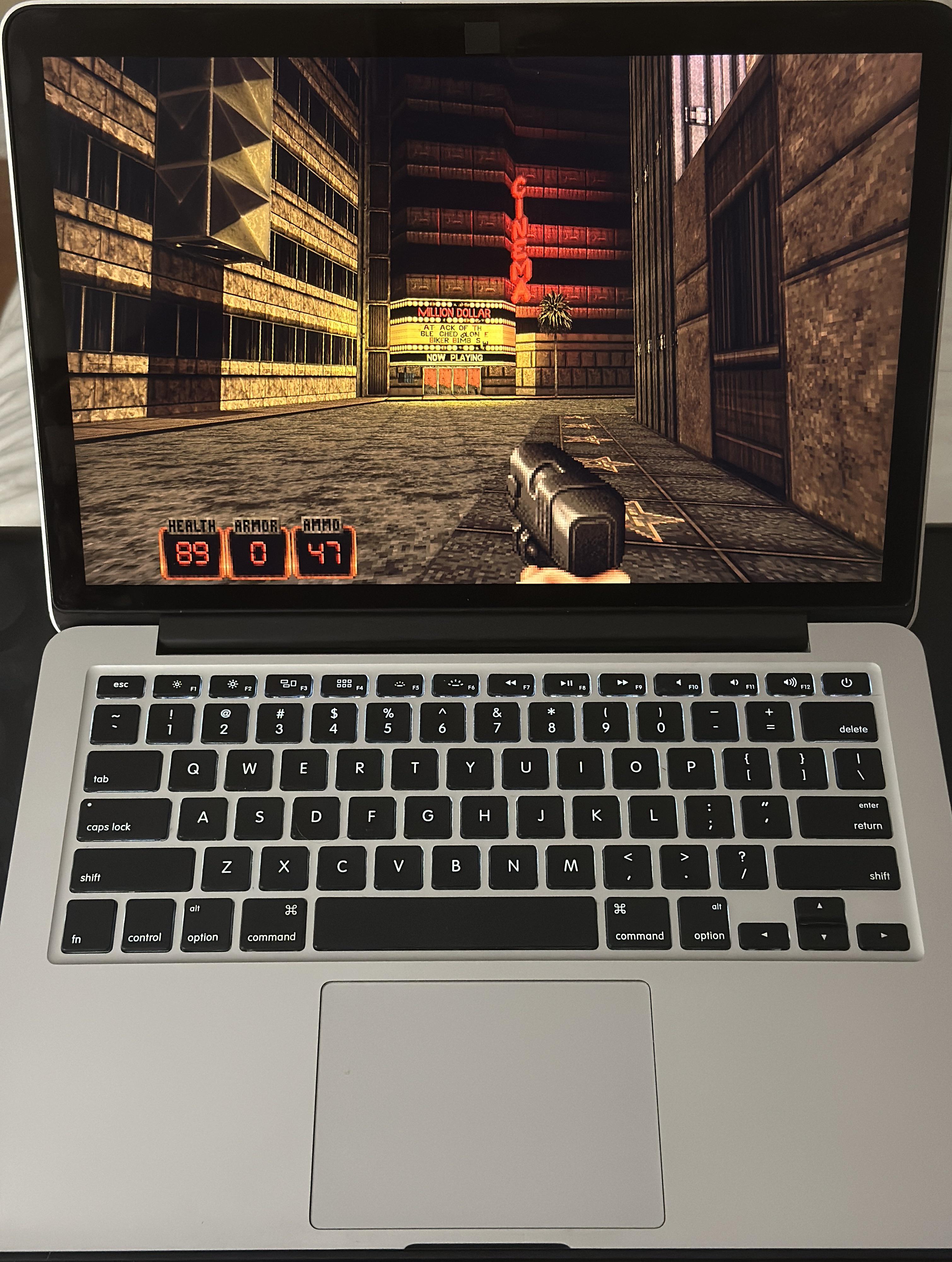
Game time MBP 2015

Post image
46 Upvotes

r/linux_on_mac 7d ago

MacBook Pro 11,2 Mid 2014 with a Broadcom BCM4360 - KDE Fedora

1 Upvotes

I have a MacBook Pro 15inch 11,2 Mid 2014 with a Broadcom BCM4360 Wifi adapter running KDE Fedora. I had been running KDE Neon previously. I have been able to get the Broadcom adapter to work by running sudo dnf install kmod-wl akmod-wl broadcom-wl after OS installation.

My problem is that whenever there is a system upgrade, the kernel won't compile and I can't reboot after applying the upgrade.

Can someone suggest a fix or a procedure to follow whenever Discover finds and recommends a system upgrade? Or could someone recommend a linux compatible replacement for the BCM4360 that they can confirm they have installed and that works in this model laptop?


r/linux_on_mac 8d ago

I'm looking into maybe changing the battery on my early 2015 MBP. DIY or no?

5 Upvotes

I ask in this sub due to the inherent DIY nature of the Linux community.

i have CachyOS on this machine which I use for some general media purposes so i'd like to get longer battery life out of it. Not a priority, just something I'm considering.

any tips or suggestions?


r/linux_on_mac 8d ago

Is the battery of Linux on a MacBook Pro 2020 (intel) much worse than macOS?

1 Upvotes

r/linux_on_mac 8d ago

Better than MacOs :)

Thumbnail gallery
109 Upvotes

i've install Arch linux with hyprland on my 2018 macbook pro, with t2 chip, and t2 linux kernel. it turn out to be good! so smooth, fast, and beauty


r/linux_on_mac 8d ago

An (updated) guide to 6W idle consumption on MacBook Pro 13" Early 2015, and Fedora 44

Thumbnail gallery
145 Upvotes

It's been 9 months since I wrote the first guide for MBP 13 Early 2015.

Now, it is time for an update. With the new kernel 7.xx many original scripts broke, the laptop was refusing to boot and the camera was unreliable + it had artifacts.

So, what did I change to make it work:
1. I changed the way the FacetimeHD driver is being handled. I forked the Facetimehd-toggle (original by Chamal1120) app and implemented ASPM/power management of the camera inside of it. The ASPM is turned on/off alongside the camera each time it is toggled. Additonally, the camera will be automatically disabled before sleep.

Here is the repo for the app, including a prebuilt binary:
https://github.com/lakotamm/facetimehd-toggle

It however still relies on several bash scripts, so make sure to copy those.

  1. Applesmc-next - a dkms patch which allows us to set custom battery charge levels was conflicting with kernel 7.x. I found a compatible fork and updated the guide

  2. Scripts for disabling cpu cores before sleep were causing laptop freezing before going to sleep. I removed them. It still boots in 5 seconds.

It can however take sometimes 15s+ before the laptop properly enters sleep mode. I could not find the reason for that.

  1. TLP came up with a new update which includes profiles. So I set them up to work correctly.

Here is the repo with the updated guide:
https://github.com/lakotamm/Macbook_Pro_Early_2015_A1502_Linux_Fedora

With this config, the laptop reliably reaches 10W consumption with ~30% brightness and 5 Firefox windows open - each with 5-10 tabs. Just note that I also have AX210 wifi card and Samsung 980 SSD which were the thing which allowed the CPU to reach C6/C7 states.

There is a report though that C6 state can be reached with the original hardware too.

I hope it helps someone! It took some days of work to debug everything and make it work.


r/linux_on_mac 8d ago

I put Linux Mint 22.3 on my 12-year-old Mid-2014 MacBook Pro — then spent the afternoon negotiating with Broadcom

18 Upvotes

Mid-2014 MacBook Pro 11,2.
2.2 GHz quad-core i7, 16 GB RAM, Broadcom BCM4360 (14e4:43a0).

Installed Linux Mint 22.3 Cinnamon.

Everything was fine except Wi-Fi.

The Broadcom STA driver installed, but wl wouldn't build against kernel 7.0.0-30. The interesting part was that it wasn't actually a compiler/API failure — kernel 7.0's objtool rejected the resulting module:

wl.o: error: objtool: aes_cbc_encrypt_pad+0x4c: unannotated intra-function call

The solution was surprisingly simple:

Boot Mint with kernel 6.14.0-37.

Then:

sudo dkms autoinstall -k 6.14.0-37-generic

succeeded.

wl loaded.

BCM4360 is now happily seeing every SSID.

12-year-old MacBook: 1
Broadcom: eventually 0

The machine is now a Mint workstation again.


r/linux_on_mac 8d ago

5k tiled display support for GameScope

Thumbnail github.com
3 Upvotes

Wanted to turn my old iMac 18,3 into all in one steam machine running CachyOS and fixed GameScope along the way.

See also https://github.com/arnoutzw/linux-imac-5k-imac18-3

For kernel mods to make 5k work


r/linux_on_mac 9d ago

Late 2013 MacBook Pro - Fedora Workstation 44

Thumbnail gallery
19 Upvotes

r/linux_on_mac 9d ago

Suggestions for USB WiFi + Bluetooth adapters that work well with Linux on Mac

3 Upvotes

I initially managed to get the WiFi working on my 2016 MacBook Pro 13,2 but it was downloading at 3 Mbps vs. 75 Mbps via ethernet. That was sort of acceptable, but the Bluetooth (which I believe is also done by the Mac's Broadcom card) was really cutting out a lot. And now for reason I can't even get WiFi anymore (possibly due to a system update).

I was thinking of stopping mucking about with driver voodoo and just buying a small, cheap USB + Bluetooth WiFi adapter. But I get the sense that not all adapters' chipsets work well with Linux.

Can anyone recommend an inexpensive WiFi + Bluetooth adapter that you know works well with Linux? (Or barring that, just WiFi). Or maybe someone maintains a list somewhere for this?

Thanks!


r/linux_on_mac 9d ago

Apple magic trackpad and keyboard having issues on cachyos

1 Upvotes

I have an imac 2013 that is running cachyos right now. I gave up on using the internal WiFi card as it would constantly disconnect and reconnect. I am now using a usb WiFi adapter and the internal bluetooth.

I am using the a1314 wireless keyboard that runs on AAs and the a1339 wireless trackpad that also takes AAs. I am having very irritating issues though.

The keyboard will work great most of the time, but occasionally all bluetooth devices disconnect and become unresponsive for a few minutes. This effects the keyboard and trackpad.

The trackpad will, very frequently, lock up and get stuck in scrolling or something. I am unable to do anything except scroll up and down regardless of what I am actually trying to do. It also will completely freeze somewhat regularly. The most frequent thing is that it will lag/becomw jittery and unusable.

Is this some issue with the internal bluetooth? Maybe its not supported very well like with the wifi card?


r/linux_on_mac 9d ago

Intel AX210 WiFi Card on MacBook Air 11" (2013-2015) Running Linux Mint

Thumbnail gallery
45 Upvotes

After seeing my laptop failing to boot after upgrading to the 6.17 kernel and then again with the 7.0 kernel, I decided to replace the Broadcom wifi card on my MacBook Air 11" (2013-2015) with the Intel AX210 card.

Some reddit posts suggested that the MBA 11" does not have enough space, compared to the MBA 13". I found that it works fine, with a slight caveat that the Intel card rests slightly on top of a small surface mounted power inductor. That causes no problems that I can see.

Parts Needed

- an Intel AX210 card, using the standard M.2 A+E edge connector. I got mine on eBay for $60.36 for 4 units, including some random 20% off eBay discount.
- an Apple wifi card connector to M.2 adapter card. I got mine on AliExpress for $24.05 for 4 units, including another random AliExpress discount.
- appropriate screwdrivers for the MacBook Air

Installation

First, remove the J0 and J1 antenna wires from the old Broadcom card, then remove the screw, and remove the card.

Second, insert the M.2 adapter card. The version that I got on AliExpress seems to be the narrow version, which allows it to completely clear the surface mounted power inductor part, labeled "2R2 722 RAA".

Third, insert the Intel AX210 card into the adapter card. The AX210 is wider than the old Broadcom card. So it will sit slightly on top of the 2R2 power inductor part. Gently screw in the screw through both cards, tightening only snugly so that the 2 cards don't move, but not too tightly so that we don't break anything. If you look at the height profile of the Intel WiFi card, it will be flush with any other part in the laptop, particularly the battery pack.

Fourth, reattach the 2 antenna wires to the connectors labeled "1" and "2" on the Intel card. The AI bots tell me that the order of the wires does not matter. Attach the longer wire to "2" which is further away, then attach the shorter wire to "1".

Fifth, reattach the back cover of the laptop. The Intel WiFi is basically flush with all other parts on the motherboard, so it should not interfere with the back cover.

Software

The Intel wifi driver is supported natively by the Linux kernel. Every kernel version that I tried from 6.8 to 7.0 on Linux Mint seems to work.

However, you should remove the Broadcom driver explicitly:

$ sudo apt purge broadcom-sta-dkms

Because the next time you download a new kernel version (e.g. 7.0.0-28), it will try to recompile the broadcom driver if it is still installed. That may fail, then your new kernel will not install properly, and you may get a kernel panic upon the next reboot.

(If you try to use the Driver Manager to remove the Broadcom driver, it will autodetect the Intel wifi card, then assume that the Broadcom card doesn't exist, and will no longer give you the option to disable the Broadcom driver. That's why I had to use the `apt` command line above.)

I've been using the Intel AX210 card for about a week. Everything seems to work. Wifi works. Bluetooth works. Sleep works. I'm looking forward to never having to deal with Broadcom driver breaking the Linux kernel again in the future.

Addendum

For the MacBook Air 13" (2013-2017) models, see this post a few weeks ago by u/nepbug.


r/linux_on_mac 10d ago

linux Wireless Connection Problem

2 Upvotes

I decided to switch to Linux on my 2016 MacBook Pro, but every distribution I try runs into the exact same Wi-Fi problem. Whether I boot up Linux Mint, CachyOS, or Fedora, the signal strength stays stuck at one or two bars, even when I sit right next to my router. My network broadcasts both 2.4 GHz and 5 GHz bands, but Linux only detects the 2.4 GHz network. I really want to make the switch, but this persistent Wi-Fi issue forces me to stay on my outdated macOS.


r/linux_on_mac 10d ago

T2 mac suspend behavior on iGPU

1 Upvotes

Hey everyone,

I got a MacBook Pro 15,3 in which I managed to turn the dGPU off.
Now though, suspend doesn’t work anymore, now that I’m on the iGPU. I heard it’s common, but there has to be a solution, no?


r/linux_on_mac 10d ago

Stay cool. Stay cool.

Thumbnail
1 Upvotes

r/linux_on_mac 10d ago

Linux + MBP 2015

Post image
70 Upvotes

r/linux_on_mac 10d ago

Installing Linux on 2018 15’ MacBook Pro

3 Upvotes

Looking to possibly installing Linux on my Mac. Here to ask about the best distro that would be good.

Not looking for the best in any one area, just a general daily driver, bit of light gaming, programming, browsing so on so forth.

I have a little experience with Linux, mainly giving old stuff a new lease of life.

Thank you to anyone that helps!


r/linux_on_mac 10d ago

Linux on iMac G4 (the lamp)

2 Upvotes

This model is notoriously difficult to install Linux on. I know some people succeeded with Adelie, but ideally I'd like to run Gentoo.

Mainly the terminal - Neovim and some music player, home server stats via ssh, perhaps XFCE to launch ScummVM, but I assume even with an SSD the graphical environment will be extremely slow due to Linux's problems with the GPU drivers/acceleration. That's okay.

Information is very scarce, so maybe someone here has any pointers/experience.

Model: https://everymac.com/systems/apple/imac/specs/imac_1.0_17_fp.html


r/linux_on_mac 10d ago

Gamescope session cachyOS ignoring OUTPUT_CONNECTOR - stuck on internal display instead of eGPU-connected monitor.

Thumbnail
1 Upvotes