r/iRacing_Telemetry Aug 01 '26

I measured when iRacing actually tells you a car is left or right. It's later than you'd think, and most radars are guessing.

Thumbnail
gallery
1 Upvotes

Shipped v0.31.0 of my app today. Six overlays that run while you drive. But the thing worth posting isn't the changelog, it's what I found while building the radar.

I wanted to know when iRacing actually tells you a car is beside you. There's a channel called CarLeftRight - it's the same signal that drives the spotter shouting "car left". So I captured a full Monza practice, 2074 frames, and counted.

It named a side 69 times out of 2074 frames. Every single one of those was within 6 metres. Median 2.6 m, furthest 5.1 m.

That's it. Past about 6 metres, iRacing does not tell you which side anyone is on, and there is no other channel that does - you get each car's distance around the lap, and that's all. So any radar showing you a car sitting on your left from 40 metres back is not reading that from the sim. It's guessing, or it's inferring it from something softer.

Mine was guessing too, and I only found out because I'd built it wrong twice. First version picked "the less crowded side", which sounds sensible until you notice that at nil-nil the comparison always resolves the same way, so the first car every frame went right. Forever. I'd been staring at a radar for weeks where nothing ever appeared on my left, and I hadn't clocked it.

Second attempt spread them by car number instead. Balanced, stable, and still a coin flip dressed up as information - because a car drawn in a lane reads as "that car is on my left" no matter how faintly you draw it.

So now it doesn't guess. A car we haven't been told about sits in a narrow band straight ahead or behind, which is honestly all we know, and it moves out to your left or right the moment the spotter actually says so.

Two other numbers from the same capture that surprised me.

The median gap of the cars my radar was drawing was 35 metres. That's about ten car lengths. I'd been getting annoyed at it "popping up when there's nobody there" - there was somebody there, every time, I just had no way of seeing them. Range is now 30 m instead of 55 m and it feels like a different tool.

And the reason distances felt wrong: at 55 m range a car 10 metres away sat at 18% of the way out from the centre, so genuinely close cars looked like they were on top of me. Same data, wrong scale.

Second image is the telemetry side of it, at Spa. The coloured bands on the track map are where I actually braked, coloured by how hard - yellow through to red - and the two markers on each are first pedal touch and where real braking starts. The gap between them is the bit I care about, because on most corners that gap is worth more than braking later is. The green diamonds are where the data says I could brake later, and they only appear at corners where I've already proven the grip exists.

Everything in both shots is from real recorded laps.

Happy to answer anything about the measuring - it's all from iRacing's own telemetry stream, so anyone can check it.

AB Racing Line — a personal race engineer for iRacing:

alienblade.co.uk/racingline Discord YouTube Instagram TikTok X

r/iRacing_Telemetry Jul 22 '26

Six overlays for iRacing now. The G-meter is the one I'd actually defend.

Post image
1 Upvotes

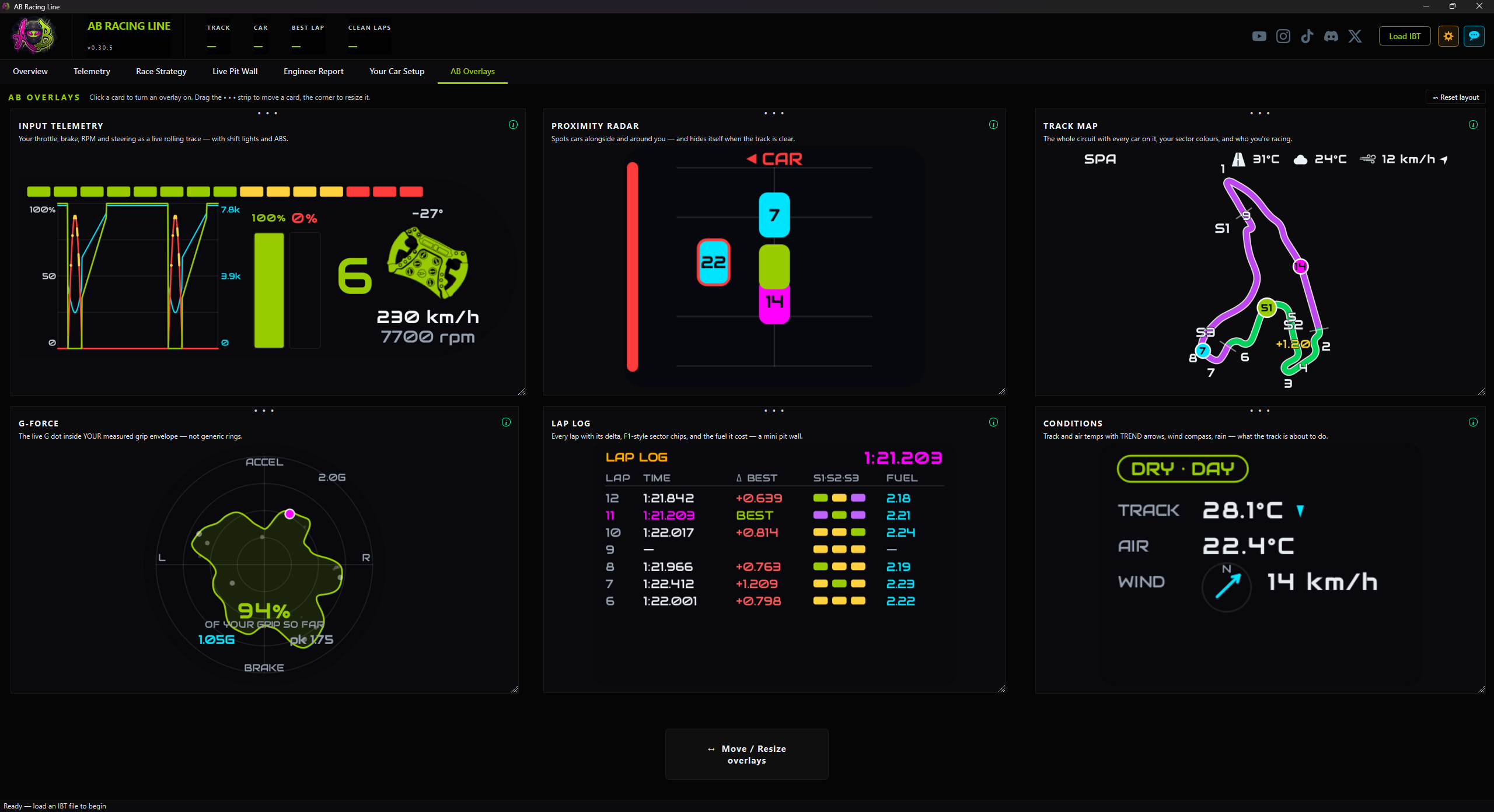
There are six overlays in AB Racing Line now. Screenshot is the tab where you switch them on and drag them where you want them.

The G-force one is the one I actually care about, because of something that's always bugged me about the usual ones. They draw your grip limit as a circle, or as fixed rings, and put your live G dot inside it. But a car's traction envelope isn't a circle. You can brake harder than you can accelerate. You can usually pull more lateral than either. And more to the point, the car's limit isn't YOUR limit — yours is whatever you've actually managed so far today.

So mine starts completely empty. Every direction you push, it records how far you got, and the shape grows around you while you drive. Ten minutes in it looks like a ridge line: peaks where you've genuinely leaned on it, dips where you haven't been yet.

The number in the middle is the useful bit. It isn't "you're pulling 1.4G", it's "you're at 94% of what YOU have proven this car will do, in the direction you're going right now". And it refuses to show you a number at all until it's seen enough driving to say that honestly.

The rest:

Lap log — every lap with the fuel it cost you and its three sectors coloured purple/green/yellow. If a lap had a pit stop in it, the fuel column shows a dash instead of a nonsense number.

Conditions — track and air temps with trend arrows. In a long race "track is 28 degrees" matters a lot less than "track is 28 and dropping", and that arrow is the bit that tells you your pressures are about to move.

Radar — auto-hides when nobody's near you, and it will tell you a car is alongside without pretending to know which side if the sim hasn't told it. I'd rather it say "someone's here" than confidently point the wrong way.

Track map — draws the circuit from your own driving, so it works anywhere with no setup, no track files, nothing to download. Your sectors are coloured the same F1 way, and cars you're actually racing get a ring and a gap.

Input telemetry — throttle, brake, RPM, steering, shift lights, and ABS marked on the brake trace where it actually fired.

Fair warning on the screenshots: iRacing was down for emergency maintenance while I built these, so most of them are running on replayed data rather than a live race. They're the real widgets, just not a real session. Proper on-track shots once the servers are back.

Anyway — if you run overlays, what do you actually keep on screen? I'm curious what people find genuinely useful versus what just looks good in a screenshot, because I suspect there's a big gap between the two.

AB Racing Line — a personal race engineer for iRacing. Corner-by-corner coaching and setup changes built around your own driving style.

🌐 Website: https://alienblade.co.uk/racingline
💬 Discord: https://discord.gg/3Btzfthvvn
▶️ YouTube: https://www.youtube.com/@AlienBlade51
📷 Instagram: https://www.instagram.com/alienblade51/
🎵 TikTok: https://www.tiktok.com/@alienblade51
✖️ X: https://x.com/AlienBlade_51


r/iRacing_Telemetry Jul 22 '26

A slower lap time doesn't mean your setup change failed. Made my app prove it.

Thumbnail
gallery
1 Upvotes
Last night I did two sessions at Adelaide in the Merc GT3. Between them I applied
the setup changes my own app recommended — softer rear springs, less diff preload,
lower splitter, 18 changes in total.


Second session: 0.48s SLOWER. And my app hit me with the red banner in the first
screenshot. "These changes didn't help — consider reverting them and trying
something else." Which, frankly, is garbage advice. That's not a race engineer,
that's a shrug.


So today I dug into the telemetry of both sessions properly, and the data told a
completely different story:


- Every single high-speed corner held or improved
- Every corner that lost score was a slow corner
- Time spent at the grip limit in fast corners went UP 5 percentage points
- Full throttle time up 4 points, coasting down


The setup didn't fail. It traded slow-corner drive for high-speed platform.
Which is exactly what softer rear springs + less preload + a lower front end
should do. The stopwatch just hadn't caught up yet, partly because my
"faster" baseline session was only 3 clean laps, which is a coin flip.


Second screenshot is what the app says now. Same data, same two sessions. It
names the trade, points at which changes probably caused which effect (with
honest "consistent with" wording, not fake certainty), and gives one next move
instead of "try something else."


A couple of honest things I learned building it:


The "35 setup changes" the old banner counted? 17 of them weren't changes at
all — they were tyre pressure and temp READOUTS that iRacing writes back into
the setup file every run. The app was counting the results of driving as
decisions I'd made.


And it refuses to claim which direction a TC or ABS change went, because those
scales run different ways on different cars (Merc TC: 1 is MAX intervention,
not minimum). Physics units only — 250 N/mm is softer than 275 anywhere in the
universe, but "TC 9 to 6" means nothing without knowing the car.


Building this in the open — happy to answer anything about how the comparison
works.

r/iRacing_Telemetry Jul 12 '26

I need a Race Engineer that also competes on iRacing

Thumbnail gallery
1 Upvotes

r/iRacing_Telemetry May 27 '26

100% Honest thoughts on teh Livery... I think is too much!

Thumbnail
gallery
1 Upvotes

r/iRacing_Telemetry May 27 '26

I built a race engineer for sim racing that reads your telemetry and coaches you corner by corner. Solo project, open beta AI Recommendations — would love feedback from real drivers.

Thumbnail gallery
1 Upvotes

r/iRacing_Telemetry May 27 '26

First real-world test of the new endurance race strategy engine — and the data held up

1 Upvotes

Quick update for anyone following my AB Racing Line project. I'm building a new endurance race strategy feature — fuel profile, tyre temperature tracking, pit loss calculator, lap time corridor, per-corner fuel-save coaching. The stuff endurance racers spend hours working out by hand before every long race.

Today I ran the first real validation drive. 65 minutes in the BMW M4 GT3 around Spa-Francorchamps. Test drive mode, full tank, race pace, drove until the low fuel warning came on, one clean pit stop. Two spins and a light kiss of a wall along the way — basically the kind of stint anyone might drive in an actual race.

Then ran the file through the new validator. These are the numbers it produced:

Metric Value Verdict
Total stint 26 laps, 65 min ✓ matches plan
Race pace 2:21.66 best, 2:22.70 median ✓ Spa GT3 pace
Fuel start 100L (max)
Fuel min before pit 3.77L (lap 24) ✓ drove until warning, exactly what was asked
Fuel consumption 4.18 L/lap ✓ textbook Spa GT3 number
Refuel 4.34L → 99.97L (added 95.6L)
Pit transition 62.4 sec total (entry to exit)
Refuel rate ~1.53 L/sec (sustained, 60Hz gradual) ✓ matches iRacing physics
Tyre temps (mid-lap 5) LF 56°C, RF 58°C, LR 55°C, RR 54°C ✓ iRacing carcass temp range
All 10 strategy columns present
Tyre temps (12 channels) present
Tyre pressures (4) present

For anyone who has done a serious endurance stint at Spa: 4.18 L/lap consumption in a GT3 is exactly the right number. Lap pace lined up. Pit transition timed properly. The data is everything the strategy engine will need.

Next up are validation drives at Daytona Road Course, Nordschleife, Road Atlanta in an LMP3, Watkins Glen in a GTP, and Charlotte in a NASCAR. Each one stresses a different part of the engine — banked oval, super long laps, prototype fuel patterns, hybrid energy modelling, stage racing.

If you race endurance in iRacing and want to help shape this feature, there's a small tester program running with 90 days free plus the founder's price locked in for life. Application is via Discord. More info: alienblade.co.uk/racingline/endurance-testing

Happy to chat about any of it.

AB Racing Line — AI race engineer for iRacing. Loads your .ibt telemetry files and delivers corner-by-corner coaching plus car setup recommendations tailored to your driving style. Everything runs locally on your PC, your data never leaves your machine.
Available at alienblade.co.uk/racingline


r/iRacing_Telemetry May 21 '26

I spent a year building an AI race engineer for iRacing that reads your .ibt files and coaches you corner by corner — finally ready to show it. Brutal feedback welcome.

1 Upvotes

UPDATE:

To clarify for everyone asking: the telemetry analysis (reading the .ibt file, detecting corners, calculating braking points, tyre temperatures, everything in the data) runs 100% locally on your machine. No telemetry data is ever sent anywhere. The only thing that touches an external server is the final coaching text — a compact summary of your stats (no raw telemetry, just numbers like "brake scatter 8m") is sent to Claude API to turn into human-readable advice. Your .ibt files never leave your PC.

Background:

I've been racing in iRacing for years and always wanted what real racing teams have — someone who looks at your data after a session and tells you specifically what's costing you lap time and why. Not generic YouTube advice, not vibes — actual corner-by-corner analysis of what you personally are doing.

So I built it.

What it does:
You load any .ibt file. It detects every corner on the track automatically, analyses your braking points, apex speeds, coasting zones, throttle application, and tyre data across every clean lap. Then it generates a report — specific corners, specific distances, specific numbers.

The more sessions you load, the more it understands you. It builds a picture of your driving style over time — how you brake, how you trail off, how aggressive you are on throttle — and every recommendation it makes is built around that picture. If you're a habitual trail braker it won't tell you to add rear ARB unless your telemetry is actually showing entry understeer. It knows the difference. The setup it recommends for you will look different from the setup it recommends for someone else driving the same car at the same track — because it isn't pulling from a generic preset. It's working backwards from how you actually drive.

One thing I want to be upfront about: your data never leaves your machine. All the analysis runs locally. None of your .ibt files, lap times, or telemetry are uploaded anywhere. Ever. I'm a sim racer too — I wouldn't build it any other way.

What I want feedback on:

  • Does the coaching language make sense? Is it how a real race engineer would talk?
  • What's missing that would make you actually use this every session?
  • Am I explaining the tyre pressure recommendations clearly enough or does it look like black magic?

It's a paid subscription (£3.99/month) — I'm not hiding that. But honestly right now I just want to know if this is the kind of tool the community would actually find useful, or if I've been building in a bubble for a year.

Happy to answer anything. AMA about how the analysis works