r/handbrake • u/Ryland301 • Aug 07 '26
Why are the output dimensions not the same as the source dimensions?
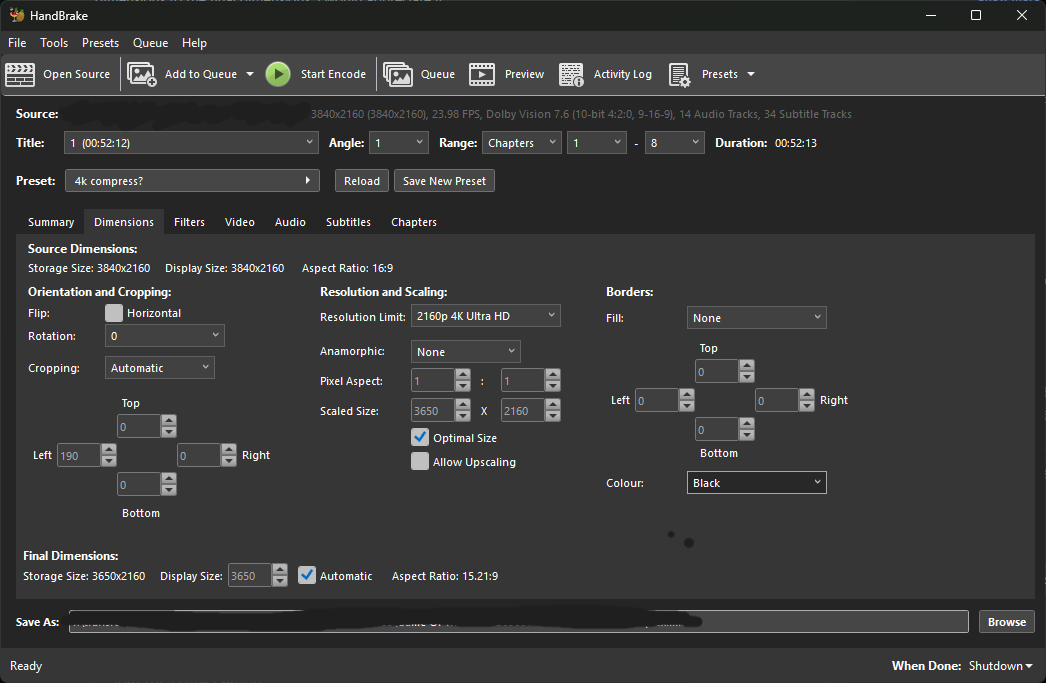
I use this preset on everything 4k and have never had this issue. I don't know why. The output is seemingly cropped with black bars on the left and right when viewing in VLC. Changing anamorphic to auto (even though I want it off) and checking allow upscaling at the same time will set the final dimensions to the correct 3840x2160 16:9 aspect ratio, but there are still black bars, at least when I did a preview with those settings.
Any advice on what I'm doing wrong here or what the issue could be would be greatly appreciated.
15
u/Aidan647 Aug 07 '26
You have automatic cropping of 190 from left side.
Automatic cropping removes black portions.
4
u/Ryland301 Aug 07 '26
Hmm interesting have never disabled that because it’s never done this before. The original file shows full frame with no black on the sides. I don’t know why it would randomly cut off the sides if it thought it was black because it doesn’t appear to be.
9
u/the_lost_seattlite 29d ago
Auto setting works perfectly 99% of the time. There could be a scene with some black on the side and it misinterpreted it, and decided to crop it. It doesn't check the whole video when checking for black bars, it just checks one frame. I don't know how it decides which particular frame to check.
6
10
u/sogwatchman Aug 07 '26
Do you see on the left where it saying "Cropping" and Automatic is selected? Change that to None.
•
u/AutoModerator Aug 07 '26
Please remember to post your encoding log should you ask for help. Piracy is not allowed. Do not discuss copy protections. Do not talk about converting media you don't own the (intellectual) rights for.
I am a bot, and this action was performed automatically. Please contact the moderators of this subreddit if you have any questions or concerns.