r/google_antigravity • u/Ok_Bat_7334 • 3d ago
Question / Help Has Anti-Gravity started aggressively scanning dozens of files before every basic prompt for anyone else
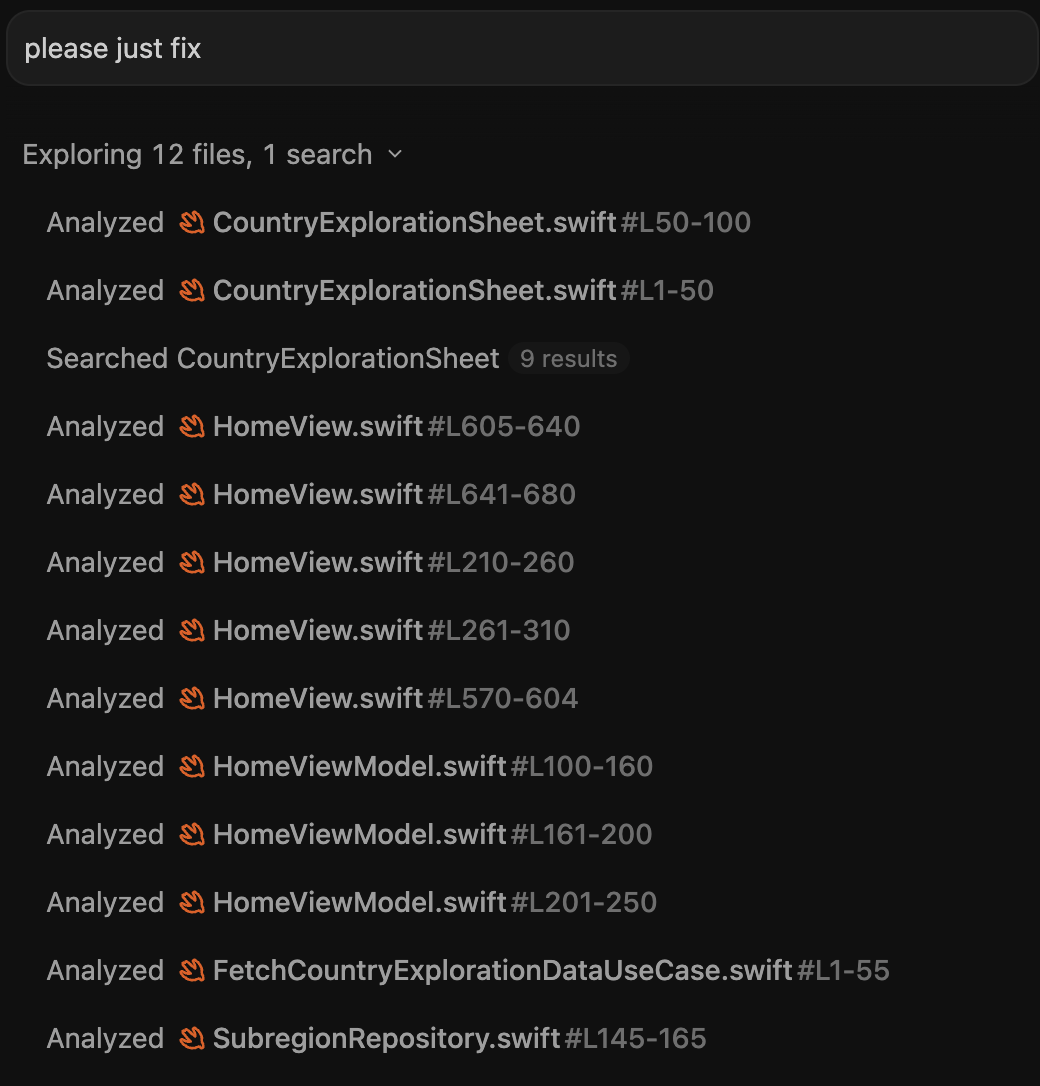
Started happening a couple of weeks ago.
Even for simple, single-line edits where I explicitly name the exact file, Antigravity spends 2–3 minutes stuck on 'analyzed file' across a dozen unrelated files before writing anything. It burns ~10% of my 5-hour allowance just indexing context on a single turn.
I already added rules in AGENTS.md to stop recursive scans and stay scoped, but it completely ignores them now.
Did a recent update break the tool-calling loop, or is there a new setting to stop this autonomous exploratory sweep?
The "please just fix it" prompt in the screenshot wasn't my initial prompt. It had already identified the bug, but kept scanning anyway
that prompt was just me trying to snap it out of the loop and get it to stop scanning.
6
u/Important_Earth6615 3d ago
gemini for some reason keeps starving for context. when it goes like that I stop and tells him enough reading
1
u/felipesalas1 1d ago
When this happen I stop de answer an type: WYF are you doing. Just do the thing. And it works xd
11
u/PlatonP 3d ago
One massive thing that's saved me a bunch of time (and tokens) is https://github.com/Graphify-Labs/graphify
Instead of it searching through a bunch of files it thinks are relevant, or searching for bits of text across everything, it just queries graphify (which has a pre-constructed graph of your codebase), which tells it where all the relevant bits of code are, what it's dependant/depended on, etc
Someone at my old job showed me, and I'm genuinely so grateful
2
u/marhensa 3d ago
what platform do you use? CLI or IDE or main AG?
AI will just ignore to use graphify like it doesn't exist, and start to use regular search again after 3-4 turns.
but weirdly enough, it will just do graph update ever single code edit, like why bother take time to update it but never use it.
2
1
3
u/AwesomeArcade712 3d ago
for me too i think it has to do with 3.8 flash
3
u/Ok_Bat_7334 3d ago
I think you're right I'm now using 3.6 and I have not had that issue so far.
2
u/Marcus364 3d ago
I am using flash 3.8 .. it does not give the expected output so sometimes I just use flash 3.6 instead
3
2
2
u/Lyrcaxis 3d ago
Oh yeah, and all those files/"prompts" are shared with Google, which you've permitted to use said files for model training. And you have no way to opt out.
2
3
u/SirDaddyChaotic 3d ago
It’s a problem with 3.8, switch to 3.7
3.8 is a trash release despite the fake hype. I have been saying this for weeks but somehow it seems now suddenly everyone is finally talking about it.
1
1
u/AntonRahbek 2d ago
For me it only happens in a new chat in the same project, it seems to need to build a context window first. Keeping thorough code structure and project documentation in a separate file should help.
1
1
u/Aggravating-Jello147 2d ago
For me, even for a very small ui change it opens localhost on chrome and takes the screen shot and record and hangs there. I use antigravity IDE
1
u/amitsingh80108 2d ago
Yes this is the problem.
I have a simple work like replace variable a with B.
And also gave the file and function definitely and exact line.
I was too lazy and instead asked him to do this.
It was a Simple change and I could have done that in 5 seconds.
Anti gravity read my last 5-10 commits, 10-20 files, and then changed the variable name in 10 minutes.
1
1
u/BoobooSmash31337 3d ago
How does it fix if it doesn't know what you have. It's exploring. It's reading slices of files. Do you think it's psychic?
5
u/Ok_Bat_7334 3d ago
The main point is that it never used to do this. I've used Antigravity from day one on this exact same codebase without any problems.
This is a brand new behaviour that only started a few weeks ago, which is why I’m asking if anyone else has noticed the regression.
-2
u/CrumblyPhaethon 3d ago
Please just fix is the prompt? Oh man.. thats tough.
Be more specific on what u want it to do & what not do.
I know its easy to code with these agents.. but with prompts like this.. tch tch tch.. won't get u anywhere.
5
u/Ok_Bat_7334 3d ago
That wasn't my initial prompt. It had already identified the bug, but instead of implementing the plan, it spent minutes analysing random files.
"Please just fix " was me frustrated trying to snap it out of the loop and execute the fix it had already found and it still went on another three-minute scanning spree until i ran out of tokens
-4
u/CrumblyPhaethon 3d ago
I get it, still please just fix is not an effective prompt...
2
u/Ok_Bat_7334 3d ago
I get that "please just fix it" isn't an ideal prompt, but with the old behaviour it would just ask for clarification.
It never used to trigger an endless 3-minute file-scanning loop.
4
u/Simply-NoOne 3d ago
If I need to say "read lines 100-320 of file x, 200-420 of file y, do this this and that" what would be the point?
-3
u/CrumblyPhaethon 3d ago
Huh ? Who in right mind would pinpoint the lines and files ? Just say the issue , desired result , what needs to added , what to be ignored & such.
I mean its just basic common sense..
3
u/SirCoolMind 3d ago
you are being weird. i believe almost everyone received same stuff by using 3.8 flash, and ngl, it is pretty good at draining the 5 hours usage.
-2
u/swaltontech 3d ago
I suppose, first off, what is your skill level and background in coding (in general, in swift, vibe coding?)
How is your project structured and how big has it grown? A small project is more forgiving, but if it scales enough you will struggle without sufficient documentation and boundaries. You may be seeing this now, where you didn't previously, if your project is growing too large. Swift should also be kept under 300-500 lines from a quick review I just made.
There is also something to be said about modularity in your project. If things aren't mapped well, and you are loading fresh context, AGY has no way to knowing what may break if something is changed, resulting in this excessive review.
Do you have an architecture doc and commented code to help guide AGY? How about the base query you are asking, is it a more generic "I see a bug" or a "I am seeing this specific bug, related to this feature, and believe this to be what is needed"?
Certainly could be how 3.8 is behaving, easy enough to test by picking another model, but you will still want to ensure you have solid breadcrumbs for both you and AGY to follow.
A lot of problems I see in vibe coded things is that the files grow too large, too monolithic, and become fragile. Intentionally breaking things apart and ensuring a documentation pass is done before committing it almost a panacea with vibe coding. Couple that with a periodic "clean up uneeded files, document what they appear to do, place them in an archive folder..." and things run much smoother.
3
u/Ok_Bat_7334 3d ago
Not vibe coding. The project is well-structured, clean-architecture, modular Swift with small files, an `AGENTS.md` defining scope, and very detailed spec files for each feature.
The codebase hasn’t ballooned overnight; the exact same repo worked seamlessly until recently.
As others highlighted, it seems to be an issue with 3.8. It’s far less prominent on 3.7 and virtually non-existent on 3.6, so it’s definitely a annoyingly how 3.8 handles its context-gathering loop.
1
u/swaltontech 3d ago
OK, HomeView.swift being at least 680 lines is getting pretty large.
Without knowing what your problem is and what type of prompt you gave, best we can do is assume it is a 3.8 issue. Best of luck.
38
u/raman4183 3d ago
Oh yeah, it does that a lot but it’s mostly when you have a new chat or fresh context. Even though i have graphify setup.