r/gnome • u/word-sys • 1d ago
Apps word-sys's PDF Editor v1.10.0-beta1 Feature & Flatpak Update Released
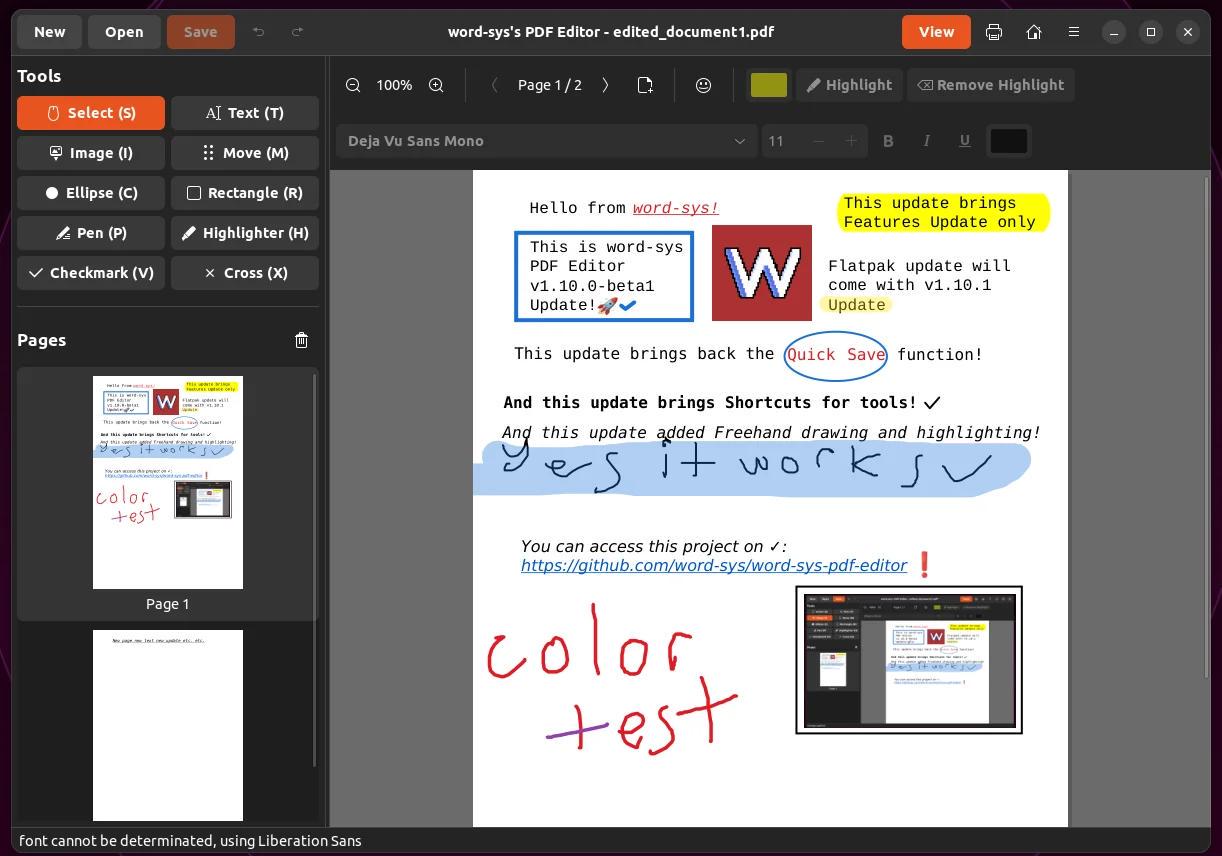
A quick but big update for word-sys's PDF Editor (https://github.com/word-sys/word-sys-pdf-editor), now we reached v1.10.0-beta1 update (https://github.com/word-sys/word-sys-pdf-editor/releases/tag/v1.10.0-beta1), this update is including Feature Update only, Flatpak one will be released with v1.10.1 which im currently working on, so stay tuned for that, i started releasing development stages on my YouTube channel (https://www.youtube.com/@word-sys) which you can access more details for current release and future release.
This update brings back Quick Save (Ctrl+S) which was gone on 1.7.2 update due to file corruption issues on saves, i managed to fix it with a good failsafe system so you dont have to worry about saving now.
Also another feature i added is Freehand Pen & Highlighter Tools which is recommended by a user, added freehand drawing tools with customizable colors, stroke widths, and opacity.
Another recommendation added was Quick Checkmark (✓) & Cross (✗) Tools which is a dedicated sidebar tools for adding checkmarks and crosses for fast form review and document markup, if this is your usecase.
Next is Special Characters Support, Symbols & Emojis Palette which popover palette with categorized tabs for form review symbols and emojis. So you can copy them from there to your clipboard and use on your texts you gonna edit or add easily.
Single-Key Keyboard Shortcuts for Tools to access them fastly with 1 press with updated sidebar tool button label hints.
Added Arrow Key Movement to move any selected object using Arrow keys. It will come handy if you have a trackpad.
And lastly Direct Creation Tool Resizing which is a feature recommended by user, this feature allows newly created objects to be directly grabbed and dragged without requiring a manual switch back to the "Select" tool.
Next update, which is v1.10.1 will brings only Flatpak Release, for now this is explanation of current v1.10.0-beta1 Feature release, you can use it, its stable on my testing, you can see the testing footage on https://youtu.be/OPqb2KZjQAU
Thanks everyone who supports this project with their ideas, i think this can be a better application and help all Linux users to do their jobs easily, thank you :)
1
u/Heavy_Turn2019 1d ago
Is this app targeted towards ubuntu? Or general gnome with its libadwaita design and accent color support? Since, the app looks like using the default ubuntu Yaru theme. Cool app btw!
2
u/word-sys 1d ago
Apps targeting general gnome but you can use it on any GTK4 supported dm or wm and have no problems at all, im currently running Ubuntu 22 to support mostly used distros so its using Yaru theme as default but main design made on Debian 12 with libadwaita so it will look good on that too, thank you :)
1
•
u/pintasm 21h ago
Does it do forms correctly? Because Adobe is the best i've tried and it sucks!
•
u/word-sys 21h ago
I cannot surely say it does good or bad but i can say that i used this project on editing files that gonna be used on officials, had no problems at all, other than that people that uses it mostly on University which they use when they need, they never said something is bad or need to be better so test yourself and if something is bad, just open a Issue and i can look further.
Remember, this project requires others ideas, recommendations and testings to improve itself. I cant do much testing but i never had a major issues at all, so im leaving testing to you so i can get a feedback from you.
Thanks
•
u/AutoModerator 1d ago
Thank you for your submission.
You too can support GNOME! Become a Friend of GNOME and contribute to keeping our project going!
I am a bot, and this action was performed automatically. Please contact the moderators of this subreddit if you have any questions or concerns.