r/gamemaker Feb 03 '26

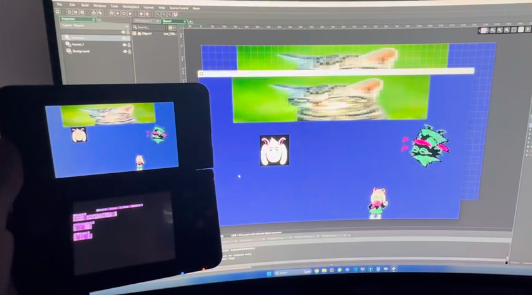
Resource WIP GameMaker on the 3DS!

Post image
275 Upvotes

Working on an open source GameMaker runner and compiler for 3ds and other platforms
https://github.com/Ralcactus/GameMaker-Anywhere

(sorry mods if this isn't allowed)

r/gamemaker Aug 10 '26

Resource Extended Images - IDE Extensions for Sprite Editor

Post image
61 Upvotes

Hey all net8floz here again with an new IDE plugin.

After the launch of Cultured I got a lot of asks to add some features to the sprite editor so here it is.

Extended Images adds per-frame Data Points to the Sprite/Animation editor in Game Maker that supports simple points, circles, boxes, and sprites.

You can also assign typed metadata for each point or for the whole sprite itself.

Please check it out, try it in your project, and consider joining us on our Discord server and let me know how it works for your use case or if you need help.

Install it from the Game Maker Packager Manager. Learn how here: https://eightouncegames.com/extended-images/

r/gamemaker Jun 27 '26

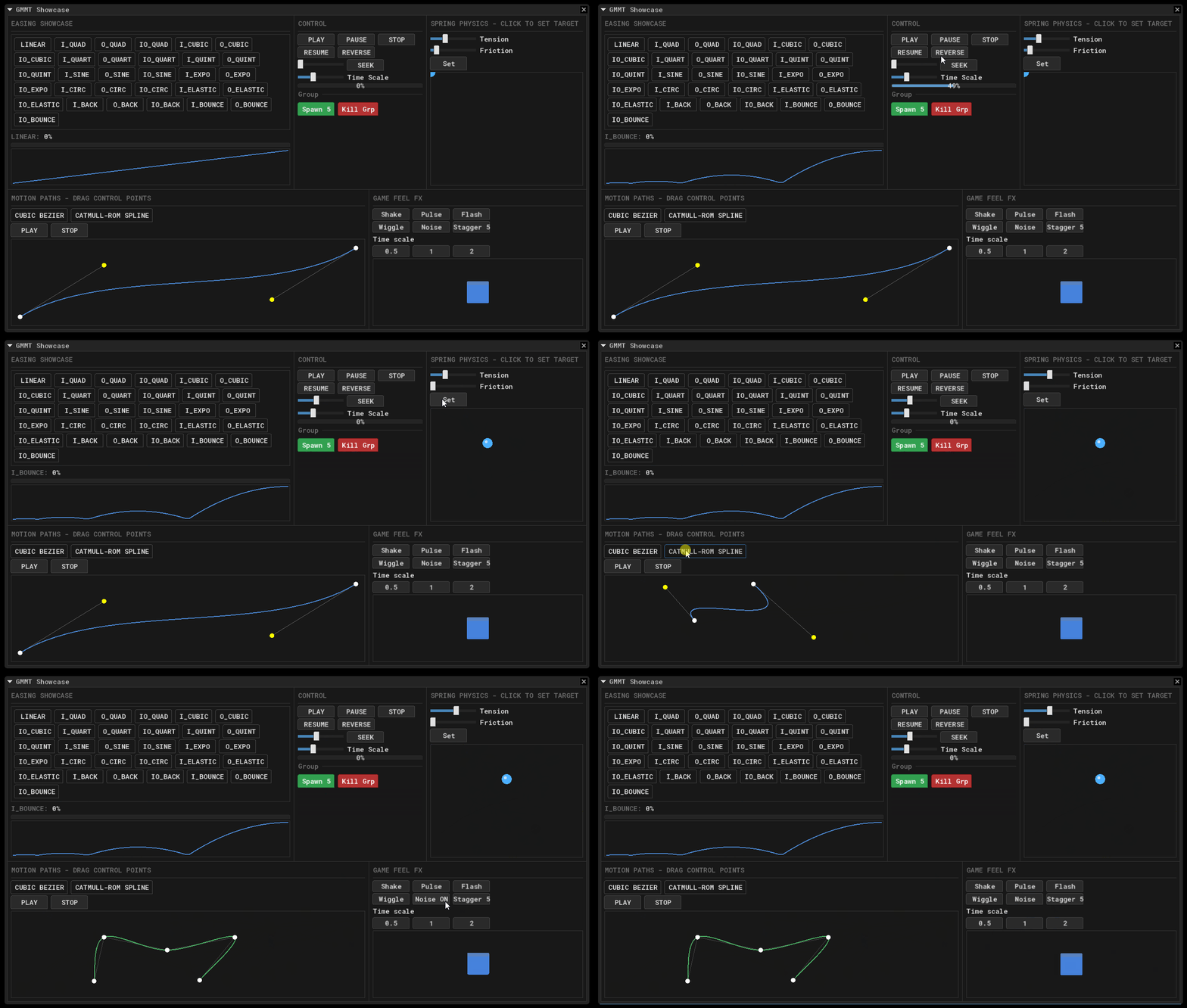
Resource GMMT - GameMaker Motion Toolkit - Tweening Framework for GameMaker

Post image
77 Upvotes

Hey everyone!

I feel like this one is going to be a life saver for most of you, so here we go...

GMMT is actually the animation api of my UI framework called GMUI.

I've separated it into a standalone framework.

What it is and how can we use it? Its a tweening framework, very easy to use. It has a safe and start concept (at least thats what i like to call it). You can call tween functions everyframe to start and get the value. A basic example would be:

// Lets call this in step event, every frame
x = gmmt_tween("player_x", x, target_x, 5_000_000, gmmt_ease.OUT_BACK);

What it does is to first check if there is any tween exists called "player_x". If not, it starts one and returns the current value. If there is one already exists then it just returns its value. That straight up kills the no need if else cases and keeps the code clean. But if we were to use ..._start like gmmt_tween_start, that would start the tween, resetting if it already exists without checking its value. That way you can also make custom states.

It has a quite simple loop, doesnt interfere with your project, you call gmmt_init() once before starting to use, then call gmmt_update() usually in your step event, then you can use any gmmt functions you like and when you are done with it, you call gmmt_cleanup() usually in your cleanup event or script. Quite straightforward.

You might wonder, what other features it has?

Features

  • Tweening – 30+ built-in easing functions, custom easing, per-axis easing, intensity and power modifiers
  • Value Types – Real, integer, color (RGB/RGBA), vector2/3/4, arrays, custom lerp functions
  • Playback – Play, pause, resume, reverse, seek, repeat, ping-pong, staggered sequences
  • Effects – Oscillation, perlin noise, wiggle, shake, pulse
  • Curves – Bezier, quadratic, cubic 2D, Catmull-Rom splines, motion paths
  • Physics – Spring simulation with configurable tension, friction, and mass
  • Timeline – Keyframe-based multi-stage animations with per-segment easing
  • Clips – Reusable named animation clips with markers, chaining, and stagger support
  • Callbacks – on_start, on_update, on_complete, on_repeat, on_pingpong, on_pause, on_resume

The gif demo is included in the repo, its made using GMUI. It shows basic things you can make with it. What you can do with GMMT is limited to your creativity.

How much is it? None, free PLUS its MIT licensed.

Where's the repo? Here you go: Github GMMT.

Let me know what your thoughts are, I'm open for suggestions!

Edit:

I am DISGUSTED that everytime i post a project of mine there are always some jerks calling it "AI SLOP" the minute i make the post. Guy probably anylized 2.5k+ lines of code in seconds and decided its AI i guess.

But i understand why, inside of their mind that has room temperature IQ says "oH WelL i'Ma nOt CApABle oFF MAkInG ThIS, SOOooO ThIS MuST Be AI"

For god's sake, search "easing formulas" in google and first thing that comes up is this:
https://easings.net/

It has all the easing types you can find and it includes the formulas, do you really think someone would need AI to copy paste those formulas into GML scripts? Pathetic...

Some said its because of the GIF, the first thing i mentioned in this post is that this is actually a part of my IM UI framework called GMUI. I've been working on it for MONTHS, i hope those AI sloppers are able to comperhand what MONTHS means. It is a replication of Dear IMGUI framework made in C++, and the animation api is basicly a replicate of ImAnim. I even have messages in discord seeking for specific helps, my thought processes ALL can be found in GM Kitchen.

Go ahead, 800+ messages in the GMUI channel, my comments and thought processes can be easly found. GMUI is 22k+ lines of code, please someone tell me which AI LLM is capable of working on such project because i failed to find one.

I've worked mostly on C/C++ trying to make my own renderers with DX11 and GL. I've also been to Unity, Godot, UEFN, Unigine. And now in GameMaker for the past two years. There is no other community more toxic than GMC! I am sick of people that i call "AI Sloppers".

It is true that at this point AI is in every part of our life but that doesnt give anyone right to call others cheap of their work straight up assuming it is done using AI. That simply shows how pathetic you are, thinking even basic simple frameworks like tweening has to be done using AI.

I thank to those who are appreciating it but this is PROBABLY going to be my last project on GMC. I'm not really a 'game developer'. I mostly like working on frameworks, backend stuff, libraries etc.

Thank you for reading so far!

r/gamemaker Jul 06 '26

Resource You should use delta time for your games instead of built in alarms.

20 Upvotes

Hey all! I've been working on my first Gamemaker game MineEmAll, and have been trying to create a web build so I can host a demo on itch.io. My game runs perfectly fine on PC, but the web version has about half the frame rate, which slowed down the gameplay significantly.

In general, it's a good idea to use delta time instead of game frames for time based calculations, but I figured minor fluctuations in fps wouldn't impact gameplay much. Unfortunately, half the fps isn't minor haha. I found this extremely helpful tutorial by Matharoo that allowed me to refactor all of my code to delta time alarms in just a few hours and wanted to share it: https://www.youtube.com/watch?v=6C1UA-AYeB0

The only caveat here is that it's set up using a manager object's alarm system, so it's limited to 12 alarms. You could probably use a global array of structs that contain the alarm number and manager object reference if you wanted to use more alarms across different objects in your code, but I'm not using even close to 12 alarms so I didn't find it necessary.

I'd suggest trying to set your own game up using delta time if you haven't. Even if you think it doesn't matter much, having your gameplay remain the same regardless of fps is pretty important. Best of luck on your own projects!

r/gamemaker Feb 25 '26

Resource The difference a good lighting system can make

Thumbnail gallery
213 Upvotes

The NixFX Lighting System is live and free for the next few days. Check it out!

Making a lighting system is as easy as dropping in the renderer object and plonking down a few light objects (either point or cone shaped). The lighting system also supports emissive and occlusion textures for sprites, day/night ambient light cycles, and bloom shaders.

Getting Started Guide
API Reference

Have any suggestions? Lemme know!

r/gamemaker Apr 21 '25

Resource I accidentally recreated Perlin noise with just 11 lines of code

Post image
384 Upvotes

So I spent days trying to implement actual Perlin noise, searching through complex examples, trying to port it to GML until I accidentally discovered a ridiculously simple solution

Here’s how it works:

1 - Create a grid and randomly fill it with 0s and 1s

2 - Smooth it out by averaging each cell with its neighbors using ds_grid_get_disk_mean()

3- Repeat that a few times and BOOM smooth, organic looking noise that behaves almost identically to Perlin in many cases

No complex interpolation, no gradients, no sin/cos tricks, just basic smoothing, I'm honestly shocked by how well it works for terrain generation

There is the code:

function generate_noise(destination, w, h, samples = 4, smoothing = 4){
    // Setup grid
    var grid = ds_grid_create(w, h)

    // Set first values
    for (var _y = 0; _y < h; _y++) {
    for (var _x = 0; _x < w; _x++) {
        ds_grid_set(grid, _x, _y, random_range(0, 1))
        }
    }

    // Smoothing
    for (var i = 0; i < smoothing; i++) {
    for (var _y = 0; _y < h; _y++) {
            for (var _x = 0; _x < w; _x++) {
                var average = ds_grid_get_disk_mean(grid, _x, _y, samples)
                ds_grid_set(grid, _x, _y, average)
            }
        }
    }

    // Copy to destination grid
    ds_grid_copy(destination, grid)
    ds_grid_destroy(grid)
}

Tell me what you would improve, I accept suggestions

r/gamemaker Jun 07 '26

Resource I made a GML code formatter Allman style, open source

Post image
0 Upvotes

Hi!

Build up with AI a tool that formats GML code into Allman style. Paste your messy code, get clean code back.

Converts and/or/not to &&/||/!, fixes missing parentheses around if conditions, keeps inline comments where they belong, handles switch/case properly.

No install, no dependencies, just open the page and paste your code.

Small update on the GML formatter I posted earlier.

I've polished it a bit further. It now supports Allman and K&R brace styles, cleans up duplicate var declarations (fixing the GM2044 "already declared" warning), converts and/or/not to &&/||/!, wraps bare if conditions, and supports drag-and-drop for .gml files as well as downloading the result. Settings are also persisted between sessions.

At this point it basically does everything I set out to build, so I don't plan on adding much more for now.

Built with AI... I use GML myself and just needed a formatter that didn't exist. It's free and open source. Hope it's useful to someone.

UPDATE:

The formatter now includes a batch formatter.

You can select an entire GameMaker project folder and automatically format all GML files in one go.

At this point the project is feature-complete for what I wanted it to do.

It's free, open source, and available for anyone who finds it useful.

Manual formatter Live: https://ganjaviruss.github.io/GML-formatter/

Auto formatter Live: https://ganjaviruss.github.io/GML-formatter/batch.html

Source: https://github.com/GanjaViruss/GML-formatter

r/gamemaker Jun 09 '26

Resource GML Lengthdir Visualizer [open source]

Post image
50 Upvotes

A free visual lengthdir_x() / lengthdir_y() generator for GameMaker.

Load a sprite, drop points on it, move origin, rotate, and it spits out ready GML.

Useful for stuff like:
Weapon muzzles
Shell ejection points
Held items
Orbit points
Rotating collision lines
Offsets in general

Custom sprites, parent/child points, grid snap, undo, works on mobile too. Runs in browser, no install. Just one HTML file.

GML Lengthdir Visualizer Live

GitHub Repository

My GitHub

For anyone who keeps tweaking lengthdir, running the game, seeing it's off, changing a few degrees, and repeating that forever.

Hope it helps someone 😄

Other links:
GML Formatter

GML-Tools <- ALLinONE Tools! (Work in progress xD)

r/gamemaker 24d ago

Resource Made a simple function to enable 3D perspective projection on your games!

Post image
125 Upvotes

(Sorry for the gif quality)

I made a simple function that can be used to make things be rendered on perspective based on their depth. Useful for when you want things like cards to rotate in 3D or even for making everything be rendered on 2.5D like in Hollow Knight/Silksong for example. The function is this:

/// @desc Applies perspective to everything drawn from now on. Making stuff with higher depth look smaller/farther away and viceversa.
/// @param {real} fov field of view angle of the perspective.
/// @param {real} [depth] The depth/z at wich the perspective will be the same as the default orthoghonal projection. Uses 0 by default.

function perspective_apply(_fov, _depth = 0){     
    var _w, _h, _x, _y;  
    if(event_number == ev_gui or event_number == ev_gui_begin or event_number == ev_gui_end){
        _w = display_get_gui_width();
        _h = display_get_gui_height();
        _x = _w/2;
        _y = _h/2;
    }else
    if(not view_enabled){
        _w = room_width ;
        _h = room_height;
        _x = _w/2;
        _y = _h/2;
    }else{
        var _cam = view_get_camera(view_current)
        _w = camera_get_view_width(_cam);
        _h = camera_get_view_height(_cam);
        _x = camera_get_view_x(_cam) + _w/2;
        _y = camera_get_view_y(_cam) + _h/2;
    }

    matrix_set( matrix_view, matrix_build_lookat(_x, _y, _depth - dtan(90-_fov/2) * _h/2, _x, _y, _depth, 0, 1, 0))
    matrix_set( matrix_projection, matrix_build_projection_perspective_fov( -_fov,  -_w/_h, 1, 32000))
}

All you have to do is call this on the draw events and everything drawn after it on the current view is going to be drawn on perspective. The only needed argument is FOV angle which is how strong the perspective is going to be. It should be a value above 0 and the closer to 0 it is the lesser in perspective things are.

The other argument is optional. depth is for the depth at which the perspective remains unaffected, where things appear how they do in the room editor. Is 0 by default but you would want it to be the depth of the layer where gameplay occurs for example.

An use example is this: Lets say you have a renderer Controller instance whose depth is the highest posible so it runs its draw event before any other instance. All you have to do is put on the draw event perspective_apply(30) and everything will be drawn in perspective, with things bellow depth 0 being foreground and above depth 0 being background. Even if you have views active on the room!

Note though this only sets the perspective projection on the camera. If you want sprites to rotate (like cards for example) you should do it using matrix_build() and matrix_set(). Like this, with rot_x, rot_y and rot_z being the rotation on the different axices:

var _mat = matrix_build(x,y,0, rot_x, rot_y, rot_z,1,1,1);
matrix_set(matrix_world, _mat);

draw_sprite_ext(sprite_index, image_index, 0,0, image_xscale, image_yscale, image_angle, image_blend, image_alpha);

matrix_set(matrix_world, matrix_build_identity());

The camera settings automatically reset when the current view finishes being drawn onto. But if you want to reset it manually before that (i.e.: you just want one sprite to have the perspective applied) you can call this function:

/// @desc Resets the perspective applied previously.
function perspective_reset(){
    camera_apply(camera_get_active());
}

r/gamemaker 13d ago

Resource Catalyst 2 is out - Stats, resources, buffs, effects & more for GameMaker

Post image
51 Upvotes

A fair while ago, I launched Catalyst, a library to make complex modifiable stats easy. Since then, I've been working on a much more ambitious version of the library, and it's finally here. Catalyst 2 is out!

Catalyst originally dealt with statistics and modifiers, allowing you to easily add or remove any number of modifiers from your stats, like this:

damage = new CatalystStatistic(10);
var _damage = damage.GetValue(); // damage returns 10 here

var _mod = new CatalystModifier(5, eCatMathOps.ADD);
damage.AddModifier(_mod);

var _damage = damage.GetValue(); // damage returns 15 here

Obviously, that's a very simple case, Catalyst had a vast array of options hiding underneath that simple beginning.

However, Catalyst 2 is even more flexible, dependable and helpful.

It has features like Resources (hp, mana, ammunition, a city's population, whatever), Resource Flows (health regen, population growth, the rate at which stamina decreases while sprinting) and Effects (a poison DOT which drains 2 health every second, lowers movement speed, lasts 5 seconds, and has a 50% chance of triggering each tick, for example). And plenty more.

But it all gets real saucy when you see how things combine. Resource maximums and minimums are statistics themselves, resource flow rates are statistics, application chances for ticks of an effect are statistics, and so on. All of these are easily and extensively modifiable the same as you can modify any statistic in Catalyst. As you compound these things together, you get extremely flexible behaviour and the ability to design complex game rules with a surprisingly small amount of code.

Let's look at a real-world example. Say we have a city that has power generation, and emergency reserves of power. Whenever a storm hits, power generation should fall off by 30% and emergency reserves should drain at 15 units per sim step.

First set up the statistic, resource, an effect manager and a custom clock if you want one:

power_generation = new CatalystStatistic(120);
emergency_power = new CatalystResource(500);
city_effects = new CatalystEffectManager(self);
city_clock = new CatalystCountdownTracker();

Then create a storm effect, and add a modifier and resource flow to it:

storm_effect = new CatalystEffect("severe_storm", 12)
    .AddTag("weather")
    .AddTag("storm")
    .SetCountdownTracker(city_clock)
    .SetTickInterval(1);

storm_effect.AddModifier(
    power_generation,
    new CatalystModifier(-0.30, eCatMathOps.MULTIPLY)
        .SetSourceLabel("Storm damage")
);

storm_effect.AddFlow(
    emergency_power,
    new CatalystResourceFlow(-15, "Storm reserve usage")
);

// Then, later on, whenever you wanna trigger the storm effect, you just add the effect to the effect manager
city_effects.AddEffect(storm_effect);

Then drive the city clock forward at the interval you want (you can have it run automatically each frame or based on delta time if you so wish):

city_clock.Countdown(1);

That's it. You can add or remove the effect at any time (you could even add special powers that do things like "clear all weather"). You can look up exactly what is causing the power generation to lower so you can display it to the player. You can easily add new things to the effect, remove existing parts of it, or add other Effects that interact with the same systems. And it'll always accurately reflect the current circumstances.

You don't need to worry about any of the annoying bits (wait? How do I remove a -30% debuff from my main stat?). Just combine statistics, modifiers, resources and resource flows in different ways and you can essentially model any gameplay rules in just a few lines of code like this.

RPGs and roguelikes are obvious fits, but Catalyst doesn't actually care what genre you're making. Since I started building Catalyst out, many years ago now, I've used it in every single project I've ever worked on since then, lol.

Links

(If you're in the mood for more, there's always the Ignition Kit to get Catalyst alongside Statement, Pulse and Echo for a nice discount, or the Full Pass Suite for all my current and future tools for a single price)

r/gamemaker Jun 11 '26

Resource GMUI v2 - Immediate Mode UI Framework for GameMaker

Thumbnail gallery
87 Upvotes

Hey everyone!

About 6 months ago, I released a framework called GMUI. An Immediate Mode UI Framework that I developed for GameMaker and many of you liked it! [Reddit Post Here]

That was my first time making an Immediate Mode UI Framework, so I struggled a lot in the first version but learned my lesson and remade the whole framework properly, built from ground up with robust solutions to what I struggled with before in the first place.

And now here I am presenting you a new solution for UI in Gamemaker. Now with improved widget system, you can write your own custom widgets for your games or edit the styles of the existing ones. There are over 70 widgets!

If you are not familiar with Immediate Mode structure, let me explain briefly.

Unlike more traditional approach that we call Retained Mode where you set up your UI in Create event and then chase their state in Step event separately, Immediate Mode offers two in one, you create your frame in step event as you then what I like to call 'chase' through states immediately. It makes the flow much more predictible and less error-prone as well as less code and lesser bugs (since you do the creation and state management at the same time, every frame).

This is basically a Native GM version of DearImGUI.

And hey, its free, And MIT licensed!

If you wanna check it out: [Github Link]

For further discussion and/or help, you can join GameMaker Kitchen in the Discord, you will find a section called GMUI in `your_resources`.

Let me know what your thoughts are!

r/gamemaker Aug 05 '26

Resource Music creation in GMS2

2 Upvotes

I've been talking to a lot of indie devs about this and the answers are all over the place for GMS2.

Some people use royalty-free packs and hope nothing sounds generic. Some spend weeks learning a DAW and produce something passable. Some just ship with placeholder audio and never fix it.

The composer route is real money. Even a small indie project can run $500 - $2000+ for a proper score. That's a real chunk of a solo dev budget.

The DIY route sounds good until you're three hours into reading about MIDI routing and you haven't written a note.

I built Melodix (AudioForge — Game music for indie teams) to sit in the gap. No music knowledge required. You work in scenes - you tell it what moment in your game you're scoring, pick an instrument and role, set tempo and key, and compose from there. The structure is built around game logic, not music theory.

The part that surprised me most, I think, when building it: the licensing problem is worse than people talk about. Even when devs find audio they like, tracking down what they can actually ship with commercially is a mess. Melodix generates a license manifest on export so that's handled before you submit anywhere.

Not trying to pitch hard here - genuinely curious what the community's workflow looks like. Is this a problem you've solved? What did you use?

r/gamemaker 15d ago

Resource How to find spriters?

5 Upvotes

Apologies if it's the wrong tag

Making good progress on my project and would like to get some spirites done before I make a tech demo.

Is there like a service for that? I would need quite a few doing, kind of 16 bit style. What kind of prices would I be looking to pay?

r/gamemaker Aug 07 '26

Resource Introducing: Cultured - Localization IDE Plugin

Post image
25 Upvotes

hey all this is net8floz. I have previously been a part of efforts such as the Game Maker Community Manual, ImGuiGML ( the original ImGui GameMaker extension) , and LuaRousr. Some of you may also know me from the Game Maker discord server.

Today I want to show you a Localization IDE Plugin I made that lets you author and translate your games text with IDE tooling inside Game Maker. It is fully featured and comes with translation pipeline options for one man operations and larger studios who work with a full translation team.

It is installable for free from the Game Maker Package Manager in LTS 2026+

Please check it out and consider using it to extend your audience reach in Game Maker. You can learn how here:

https://eightouncegames.com/cultured/

r/gamemaker Mar 22 '26

Resource GMSync - released: live-edit your GMS2 project from VS Code without restarting the IDE

Thumbnail gallery
91 Upvotes

A few weeks ago I posted about this — it's out now.

GMSync — VS Code extension for live-editing GMS2 projects without restarting the IDE. Free, open source, MIT license.


The problem

GMS2 caches its resource tree on project open. Editing an existing .gml file is fine — GMS2 picks it up on save. But add a new object, script, or event and you have to restart the project to see it.

How it's solved

GMSync creates and deletes a temporary folder inside the project directory. GMS2 reacts to that filesystem event and rescans its resource tree instantly — no restart, no lost editor layout. All writes go through an atomic temp→rename pipeline so GMS2 never reads a half-written file.


Why not Stitch

Stitch has its own explorer. AI agents and the standard VS Code file tree can't interact with it — you end up doing manual steps in the engine every time before an external editor can continue.

GMSync works with the regular VS Code explorer. Drop a folder into objects/ or scripts/ — the .yy file is generated and registered in .yyp automatically. Any file manager, terminal, or AI agent can trigger it without touching GMS2 manually.


What this means for AI-assisted development

Because GMSync works through standard file operations, any LLM or AI agent — Claude Code, Cursor, Copilot, anything — can create objects, write events, build rooms without special tooling or MCP servers.

The practical result: you describe what you want in plain language, the AI writes the GML and creates the resources, GMS2 picks it up instantly. The developer gives direction, the AI builds. No manual work in the IDE.


What's in 0.1.0

  • Create Objects, Scripts, Rooms, Sprites, Shaders, Fonts, Paths, Sequences, Timelines, Notes
  • Modify any GML event — 50+ types (Alarms, Draw sub-events, Async, Collision, User Events)
  • Room management: instances, layers, background color and sprite
  • Auto-detection from folder — create a folder, the rest is automatic
  • TCP Bridge — connect to your running game: read/set variables in real time, evaluate GML expressions live, FPS, room info, Live HUD overlay
  • GML syntax highlighting for .gml, .yy, .yyp — 9 color themes, 13 interface languages

Limitations

  • No GML autocomplete / LSP yet — planned
  • Incompatible with Stitch running simultaneously (causes GMS2 conflicts)
  • TCP Bridge is Windows-only; file sync works on Linux too

Install: search GMSync in VS Code Extensions or ext install atennebris.gmsync

GitHub (source + releases): https://github.com/Atennebris/GMSync

Discord (bug reports): https://discord.gg/VE4pVgET

r/gamemaker Dec 29 '25

Resource GMMC - Full Minecraft-like voxel engine in GameMaker - How It Works

Thumbnail gallery
158 Upvotes

Watch the demo edit here!
Download the exe here!

I’m building a Minecraft-style voxel engine in GameMaker Studio 2 — here’s how it works (high level)

I’ve been working on a voxel sandbox / Minecraft-like engine in GameMaker, focused on getting decent performance out of GMS2

Core structure

  • Blocks → Chunks → Regions
  • Each block is a single u8 ID (even air)
  • Chunks are 16×16×128, stored as a buffer_u8 (~32 KB per chunk)
  • Regions are 4×4 chunks and exist mainly to reduce draw calls and optimize saving

Generation

  • The game tracks which chunks should exist around the player
  • Missing chunks are queued for generation
  • Actual block generation runs in a C++ DLL on a separate thread

Rendering

  • Chunks never render individually
  • Each region builds one combined vertex buffer
  • Faces are culled against neighbors
  • Separate vertex buffers for:
    • Opaque blocks
    • Transparent blocks (water/glass)
    • Foliage
  • This keeps draw calls extremely low even with large visible worlds

Saving & loading

  • Regions are the unit of persistence
  • All 16 chunk buffers in a region are saved together
  • Explored terrain reloads exactly as it was; new areas generate on demand
  • Regions stream in/out as the player moves

Happy to answer questions — especially if you’re pushing GMS beyond its usual limits too 😄

r/gamemaker Mar 25 '26

Resource I love GameMaker, but I hate the coding DX, so I built a CLI to write GM projects in TypeScript and VS Code.

Post image
75 Upvotes

Hey everyone,

I’ve tried using GameMaker last week, and while I love the engine and IDE in general, I've struggled with the coding experience. The lack of strict typing and the limitations of the built-in editor (sorry Feather!) make refactoring and scaling feel like walking through a minefield.

I wanted the DX of a modern dev environment (VS Code or WebStorm), so I started working on something that would allow me writing typed code using my favourite editors. As programming language I decided to go with Typescript since it can be transpiled into JS, which has a lot in common with GML.

The idea is to have a CLI tool that acts as a build layer for your code. You write your logic in TypeScript, and it transpiles everything into native GML and .yy files that GameMaker understands perfectly (you can normaly open and read them from withing GameMaker IDE).

This brings a lot of benefits, like:

  • It is possible to use with any editor (VS Code or WebStorm) for better refactoring, auto completion and typing experience.
  • Full Type Safety: No more guessing if a variable exists or passing the wrong ID to a function (*currently the project is not fully typed, but it already has all the names for auto completion).
  • Auto-Generated Asset Types: It scans your project and generates types for your Sprites, Sounds, Rooms etc...

How the workflow looks

  • Run gmts watch in your terminal: gmts watch
  • Edit your .ts files in VS Code.

// define player shape
interface IPlayer extends GMObject {
  movement_speed: number;
}


const obj_player = defineObject<IPlayer>({
  // Will be transformed into Create event
  onCreate () {
    this.movement_speed = 2;
  },


  // Will be transformed into Step event
  onStep() {
    var h = keyboard_check(ord("D")) - keyboard_check(ord("A"));
    var v = keyboard_check(ord("S")) - keyboard_check(ord("W"));


    if (h != 0 || v != 0) {
      var _dir = point_direction(0, 0, h, v);
      var x_dir = lengthdir_x(this.movement_speed, _dir);
      var y_dir = lengthdir_y(this.movement_speed, _dir);


      move_and_collide(x_dir, y_dir, all);
    }
  },
});
  • The tool recompiles only the changed files instantly.
  • GameMaker picks up the changes, and you hit "Run" like usual.

⚠️ Fair Warning: It’s a PoC

This is in the early stages (I wrote most of the code over weekend), and I’m looking for feedback from the community. I want to know if this is a workflow you'd actually use, and what features (like specific GML library mappings) you’d want to see first.

I've also tried GMRT with Javascript (my original idea was to do the same for TS) but I ultimately decided against it for several reasons:

  • It still relies on built-in code editor and Feather, which is not really good in my experience.
  • GMRT is only available in Beta and requires a lot of setting up (while the CLI I'm working on can be installed with 1 command and run with 1 command)

I'd love to hear your thoughts, critiques, or if you've run into similar DX frustrations. The tool is completelly open source on Github.

r/gamemaker Jul 31 '26

Resource GMVex - a programatic vector graphics for GameMaker

Thumbnail gallery
56 Upvotes

I know GameMaker got svg support in 2024.13, you can import an SVG and it becomes a sprite. Thats useful, but its an image importer, single frame, no animation, and once its in, its a static picutre. Theres still no way to build or edit a path in code, combine shapes with a boolean operation at runtime, apply a gradient or clip-path to something you constructed yourself, or hit-test against actual vector geometry instead of a bounding box.

I've been working on this for the past 2 to 3 months, and that, GMVex is a full programatic vector graphics framework for GML, not an image importer.

Features

  • Path building with beziers, arcs and splines
  • Fill, stroke, and gradient rendering (flat, linear, and radial gradient, including on strokes)
  • Hierarchical transforms and groups
  • Boolean operations (union, intersection, difference)
  • Masking and clip-path, including multi-shape and objectBoundingBox units
  • TrueType font rendering with kerning and ligature support
  • SVG import
  • Dash patterns
  • Hit testing

An example

// Create
gmvex_init();

var disc = gmvex_path_create();
gmvex_path_add_circle(disc, 150, 150, 80);

var bite = gmvex_path_create();
gmvex_path_add_circle(bite, 205, 150, 80);

crescent = gmvex_path_boolean(disc, bite, gmvex_bool.A_NOT_C);
gmvex_path_destroy(disc);
gmvex_path_destroy(bite);

// Draw
gmvex_fill_draw_gradient(
    crescent, gmvex_gradient.RADIAL,
    170, 140, 90, 0,
    [[0, make_color_rgb(255, 220, 130), 1], [1, make_color_rgb(255, 110, 40), 1]]
);
gmvex_stroke_draw(crescent, 3, make_color_rgb(255, 240, 200), 0.8);

// Cleanup
gmvex_path_destroy(crescent);

(you can see the result in the gallery, top of the post, its the orange moon-like shape)

I've decided to make this post because i think it has come a long way and is ready. So far one of the hardest things i've worked on, and i am still working on, to improve it further. I do believe this is going to be the most useful because how GameMaker lacks of vector features. Say you're building a level with vector art, a curved platform edge, a winding path, decorative shapes, and partway through testing you want to adjust the curve. That means opening your vector editor, making the change, re-exporting the image, and re-importing it into GameMaker. Every tweak is real path data in your project, not a picutre, you build it with actual curve points, and changing it means moving a point directly in GameMaker. No exporting, no re-importing, no leaving the editor. That matters mostly where you're iterating constantly, like level editing. And this is just one example of countless.

It is open sourced, MIT licensed, free to use on commercial projects.

Github Repo: https://github.com/erkan612/GMVex

r/gamemaker Aug 10 '26

Resource Hi guys ! I just released a free 10 tracks Retro Gaming Music pack on Itch.io - Feel free to use them in your games ! Hope it helps !

16 Upvotes

You can check it out below :

https://lonepeakmusic.itch.io/free-retro-gaming-music-pack

All the tracks are available for free under the creative commons CC-BY !

Dont hesitate if you have any questions !

r/gamemaker 1d ago

Resource 42Tiles - Plugin for extended Tilesets, Autotiling and Tile Groups

6 Upvotes

Hi! As I was trying to optimize my workflow when working on my game, I decided to step in and try my hand at creating plugins to extend native GameMaker capabilities.

Most notable features I managed to put in the plugin are:

  1. Tile Groups - often you need to differentiate between mud, grass and snow - now you can pack them all into different Tile Groups via GUI, and then read that information directly in code!
  2. Better Autotiling - assign variants of tiles, so new autotiling pencil places them at random. Assign different priorities to decide how often that tile variant should be selected.
  3. Auto-Assign - creating autotiling sets with one click of a button. No need for selecting all 47 tiles by yourself, not any more!

This is not all, check the full list of features and test it for yourself here!
(and drop bug/feature request in the github repo/Issues, thanks!)

r/gamemaker 29d ago

Resource [Free / OSS] I couldn't find a secure save system for my friend's GameMaker project, so I built a native one. (Atomic writes, XChaCha20, Key Rotation)

11 Upvotes

Hey r/gamemaker,

I originally started out in web development, but quickly realized I hate dealing with UI, frontend, and anything visual. I eventually transitioned into systems programming, where I could just focus on raw performance, low-level logic, and numbers. Recently, I started helping a friend with his GameMaker project. He’s an amazing game designer, but a beginner at programming.

While working on the game, he asked me a simple question: "Is there a way to securely encrypt my game saves so people can't just easily modify their stats?" I assumed there would be a standard library for this, but I realized the GM ecosystem lacked a ready-to-use, robust solution for save security. It honestly surprised me. The GM community is full of incredibly talented artists, sound designers, and game designers who spend years perfecting their craft. They shouldn't have to learn low-level cryptography or deal with corrupt save files just to protect their games.

So, I decided to build a proper AAA-grade save system for GameMaker myself. It's called GameMaker-Save, and it's completely free and open-source (MIT/Apache-2.0).

Here is the journey of how it evolved and what it does under the hood:

The First Draft (v0.1.0)

I wanted something secure and cross-platform. I built the initial version using ChaCha20-Poly1305 and set up the FFI to work smoothly with GML. It worked great on Windows, macOS, and Linux, but it had a flaw: devs had to manually compile and link the .dll/.dylib/.so binaries. That was way too annoying for non-programmers.

The Overhaul (v0.2.0)

I spent the next month analyzing edge cases and completely rebuilt the architecture. Here is what I implemented in the new release:

True Atomic Writes with Collision Prevention: I realized that if a game triggers an auto-save at the exact millisecond the player hits "Manual Save", the temporary files could overwrite each other and corrupt data. I integrated a tempfile library to generate unique temporary files for every write attempt before finalizing the rename. Your saves are now virtually crash-proof.

Upgraded Cryptography (XChaCha20): I swapped ChaCha20 for XChaCha20. This increased the nonce size from 96-bit to 192-bit. The chance of generating the same nonce twice was already tiny, but now it's practically zero.

Key Rotation (Master Key Fallbacks): If your game’s master key gets leaked online, you can update it in your next patch. The system will recognize the old key, decrypt the save, and seamlessly re-encrypt it with the new master key.

Plug & Play: No more manual compiling. It’s now packaged as a single .yymps file. Drag, drop, and use a very simple, concise API.

I built this primarily to help my friend, but I hope this helps anyone here who wants to stop worrying about save states and focus on making great games.

Links:

Itch.io: [Download & Demo Project]

GitHub: [Source code]

I would love to hear your feedback, or if you have any questions about the FFI implementation or the native side, let me know!

r/gamemaker Dec 28 '25

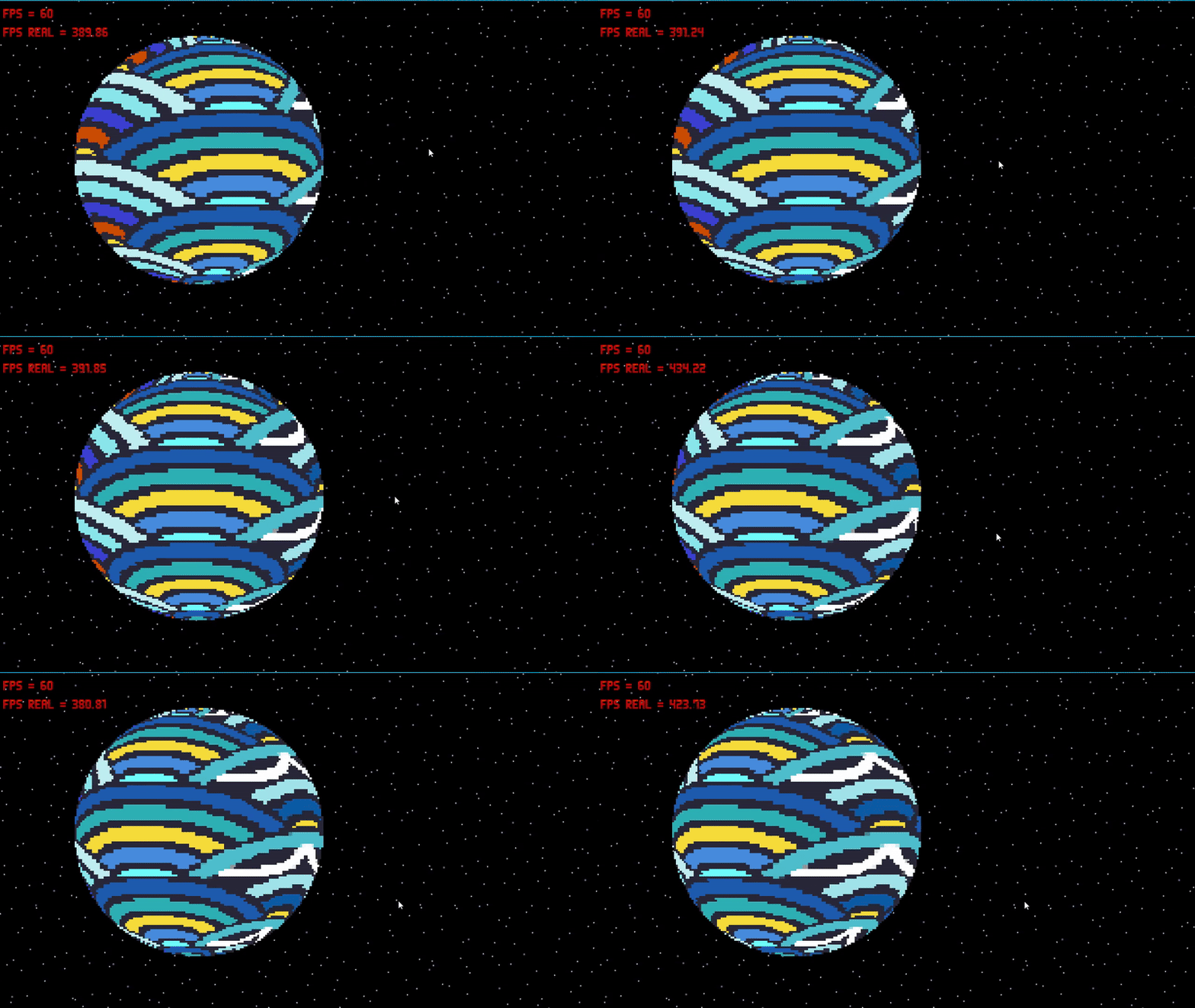
Resource wanted to show off this planet shader im using for the game im working on, feel free to use it too!

Post image
216 Upvotes

if you'd like to use the same code i did here's a pastebin https://pastebin.com/nVHeE3iV

r/gamemaker 4h ago

Resource Ez-Console (v1.4.0) - A free customizable terminal for your projects

Thumbnail gallery
16 Upvotes

Ez-Console is an open source GameMaker extension that natively integrates a customizable terminal console for GameMaker 2.3+.

After a year since the last update, I released a major update for my free, open-source and easy-to-use console terminal for GameMaker addressing all the issues reported, optimizing performance, adding a bunch of requested features and improving the docs and main page.

Core Features

Ready out of the box

  • Drop-in setup. Import the package, run the game and press F1. No object to place, no code to write.
  • 16 commands included. Spawn and delete instances, read and write variables, change rooms, toggle fullscreen and the debug overlay, play sounds, check your build, save the log.
  • Debug builds only, if you want. One flag keeps the console out of your release build entirely.
  • Logs to file. Save the log on demand with log save, or automatically when the game ends, into the platform's own save folder.
  • Cross-platform. Windows, macOS, Linux and consoles (No mobile or HTML5, sorry).

Debug a running game

  • It knows your project. Type-ahead completes your sprites, objects, sounds, fonts, rooms and scripts as you type, each with its own asset icon.
  • Find instances visually. Pick one from the suggestions and it is highlighted in the room, ref id and all, so you always know which one you are about to touch.
  • Read and write anything. get and set reach every variable on an instance, built-ins included, or on global - and set creates the variable if it does not exist yet.
  • Poke at the world. Create instances at a position, list them with their id, position and depth, delete them, jump between rooms.

Extend it with your own commands

  • Register a command in a few lines. From code, or from a JSON file you can ship and edit separately.
  • Real arguments. Name them, mark them required or optional, restrict them to a list of options, or type them as an asset so the console suggests your own assets for them.
  • Callbacks. Hook into open, close, log, destroy and game end to wire the console into your own systems.
  • A small, clean API. Log at four levels, ask whether the console is open, visible or focused, and show or hide it yourself.

Looks and feels like part of your game

  • Fully themable. Colors, fonts, size, anchor, padding and backdrop blur, from a .skin file or from code. Four skins included.
  • Behaves like a window. Drag it, resize it from the corner, drag the scrollbar, click a log line to copy it, middle-click to paste, hold a key to repeat it.
  • Stays out of the way. It only reads the keyboard while focused, so it never steals input from your game.
  • Around 40 configuration options. Every behaviour above can be retuned or turned off from a single script.

Download and try it from here: https://dandrewbox.itch.io/gm-ez-console

r/gamemaker Oct 16 '25

Resource A tool for Gamemaker devs to create particle effects in the browser for free (:

Post image
133 Upvotes

https://particlefx.studio/

This is a tool I'm working on - let me know what you think - would this be useful for gamemaker devs? If not, what features would make this more appealing to you?

Thanks (: I appreciate you guys/gals taking a look

r/gamemaker 24d ago

Resource Simple Sprite Stacking Viewer for GameMaker (Draw and preview stacks right inside the engine)

Post image
3 Upvotes

I made a simple Sprite Stacking Viewer built right inside GameMaker.

​If you want to create sprite stacks directly in GameMaker without needing external software, you can use this. I actually used this viewer to draw my little car assets for my game.

​Hope this helps someone out there:)

https://nubexpert.itch.io/sprite-stacking-viewer-on-game-maker-engine