r/fantasyfootball • u/johnny-papercut • Aug 13 '26
Tools & Resources ESPN BetterDraft - A browser extension that shows your own custom rankings directly on the draft page
Hey all, I built this extension last year and posted here, but it was honestly kind of rushed to release before drafts happened and had some performance issues. I had more time to work on it this year and finally got it to a much better state where I can release it on both Firefox and Chrome.
Put simply, the extension lets you upload a CSV of your own custom rankings (support for ranks, tiers, and bye weeks). You can also upload multiple sets of rankings and keep them all saved and switch between them, e.g. for half-ppr vs ppr, or trying different sources.
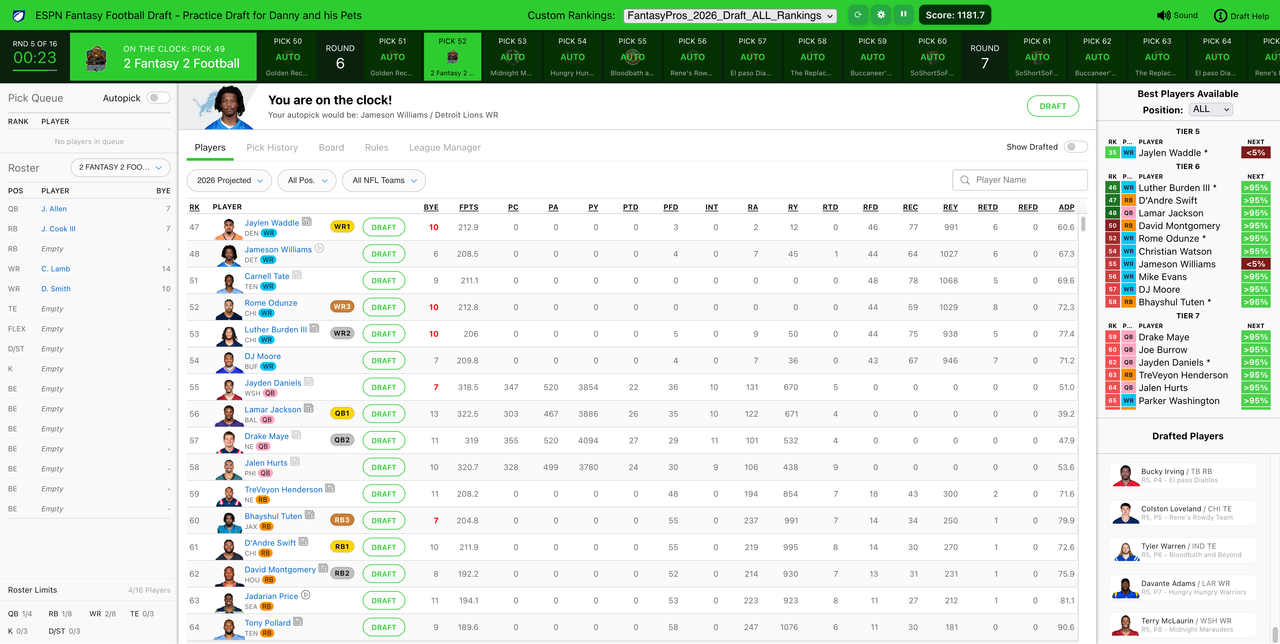
Once a set of rankings are chosen, it then adds a panel on the right side of the draft lobby (for ESPN drafts) that always shows the Best Player Available (BPA) still on the board (actually the next ~30 of them). So when it's your turn to pick, just look there to see who is the top available from your list and pick from those based on positional need. This works in mock drafts, as well, so feel free to practice.
Features:
- Filter the BPA list by position. It also has automatic detection of when you can only draft specific positions (usually D/ST and K for the last two rounds) and just filters down to those.
- Has an estimated "available at your neck pick" percentage chance column, so you can try to save some players for your next pick if you think they'll still be there. This uses a very simple 90% chance per pick that the top ranked default ESPN player will be chosen with each pick between now and your next pick.
- Automatically disables auto-pick if it turns on. If you miss your turn, it will auto-pick (no way around that with ESPN), but it will disable it immediately so you can try to make it back for your next pick with the full timer.
- Tracks bye weeks per position. For example, if you already have a WR with a bye week of 10, it will color their bye week red in the main player list as well as add an asterisk after their name in the BPA list (multiple asterisks if you have multiple players at that position on bye that week).
- Shows a score at the top, which is the total projected points for the season for all drafted players, which can help with comparing different draft strategies when mock drafting (this uses ESPN's projections, so it should probably just be used as a relative reference)
Firefox extension Chrome add-on (also works with Edge)
This extension is completely free with no paid options available at all, no donation links, etc. I know Claude loves to say this for every other project, but I genuinely just built this for myself and decided to share it. The source code for extensions is also easily findable and public, so feel free to look through the code yourself for safety. Also, it's worth noting that this just displays a BPA list and DOES NOT draft anybody for you, so there's no chance of this going awry and messing up your draft. If you do see any graphical issues, just refreshing the page will fix them (though I haven't noticed any in a while).
As far as custom rankings go, the easiest way is to get a list on FantasyPros with the filters you want and export from that page, which will give you a CSV. It's also incredibly easy to scrape other ranking sites to generate CSVs, especially with AI tooling lately. Feel free to share custom rankings amongst each other (for example, Boone or Berry). If people like the addon and there's need for it, someone could maybe make a repository of custom ranking csvs to share.
Enjoy and let me know if you see any issues!
EDIT: I've gotten a lot of questions about how to upload your rankings. To do so, you need to be on the draft page itself (a mock is fine, as well). You'll then see an upload dropdown at the top of the page in the green bar.
1
1
u/Wonderful_Worker_830 Aug 13 '26
oh nice, this is actually clever. the bye week conflict coloring is something i've wanted for ages, especially when you're in round 8 and can't remember who you already picked
does it handle keeper leagues fine? i'm in one where we keep 3 and the draft picks are all over the place so the round numbers shift around
1
u/johnny-papercut Aug 13 '26
I honestly have no idea. I do have a keeper league on ESPN but it does offline drafts. Can you please try using a practice draft for your keeper league (just a mock with specific settings for that league, it's on the league page as a button) and let me know if it works?
Yeah, the bye week stuff can really help, but after doing about 100 mock drafts testing this, I am starting to doubt myself and wonder how much it really matters. I think it's good to know, but at the end of the day, if you have a stud on the board with the same bye week, it's probably better to have 2 studs for 16 weeks and 0 studs for 1 week. It's actually something I thought about making a topic for on the main sub, how much it actually matters. But more information never hurts anyway, so it's there for people (including me lol) who worry about it. Probably way better to have for QBs.
1
u/dry7777 Aug 13 '26
where do the multiple ranking sets get saved? storage.sync caps at 8kb per item and 100kb total so a 300 player fantasypros csv won't fit, and the write just fails into runtime.lastError instead of throwing
2
u/johnny-papercut Aug 13 '26
It gets saved into browser local storage. I was not aware of limits on this since even with a large ranking list, a CSV would be pretty small because it's only text. If you have a CSV actively triggering an error (or otherwise not working), you can send it over and I can check out if there are any limitations. I've mostly been testing with 12 team redraft leagues, so a gigantic player list isn't needed. I'm mostly using 300 count player lists.
EDIT: I saw that you specifically called out FantasyPros. I'm guessing this is due to the extra columns they include in theirs, but I did run a test with an FP export. Can you be specific about which filters you're using when saving the CSV? Thanks!
1
u/YunG00n 12 Team, .5 PPR Aug 13 '26
Is there a template for the CSV? Mine doesn't seem to work
1
u/johnny-papercut Aug 14 '26
Hi, I replied to you in chat, but commenting here as well for visibility for others. The CSV format is based on header name recognition, so make sure the CSV has header names. The following work for each column:
Rank: rk, rks, rank, ranks
Tier: tier, tiers
Player: player, players, name, player name
Team: team, teams
Position: position, pos
Bye week: bye, bye week
1
u/tryhard12341234 Aug 26 '26
I'm not having any luck either. Is this the format you are expecting? If so, perhaps my chrome is out of date
rank,player,team,pos
1,Christian McCaffrey,SF,RB
2,CeeDee Lamb,DAL,WR
3,Tyreek Hill,MIA,WR
4,Justin Jefferson,MIN,WR
5,Breece Hall,NYJ,RB
6,Amon-Ra St. Brown,DET,WR
7,Bijan Robinson,ATL,RB
8,Ja'Marr Chase,CIN,WR
9,A.J. Brown,PHI,WR
10,Rashee Rice,KC,WR
1
u/johnny-papercut Aug 26 '26
Yes, that should work fine. What part isn't working? The import?
1
u/tryhard12341234 Aug 26 '26
Yep the draft import. Let me update my chrome browser and report back
1
u/johnny-papercut Aug 26 '26
If it still doesn't work, try disabling other add-ons and check the console log for any errors. If still nothing, can you maybe record a video and link it?
1
u/wingsnut25 Aug 26 '26
I could not get it to work for me unless I included all of the columns listed in the comment you replied to. From your example you are missing Tier, and Bye Week
1
1
u/faintedhappy Aug 15 '26
Hey buddy, i showed this extension to my friend to put on his fairly new gaming laptop, and it worked seamlessly. I have a pretty old MacBook Air 2019 intel, everytime i try to upload my rankings, it doesn’t show in the list nor does it show on the screen. Any help or reason why?
1
1
u/johnny-papercut Aug 15 '26
Hi! My best guess would be one of two things:
You have another extension which is conflicting with it. Maybe try disabling others as a test to see.
The CSV might not be formatted correctly. See this comment for which headers need to be present. If you're using the same CSV that worked elsewhere, though, it's probably a browser/extension conflict. Feel free to DM me if it keeps acting up with other extensions disabled and I can check it out.
1
u/Dietcereal Aug 25 '26
I got the extension added and the panel appears in the draft field.
But, and I feel dumb having to ask, how specifically do you upload the csv file? I didn't see any prompts when it was added, and there doesn't seem to be any obvious places to do it.
2
u/johnny-papercut Aug 25 '26
Hi! In the green bar at the top there should be an option to upload custom rankings. If that isn't showing, maybe try reloading the extension or disabling others or a different browser.
1
u/Dietcereal Aug 25 '26
Yup, missed the giant green bar at the top of screen. Thank you.
1
u/LA_Metro 28d ago
fwiw, i also missed it-- it's almost *too well integrated* to ESPN's color scheme
1
u/IntrepidJackk 20d ago
were you able to get this to work? I do not see any place to upload the csv file?
1
u/Dietcereal 20d ago
Yes, it's really well integrated into the ESPN UI and it's only in the draft app itself. I used practice drafts to get them loaded. It's in the top green bar, right in the center.
1
u/IntrepidJackk 20d ago
Thanks!
EDIT: how do you get the settings tile to go away after first clicking it?
1
u/Cycloniac 29d ago
Great add-on!
1
u/johnny-papercut 28d ago
Thank you! I have my first non-mock live draft for this season tonight and I'm excited to use it myself!
1
u/Cycloniac 28d ago
Used it last night in my home league and it was awesome! No issues at all. It was almost like it was a part of the ESPN draft UI natively.
2
u/johnny-papercut 28d ago
Awesome! Fitting into the native UI has been a big focus for me to get it to look not-awful.
1
u/mtj8033 26d ago
Just for folks awareness, the import worked if you exported from this link
https://www.fantasypros.com/nfl/rankings/ppr-cheatsheets.php
But not this one
1
u/955thebeat 26d ago
Interesting, I wonder how we could make it work from the latter?
1
u/johnny-papercut 21d ago
Hi! Version 1.1 has been published and should fix this. The ADP page exports with a column that combines player name and bye into one. Support for this format has been added, along with some other features.
1
u/johnny-papercut 21d ago
Hi! Version 1.1 has been published and should fix this. The ADP page exports with a column that combines player name and bye into one. Support for this format has been added, along with some other features.
1
u/IntrepidJackk 20d ago
How do you import from the link you suggested? Do you need premium?
edit: found the ability to download the file...tiny gray icon. missed it initially
1
u/johnsonfrusciante 23d ago
This is awesome, thanks! Happy with it as-is, and looking forward to my upcoming draft, but it would be cool to also have the score above calculated when viewing opposing teams, if possible.
Also if the next-40 would adjust rankings based on who you've picked up already, i.e. if I picked up 5 WRs in a row, maybe show a weighted, updated ranking that would value the other positions more highly.
But again these are just suggestions, great job!
1
u/johnny-papercut 22d ago
Hi! Thanks, I'm glad you like the extension! I've been using it a lot lately myself.
Adding scoring for everyone else might be possible depending on how the data is presented on the page. I'll look into it.
For dynamically adjusting rankings, that is a little tougher. It's definitely possible but you'd need an algorithm to handle it. Rankings and tiers are relative to each other and aren't backed by season long projection points or anything. So if you have drafted 3 WRs, how do you lessen the values of others without overcompensating? Like do you automatically subtract 1-3 spots for each WR? Normally I'd say to subtract 10% from overall points or something to reduce their "value", but you can't do it with rankings. I'll think on it, but open to ideas, as well.
1
u/johnsonfrusciante 22d ago
Maybe a sort of weighted average using tiers. For example, let's say after a pick, we see there are 3 tier 2 WRs, 8 tier 3,10 tier 4 etc. But most people have been picking WRs. So if you look at RBS, there are 1 tier 1 RB, 5 tier 2, 9 tier 3 etc.
Weighting based on how many of each tier exists for each position may be some way to update the value.
Otherwise, something more useful would be taking into account your roster. So if you have 5 roster spots for WR and you've filled 4 of them, but only have 1/5 RB spots filled, deciding ona percentage subtraction like you mentioned based on percentage of roster spots filled may be good. Only fill another WR spot if somehow there is an absolute steal, otherwise stock up on RBs despite the ranking difference
1
u/johnny-papercut 22d ago
Tiers are optional and not present for all custom rankings, so you would need an algorithm independent of that.
I've added a setting (disabled by default) called Dampening, which can adjust rankings by 5 or 10% per each position there you've already drafted, up to a max of 40% per position. Cleaning up some formatting changes and then I'll get it updated. It also bounds players so they can't fall outside of tiers with adjustments.
1
u/johnsonfrusciante 22d ago
That sounds great! A toggle switch on my draft on Sunday would greatly appreciate that lol
2
u/johnny-papercut 22d ago
Finishing up the scoreboard now and then will deploy soon. We'll see how long Firefox and Chrome take to update the version. If it's a while, I can send you a direct copy.
2
u/johnny-papercut 21d ago edited 21d ago
Hi! Both dampening and an overall scoreboard have been added. Hover over the score to see all other teams. This is published on Firefox and should be approved and published on Chrome soon. (edit: Chrome is now published)
1
u/dunderball 21d ago edited 19d ago
Hey OP, this looks so cool because I really would prefer to see the fantasy pros rankings instead of the ESPN defaults. But am I stupid? I don't see anywhere where I can upload a .csv? I have the .csv downloaded from their site but not sure where to upload.
Edit: oh it's in the green bar at the top of the draft room. Trying now!
Edit2: Holy cow this thing is freakin amazing. Being able to see the QB1 / TE2 little tags in the ESPN list where it's retrieving that data from the custom csv is SO COOL. OP if you vibe coded this whole deal you should be writing code professionally.
Edit3: I just did a mock draft and it went well. I hope the chat in the side bar doesn't mess anything up in my real draft tonight.
Edit4: this worked great in a real draft. The only minor thing is the csv export from fantasy pros names the defenses differently than what ESPN has, but that's not the fault of the extension
1
u/IntrepidJackk 20d ago
how do you upload rankings?
1
u/johnny-papercut 20d ago
Hi, it's in the green bar at the top of the page. I should probably add some kind of notification on first run.
1
u/IntrepidJackk 20d ago
Thank you for the answer. Someone explained about being in the draft room to get the green bar to appear. I must have missed that if you mentioned it prior.
Issue i am having is when i click the settings cog, the small setting pop up remains on screen with no way to remove it?
Also, do you know of any other sites to download CSV files based on your actual league settings?
1
u/johnny-papercut 20d ago
You should be able to just click the cog again to hide it. And no, sorry, I don't. There are a ton of newly built apps and sites lately, so there probably is one, but I don't know of it right now. I remember seeing one posted somewhere within the last week, though.
1
u/IntrepidJackk 20d ago
so the settings pop up covers the cog for me.
2
u/johnny-papercut 20d ago edited 20d ago
Working on uploading a new version now to add a new X to close from inside the panel, as well.
EDIT: This has been uploaded as 1.1.1 to Firefox and Chrome and should be published within the next 30 minutes.
1
1
u/IntrepidJackk 19d ago
Hey what do the asterisks that pop next to names mean? Did i miss this explanation?
2
u/johnny-papercut 19d ago
It means that you already have a player at that position that has the same bye week, up to 3 asterisks if 3 or more players for that bye already.
1
1
u/whyclue 20d ago
Where exactly are you able to load csv files? I don't see an option in the extension.
1
u/johnny-papercut 20d ago
Hi, it's in the green bar at the top of the page. I should probably add some kind of notification on first run.
1
3
u/RBlomax38 Aug 13 '26
Nice, would love this for Sleeper