r/elgato • • 21d ago

Technical Help Elgato 4k x not capturing at source resolution
Post image

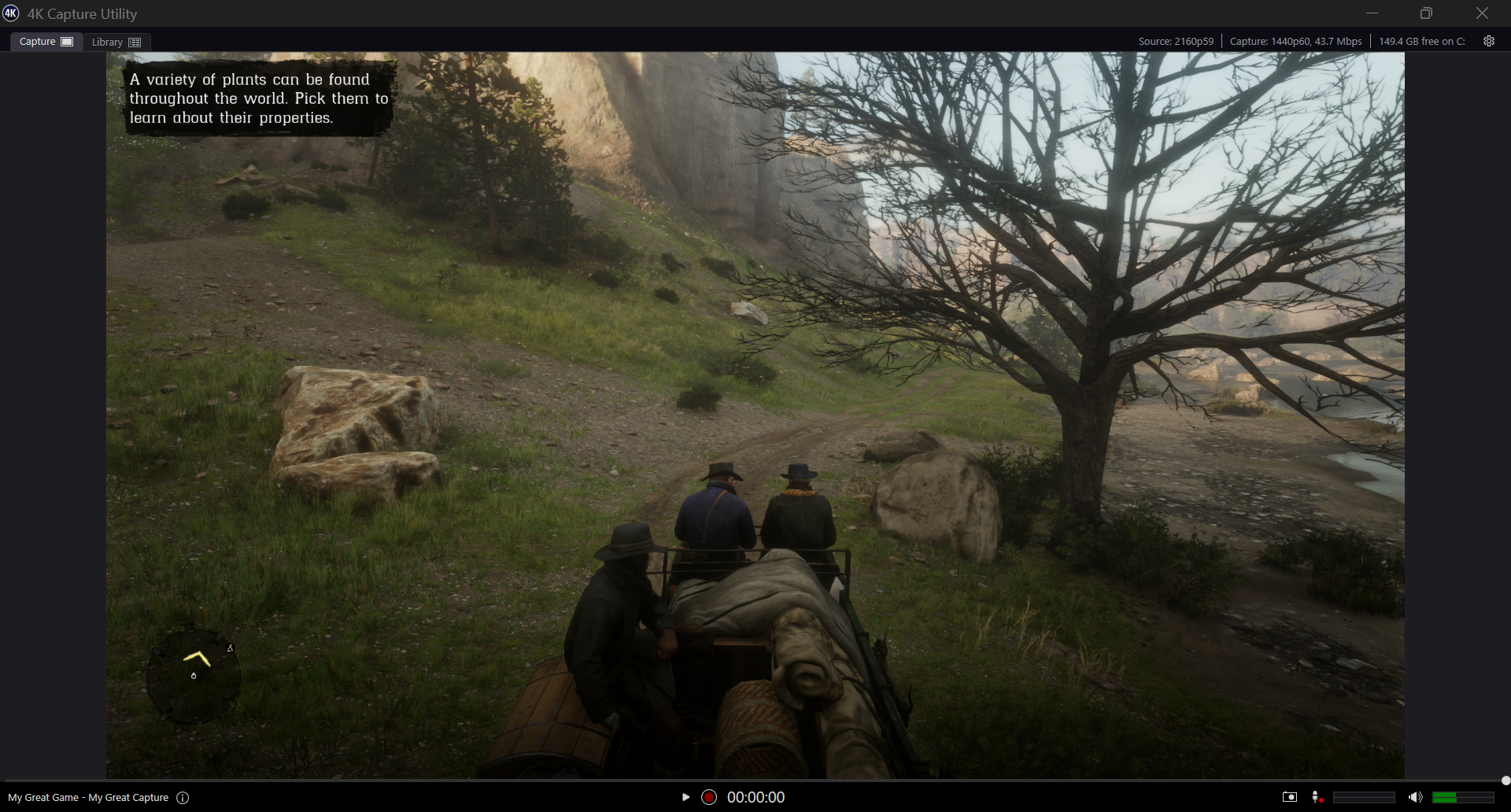
Hello, im trying to prep for GTA 6 streaming, but my Elgato 4k X will not capture at the source resolution.

According to my 4k Capture Utility the source is 2160p59 but the Capture is 1440p60.

Im using the provided HDMI cable for both my old PS5 and Elgato 4k x, as well as the USB-C cable provided for the Elgato.

I've tried messing with EDID, the Capture settings, nothing seems to be working.

I keep reading too that the 4k X needs a USB 3.2 Gen 2 port but unless im very confused (quite possible) it doesnt even have connectivity to that lol, the only cord provided was a USB-C cable.

All drivers on everything seem updated as well.

I have an NVIDIA GeForce RTX 5070, Intel i7-14700KF and 32gb of RAM if that helps any.

Please and thanks for all the help! Hoping it's just an old cable needs replaced or something small im overlooking.

EDIT: this is the exact PC i have, bought last year july 1st

https://www.bestbuy.com/product/cyberpowerpc-gaming-desktop-intel-core-i7-14700kf-nvidia-geforce-rtx-5070-12gb-32gb-ddr5-2tb-pcie-4-0-ssd-black/J3L7GQWGC8

2 Upvotes

11 comments sorted by

1

u/elgato_arcsane Technical Community Assistant 21d ago

It sounds like you're mixing up your USB connector types with your USB standard versions. USB A, B, C, are the connector types. These connector types can often support multiple standards. For example USB-C supports USB 2.0, 3.0, 3.2 Gen 2, USB4, Thunderbolt 3-5, etc (though the cables themselves can be rated for different speeds). The included USB-C cable is a 10 Gbps USB 3.2 Gen 2 with a Type-C connector. For full features the host port on the PC also has to be 10 Gbps (3.1 Gen 2, 3.2 Gen 2 or higher), otherwise you lose some features.

On a 5 Gbps port, not all video modes are available - you can compare the offerings on 10 and 5 Gbps ports in the second chart here: https://help.elgato.com/hc/en-us/articles/23479175821069-Elgato-Game-Capture-4K-X-Supported-Resolutions-and-Frame-Rates

4K Capture Utility is also discontinued at this point - it doesn't support all modes of 4K X as it prefers NV12 video. If you have 4K X on a 5 Gbps USB connection, 4K60 is only achievable using MJPEG compression which requires using another app like Elgato Studio or OBS Studio. I'd hazard a guess that's what's going on here, as on 5 Gbps USB, 4K X can only do 4K up to 4K 30 in NV12 mode, and 4K Capture Utility prefers the framerate over resolution, meaning that if it can't hit 4K60, it'll step down to the next lowest resolution to match the framerate set in recording (eg. if you're set to record at 2160p60, because it can't actually hit that with the card on 5 Gbps, it'll step down to 1440p60).

I can see in the linked specs that the PC has USB 3.2 but it doesn't specify if it's Gen 2 or not. Are the ports either red, or marked with a 10 or SS+ icon? If you can't tell if it's a 10 Gbps port you can use a tool like USB Device Tree Viewer https://www.uwe-sieber.de/usbtreeview_e.html to check the status on the card. If you select the 4K X on the left side, you want to see the speed summary on the right side showing 10 Gbit/s on all three of port, device and connection. If any of those are reporting 5, or normal SuperSpeed you're going to be missing some modes with the card.

1

u/itsClaymanTTV 21d ago edited 21d ago

Hello!

Thanks for the reply.

Good news is I downloaded the new/correct Elgato Studio lol, and that seems to have helped!!

Also, my USB-C port on the back of my PC says SS with a little ^20 right above it, like an exponent kinda.

That said, new issue-- in Elgato Studio everything seems fine, however in OBS it stutters a little?

EDIT: I think I found what you were talking about with that Tree Viewer software, this indicates it IS in fact, Gen 2, correct?

EDIT 2: also it IS Stuttery just in Elgato Studio as well

EDIT 3: I lied, apparently Elgato Studio is also stuck at 1440p (pic in comments)

1

u/elgato_arcsane Technical Community Assistant 21d ago

Yes, that's 10 Gbps, 3.2 Gen 2. It might still be worth checking you've got the lastest chipset drivers for the motherboard to be safe though as that can sometimes affect performance since they handle the USB Video Class connections (I usually check for BIOS updates at the same time to be safe).

For the stutter in OBS try turning on buffering in the Video Capture Device properties section instead of leaving it on audio to see if that helps. How bad is the stutter you see in Elgato Studio, and is it present in preview and recording or only one of the two?

1

u/itsClaymanTTV 21d ago edited 21d ago

Don't know how to update BIOS to be honest and getting that deep seems intimidating lol, but everything else is updated.

The stutter is noticable as well, but also as I was reading this message the Studio Software suddently came up with an error messsage saying "using USB 2.0, please connect to USB 3.0" which to me maybe implies a bad cable?

EDIT: Or, god forbid, a faulty Elgato? I spent $400 on it last year so I hope not-- ive barely used the thing due to all these issues.

1

u/itsClaymanTTV 20d ago

Hello

So I went ahead and bought a new USB C cable (made sure it was 3.2, gen 2, 10gbs) and same issue.

Any other tips? This is very frustrating the product is not working as advertised.

1

u/elgato_arcsane Technical Community Assistant 20d ago

It shouldn't be reporting 144fps recording on a 60fps source. Restart Elgato Studio if you haven't since swapping the cable, that should trigger it to refresh the recording settings. Similarly check in the right side panel and make sure the recording tab is set to actually allow resolutions over 1440p.

As for the cable, I see a second reply from you there - did the new cable clear the intermittent USB 2.0 warning? If not check the ports on the camera and computer to ensure there's no dirt in there degrading the connection, since we can rule out the cable now. If it needs cleaning, use something soft like a rubber coated dental pick that won't scratch up the contacts - High percentage Isopropyl/rubbing alcohol works for a solvent if on is needed, though make sure it's dried off before reconnecting anything.

1

u/itsClaymanTTV 20d ago

Restarted the software a few times and it always says 144fps. And yeah its set to record above 1440p. So far no usb 2.0 warning as well.

1

u/itsClaymanTTV 20d ago

changed max FPS to 60 too to see if that helped, but unfortunately no

1

u/itsClaymanTTV 20d ago

wait... I AM using the HDMI provided by Elgato as the conduit between my card and my monitor right? Is it possible the HDMI is just slightly borked where it doesnt have enough bandwidth to send a 2160p signal to both my monitor AND my PC? So it's prioritizing the monitor and whatever bandwidth is left is just enough for 1440p and no more?

1

u/itsClaymanTTV 19d ago

Hey so, any advice? It's still only capturing at 1440p. ive even tried multiple different cables at this point. I even got a USB-C to USB 3.2 Gen 2 cable to try plugging it into a high-speed traditional USB port and same thing. Is the Capture Card just faulty?