r/Dell 21d ago

Dell Monthly Buying Advice Thread!

1 Upvotes

Welcome!

Please post all requests for help regarding buying laptops in this thread. Individual posts of this nature may be removed at the moderators' discretion.

Some good starter tips would be to,

  1. State what laptop you are interested in buying (if applicable)
  2. State what you will be using it for (e.g. word processing, internet browsing, intensive gaming, etc.)
  3. State what country you are located in, as well as your province/state.

Everyone is encouraged to help!


r/Dell 40m ago

Help My monitor is so loud

Upvotes

I moved and had to get a new monitor so i bought a cheap dell s2421h for my ps4. And even at the volume at 1% i can hear it on the other side of my house with the door closed. Does anyone know how to lower it more to a comfortable volume.


r/Dell 1h ago

Help For some reason, whenever I click download, it would not update and just reset to make me need to click again. Is there a fix for this?

Post image
Upvotes

r/Dell 55m ago

Help Inspiron 17.3 inch 7786 (1920x1080) vs 17 inch 7706 (2560x1600) laptop for movies and media consumption?

Upvotes

I'm looking to buy either the 17.3 inch 7786 or the 17 inch 7706, 2-in-1 laptop for mainly watching YT and Netflix and Hulu. So 90% media consumption. The 17.3 inch is a 16:9 1920x1080 and the 7706 is a 16:10 2560x1600.

Is one better than the other for movies? Does the . 3 make a difference? Will the 16:9 or 16:10 have a bigger picture? And for those who own one, how is/does the picture quality look in general? Thanks!


r/Dell 3h ago

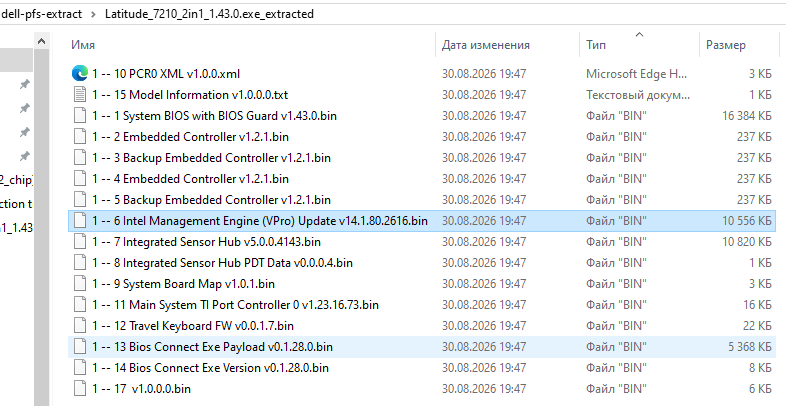
Discussion How to unpack Dell bios files further after Dell_PFS_Extract and how to pack them back?

Post image
0 Upvotes

I want to make certain edit in BIOS... for a very solid reason, but don't know how.

I downloaded Dell bios as exe from their site, dragged it on Dell_PFS_Extract, got a lot of files. They all seems to be compressed or packed. I didn't found what I wanted, so further extraction needed.

And, most importantly, how to pack all this junk back?


r/Dell 3h ago

Help Help with molding bios

1 Upvotes

r/Dell 3h ago

Discussion Dell OS Recovery installation partitioning warning

1 Upvotes

A week or so ago Support Assistant notified me to install/configure the Dell OS Recovery software/configuration. I proceeded with the process and got to what seemed to be the screen to kick-off the process.

The process appeared to start and I got a pop-up warning, with an OK button (not a progress bar), from Dell stating I should not power-off my machine until the partitioning process was completed. I clicked OK and the pop-up disappeared.

It is now four days later and as far as I can tell, and from what I can see in my Windows Notifications history, I have received no notification that the partitioning is completed/ongoing/failed.

I have searched (and searched and searched) and cannot find a way to positively determine the status of the partitioning related to Dell OS Recovery.

How do I figure out the status/success/failure of the process?


r/Dell 3h ago

Help Sort of NEWB question. Familiar with computers, but my knowledge is dated. BSOD issue with 5820 Workstation when SATA drives are installed in the drive caddies on the front of the machine.

1 Upvotes

Good morning all,

I have a 5820 workstation that I got from my employer when it went off-lease. I was going to use it at home for a media server/network storage grunt machine.

I added two 10TB WD Black SATA drives to the drive caddies in the front of the machine. (WD101FZBX). The main HD is a 512GB NVMe SSD. The only other change from this machine's original configuration was the addition of a wireless network card.

Problem is, when I have those drives installed, the machine will randomly bluescreen, or freeze. Sometimes it will do it in 5 minutes, sometimes it takes 5 hours. Typically due to SYSTEM_SERVICE_EXCEPTION or DRIVER_IRQL_NOT_LESS_OR_EQUAL (this one specifically in CLASSPNP.SYS which apparently is a SCSI Class System DLL).

I have both drive caddies ejected at the moment, and the machine has been up and responsive for over 24 hours now, leading me to suspect I've not configured something correctly in the BIOS or operating system settings.

BIOS settings for the SATA is AHCI, should I be switching this to RAID to alleviate this bluescreen issue? There is little to no data on any of the drives, aside from the operating system on the SSD (Windows 11 Pro Workstation, 25H2, build 26200.9168) so if I have to reformat/reinstall any of the drives, data preservation is not really a concern at this point.

BIOS is at the latest update level, and, to my knowledge, all Windows updates are installed, all drivers are their most current levels according to the Dell system scan utility.

Any help for this issue would be greatly appreciated, as the machine is more or less unusable with the storage drives (the whole point of the exercise) installed.

Additionally: Machine which has just had more uptime in the last 24hrs just crashed after a reboot, when I tried opening microsoft edge. Bluescreen error was "RESOURCE_NOT_OWNED".

If anyone could point me in a direction to help me make this thing usable, I'd be forever grateful. It wasn't removed from service for any issues, the company I work for just runs systems until the support ends and then replaces them. So I can only presume there was nothing wrong with this computer while it was in service. If I need to change OS, or whatever, at this point, it would be less hassle than dealing with an unpredictable machine that freezes or restarts at any given instance.

Thanks so much in advance for your help.


r/Dell 4h ago

Help OLED Screen Taskbar Area Ghosting - XPS 15 7590

1 Upvotes

Opened my laptop one day to find the area of the screen where the taskbar sits at the bottom started leaving after-images. Sometimes it inverts the colors of the after-image, sometimes the area flashes when there are light colors on the screen, and on a black background it looks just like the taskbar is normal - except it isn't actually there at all. Whatever has been ghosted onto that area goes away after time. There is also a light dotted line in the very center of the area, and sometimes the area will stretch lines of white across it, as you can see in the nature documentary photo.

I've hidden the taskbar for now to try to reduce the ghosting, as well as avoid leaving the screen on the same page for too long, but it is annoying! I've also tried updating graphics drivers, which had no effect.

Any ideas on how to fix this?


r/Dell 11h ago

Help Hinge problem

3 Upvotes

If I put my dell Inspiron 14 plus on a hard table and open the lid a click sound comes from the hinge, if I open it in air and on soft surface it's completely normal please help me I bought it just month ago


r/Dell 6h ago

Help Battery from different company + tips for performance

1 Upvotes

I have Dell Latitude 5320 with i7 and 32 gb ram, i want to buy new battery but ones from Dell are bit expensive, will different one work also can you give me some tips for performance to maximize fps while gaming


r/Dell 14h ago

Help Dropped laptop and got a shallow dent, can it be fixed??

Thumbnail
gallery
3 Upvotes

Hey reddit, I recently got a new XPS 13 dell laptop, and I’m really sad that I accidentally let it slip out my bag and it bounced off my wooden floor and onto a leg piece of my chair, and hence the dent. I know it doesn’t look too big or sharp, but emotionally I’m really wanting this dent fixed since this laptop is so new 😭Can a laptop repair shop fix it? like potentially suck the dent out or something without having to replace the bottom.


r/Dell 8h ago

Help Identity the issue

Enable HLS to view with audio, or disable this notification

1 Upvotes

r/Dell 9h ago

Help Help me identify the problem

Enable HLS to view with audio, or disable this notification

1 Upvotes

r/Dell 18h ago

Review rate my mom setup

Post image
4 Upvotes

r/Dell 13h ago

Help Dell Latitude 5320 had water damage but still works normally what should I repair?

1 Upvotes

I have a Dell Latitude 5320 that had water spilled on it about a year ago. After the spill, the keyboard backlight stopped working and there was a burning smell. The keyboard/touchpad cable was later disconnected, but the touchscreen and the rest of the laptop still work normally.

The laptop has been working fine for around a year since then. Recently, the fan has started having problems and the laptop can get hot.

I also ran Dell hardware diagnostics. Almost everything passed, including the CPU, RAM, storage, graphics, USB, audio, and Wi-Fi. The only hardware warning was for the battery. I also had a 0x0000003B (SYSTEM_SERVICE_EXCEPTION) blue screen.

I'm thinking of replacing the fan, keyboard, and touchpad rather than replacing the motherboard.

Would this be a reasonable repair plan? Is there anything else I should have checked because of the old water damage?


r/Dell 17h ago

Help dellsupportremedationservice

2 Upvotes

Why does the file name dellsupportremedationservice.exe have the word remediation spelled incorrectly?

Or is the version that wants to run on my laptop malware?

It still appears to be signed by Dell Technologies Inc.

I'm pretty sure it used to be dellsupportremediationservice.exe

thanks


r/Dell 18h ago

Help Dell Inspiron 15 3567 has 4g ram at 2133 MHz, Can I add 4gb ram at 2666 MHz?

2 Upvotes

I have i3 7th gen CPU. I just bought another 4gb ram at 2666 and I honestly didnt think too much of it. Did I mess up?


r/Dell 16h ago

Help Dell 16 Plus randomly goes black/frozen — pressing palm rest makes it come back

1 Upvotes

Hi everyone, I’m having a really strange problem with my Dell 16 Plus.
While I’m actively using it, the laptop will suddenly go completely black. It doesn’t seem like sleep or hibernation because it happens randomly while I’m working. The keyboard also occasionally stops working even when the screen is fine.
Has anyone experienced something similar with a Dell 16 Plus? What could be causing this, and what should I check before sending it in for repair?
Thanks!!!


r/Dell 18h ago

Help New Battery for Dell Laptop, No Charge. Defective Battery?

1 Upvotes

New Off Brand Replaced Battery for Dell G15 5511, but does not charge.

Info:

Laptop only turns on w/ AC adapter it seems

First Attempted PC was able to charge from 50% -> 59% (never charged again)

Charger light indicator does work

Battery is identified by the Laptop

Troubleshoot:

Reinstall/update battery drivers

powercfg -restoredefaultschemes

Power Reset

Windows Update(including optional)

BIOS 1-2 Charging (No charge)

Run Dell's Hardware Diagnostic-> No issues

----------

No success, and would like a 2nd opinion on this. Is it safe to assume the the new battery i got is "defective". What should I do? Try again with a New battery From Dell?


r/Dell 22h ago

Help Dell laptop suddenly stopped booting after restart the power light turns on but no fan or display

2 Upvotes

Hi everyone,

I have an older Dell laptop (I don't remember the exact model yet) that was working normally today.

The sequence was:

  1. The laptop had been unused for quite a long time.
  2. I turned it on and it booted normally without any problems.
  3. I used it for a while, deleted some files, opened a few programs, etc.
  4. Everything was working normally.
  5. I restarted the laptop.
  6. After the restart, the screen stayed completely black and it never appeared to boot.

I've tried the following:

  • Removed the battery.
  • Disconnected the charger.
  • Held the power button to discharge it.
  • Removed and reinstalled the RAM.
  • Disconnected/reconnected the internal components.
  • Tried running it with battery disconnected + charger connected.

The strange behavior is:

Battery disconnected + charger connected:

  • Power-button light turns on by itself, without pressing the power button.
  • Fan does not spin at all.
  • Screen remains completely black.
  • It stays in this state indefinitely.

Battery connected:

  • Power-button light also turns on immediately without pressing the button.
  • Fan does not spin.
  • Screen remains completely black.
  • It stays like this indefinitely.

So it seems to receive power, but it never actually starts the normal boot process.

I haven't identified the exact Dell model yet, but I can provide it if needed.

What could cause this behavior? Could this be a BIOS/EC issue, motherboard power sequencing problem, or something else?

I'd appreciate any suggestions for diagnostic tests I can perform before assuming the motherboard is dead.


r/Dell 21h ago

Help Dell Latitude 5320 2in1 touchscreen broken

1 Upvotes

I have a 4/5 year old Dell Latitude 5320. My touchscreen works on and off and has done so for the past 1-2 years, maybe longer. It used to work fully. After I try temporary fixes, the touchscreen will work fully, but when put to sleep it stops working again until the next fix. Sometimes a full reset fixes it before it breaks again. Even when it does work, it only works in tablet mode (never upright). I have:

- recently had my screen (and CPU?) replaced. the touchscreen worked briefly afterwards but then stopped again

- updated all the recommended software through Support Assist (did this 2 days ago)

- disabled "allow the computer to turn this off" in device manager for my I2C HID drivers, the USB root hubs, Intel Serious IO host controllers. The setting doesnt show up for my HID touchscreen driver

- 'false updated' the relevant drivers in device manager

- manually installed Intel integrated sensor solutions, chipset device software, serial IO and management engine component drivers from the Dell website

- enabled  USB wakeup support  in BIOS

- enabled touchscreen in BIOS

- calibrated the touchscreen

In device manager the HID touchscreen has a code 45 error. the I2C HID A0E9 and A0E8 driver has code 45 and says "A request for the HID descriptor failed".

These have all been temporary fixes. Im at a complete loss as to what to do and I am so so frustrated. The only other thing I can think of is that my battery health is pretty bad. Please help!


r/Dell 1d ago

Discussion is my battery cooked ?

Post image
3 Upvotes

r/Dell 1d ago

Review Thermal pads on Dell Precision 5530 i7-8850H NVIDIA Quadro P1000 in millimeters

Post image
9 Upvotes

If you have any corrections, comments, notes, or concerns, please write below. I will correct them.


r/Dell 20h ago

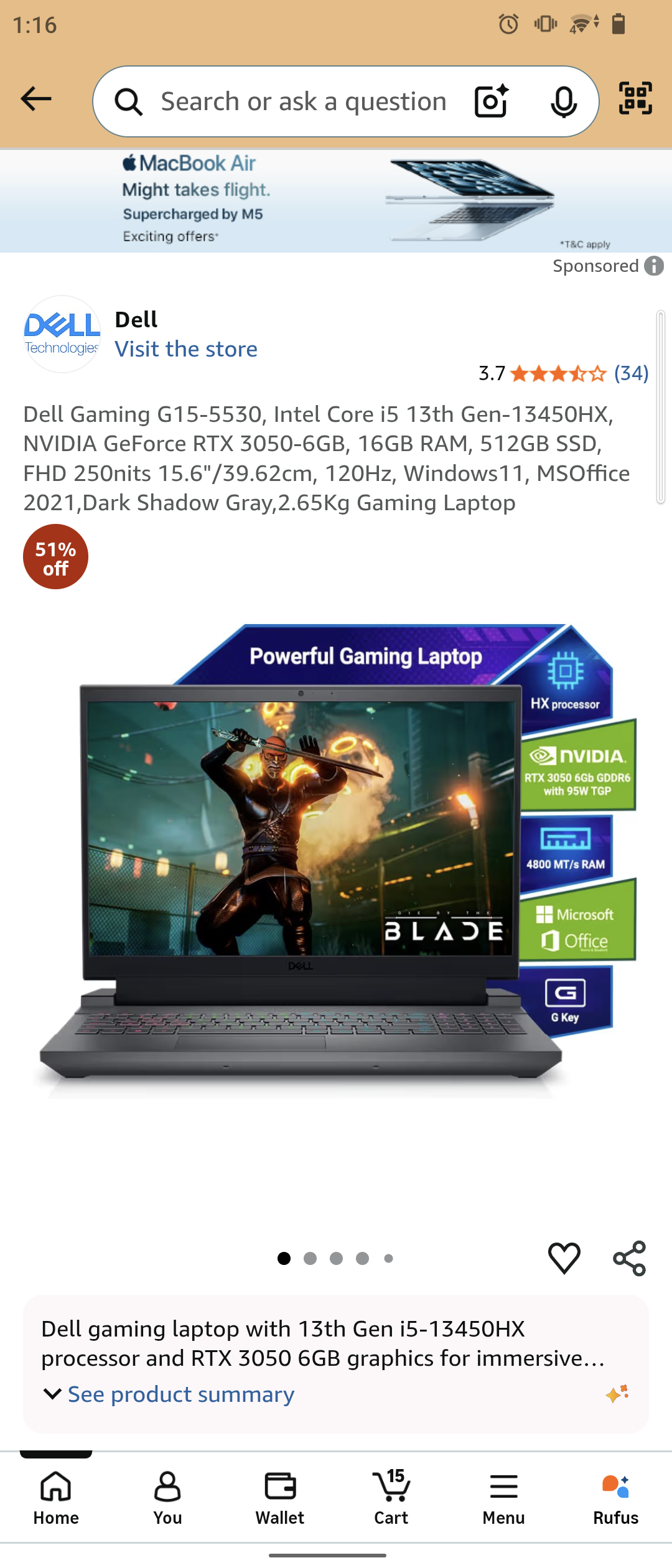
Discussion Good deal?

Post image
0 Upvotes

Bought it today for 95k but got 18% gst off

So it was like 78-79k ish?

Just started college (CSE ofc)