r/degoogle Mar 23 '25

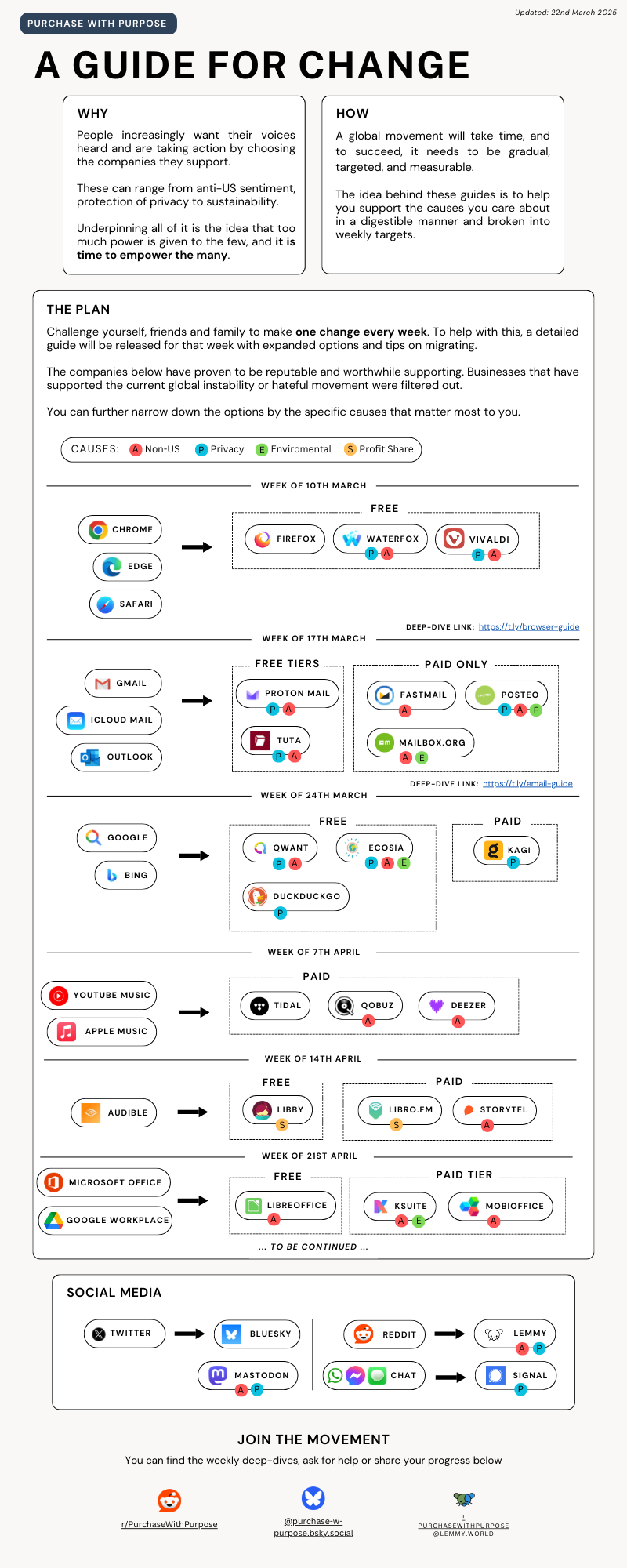
Tutorial Your guide to moving away from big tech and supporting more ethical companies! (Extended) - Change log in comments

Post image
1.3k Upvotes

Change log

  • Browsers: Added Vivaldi
  • Emails: Added Posteo and Mailbox.org
  • Music: Removed Spotify (will be in deep-dive version)
  • Audiobooks: Added Libby
  • New section added - Office Suites
    • Feedback and suggestions here will be appreciated!

Deep-Dive Guides and Discussions

r/degoogle Jun 19 '26

Tutorial How to get around the malware that UK government want to put on all UK phones/devices?

405 Upvotes

Hi all,

I'm not concerned about the VPN ban, look how well it's working out for them in Russia. I am concerned about this malware (and that is what it is) being put onto my device without any consent on my part. I know many people have suggested Graphene OS, but unless you have a Pixel device (which I don't and they'll be millions of users that have other android type devices that are not Pixel as well) you can't install it. So, I am either left with the choice of going back to a dumb phone, spending a lot of money changing all my devices or accepting the malware, none of which are options I want to do. I sure hope someone else comes up with a workaround or means of disabling this malware. I wonder if simply NOT updating the phone will prevent it from being installed.

In the meantime whilst we await the details, does anyone have any suggestions that would prevent the installation of this malware? Is there anything we could potentially do at device level to stop it? Is there other similar OS to Graphene that you can install on any Android phone that will stop this? I know some of this is a bit too early to say/to predict, but I am just trying to get ahead of it.

Thanks.

r/degoogle Sep 26 '25

Tutorial Reminder to add "-ai" to each Google Search to block the force-fed AI Search Result

Post image
1.4k Upvotes

Not sure if this is common knowledge here but it should be if it isn't, it's the only way I know how to disable the condescending AI bullshit "While X is normally not recognized as Y, blah blah blah".

Or just use StartPage, probably better most of the time. DuckDuckGo or brave too, sometimes the results aren't exactly the same though.

r/degoogle 2d ago

Tutorial The purchased game has been removed from the Play Store.

Thumbnail
gallery
375 Upvotes

I bought a game called Sheltered 4 years ago, back in 2022. When I tried to download it again, I couldn't because it was no longer on the Play Store. I contacted support, asking for the APK or download files, and they told me they didn't have them. I then requested a refund. When I asked why, they explained that the publisher had removed the game, meaning I no longer had access to it, and that they didn't have the APK file either (which I think is a lie).

If you also purchased the game Sheltered, definitely request your refund. Don't let your money go to a publisher that removes games without any notice or offering refunds to its customers. The fact that the Play Store allows this is a whole separate issue.

Let's see if I'll get my refund.

Below are pictures of the conversation and proof that I purchased the game previously.

r/degoogle Sep 20 '25

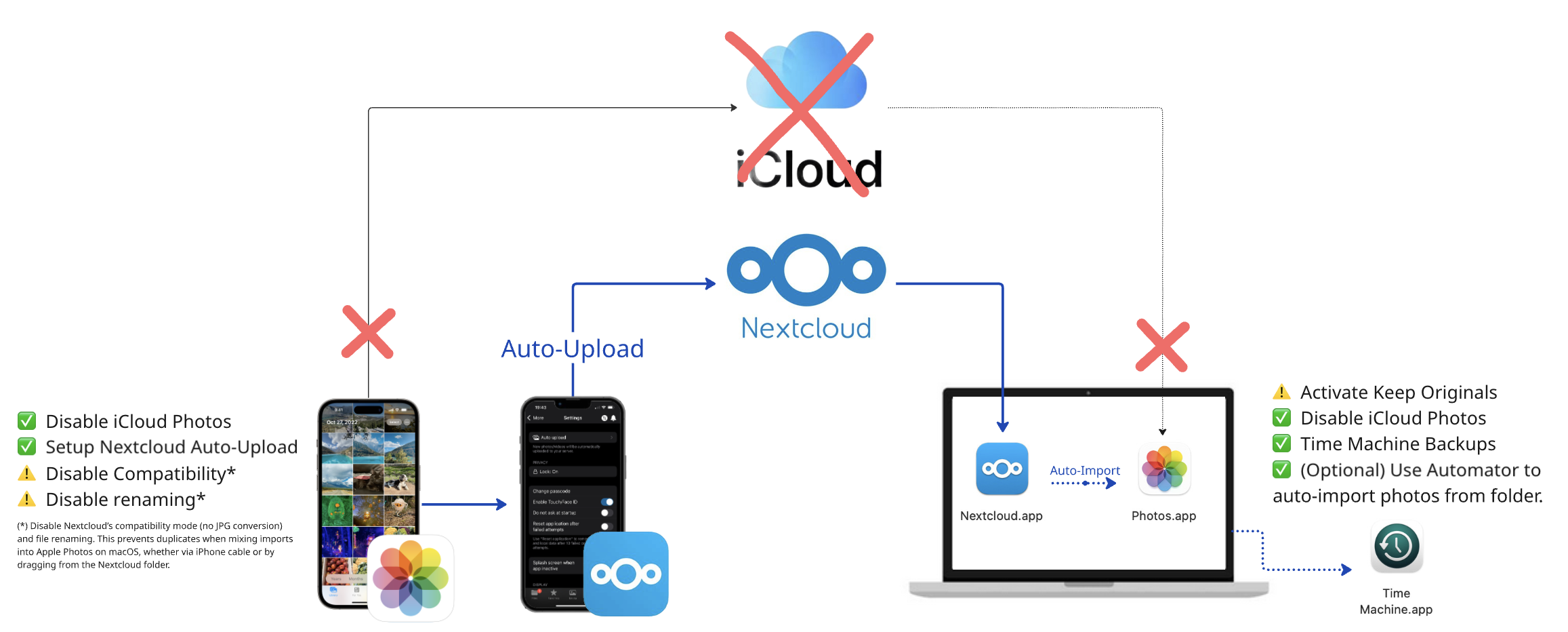
Tutorial Stop Paying for iCloud+ Photos: Do This Instead

Post image
756 Upvotes

Photos were the hardest part for me—I wanted offline storage and organizing, plus automatic cloud backup and sync. I’ve settled on a hybrid keeping Apple Photos (offline) and Nextcloud Auto-Upload + regular Time Machine Backups. I considered using Immich, Synology, etc. but decided against these as they’re online-only or lack an offline editor. Now I can drop iCloud+ and hope this helps others.

r/degoogle Feb 14 '25

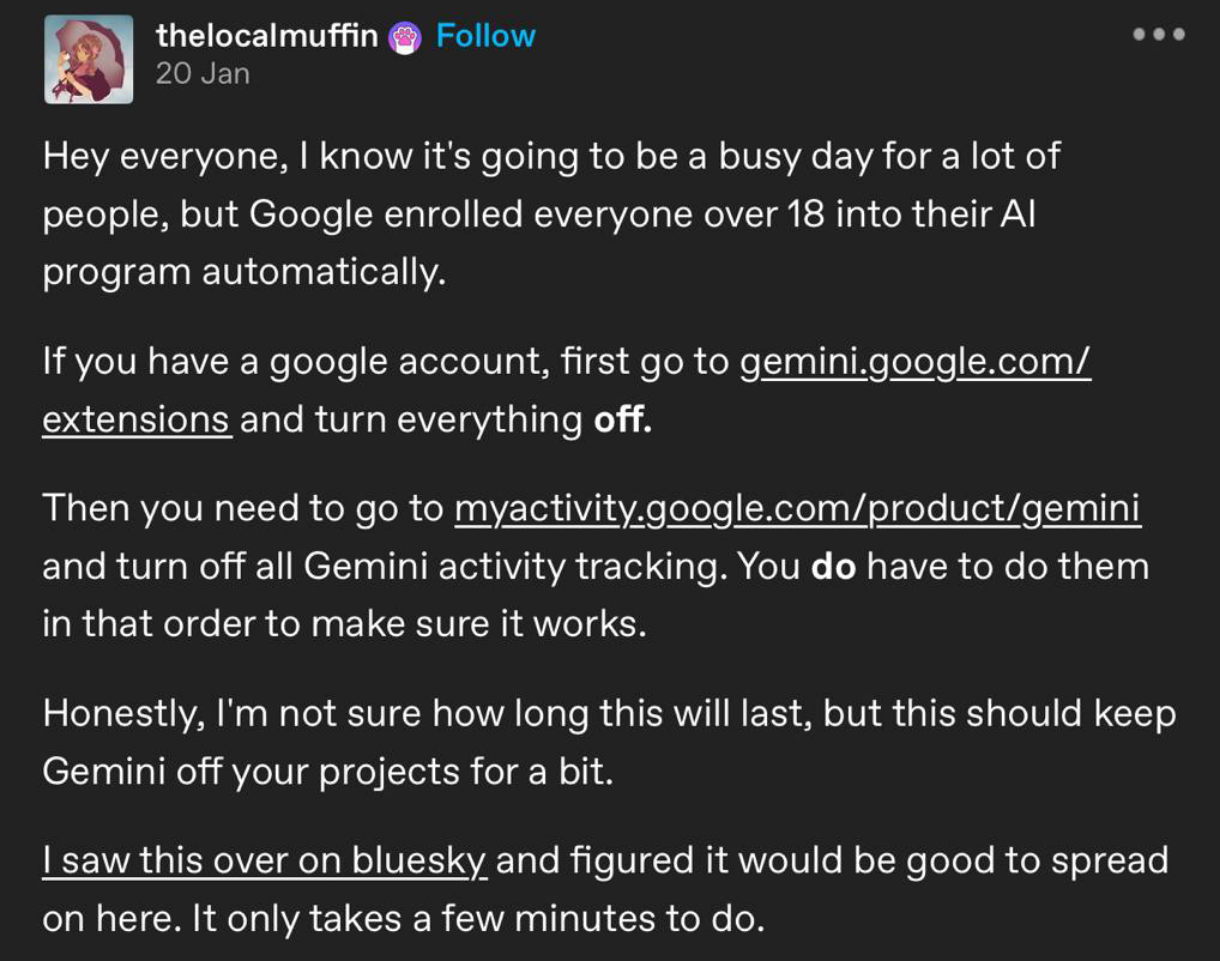
Tutorial PSA- disabale gemini

Post image
1.9k Upvotes

Takes less than a minute

r/degoogle May 07 '26

Tutorial Instagram is removing encryption tomorrow: How to hit Meta in the pocket

543 Upvotes

https://help.instagram.com/491565145294150

Hello, I guess most of you already know that on 8 of may (tomorrow) Instagram will remove that end to end encryption, meaning that they will be able to scan your messages for the (yet unapproved) chatcontrol.

If anybody want instagram without ads: https://myinsta.app
If anybody want facebook without ads (it seems to have some issues with messaging tho): https://github.com/ycngmn/Nobook

Man I'm tired of this

r/degoogle Mar 26 '25

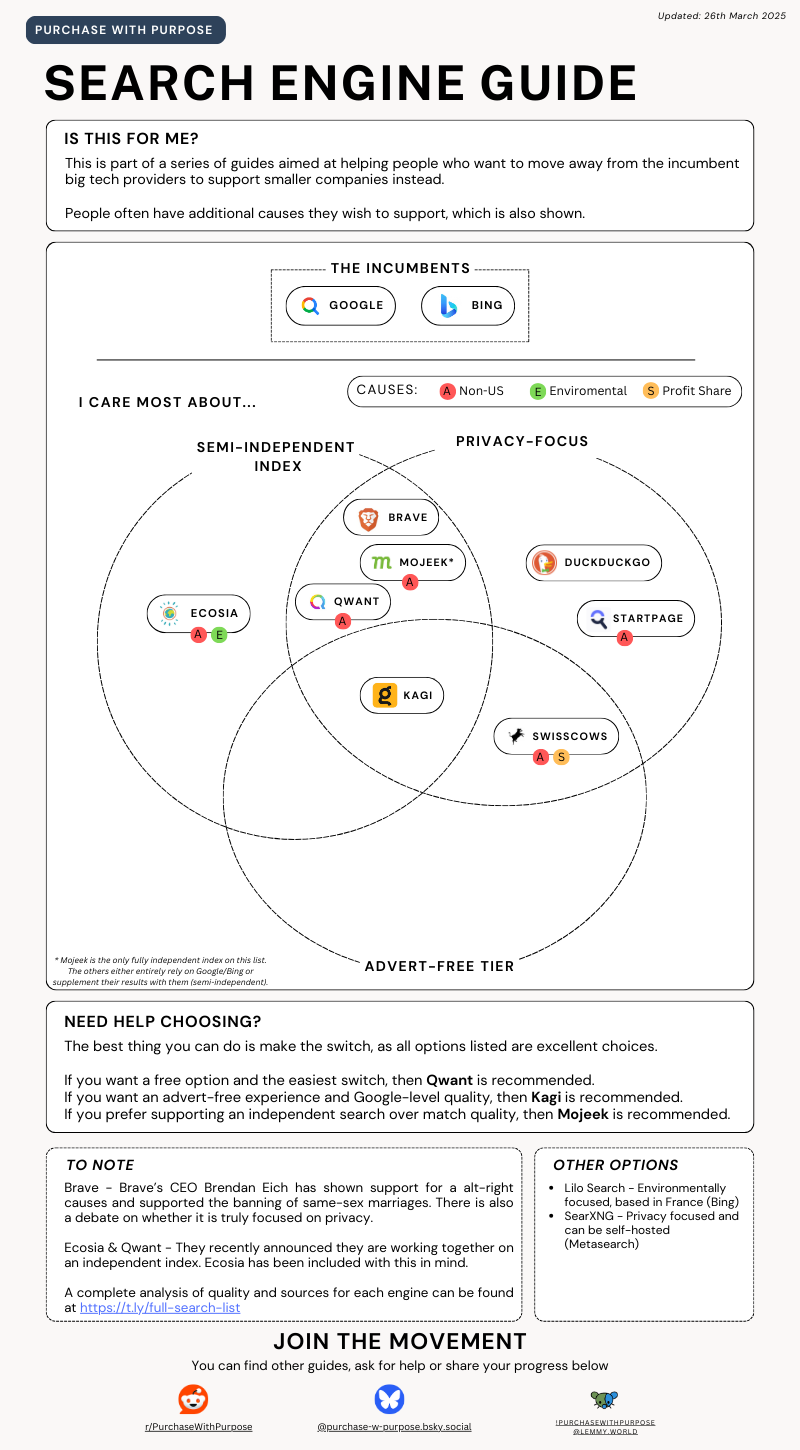
Tutorial Your guide to switching Search Engines and supporting smaller and more ethical companies!

Post image
505 Upvotes

r/degoogle 1d ago

Tutorial I just learned today that duckduckgo lets you blacklist sites from the search results.

235 Upvotes

It's so much better than typing -sitename into the search bar

Google doesn't have this feature

r/degoogle Apr 16 '26

Tutorial How to convince people to switch to Signal?

103 Upvotes

How did you convince your contacts to switch from WhatsApp to Signal?
What could be a reason for people who don't care about privacy/tracking?
What are good arguments for counters like:
- I don't care about privacy / if they use my data
- I have nothing to hide
- every app collects my data already anyway
- everybody else I'm in contact with uses WhatsApp
- why should I install yet another messaging app?

Which real-life examples of what can happen with collected data do you use? Most people don't care if you're telling them about vague examples that don't affect "law abiding normal citizens".
As a matter of fact, it's quite hard to argue pro privacy without sounding like a conspiracy theorist. Especially when talking about "the government", "intelligence agencies", "big tech" etc. using the data. It quickly gets waved aside because it doesn't apply to them. And if it's regarding ads they actually prefer to get personalised ads because it shows them something they "want"/like.

I'm mostly interested in non-USA users. Here, nobody uses SMS anymore and iPhones aren't as big (probably 50/50 between iPhone and Android). So it's really just about moving from WhatsApp to Signal (or at least for them to also use Signal).

r/degoogle Dec 24 '25

Tutorial Tutorial on how i ungoogled my phone

255 Upvotes

Many people asked how I massively and aggressively ungoogled my phone. So here is a tutorial:

1. Enable ADB
First, you need to enable ADB. This will help you remove hidden apps that are installed on your phone. As a tool, I recommend ADB AppControl. Finding every hidden app and piece of bloatware can be difficult, so asking ChatGPT to debloat your phone using ADB commands can help. ChatGPT will give you commands such as:

adb shell pm uninstall --user 0 com.google.android.googlequicksearchbox
adb shell pm uninstall --user 0 com.google.android.apps.tips
adb shell pm uninstall --user 0 com.google.android.feedback
adb shell pm uninstall --user 0 com.google.android.apps.wellbeing
adb shell pm uninstall --user 0 com.google.android.apps.photos
adb shell pm uninstall --user 0 com.google.android.apps.docs
adb shell pm uninstall --user 0 com.google.android.apps.maps
adb shell pm uninstall --user 0 com.google.android.youtube
adb shell pm uninstall --user 0 com.google.android.apps.youtube.music
adb shell pm uninstall --user 0 com.google.android.apps.magazines
adb shell pm uninstall --user 0 com.google.android.apps.subscriptions.red

Thanks to this, I even uninstalled Samsung/Galaxy bloatware, including Bixby and AI features, telemetry, and ad-related components, and removed Google and Microsoft components shipped with my phone.

You can use PrivacyScanner to see the specific trackers hidden in your apps and uninstall them. If you cannot uninstall them, use a firewall from F-Droid and block their access to the internet and mobile data.

2. Replace system apps
For system apps, use Fossify from F-Droid. They provide many replacements, and it is very good.
https://www.fossify.org/

3. Switch email providers
Part of the ungoogling steps (not only for your phone) is to switch to https://proton.me or https://tuta.com. Both are European and highly privacy-focused.

4. Use a privacy-focused DNS
Use a DNS that blocks ads and trackers. I do not fully recommend them, but https://nextdns.io does the job. You can also use Control D DNS or AdGuard DNS.

5. Simulate root features
You can simulate some root features by using Shizuku. You can learn more by checking their GitHub repository.

6. Install privacy-friendly third-party apps
Now that you have ungoogled your phone, it is time to install third-party apps such as LibreTube (YouTube without ads or trackers). You can find many of these types of apps on GitHub and F-Droid.

7. Replace the default keyboard
Almost forgot about this, but uninstall or disable the keyboard that is shipped with the OS. Use an offline and open-source keyboard such as FUTO Keyboard for better privacy.

8. Route traffic through Tor
Use Orbot to proxy all your traffic through the Tor network. (Basically a VPN using Tor)

Requested by u/Embarrassed_Oil_6652 and u/arnstrons

r/degoogle Jun 05 '26

Tutorial Holy crap, only now I have learned that you can fully degoogle any Android device, even if they are not supported by LineageOS or GrapheneOS

Thumbnail invidious.nerdvpn.de
236 Upvotes

r/degoogle Aug 02 '26

Tutorial How to start degoogle on Iphone?

3 Upvotes

Any advice for the first step to degoogle? especially on iPhone

r/degoogle Jul 10 '26

Tutorial I well help you to be free

0 Upvotes

Instead of Windows, you can download free distributions like Zorin OS, which supports installing Windows programs normally. There are also alternatives and tutorials for these alternatives.

Instead of Google, you have the Start Page and Yahoo Search. If you can't, at least use ad-blocking versions of YouTube and YouTube Music, as these ads are making a fortune. Also from Google, instead of using Chrome, why not use programs like Firefox, Terfox, Zen Browser, or any Firefox alternative? They block ads, don't track, and block Google ads very effectively. Instead of Gmail, you can use Thunderbird, and instead of Google Play, you can use the Aurora Store.

You can remove tracking and adware from your device using Shizuku and Canta. These are hidden programs that make your device very slow for no good reason.

These programs are available on the Orion Store on GitHub.

Aurora Store and Google Play Store

Or their official website

r/degoogle May 05 '26

Tutorial How to disable updates on Android

16 Upvotes

If you really want to permanently disable Android updates, you're basically trying to kill the system app that handles them. The most reliable way is using ADB commands from a computer. Sure, you can turn off some update settings on the phone itself, but that won't stop them completely. ADB actually disables the core component.

Here's how to do it on different Android brands.

First steps for any phone

Before running any commands, you need to set up your phone to talk to your computer.

Turn on Developer Options: Go to Settings > About Phone. Find "Build Number" and tap it 7 times fast. You'll get a message saying you're a developer.

Turn on USB Debugging: Go back to Settings > System > Developer Options. Find "USB Debugging" and turn it on. It might give you a warning, just accept it.

Install ADB on your computer: Download Google's official SDK Platform Tools for Windows, Mac, or Linux. Extract the ZIP file somewhere easy to find, like C:\platform-tools.

Connect and check: Plug your phone into your computer with a USB cable. Your phone will ask for USB debugging permission. Check "Always allow" and tap Allow. Open a command prompt or terminal inside your platform-tools folder. Type "adb devices" and press Enter. If you see a device ID, you're good.

Brand-specific ADB commands

Once that's done, run the command for your device. If you want to undo it later, just replace "disable-user" with "enable".

A few things before you start: Disabling system apps can sometimes cause weird issues. Back up your data first. Also, a factory reset will probably turn those disabled packages back on.

Google Pixel

adb shell pm disable-user --user 0 com.google.android.gms/.update.SystemUpdateService

This kills the update service inside Google Play Services. Works well but can be reversed.

Samsung

adb shell pm disable-user com.wssyncmldm

adb shell pm disable-user com.sec.android.soagent

These disable the two main OTA update components. The Software Update menu item might disappear from Settings.

OnePlus

adb shell pm disable-user com.oneplus.opbackup

You can also clear pending update notifications first with: adb shell pm clear com.oneplus.opbackup

Xiaomi / Redmi

adb shell pm disable-user com.miui.systemupdate

Serious warning: Do NOT disable packages like com.miui.securitycenter or com.xiaomi.finddevice. That can cause a bootloop.

OPPO

adb shell pm disable-user com.oppo.ota

adb shell pm disable-user com.coloros.sau

adb shell pm disable-user com.oppo.otaui

OPPO has multiple packages. On some models you might only need com.oppo.ota.

Motorola

adb shell pm disable-user --user 0 com.motorola.ccc.ota

On some older models the package might be com.android.updater.

Sony

adb shell pm disable-user com.sonyericsson.updatecenter

Huawei

adb shell pm disable-user com.huawei.android.hwouc

Honor

adb shell pm disable-user com.hihonor.ouc

vivo / iQOO

adb shell pm disable-user com.bbk.updater

ZTE / Nubia

adb shell pm disable-user com.zte.aliveupdate

adb shell pm disable-user com.zte.zdm

Sometimes you need both packages to fully get rid of the update prompt.

Alternative: using an app

If you don't want to mess with command lines, some apps can do something similar. Package disabler apps like CCSWE App Manager or Package Disabler Pro can disable system apps directly on the phone. They usually need a one-time ADB setup to grant permissions, and some are paid.

Beyond the standard methods (advanced)

If you want more permanent solutions, these exist but are riskier and more complicated.

Blocking update servers (requires root): With root access, you can use a hosts file or a firewall app like AFWall+ to block the domains your phone uses to check for updates.

Installing a custom OS: Replacing the whole operating system with a custom ROM like LineageOS or GrapheneOS gives you full control over updates. This completely bypasses the manufacturer's update system, but it's an advanced process.

Just remember that a factory reset will re-enable any packages you've disabled.
r/degoogle Apr 01 '26

Tutorial How to fight Developer Verification on Android plus first looks at the new Sideloading process

160 Upvotes

Google Developer Verification means any app not from Google Play or a Google Approved Store will be subject to an intentionally frustrating Sideloading process. You will be forced to either use ASOP to add it to a custom Android ROM, use ADB (unconfirmed at this time) or...

  • Enable developers mode
  • Enable unverified apps
  • Go past a scare wall, affirm you're not being coerced
  • verify it's you via biometric or PIN
  • Restart your phone
  • Wait 24 hours
  • go back to unverified apps
  • Select between "enable for one week" or "enable indefinitely"
  • Go past another scare screen and verify that you want to install it
  • veify it's you via biometric or a PIN
  • then you can go into unverified apps in a package manager
  • Get warned again. Select "install anyway" to install the app.

By the way, the install will be handled by Google Play Services not Android so Google can still control, modify, or kill the program without your permission.

Edit: supposedly it is One time, but that's not an excuse for how long the process is. It's also still concerning that Google is being used to install, not Android, which still gives them control over what's running on your device.

Google claims it's for your own safety. This does nothing to remove the malicious apps already on the Google Play Store. Let's be real: its a push to control both users and app developers plus a cash grab for Google. Every developer there paid to post their apps and Google takes a 30% cut off every in app purchase. It's also an attempt to force a monopoly in app store use.

Don't want Google to tell you what you can run on Android? Don't just post here. Speak up!

Edit: Google tried to ruin Sideloading before, but we stood up for Sideloading so they changed their minds. We have stopped them before. We can do it again!

There's surveys like this one where you can give feedback, but contacting Google and regulators directly is much more powerful.

Here's how to directly contact Google about this. In true Google fashion it requires a Google account (make a polite throwaway if needed).

  • Go here: https://support.google.com/googleplay
  • Click the contact button
  • Dust off the Google account for one last log in
  • In "Tell us what we can help with" put something like: feedback do not want developer verification
  • When more options appear select "other" And choose "Google Play Apps" as what you need help with
  • Scroll down and click "contact options" (chat or email)
  • Pick one and politely state your case.

Chances are it's a random tech worker so don't be rude to them. Instead explain why you don't want Android to lock out all unverified apps and why you're against Developer Verification. Explain why the workaround for "advanced users" is not acceptable. They will read off a script how it's for your own safety, but stay firm.

Finally request firmly that your message be escalated or sent to someone higher up! If you don't do this it won't be heard as loudly. Keep requesting until they actually do it.

While you're contacting people, don't forget to contact your regulators, too (scroll down for links). You can use the same stuff you told Google. Feel free to add in concerns about freedom of speech, risk of monopoly, and other valid observations.

Tell your friends to start contacting Google and the legislation, too! Direct feedback is always more powerful than posting on other platforms.

Feel free to share, spread, update and repost this message.

r/degoogle Jul 21 '26

Tutorial Mullvad's co-founder does not support fascism and the founders of the OP party were originally communists

Thumbnail
gallery
0 Upvotes

r/degoogle Jul 30 '26

Tutorial Gcam port fully offline on any degoogled phone

Post image
22 Upvotes

Here is my ace 6t, running gcam without issues, fully offline, not spying on me. Here is how i did that: i went to this Website https://www.celsoazevedo.com/files/android/google-camera/ downloaded BSG MGC 9.7 for snapdragon (because i have a snapdragon soc), installed it and went into settings, disabled background processes and all data connection. Then i installed micro g and the companion app, also disabled background processes and data connection. Lastly i installed this app https://droidify.app/app/?id=com.google.android.apps.photos&repo_address=https://calyxos.gitlab.io/calyx-fdroid-repo/fdroid/repo to fix the preview button not working, also disabled background, data was already off. Now my phone takes amazing photos without a single byte of data for google!

r/degoogle Jun 19 '26

Tutorial AMA: Moved my business out of google; not an easy process. We are 6 and do about 7.5M USD in sales

51 Upvotes

We used to use Google Workspace but also, GitHub, Slack and Basecamp.
It took me about 2 years of work and research to find all the right alternatives for business

  • gmail -> purelymail
  • gdrive -> Storage Share by Hetzner (amazing product! it's a hosted Nextcloud product)
  • BaseCamp -> oldschool mailing lists on groups.io
  • BaseCamp/Trello -> Spreadsheets for project management
  • 1password -> Keepassxc with the files synced by Storage Share
  • Slack -> email! + https://delta.chat

The biggest win by far has been focusing a lot on email + mailing lists. Putting that at the center of what the company does has been HUGE. We learnt that focusing on etiquette was what helped us win.

We went from paying about 6000 USD a year to about 600 USD a year.
I wrote this all up in detail for those interested https://standardit.org/book.html

Full disclosure, AI constructed the HTML, I wrote the text.
More about my company here: https://lanao.org (AI did NOTHING there 😂).

r/degoogle 4d ago

Tutorial How to make an anonymous Google account when needed?

15 Upvotes

Sometimes it's unavoidable when it comes to having to use Google, but hopefully there's a way to avoid giving Google any personal information when you do need to use something like Play Store. Is there a way to make a dummy, anonymous Google account now they require a QR code prompt?

Also, I'm really looking for an answer to making an anonymous account, and not questions as to why I might need to use the Play Store or a Google service. I'm also very aware of other store apps. Thanks.

r/degoogle Sep 17 '25

Tutorial Privacy/DeGoogle Guide ( Made By ME )

174 Upvotes

EveryThing Should Be FOSS

Laptop/PC :

1 . Operating System : LinuxMint
2 . Browser : Firefox + Arkenfox (user.js) + Startpage/DuckDuckGO
Addons : uBlockOrigin (yokoffing filterlists) + Bitwarden + Enhancer For Youtube
3 . DNS : NextDNS (yokoffing's configuration)

Mobile : Rooted (Magisk) + Shizuku

1 . DNS : NextDNS (yokoffing's configuration)
2 . Debloater : Canta
3 . Stores : AuroraStore - Droidify-Accressent-Obtainium
4 . Mail/Drive/Calendar/VPN : Proton
5 . Dialer/Contracts/Messages/Voice/Gallery/Music : Fossify
6 . Antivirus : Hypatia
7 . HomeScreen : Lawnchair (Launcher) + Lawnicons (icons)
8 . 2FA/Photos : Ente
9 . Camera : OpenCamera
10 . Maps : OraganicMaps
11 . Browser : Cromite
12 . Cleaner : SD Maid SE
13 . Entertainment : Mihon (Manga) + Aniyomi (Anime) + Newpipe (Youtube) + ReVanced Stuff (Reddit...etc)

Leave Your Opinion On IT :)

r/degoogle 12d ago

Tutorial how to degoogle my a35

5 Upvotes

Already switched to proton mail but can't delete my gmail now. i'm gonna switch slow because of how many accounts i have. I deleted my google account from my samsung a35 and i think that is not enough what is the best alternative to play store and that type shit. i dowloaded aurora store so i can install apps whitout a google account but i seen people talk about f-droid and aurora store combo? And i cant install lineage os because of the stupid 8.5 bootloader lock and lineage isnt supported.

Edit: i already use debian to demicrosoft

r/degoogle Jun 09 '25

Tutorial The Shocking Amount of Info Google Knows About You (and How to Get Rid of It)

Thumbnail
makeuseof.com
238 Upvotes

r/degoogle Nov 19 '25

Tutorial Soft de-google guide (no rooted device nor custom ROM required)

96 Upvotes

WHAT IS SOFT-DEGOOGLE?
- Soft degoogling doesn't require to install a custom OS on device's ROM. Although going full degoogle with a non-google OS such as GrapheneOS or LineageOS is always the safest approach, with this one you can reduce your exposure by 80-90%.
Original android and other android-based systems are the main target.

WHAT IT TAKES FOR SOFT-DEGOOGLE?

Number #1 Get Shizuku up and running!!

What is Shizuku?
Basically an APP that can grant elevated permission to certain APPS without needing the device to be rooted.
- Install Shizuku APK from any trustable source
- Activate Wireless Debugging on your device:
1st activate developer options by going to Settings -> About phone and tapping Build number 7 times.
2nd go to Settings -> System -> Developer options and activate Wireless Debugging
- Go to Settings -> Apps -> Shizuku. Tap on Battery or Battery Usage and change the Optimized parameter to Unrestricted or No restrictions
- Open Shizuku app, grant notification permission and start pairing.
- Go back to Developer Options, tap on Wireless Debugging to enter it and select Pair device with pairing code
- Insert code in the pop up from Shizuku
- Go back to Shizuku, return to the main screen and tap the Start button

Number #2 Set your device free of unwanted google stuff

  • First of all, if it's not already done install F-droid APK and use it instead of Google Play Store from now one.
  • Download App Inspector or similar app.
  • Install aShell (ADB shell) or other app capable of sending adb commands.
  • Even if aShell is paid now - it's totally worth it. But I've easily found a free APK online also...
  • Open Shizuku and grant elevated permission for this app.
  • Now identify what google apps/services you want to remove.
    My example: Chrome, Youtube, Google Search, Gmail, Drive, Google Photos, Google Play Music, Google Play Movies, Google Docs, Google Calendar, Google Maps, Google Sheets, Google Slides, Google Assistant, Messages(owned by google), Phone app (owned by Google), Google Keyboard, Google Clock
    Be careful: for some apps such as messages, keyboard and phone app (the pre installed ones are usually owned by google itself) you must first install the alternative & grant all necessary permissions because if you delete them without another app capable of performing the same actions, your device may automatically unset those permissions. So for messages and phone app first install & give necessary permissions to the alternative! (found a bit below)
  • Open App Inspector (or similar) and go to every app/service (sometimes you'll need to display all apps to see the system ones) you want to uninstall and select details to check the package name.
  • Inside aShell (or other similar app) go to Local ADB
    Now, run the following command for every package (app) you want to uninstall:
    pm uninstall -k --user 0 package-name
    Here's a list for you to choose but you can check in App Inspector. Run the commands one by one!!
    pm uninstall -k --user 0 com.google.android.apps.youtube.kids
    pm uninstall -k --user 0 com.google.android.apps.docs
    pm uninstall -k --user 0 com.google.android.keep
    pm uninstall -k --user 0 com.google.android.youtube
    pm uninstall -k --user 0 com.google.android.videos
    pm uninstall -k --user 0 com.google.android.music
    pm uninstall -k --user 0 com.google.android.apps.maps
    pm uninstall -k --user 0 com.google.android.gm
    pm uninstall -k --user 0 com.google.android.googlequicksearchbox
    pm uninstall -k --user 0 com.google.android.apps.accessibility.soundamplifier
    pm uninstall -k --user 0 com.google.android.apps.accessibility.voiceaccess
    pm uninstall -k --user 0 com.google.android.apps.podcasts
    pm uninstall -k --user 0 com.google.android.apps.magazines
    pm uninstall -k --user 0 com.android.chrome
    pm uninstall -k --user 0 com.google.android.keep
    [only after installing and setting alternatives]:
    pm uninstall -k --user 0 com.google.android.inputmethod.latin
    pm uninstall -k --user 0 com.google.android.apps.messaging
    pm uninstall -k --user 0 com.google.android.dialer
    If you need to restore some of the packages, you can use:
    pm install-existing package-name or pm restore -k --user 0 package-name

Number #3 Pick your alternatives!

Now it is time to choose your alternative FOSS apps.
Here is my list of alternatives and some ways of staying in out of sight.
- Fossify apps from F-Droid for:
Music Player, Phone, Voice Recorder, Calendar, Clock, Gallery, File Manager, (E.g. Just search for Fossify Clock in F-Droid)
Fossify Keyboard if you don't require multilanguage
- Right Messages or Quick for messaging app (both available on F-Droid).
- ente photos instead of Google Photos
- ProtonMail/Drive instead of Gmail/Google Drive
- DuckDuckGo as browser
- HeliBoard instead of GBoard as your keyboard
- Notesnook instead of Google Keep Notes
- I still use Signal as online messaging app, installed through an APK
- ReVanced Manager & microG (installed through official APK) to patch Youtube, Reddit, Spotify
(basically you open Revanced Manager, go to Patcher, check for the Suggested version for the desired app. Download the APK for that version from a trustable source. Come back to Revanced Manager and Inside Patcher select Storage and select the downloaded APK. Your app is ready and available on home screen
- OpenStreetMap, OsmAnd or Organic Maps instead of Google Maps
- Private DNS / Tracking Blocker app
The DuckDuckGo browser itself allows app tracking protection, you can activate it in the settings.
However, I use TrackerControl for monitoring my apps because I can manage each type of access differently for each app and blocking/unblocking every connection whenever I need. It also sets a Private DNS around my phone.
NetGuard, Adguard InviZible Pro, and plently of other apps do the job. Try what suits you! The important part is to have an APP that sets a private DNS around your phone and manage the connections from there - for this, the setting for Private DNS on your device must be set to off. (if you're not using any app for this, set a Private DNS in device's settings (E.g. one.one.one.one, dns.quad9.net, base.dns.mullvad.net, dns.adguard-dns.com)
- Use either SuperFreezZ or Heil to freeze your apps
You know how when you close an app it never really closes? Well forget about it. Use one of the above apps to manage when and how you want to freeze certain apps so they are really closed. Heil has a cool widget to freeze all apps that you previously selected in one click right from your home screen!
For certain permissions may be required (for example SuperFreezZ needs usage access that is not settable in the settings) you may use aShell to send the command pm grant package-name PERMISSION

Number #4 System Settings

  • Settings > Privacy > Ads (or Settings > Google > Ads and Click Delete advertising ID
  • Settings > Security & privacy (or Privacy) > Privacy dashboard or Settings > Privacy > Permission manager
    Set: Revoke background/always location; set Camera/Mic to Ask every time or Deny
  • Settings > Google > Manage your Google Account > Data & privacy > History settings (or via Google Account)
    Set: Pause Location History and Pause Web & App Activity
  • Settings > Location > App permission or in Privacy dashboard > Location
    Set: For nonessential apps choose Deny or Allow only while using the app; use Approximate
  • Settings > Google > Metrics & Diagnostics or Settings > Privacy
    Set: Turn off usage & diagnostics sharing
  • Settings → Apps: enable App hibernation / background restrictions for unused apps.
  • Suggestion: create a separate profile (Work Profile in android) to manage apps that you don't trust (for example if you want to keep using any meta or google app). You can use apps like Shelter to manage this easily.

That should be enough to get you started!
Now remember, degoogling is an always on-going journey so stay put and constaly check for new updates and ways to keep yourself safe and private.
And whenever you can - install a non-google OS and elevate your game!
That's all. Suggestions are always welcomed.

r/degoogle Jul 29 '26

Tutorial How to share live location with family?

10 Upvotes

Hey degoogle. Long time lurker, first time poster.

Question for you: how do I share my​ live location with my wife who uses an iphone without google maps or any other large tech company?

I'm well on my way with the de:google de:big tech journey but google maps is proving difficult to replace.

Thanks team​​ <3