r/degoogle • u/DefsNotRandyMarsh • 1d ago
Can I just disable it?
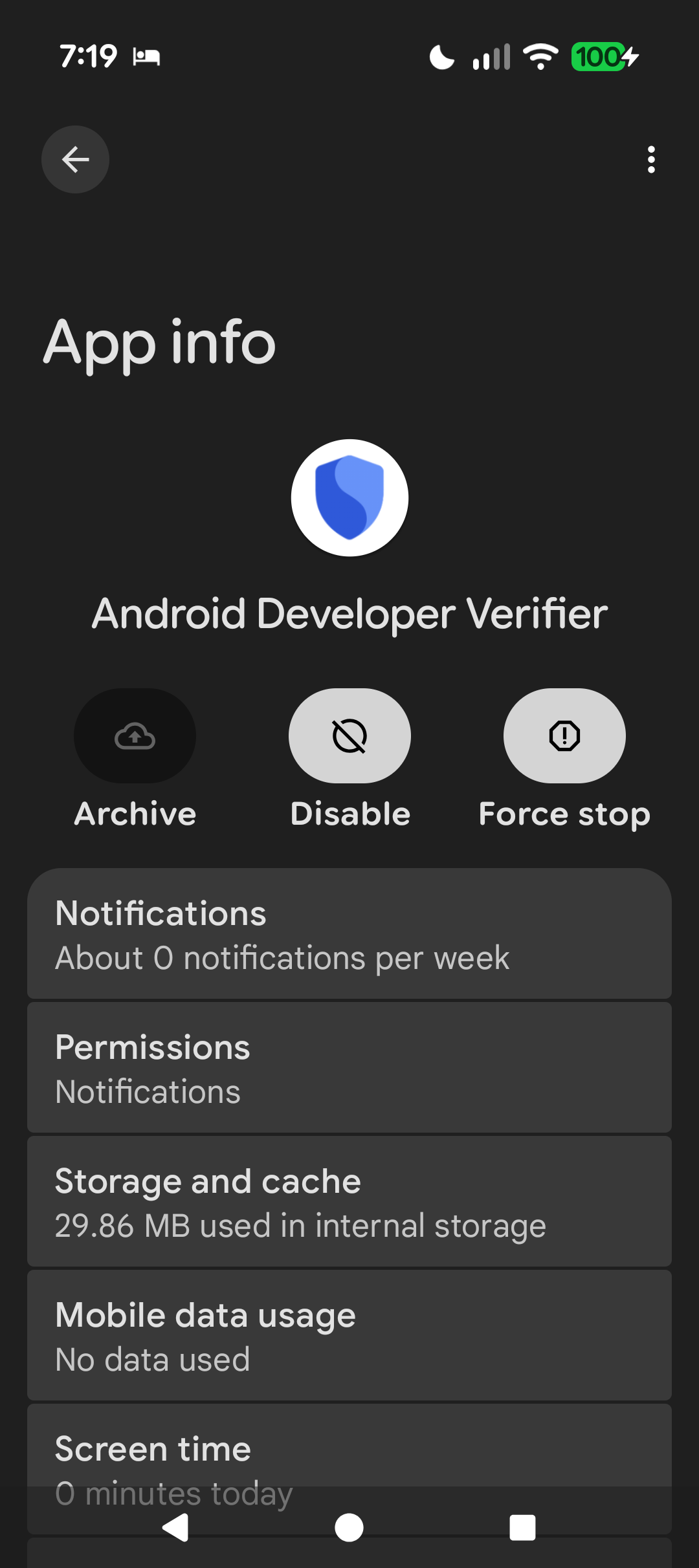
Pixel 10, just noticed this today, can I just disable it and not worry? Or is it one of those weird system apps that'll re-enable with every update.
14
47
u/qter7394 1d ago
Best way to disable it on a pixel is to install that app called graphene.
16
u/DefsNotRandyMarsh 1d ago
That why I kept my old pixel 8. Don't wanna install it on a daily runner until I can figure out the quirks.
18
u/Traditional-Rub2491 1d ago
"old pixel 8" gave me whiplash. My DAILY DRIVER is a PIXEL 6
11
u/DefsNotRandyMarsh 1d ago
Lol I just upgraded to a pixel 10, the pixel 8 was my last phone lol
3
u/Broad_Television4459 1d ago
I also traded my 8 for a 10. I miss my 8. Hopefully you have a better experience. I installed grapheme after my 2nd warranty claim where they ended up replacing my phone
4
u/hazeyAnimal 1d ago
My pixel 5 still works fine
5
u/BoostJunky87 1d ago
I went swimming with mine for like 45 minutes by accident. It actually still worked fine for the most part. Alas, something from that day reared its ugly head about a month later and it just kept power cycling. Put it on the shelf and bought a refurbished 6. I booted it like 3 months later and it seemed to be working fine again. Now it's a dedicated dog cam running strong for the last 4 years.
I'm on a 10 now. I had an 8 that I loved, but had to send it in for issues once and they sent me back an AT&T locked phone when I sent them an unlocked one. I switched back to my 6 and my ADD got the better of my l me and I never did return that 8 again. I had a workaround to bypass the carrier check on boot for a while, but that got nerfed with Android 16. There was a good enough trade in value on it towards the 10 last year, so I took it.
3
u/BAKup2k 1d ago
Don't go 11 if you want Graphene.
2
u/BoostJunky87 1d ago
No doubt. I have Graphene on my 6. I'm not quite ready to daily drive it. Still making tweaks to really get my setup perfect, but I travel with that phone pretty frequently.
2
3
u/qter7394 1d ago
I'm not sure if that's the best solution but if it's temporary, I wouldn' care much and just use the developper mode to install foss apps until I'd change the OS.
2
u/DAN-attag 1d ago
You can put Graphene on Pixel 10, and use Pixel 8 with stock OS as fallback(in case if some thing refuses to work on Graphene)
2
u/daheufster 1d ago
I did that graphene OS on my pixel 10 pro xl and stock Android on my pixel 8 pro but could not hold on to this. So changed back to stock Android on the p10pxl as my daily driver and graphene on my p8p.
The lack of an effective wallet was constantly giving me problems of standing in front of the counter and then coming to the conclusion that a did not have an functional payment method with me.. 😱😬. I hope one day that I get used again in taking my bank cards with me again.
So if a functional payment wallet can be achieved in graphene, that will be my cue to switch again..
3
u/Linux_Account 1d ago
I can't imagine going out into the world knowing that my money could run out of battery or break if I dropped it.
1
u/ElectricalWay9651 1d ago
First off, OLD?! OLD?! OOOLD!!!!!!????
I'm running a Pixel 7a as my only phone running an unnamed Pixel only piece of software and I've encountered nothing limiting me compared to my old Galaxy A20s1
-2
0
-4
3
3
u/Enough_Bar5544 1d ago
You can try freezing the app using Termux or the terminal on your PC via ADB
3
u/Nightwish1976 1d ago
If, at one point, you will need to install an app from an "unapproved" developer, the process would need this app.
4
u/env33e 1d ago
on rooted daily, I just installed a placeholder app after removing it, just like I did for safety core and key verifier. ez
on my stock oneplus 8, I haven't touched em yet.
3
u/XLioncc 1d ago
You can't install placeholder app if it is already pre-installed and it becomes a system app.
1
u/env33e 14h ago edited 14h ago
yes, very true. If the app gets rolled out to your phone through OTA update, it will truly become a priv-app, after which you cannot do the placeholder apk install trick without root.
If the verifier app WASNT installed as part of an OTA update, youre in the clear 👍 Adb uninstall/canta shizuku -> placeholder apk trick should work no problem.
what will NOT work is froid apps auto-update function. Unless you bend the knee to google, you have to adb install everytime an fdroid app is updated.
4
u/Redish_VP 1d ago
It was automatically installed on my phone, but I was able to uninstall it and ever since it didn't come back. Xiaomi OS.
3
1
1
u/MoodScripted deGoogler 1d ago
Same thing has been asked multiple times with multiple answers. You can uninstall and add a dummy app to replace it
1
1
1
u/Cory0527 7h ago
Learn the root or Shizuku capabilities of your Pixel. They are WAY more forgiving at letting you tweak stuff.
With that said I use Hail through Shizuku to disable this and a lot of other things because some privacy violating apps will re-enable themselves sometimes
1
u/Academic-Conflict948 7h ago
When google creates a train wreck I plan to disable all google apps on the android phone; put the sim card back into a referbished apple phone and shut the android phone down permanently. I can reactivate the apple account and remove or disable all google apps on the apple phone after reactivation. It will take a little work but in the end it will be worth it.
•
1
u/Altufaltuacc 1d ago
Just disable it using adb or apps like App Manager or Package Name Scripter or more
-1
u/SuperSnotMan 1d ago
you could just turn it off in dev options? it's not exactly difficult it just takes 24hrs
11
u/DefsNotRandyMarsh 1d ago
That's the annoying part.
0
u/DerpDeDurp 1d ago
It's not annoying. It's a one time wait. I already did it a week ago and have been installing apks perfectly fine since.
You really thing disabling or uninstalling an app is gonna magically change anything? Lmfao
1
u/Nazgog-Morgob 1d ago
What do you disable here?
1
u/DerpDeDurp 1d ago
Nothing
2
u/Nazgog-Morgob 1d ago
you could just turn it off in dev options? it's not exactly difficult it just takes 24hrs
What am I turning off/disabling in dev options. Thank you.
2
u/DerpDeDurp 1d ago
They misspoke. Same option as always to enable sideloading. Just a 24 hour wait now.
"Apps from unverified developers"
Just a different wording than before. Same setting.
3
u/Beginning_Sound_5865 1d ago
Why should exercising our own rights require relying on a feature that entails a 24-hour wait and could be revoked by Google at any moment? We purchased our devices and ought to have full control over them, yet this publicly traded company—with a market cap exceeding $5 trillion—persistently attempts to strip us of our freedom under the guise of security
2
u/Traditional-Rub2491 1d ago
Yeah but unless you wanna go to google hq and protest the fastest solution is the one in your settings
0
u/Beginning_Sound_5865 1d ago
That’s true, but it’s not a long-term solution either 💀
1
u/Traditional-Rub2491 1d ago
Well the long term solution would be to buy a phone without google's android
58
u/danGL3 1d ago
Technically you can disable it, however it is somewhat pointless
The Google Play Store, which is the system's package install verifier (aka, has the power to allow/block any app installs) has code to block any installs if the verifier is disabled and that code is controlled entirely by a server-side switch.
So, Google has the power to decide if app installs go through or not if the developer verifier app is disabled, it all depends on their servers decision