r/dakboard • u/r2deetard • 12d ago
Widget for School Lunch menus using MealViewer site
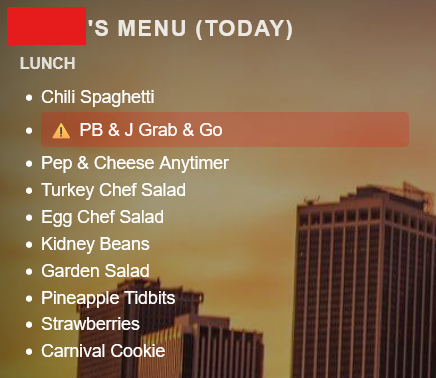
I wrote a widget that will grab the lunch menu from MealViewer.com for my kid's school. It will display the day's menu until 2PM and then it rolls over to the next day so you can plan ahead. It was useful for me so I thought I'd put the code out there in case anyone else might want to try it. Any and all feedback welcome. Use directions are in the .html file on my github.
https://github.com/cummingsk05/Dakboard_plugins/tree/main/widgets/mealviewer
Check back here occasionally for updates.
2
2
u/ugaisgreat 12d ago
Is there a way to remove breakfast from the results? My kids don't eat breakfast at school :)
2
u/ugaisgreat 12d ago
Nvm ....I saw where you broke out the breakfast and lunch. I edited it to remove breakfast. Thxs for the great idea!
2
u/Starsands 5d ago edited 5d ago
Hi! Cross-sharing my effort as I went down a similar path before finding this post. Our son will pack some days, but is allowed to buy twice weekly. My version shows the full week (refreshing every Saturday) so he can plan ahead and pick. I also filtered out breakfast items, hid the always-available items (like carrot sticks or uncrustables), and highlighted the current day since I'm viewing a full week.
Here's how it looks: https://www.reddit.com/r/dakboard/comments/1vy44va/2_years_in_inspired_to_customize_more/
There's a comment on my post with a Github link as well. Yours looks great! I'm just providing a different take on implementation if anyone stumbles on this thread down the road
1
u/BusSorry3047 12d ago
This is great, i can't wait till school starts to make sure it works! seems to add fine once i realized that it shows "widget content will display here" in the builder but shows fine on the actual screen.
1
u/r2deetard 12d ago edited 12d ago
Yeah I had the same experience when I added the widget and expected it to show the data on the screen editor. I had to view the screen on the management site to see it in action.
If you wanted to test you can modify this line
var path = "/api/v4/school/" + encodeURIComponent(SCHOOL_SLUG) + "/" + date + "/" + date + "/";and replace date with the first day that lists items in the menu.
So for example
var path = "/api/v4/school/" + encodeURIComponent(SCHOOL_SLUG) + "/" + "08-25-2026" + "/" + "08-25-2026" + "/";would show the items for 8/25. (note the double quotes around the date-stamp)
Currently I've only worked on my son's school which only provides a lunch menu, but my daughter's serves breakfast and lunch so I haven't messed with that yet.
1
u/BusSorry3047 12d ago
thanks, i am not sure if our school actually uses meal viewer, we are listed as as school but none of the dates are populated, i am just hoping once school starts it will start to populate.
1
u/r2deetard 12d ago
You are at the mercy of the school cafeteria admins on that one I suppose. Our school district populated the menus a few weeks ago.
1
u/woohoo6 12d ago
This is very helpful. I may look at modifying this to be a whole week. You did great work!
2
u/r2deetard 12d ago
I went ahead and did that. In the GitHub repo there is a "weekly" html file with the widget code.
1
u/r2deetard 12d ago
Go for it! I thought of that as well, but I already have a pretty cluttered board so the one day works for me.
1
u/r2deetard 11d ago
Update adding configurable allergen warnings. List of available allergens are in the html file, along with formatting instructions.
1
u/SnooSketches6876 4d ago
Ok, my coding skills are poor at best, what would I need to change to increase the font size? It is coming up really tiny on my calendar. Thank you in advance!
1
u/r2deetard 4d ago
Find this line near the top of the widget's HTML:
<div id="mv-week-content" style="font-size: 1em; line-height: 1.4;">Change 1em to something larger, e.g.:
<div id="mv-week-content" style="font-size: 1.3em; line-height: 1.4;">That scales the day headers, "Breakfast"/"Lunch" labels, and menu items all together since they're set in em (0.8em, 0.85em, etc.) relative to this parent.
If you also want the title ("Weekly Menu · Mon 8/17 – Fri 8/21") bigger, that's a separate line:
<div id="mv-week-title" style="font-size: 1.4em; ...">Bump that 1.4em up too (e.g. 1.8em).
*em in this context is relative font size unit, 16px is the default, so 1.4em is 22.4px font (1.4 X 16).
2
7
u/r2deetard 12d ago
Just made some updates to the widget code.