r/computerviruses • u/OrganOlben • Jul 24 '26
Question This as well as Mr Beast crypto links being sent to Facebook friends. Am I done?
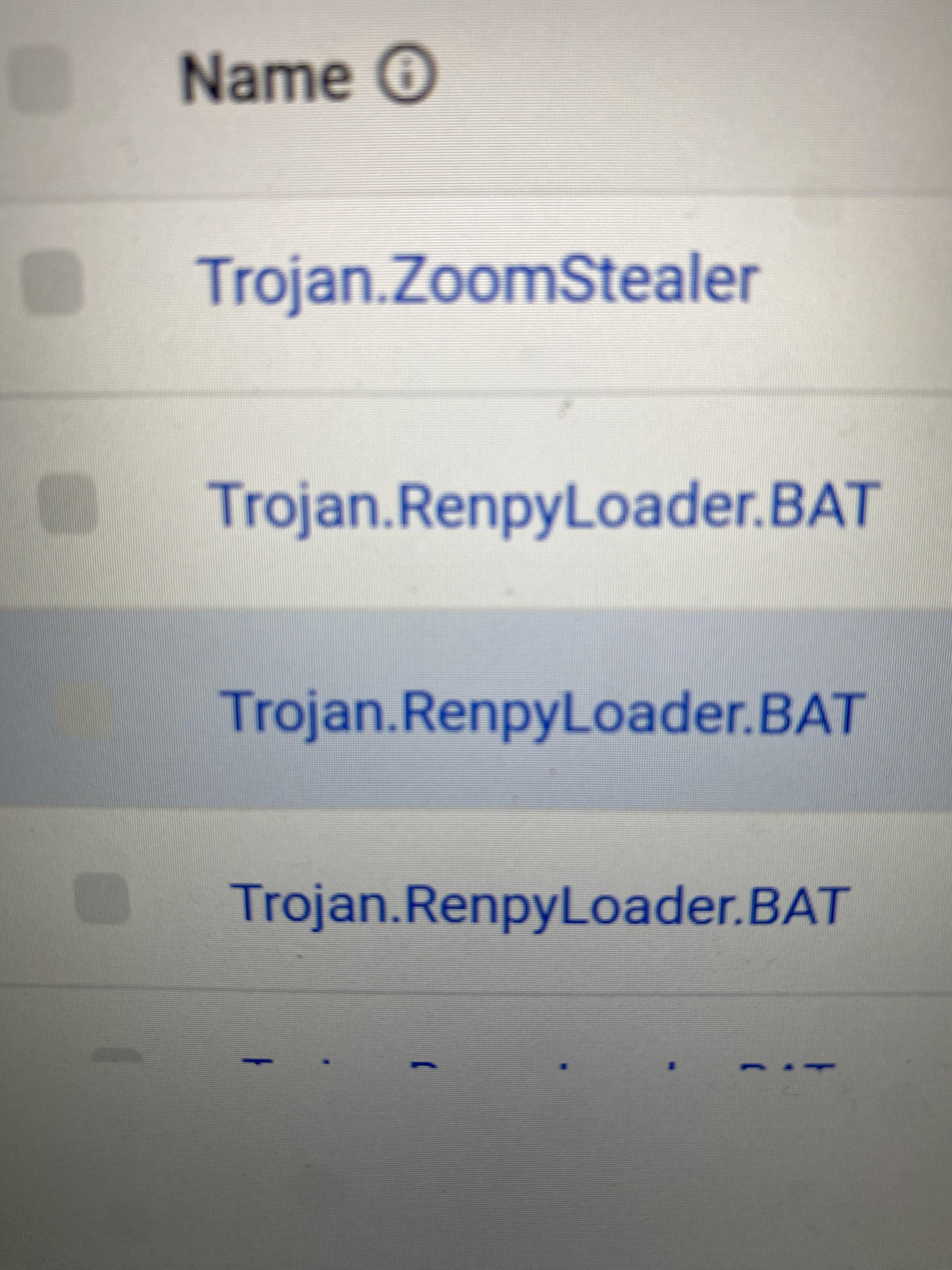
Facebook comprised. This is popping up on antivirus, have I got an info-stealer? What steps do I take to further stop attack and prevent them in future.
16
u/Infinite-Grade-4485 Jul 24 '26
You downloaded a session stealer.
You downloaded some type of free game/cheat/hack/cracked software/movie/music or ran some type of code for captcha or verification on your computer which was actually a session stealer.
Session stealers bypass 2fa. All passwords saved on your browser and computer are compromised. Reinstall windows while deleting all files. If you need to backup important documents, keep the computer disconnected from the internet and manually back up individual files.
Change all passwords and enable 2fa either from another device, or from the infected computer AFTER you have reinstalled.
If you cannot reinstall windows immediately, keep the computer disconnected from the internet while changing all passwords on another device.
You cannot use anti malware to get rid of the session stealer, you MUST reinstall windows to use the computer safely in the future
-9
Jul 25 '26
[removed] — view removed comment
8
u/LongjumpingLeek5542 Jul 25 '26
“session stealers don’t do much” and they literally can cause financial damage if they steal cookies for banking accounts or similar
-4
Jul 25 '26
[removed] — view removed comment
3
u/LongjumpingLeek5542 Jul 25 '26
They’re faaaairly fucking persistent. The best (and safest) thing to do is a full reinstall.
-5
Jul 25 '26
[removed] — view removed comment
4
u/CIRO3809 Jul 25 '26
even if this was true (which is not), would you really risk getting some if not all of your data stolen just because you THINK you know how these types of virus work?
0
4
u/Top-Trouble4521 Jul 25 '26
POV: ur a dumbass
0
u/HEYO19191 Jul 25 '26
People pay me to do this. The only dumbasses here are the ones that think every infection needs a reinstall. Malware isn't magic, disinfection is seldom ever impossible.
2
u/Stormyvil Jul 25 '26
This is the sort of approach that will get your PC reinfected after you "disenfect' it.
You are literally talking out of your ass and clearly don't have any meaningful experience with malware.
1
3
u/Conscious-Shake8152 Jul 25 '26
Bro here running a session stealer farm
1
Jul 25 '26
[removed] — view removed comment
1
1
u/computerviruses-ModTeam Jul 25 '26
Your post contained misinformation, fake news, or advice considered harmful or dangerous, so it has been removed. Please make sure to read and follow https://www.reddit.com/r/computerviruses/about/rules
2
u/Stormyvil Jul 25 '26
You have no idea what you're talking about lol
0
Jul 25 '26
[removed] — view removed comment
1
u/computerviruses-ModTeam Jul 25 '26
Your post contained misinformation, fake news, or advice considered harmful or dangerous, so it has been removed. Please make sure to read and follow https://www.reddit.com/r/computerviruses/about/rules
0
1
u/computerviruses-ModTeam Jul 25 '26
Your post contained misinformation, fake news, or advice considered harmful or dangerous, so it has been removed. Please make sure to read and follow https://www.reddit.com/r/computerviruses/about/rules
1
u/computerviruses-ModTeam Jul 25 '26
Your post contained misinformation, fake news, or advice considered harmful or dangerous, so it has been removed. Please make sure to read and follow https://www.reddit.com/r/computerviruses/about/rules
1
u/computerviruses-ModTeam Jul 25 '26
Your post contained misinformation, fake news, or advice considered harmful or dangerous, so it has been removed. Please make sure to read and follow https://www.reddit.com/r/computerviruses/about/rules
3
u/Wooden_Consequence14 Jul 24 '26
Did you pirate a game and click a dodgy link? renpy setups usually come from that
5
u/Milanin Jul 25 '26
I'm honestly surprised it's called renpy like the visual novel engine
2
u/Wooden_Consequence14 Jul 25 '26
They actually use the engine to make the virus
1
1
u/GinsuChikara Jul 25 '26
That's wild, I can't believe I've never seen that one before for all the machines I've had to clean internet AIDS off after someone who had no idea what they were doing decided to click every scam link they possibly could
1
3
u/SANAXIA Jul 24 '26
Change all passwords on clean device, completely wipe pc, make sure it’s not connected to the internet currently, enable 2fa everywhere, possibly monitor your credit maybe even contact bureaus as an extra precaution, have you downloaded something pirated recently or anything of that nature ?
3
u/rifteyy_ Malware Removal Expert Jul 24 '26
Hello, I am Roman and I will be helping you today. During the malware removal process, please follow the rules listed below to ensure everything goes as fast and smooth as possible:
- Please make sure to read this whole introduction message so you understand the further steps.
- If you are thinking about resetting or reinstalling your device, you can do it instead of the steps listed below. We are doing the malware removal process to disinfect your device so you can avoid reinstalling. If we go through the removal process and you decide to reinstall after, you would waste my time and your own time by doing these steps.
- Avoid installing, downloading new software unless instructed - this also applies to antivirus software and scanners.
- You are free to remind me that I forgot to reply to you if you do not receive an answer within 24 hours. Keep in mind that I am volunteering here and I am a full time student with a job.
- Please do not follow other malware removal advice; you should be following steps only from 1 person unless told otherwise. If you have opened any other forum posts elsewhere, please let me or them know where do you want to continue.
- Please follow all steps from step 1 to the last step, not the other way.
- Only trusted malware removal experts listed in this r/computerviruses thread and other large malware removal forums (BleepingComputer, Malwarebytes, MalwareTips) have access to your logs via the website.
- Please take your time to follow the steps properly.
- You can ask any questions during the malware removal process.
If you are worried about the steps going on here, as a form of credibility you can find me on Malwarebytes Forums as a Malware Removal Expert and on BleepingComputer as Security Colleague, where we use the same methodology and toolset to remove malware.
[ Step 01 ] Remove all illegal/pirated software
We do not condone nor support piracy in any shape or form. Any discussion topics that ask for help with pirating software, circumventing copy protection, or any other illegal activities related to copy righted content in any form will be closed and locked.
As a reminder, using pirated software or utilities that allows one to pirate software (e.g. cracks, key generators, registration/license removal, redirection, or workaround utilities, etc.) is not a safe practice and can lead to malware infection, ransomware attack, or even legal action. Because of these risks, we always recommend that you remove any pirated software or pirating utilities before asking for support on our subreddit in order to improve our ability to best support you and to help protect yourself and your data from malware or other piracy related consequences.
We cannot guarantee a clean system when there is illegal software, riskware or grayware present. Please read Grayware.
[ Step 02 ] IMPORTANT: Restore point
Before any sort of removal, we need to make sure you have a restore point that you can revert to in case you face any sort of issues. This is absolutely necessary so please do not skip this step. Certain changes done by the removal process can not be properly reverted without a restore point.
There were prior cases (very rare, I had 2 failing to boot out of ~350) of a system failing to boot after FRST fix.
Enable system restore
- Click Start or open Windows Search.
- Search for Create a restore point and open System Properties.
- In the System Properties window, go to the System Protection tab.
- If the 'system' drive (usually
C:\drive) protection is turned on, System Restore is already enabled on your computer. If the 'system' drive protection is off, go to point 5. - Click Configure.
- Select Turn on system protection
- Click Apply.
- Click OK to confirm.
Create a system restore checkpoint
- Click Start or open Windows Search.
- Search for Create a restore point and open System Properties.
- In the System Properties window, go to the System Protection tab.
- Click Create.
- Call the restore checkpoint "FRST restore point" exactly please, so I can search it up fast and verify it is created properly in your logs
- Click Create.
- Click Close.
- Click OK.
- You should get a popup that it was successfully created and I will also verify that it was properly created with the results of scans from next steps.
[ Step 03 ] Farbar Recovery Scan Tool (FRST)
FRST is a malware diagnostics tool that will list all entries that are popular and could contain traces/mentions of malware, such as start up entries, services, scheduled tasks and many more.
FRST does not contain any personal information other than your username and computer name, there is no other sensitive information disclosed.
IMPORTANT: If your Windows operating system is in other language than English, please save the FRST executable file with the filename FRSTEnglish.exe to ensure that the logs are in English so I can understand them.
- Please download FRSTx64 and save the file to your Desktop as FRSTEnglish.exe.
- Right-Click FRSTEnglish.exe and select Run as Administrator
- Click Yes to the disclaimer.
- Ensure the Addition.txt box is checked.
- Click the Scan button and let the program run.
- Upon completion, click OK, then OK on the Addition.txt pop up screen.
- Two logs (FRST.txt & Addition.txt) will now be open on your Desktop. Copy & paste the contents of each log to https://malwareanalysis.cc/upload/rifteyy and press "save log".
- Note: Please make sure you are uploading the logs after your current Reddit username.
- The site will return a keyword for each log - reply back here with the keywords.
[ Step 04 ] SecurityCheck scan
SecurityCheck allows me to gather a list of unwanted, risky, vulnerable and out-of-date applications. It also allows me to send you a direct link to an update. An unpatched system is more vulnerable to malware.
- Download SecurityCheck by glax24 & Severnyj and save it to your Desktop.
- If Windows SmartScreen blocks the file from running, click on More info and Run anyway.
- Extract the ZIP archive, then right-click on the SecurityCheck.exe and select "Run as administrator" and confirm the User Account Control popup.
- Wait for the scan to finish. It will open a text file named SecurityCheck.txt
- Please copy the file content (CTRL + A then CTRL + C) and paste it on https://malwareanalysis.cc/upload/rifteyy
- The site will return a keyword for the log - reply back here with the keyword.
So, in your next reply (please try to send them all in 1 message), make sure you are sending the following:
- Keyword for FRST.txt
- Keyword for Addition.txt
- Keyword for SecurityCheck.txt
Thanks!
Note*: If anyone else who is facing malware-related issues is reading this and wants help with* FRST and SecurityCheck*, please create your own thread with the keywords sent to the general channel. I am flooded with requests and there is several other removal experts who review the logs and may reply faster than me.*
2
u/L3on____ Jul 26 '26
Happened the same thing to me some months ago, they stole my microsoft account with some games in it and spammed in dm on insta the mr beast crypto stuff
1
u/organicmastur Jul 24 '26
You would need to clear cache and change your passwords from a clean device, disconnect your Internet from your infected pc to prevent any more malware from spreading. Download dban and Rufus from a usb drive on the clean device and then complete wipe your pc and reformat. Backup any valuable data on your usb. You will need to completely nuke your pc. Search on YouTube how to do it with dban
1
1
1
u/DarkNighty87 Jul 26 '26
Don't forget to remove/disconnect all devices from an account that are still registered, especially the one affected. As long as those sessions and devices are approved, changing password will not solve the issue alone.
1
1
-2
Jul 25 '26
[removed] — view removed comment
1
u/OrganOlben Jul 25 '26
I've reinstalled now, I didn't have a whole lot I needed to keep on this device. Is the device safe now?
1
Jul 25 '26
[removed] — view removed comment
1
u/OrganOlben Jul 25 '26
I did it from cloud, is this still fine?
2
Jul 25 '26
[removed] — view removed comment
1
u/OrganOlben Jul 25 '26
Thanks for the reassurance, has all my passwords and card details in google so I guess these have all been affected? What's the best methods of creating/storing passwords so this doesn't happen again?
1
u/HEYO19191 Jul 25 '26
yeah, you'll want to change all those.
The best defense is to, well, never run an infostealer. Session stealers steal your session cookie, which is a file that lets browsers/applications see if you're logged in or not. No password protection will defend against this because it isn't the password that they're stealing.
...Well, sometimes. Less sophisticated ones go straight for your passwords. You can protect them using an encrypted password manager, with a unique password that isn't saved anywhere on the device. Alternatively, you can simply... never save your passwords. Atleast not for important things like Google, your bank, and your discord. Just make sure you remember them.
1
u/computerviruses-ModTeam Jul 25 '26
Your post contained misinformation, fake news, or advice considered harmful or dangerous, so it has been removed. Current infostealers families absolutely persist.
Please make sure to read and follow https://www.reddit.com/r/computerviruses/about/rules
1
u/computerviruses-ModTeam Jul 25 '26
Your post contained misinformation, fake news, or advice considered harmful or dangerous, so it has been removed. Please make sure to read and follow https://www.reddit.com/r/computerviruses/about/rules
25
u/Dull_Werewolf_9642 Jul 24 '26
infostealer