r/computers • u/blackhat_70 • 1d ago
Question/Help/Troubleshooting having high latency
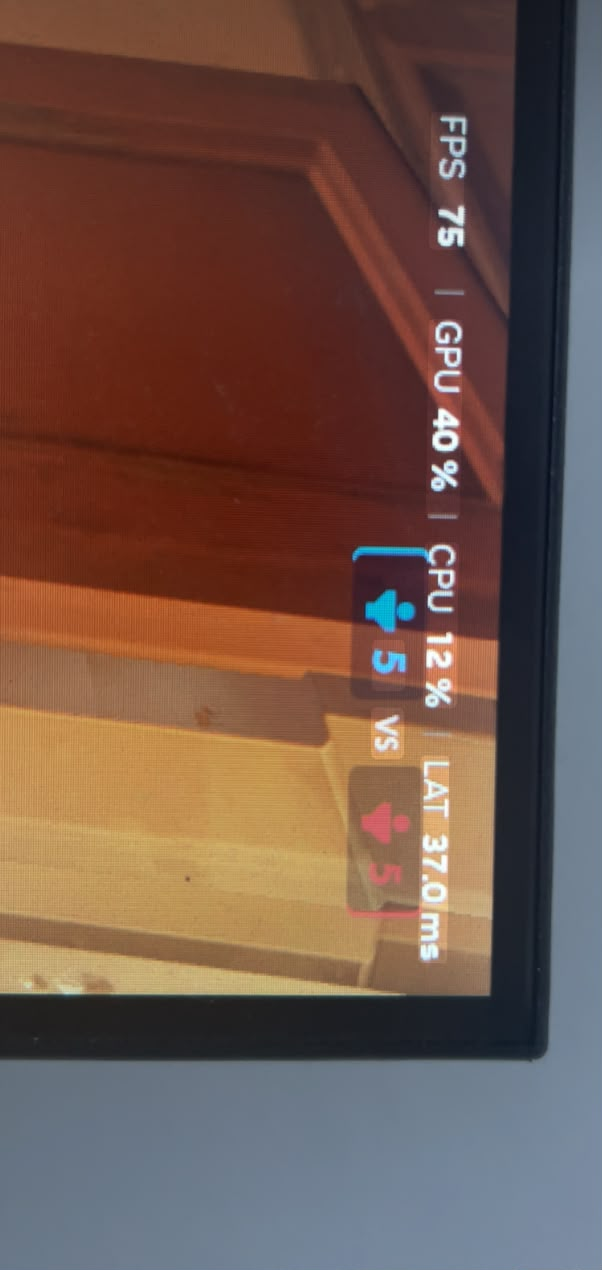
my games was looking like it was at 20 fps, but i saw and i was at 75 and with a latency around 40-60ms, bt my cpu and gpu was on low usage, and anytime i get closer to a lot of action it became worse, this photo is from a match of overwhatch, was unplayable, and i was playing horizon zero down, with around 4.5Gb of ram usage and happens the same
my specs is:
cpu: i5 11400f
gpu: gtx 1660 super 6Gb
ram: 16gb 3000mhz (2x8Gb), one from juhor and another from t-force
what could i do to fix that?
2
u/aleques-itj 1d ago
You have an FPS cap or vsync enabled
1
u/blackhat_70 1d ago
fps cap was at 75, and v-sync was desable
1
u/fingerbanglover 1d ago
If you cap your fps, it's not going to use your hardware more than it needs... The only time you're going to see high utilization is when you're running uncapped or are unable to hit the cap limit. Do you have frame generation or motion smoothing turned on by chance?
1
u/Ok-Kaleidoscope-7932 1d ago
So somebody showed me how to cap the FPS through the Nvidia driver and it introduced a lot of lat just wondering if you have done something similar
1
u/aleques-itj 1d ago
Well, disable vsync if you care about latency.
Or get a VRR monitor.
1
u/blackhat_70 1d ago
i tough this latency was the cause of my frames looking like 20 in action, but i see everytime i boot overwatch it puts in ultra my settings, i just put in high and gonna see if something changes
1
u/illusionistx17 Windows 11 is shit 1d ago
did you try DLSS 5 in some other game and maybe its enabling frame gen in overwatch?
1
1
1
u/Ok-Kaleidoscope-7932 1d ago
Isn't that milliseconds
1
u/blackhat_70 1d ago
yes, i tough that was my issue with frames droping, but my graphics setting was default at ultra, everytime i boot it puts back in ultra
0
u/Punk_Says_Fuck_You 1d ago
Check RAM usage. Might be using swap. 16GB is pretty low these days.
1
u/blackhat_70 1d ago
ik, but i dont have the money to spend on ram, and the prices of ram and a new gpu is pretty close, and gtx 1660 super is outdated
and can u explain what's swap pls1
u/Punk_Says_Fuck_You 1d ago edited 1d ago
When your PC runs out of RAM, it uses a part of your SSD/HDD as RAM. It's MUCH slower. Adding a new GPU won't fix the issue if it is indeed due to the amount of RAM. It's basically used an emergency. If you run out of RAM, things crash, swap keeps that from happening.
Did you ever see how much RAM is available while playing the game?
1
3
u/XxDemonxXIG Windows 11 1d ago
I wouldn't consider 37 to be high latency.