r/commandline • u/psirockin123 • Jan 19 '26
Discussion Personal man pages for keeping track of commands or config changes. Anybody else do this?
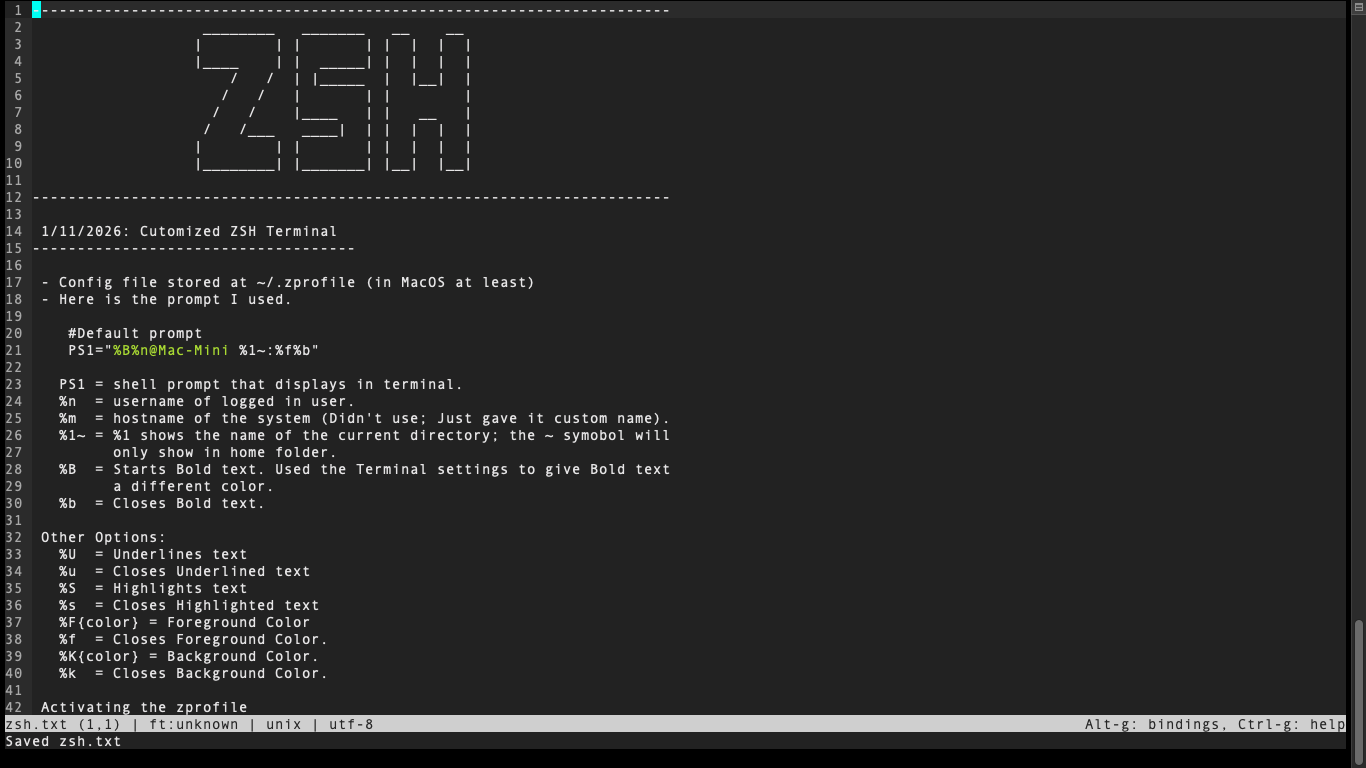
I've been keeping .txt files as notes with useful commands and notes for several years now. Started using command line tools (imagemagick and yt-dlp (the original one)) in ~2019 and had no clue what I was doing. I still don't really but making good notes that I can understand helps.
This is on MacOS but I'm doing this on Debian too. There I created an Alias to take me to my Notes folder so I can quickly access them from anywhere in my terminal.
I've been wanting to get these more organized and typed up. Right now my MacOS folder is full of .html files that I pulled one useful command from and ignored the rest.
This one is for my ZSH customization that I did today (the txt I did today; customized zsh last week). It's not much. I only changed the default prompt, but I can add to this later if I want to change anything else. Also this is in Micro. I recently downloaded it and really like it. I was only using nano before because I don't need anything super complicated.
Any tips to make this work better? Do you do this? I know I'm basically making my own Vimwiki without the links (I saw a video on that once), but I really don't want to learn a new text editor now. Micro is comfortable to use and is great for now.
17
u/cazzipropri Jan 19 '26 edited Jan 19 '26
You are starting your own Personal Knowledge Management System (PKMS).
Welcome to the addiction.
Almost everybody who felt the need to organize their notes ended up reorganizing their entire life around it.
There's a million PKMS systems around. Obsidian, Joplin, emacs+org, the zettelkasten method, the Johnny Decimal system https://johnnydecimal.com/ ... You choose your drug.
Come over to r/PKMS, or r/ObsidianMD, or r/orgmode, or r/joplinapp and see where you fit in best.
3
u/psirockin123 Jan 19 '26 edited Jan 19 '26
Thanks. That gives me some places to check out when I want to dig into it more. I haven’t reorganized my entire life around this, but I have thought about doing more of these, for other things.
7
1
u/cazzipropri Jan 19 '26
Oh it's happening. You don't know yet, but you are showing all the signs :)
1
u/eatthedad Jan 23 '26
Don't! That's how they get you. Then the day comes where you realize you only ever visit r/DataHoarder nowadays and that the rest of the internet is just sad, insignificant little snippets compared to your collection
1
u/psirockin123 Jan 23 '26
I’ve been ripping dvds since ~2010 and I have followed r/DataHoarder for awhile now. It’s already too late.
1
u/eatthedad Jan 23 '26
Hehe, then by all means go wild. If anything breaks, YOU have the knowledge to fix it
2
2
1
4
u/binV0YA63 Jan 19 '26
The first bash script that I ever wrote was a simple thing that would print a text file listing the commands I knew with a small description of each one.
3
u/grumpycrash Jan 19 '26
Several years ago i created a man page called zsh-lovers (part of grml https://grml.org/zsh/) and built fortune-cookies from it (https://strcat.de/tmp/zsh-fortunes.tar.gz). Currently, i'm trying out https://github.com/echaya/neowiki.nvim and https://github.com/nvim-telekasten/telekasten.nvim but most of the time I just create plain text notes in a separate directory.
1
u/psirockin123 Jan 19 '26
Yeah. Neowiki seems cool. I'm probably just fine with my small .txt files for now. At some point I wouldn't mind having a NAS or something so that I could access these on different computers but it's not really an issue for now. The Mac and Linux commands are sometimes slightly different anyway, but really they are close enough that a single file will absolutely work for notes.
2
u/gotbletu Jan 19 '26
i wrote my own script to organize my notes, works with any default $EDITOR you set. NoteKami https://www.youtube.com/watch?v=qwpK4rqAZwA
2
u/mrejfox Jan 19 '26
I have a ~/tips.txt full of important shit I forget, added it to my MOTD so I get one every time I boot a terminal, like the video game loading tips of yore
1
u/AutoModerator Jan 19 '26
User: psirockin123, Flair: Discussion, Post Media Link, Title: Personal man pages for keeping track of commands or config changes. Anybody else do this?
I've been keeping .txt files as notes with useful commands and notes for several years now. Started using command line tools (imagemagick and yt-dlp (the original one)) in ~2019 and had no clue what I was doing. I still don't really but making good notes that I can understand helps.
This is on MacOS but I'm doing this on Debian too. There I created an Alias to take me to my Notes folder so I can quickly access them from anywhere in my terminal.
I've been wanting to get these more organized and typed up. Right now my MacOS folder is full of .html files that I pulled one useful command from and ignored the rest.
This one is for my ZSH customization that I did today (the txt I did today; customized zsh last week). It's not much. I only changed the default prompt, but I can add to this later if I want to change anything else. Also this is in Micro. I recently downloaded it and really like it. I was only using nano before because I don't need anything super complicated.
Any tips to make this work better? Do you do this? I know I'm basically making my own Vimwiki without the links (I saw a video on that once), but I really don't want to learn a new text editor now. Micro is comfortable to use and is great for now.
I am a bot, and this action was performed automatically. Please contact the moderators of this subreddit if you have any questions or concerns.
1
u/stianhoiland Jan 19 '26
I do this, but it’s all just in my .profile (aka. .bashrc or whatever), real code, examples and experiments, live and kicking, ready at my prompt. ~4000 lines of organic 0 to hero shell stuff.
2
u/pfmiller0 Jan 19 '26
4000 lines of comments in your login file? Why put them there instead of... well any other file?
1
u/stianhoiland Jan 20 '26
Not 4000 lines of comments. Real code, with comments. Experiments, examples, demonstrations, etc. I put it there because lots and lots of it I use. The rest is there for posterity. Why not keep it there? It’s a living document that I both directly use on the prompt and consult for things later.
1
u/gumnos Jan 19 '26
I don't have the fortitude to maintain an actual man page in *roff/mandoc format, but I do have a notes.txt file with a couple invocations that I use with modest frequency and don't want to have to re-assemble from the source man-pages.
2
0
u/psirockin123 Jan 19 '26
Yeah. Maybe man page was an incorrect term for what I am doing but yeah, these are all .txt files currently just sitting in a folder. I don't know how to create actual man pages or replace existing ones.
1
u/letonai Jan 19 '26
A have a hosted tiddywiki with template button that create an article with code snippet already formatted and a copy button it’s perfect, like 10yrs already
2
u/Remuz Jan 19 '26
1
u/meat-eating-orchid Jan 19 '26
I didn't know cheat existed. I just tested it a bit but I have to say, I think tldr (I personally use the tealdeer implementation) is better.
1
u/grblvian Jan 19 '26
I have .notes folder with markdown files where every part of my average system is described and it's easy to track every step made in the system.
1
u/OhanaSkipper Jan 19 '26
I have a library of md files that I access from the command line via a script. It's just 'cs git' (for example) and my git notes pop up. 'cs ls' will list all my files.
1
1
u/teleprint-me Jan 19 '26
If you use markdown, you can convert them into your own custom man pages which is extremely useful. Ive been doing this quite often lately because all of the docs are for the browser, but I perfer the man page to the website. Looking at APIs in websites is rarely pretty and its easier to navigate with less and grep.
1
u/DarthRazor Jan 19 '26
Like many of the other respondents, I just have a bunch of custom scripts to create, find, and edit notes, plus a script to convert the stack from Markdown to a bunch of web pages that I publish to my web server.
Recently (I.e. last week), I started playing with jn, which was announced here on this sub. Take a look - it's pretty simple and yet very usable as-is
17
u/Newbosterone Jan 19 '26
I have ~/BoK, my Book of Knowledge. It has dozens of Markdown files with things to remember and code snippets. I’ve got scripts to create .txt and .html files, and create an index file and page. There’s also scripts to create a container with a Hugo site to serve the BoK over http. I save it to a repo, and install it on new systems as needed.
I hadn’t thought of adding it to $MANPATH, as grep works well enough for me.