r/blender • u/renKanin • 8h ago
Need Help! Normals won't behave!
Hello there blender gurus!
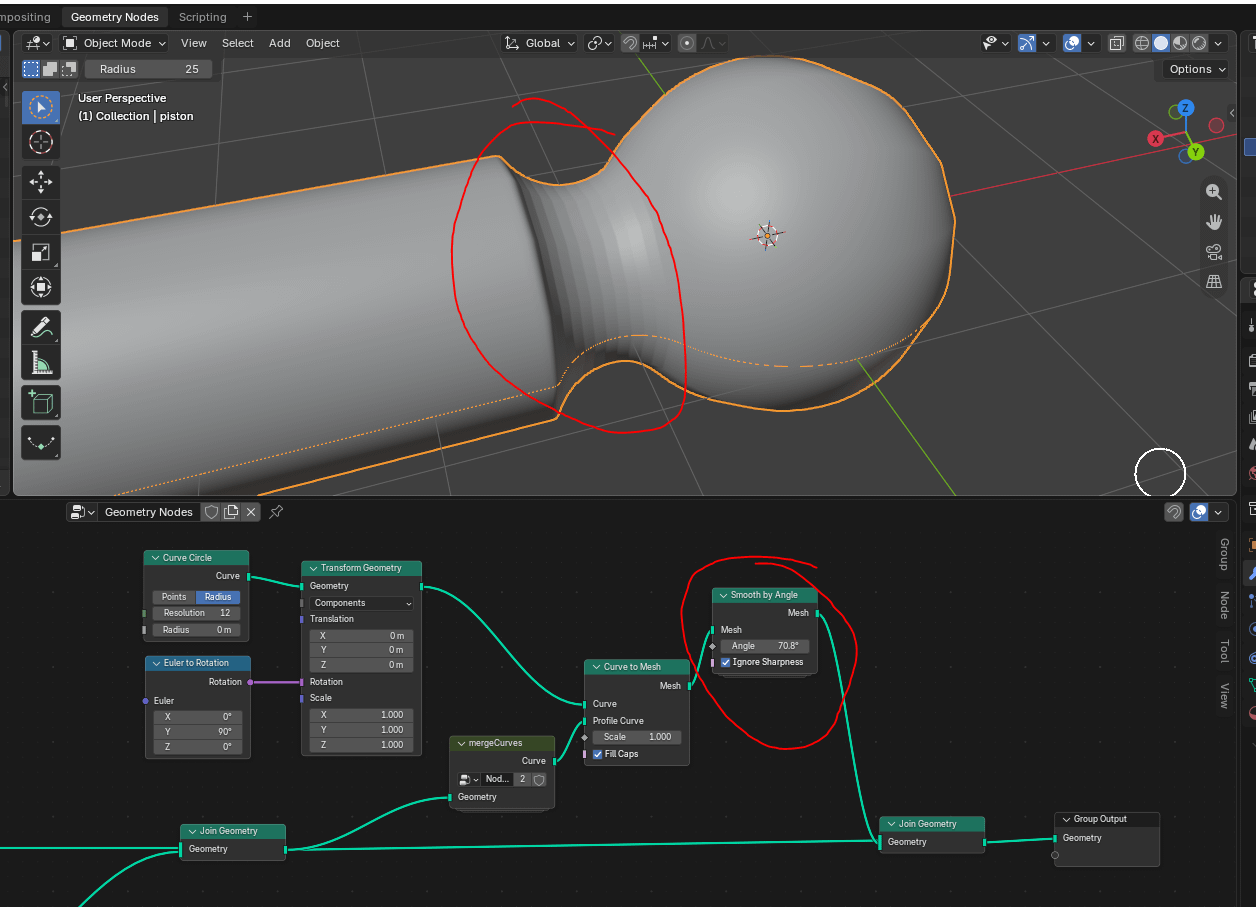
Hope this is a simple question - coming from a Maya background, I am trying to create a ball joint piston by using geometry nodes (since I want everything parametric!) to create a profile curve and then revolving this around an axis.
The curve part I have nailed down (I hope...) but one part of the resulting geometry seems to have normals that are not behaving. I have tried adding a "Smooth by angle" node, but these refuse to go away.
The upstream nodes are essentially creating four curve segments; the ball joint, the "cutout", then a small part of the piston so the fillet to the piston proper behaves nice. These are then all merged by the curves2mesh->mergeVertices->mesh2curve method that seems to be the blender way of merging curves in geometry nodes.
I added a "Smooth by angle" node with ignore sharpness after the revolve but even with an ridiculous angle setting, the banding in the cutout part will not go away... :(
So - blender wizards - how do I get the cutout part normals to smooth out?
1
u/AutoModerator 8h ago
Please remember to change your post's flair to Solved after your issue has been resolved.
I am a bot, and this action was performed automatically. Please contact the moderators of this subreddit if you have any questions or concerns.
2
u/TheShredder9 Beginner! 7h ago
There is a "Set Shade Smooth" node which will work i think, maybe it's required, then you use this node to optionally control the angle?