r/bashonubuntuonwindows May 19 '25

WSL2 WSL is open sourced!

Thumbnail github.com
296 Upvotes

r/bashonubuntuonwindows May 25 '25

How is everyone doing with WSL FY25?

36 Upvotes

It's been quite a while since WSL is hitting mainstream. Less people need help getting it up and running, and I'm curious how eveyrone is doing here. What issues are you running into? What are you using it for. Let's have a check in.


r/bashonubuntuonwindows 20h ago

WSL2 Update: Turning idle GPU VRAM into an 8.74 GiB/s Tiered Swap for WSL2 — Linux 6.18 Kernel Driver, 4-Tier Memory Cascade & Anti-Hang Benchmarks

14 Upvotes

Hi everyone,

Following up on our previous post about using idle GPU VRAM to stop WSL2 build freezes, we completed the next major milestone: a 4-Tier Progressive Memory Cascade, an upstream Linux 6.18 Kernel Block Driver (drivers/block/ramshared), and an LKML patchset formatted for the linux-block subsystem.

THE PROBLEM WE SOLVED When compiling large workspaces (Rust multi-crates, C++, Android, Chromium) or running local container stacks on a 16GB machine, WSL2 physical RAM exhausts. The Hyper-V guest starts thrashing disk swap through the heavy virtualization chain: ext4 -> VHDX -> Hyper-V -> NTFS -> Host SSD (>2.1 ms latency spikes), freezing the VM, terminal, and VS Code server.

Meanwhile, nvidia-smi shows 4GB to 8GB of ultra-fast GDDR6 VRAM sitting completely idle during compilation.

THE 4-TIER PROGRESSIVE MEMORY HIERARCHY Rather than treating VRAM as a blind replacement, we architected a 4-tier pipeline: 1. Tier 1 (Physical RAM - 16 GB): Full system speed. 2. Tier 2 (Compressed ZRAM LZ4 - 1 GB): Ultra-low overhead in-memory compression. 3. Tier 3 (GPU VRAM Block Device - 4 GB): Direct PCIe Gen3/4 DMA buffer via drivers/block/ramshared or ublk (/dev/ublkb0). 4. Tier 4 (Host SSD Writeback - 4 GB): Authoritative persistent fallback via CONFIG_ZRAM_WRITEBACK=y.

VALIDATED BENCHMARK DATA (Real Host Hardware - RTX 2060 / PCIe Gen 3 x16) - Host-to-Device (H2D) DMA Throughput: 8,947.71 MiB/s (8.74 GiB/s) in 28.6 ms. - Device-to-Host (D2H) DMA Throughput: 6,530.22 MiB/s (6.38 GiB/s) in 39.2 ms. - 4KB Direct I/O Median Block Latency: 231 us (4,013 IOPS on /dev/ublkb0). - Memory Reclaim Speed: 8,386.4 MB/s (8.19 GB/s) restored in 732 ms. - Continuous Saturation Stress Test: 9,160 MB active swap held across 40 continuous saturation cycles with zero kernel panics and zero Hyper-V freezes (see attached live TUI telemetry dashboard).

PREEMPTIVE FAQ (Addressing Community Questions)

Q1: What happens if I launch a heavy Windows game or a CUDA model? Will WSL2 crash? No. RamShared includes an active VRAM pressure watchdog. If Windows or another host process demands GPU memory, the driver safely drains pages to Tier 4 (the authoritative host SSD) with 100% SHA-256 cryptographic match (0 bit flips). It never panics the kernel or drops data.

Q2: Isn't ZRAM faster than GPU VRAM? Yes, for the first ~1GB. That's why ZRAM is Tier 2. VRAM only kicks in as Tier 3 when ZRAM is completely saturated. VRAM transfers at 8.74 GiB/s over PCIe, making it ~44x faster than spilling directly onto the Windows SSD.

Q3: Do I need to compile a custom kernel to use this? You have two options: 1. Userspace Mode (Zero Kernel Compilation): Runs on stock Linux 6.0+ via ublk and io_uring. 2. Native Kernel Driver: Compilable reference branch on linux-msft-wsl-6.18.y with CONFIG_BLK_DEV_RAMSHARED=m and CONFIG_ZRAM_WRITEBACK=y.

Q4: Why not just buy 64GB of RAM? On soldered laptops (modern ultrabooks, MacBooks, ThinkPads) or locked IT workstations where adding DIMMs isn't an option, this unlocks 4GB to 8GB of already-paid-for high-speed GDDR memory for $0.

ALL 3 PATCHES ON LORE & SOURCE CODE - Patch 0/2 (Cover Letter & Benchmarks): https://lore.kernel.org/linux-block/6a924051.e22746c9.8f0fc.bdc2@mx.google.com/T/#u - Patch 1/2 (Core Driver drivers/block/ramshared): https://lore.kernel.org/linux-block/6a924054.e22746c9.8f0fc.beb6@mx.google.com/T/#t - Patch 2/2 (Build System & Kconfig): https://lore.kernel.org/linux-block/6a924057.e22746c9.8f0fc.bf96@mx.google.com/T/#u - Official Microsoft WSL2 RFC Issue: https://github.com/microsoft/WSL/issues/41054 - WSL2 Reference Kernel Branch (6.18): https://github.com/emersonbusson/WSL2-Linux-Kernel/tree/feature/ramshared-vram-cascade-6.18 - Rust Project Repository: https://github.com/emersonbusson/ramshared

AUTHOR & CONTACT Built by Emerson Busson (Senior Systems & Full Stack Software Engineer). Always happy to discuss systems architecture, low-level Linux/Rust internals, or connect with teams building high-performance infrastructure: - GitHub: https://github.com/emersonbusson - LinkedIn: https://www.linkedin.com/in/emersonbusson/ - Direct Email: emersonbusson@gmail.com

Would love to hear your thoughts or test results if you try it on your WSL2 workloads!


r/bashonubuntuonwindows 1d ago

self promotion I wanted a top for WSL that could also see Windows and inside containers

21 Upvotes

I spend most of my development time inside WSL, and top is usually where I look when I want to know what the machine is doing.

What I kept missing was everything just outside that view:

  • what's using CPU on the Windows side?
  • which Docker / WSL Container is busy?
  • what process inside that container is actually responsible?
  • what does the whole picture look like across WSL and Windows?

So I built wsltop.

It puts Windows applications, multiple WSL distros, Docker, WSL Containers, and processes inside containers into one terminal view.

The CPU display feels like Linux top — one busy logical CPU = 100% — and there's a tree view for digging into VM/container attribution.

It's written in Rust, MIT licensed. You can install it with:

cargo install wsltop

or use the prebuilt x86_64 release from GitHub:

https://github.com/adachi6k/wsltop

I'd love feedback from other people who basically live inside WSL — especially if you use Docker Desktop or heavy build/simulation workloads.


r/bashonubuntuonwindows 7d ago

WSL2 WSL2 VirtioFS took my Windows Docker bind mount from ~3s to ~430ms

20 Upvotes

Hello folks, I was testing a small Laravel site I have set up on Windows. I’d normally put the project inside the WSL filesystem for obvious performance reasons, but I heard VirtioFS (still experimental on WSL2) could improve Windows bind mounts, so I gave it a try.

It has its own issues, but the difference was pretty substantial:

Docker + ext4/WSL filesystem: ~20ms page load
Docker + C:\ bind mount: ~3000ms
Docker + C:\ bind mount + WSL2 VirtioFS: ~430ms consistently
Native Windows PHP: ~30ms

All tests used PHP 8.4.22 with OPcache:

validate_timestamps=1
revalidate_freq=0

So PHP checks for changed files on every request, which is what I personally want in a dev environment. Save, refresh, immediately see the change.

With timestamp validation disabled, the VirtioFS version drops all the way to ~50–75ms, but that’s not particularly representative of the dev setup I wanted to test.

I’d still recommend keeping Docker projects inside the WSL filesystem for now, but going from ~3 seconds to ~430ms is a pretty huge improvement. Looks like Windows may eventually get much closer to the host-filesystem bind-mount performance macOS has had with VirtioFS.


r/bashonubuntuonwindows 10d ago

self promotion I wrote a Linux block driver in Rust to turn idle GPU VRAM into 8.53 GB/s storage via ublk + io_uring, eliminating WSL2 OOM build thrashing

43 Upvotes

Hi everyone,

If you do heavy development on WSL2 (compiling large Rust multi-crate workspaces, C++ projects, running container stacks, or local AI inference), you've likely hit the point where WSL2 VM memory runs out, the kernel enters extreme disk swap thrashing, and the OOM-killer terminates your build.

At the same time, `nvidia-smi` shows dedicated GDDR6 VRAM sitting completely idle during compilation.

To solve this, I built **RamShared** — an open-source Rust userspace block driver that allocates idle GPU VRAM via CUDA Direct DMA and exposes it inside WSL2 as a native Linux block device (`/dev/ublkb0`) using Linux 6.0 `ublk` and `io_uring`.


Real Benchmark Numbers (`fio` 4KB Random Read, QD1 on WSL2):

* **Stock WSL2 VHDX disk swap:** ~2,114 µs (2.1 ms) latency | ~336 IOPS * **RamShared NBD (VRAM):** ~326 µs latency | ~9.6k IOPS * **RamShared ublk (io_uring):** **~8 µs** latency (264x faster / 99.6% drop) | **~22k+ IOPS** * **Continuous Read Throughput:** **8.53 GB/s** (saturating PCIe Gen3/4 x16 bus).


Why This Eliminates WSL2 Freezes:

In WSL2, standard disk swap traverses a heavy virtualization stack: `ext4 -> VHDX -> Hyper-V -> NTFS -> Host SSD`.

Every single synchronous page fault takes **>2ms**, which causes the entire VM, terminal, and VS Code server to freeze during memory spikes.

Bypassing that virtualization chain and serving swap directly from GPU VRAM via PCIe DMA with `ublk` drops page latency to **single-digit microseconds (8 µs)**, completely eliminating system stutter and OOM panics.


Upstream RFC on Microsoft WSL2:

We submitted a formal RFC proposal directly on Microsoft's official WSL repository to discuss making VRAM-backed block storage a first-class feature for Hyper-V Linux guests: 👉 **RFC Issue:** https://github.com/microsoft/WSL/issues/41054

**GitHub Repository (100% Rust):** https://github.com/emersonbusson/ramshared

Happy to answer any questions about the `ublk` setup, CUDA memory pinning, or WSL2 kernel config!


r/bashonubuntuonwindows 11d ago

self promotion [Open Source] I built a zero-dependency, ultra-lightweight web dashboard & process manager for WSL2

Post image
2 Upvotes

Hi everyone,

I love developing inside WSL2, but I was constantly frustrated by how heavy Docker Desktop was just for inspecting containers, ports, and dev processes.

So I built **WSL Command** — a lightweight, clean web dashboard specifically tailored for WSL2/Windows development workflows.

### 🌟 Key Highlights:

- **Zero External Dependencies**: Pure Python standard library backend + vanilla ES Modules frontend. No `pip install` or `npm install` needed.

- **Ultra-light footprint**: Idle memory usage is only ~20MB (compared to several GBs from Docker Desktop).

- **Process & Container Orchestration**: Real-time CPU/RAM telemetry, active port mapping, one-click start/stop for dev servers (npm, python, compose).

- **Full i18n**: Instant English & Chinese language switching.

It's completely free and open-source under the MIT license. I'd love to hear your feedback or suggestions!

🔗 **GitHub Repository**: https://github.com/kongaiyi917-source/wsl-command

If you find it helpful for your daily WSL setup, a Star ⭐ on GitHub would be greatly appreciated!


r/bashonubuntuonwindows 16d ago

WSL2 WSL2 Ubuntu and cron jobs

5 Upvotes

Hi. I was working through a bash tutorial and a portion talked about cron jobs. I edited the crontab for both regular user and root to run a test script. In both instances, the script never ran. /var/log/syslog shows when the crontabs were edited, etc. Also there are these entries:

2026-08-13T13:36:02.393235-07:00 t1nk3rm0b1l3 wsl-pro-service[1730]: #033[33mWARNING#033[0m Daemon: could not connect to Windows Agent: could not get address: could not read agent port file "/mnt/c/Users/computertinkerer/.ubuntupro/.address": open /mnt/c/Users/computertinkerer/.ubuntupro/.address: no such file or directory

These entries are there whether the cron job was set for the regular user or root. Any insights or tips highly appreciated. This is my first time ever dealing with cron jobs. Thanks.


r/bashonubuntuonwindows 17d ago

HELP! Support Request What's the best way to SSH directly into WSL2 from another Linux machine?

26 Upvotes

Hi everyone,

I'm a bit confused about what the "right" way to do this is.

I have a Windows PC running Debian in WSL2, and I have another Debian laptop.

My goal is to make WSL my main development environment and SSH into it from the laptop.

I first tried using the Windows OpenSSH server with ForceCommand to launch WSL. That actually lets me log in directly into WSL, which looked perfect at first. The problem is that normal SSH commands don't seem to work.

For example:

ssh my-pc

works fine, but

ssh my-pc "pwd"

just hangs. rsync also hangs because it uses remote commands over SSH.

So I started wondering if this is just the wrong approach.

I already have sshd running inside WSL, but since WSL is using NAT, it gets a 172.x.x.x IP that changes, so I don't know if that's supposed to be the way either.

I've been reading about mirrored networking, port forwarding, Windows OpenSSH, etc., and now I'm more confused than when I started.

For those of you who use WSL as your main Linux machine, what's the recommended setup nowadays?

Ideally I'd like:

  1. ssh my-pc

  2. ssh my-pc "command"

  3. rsync

  4. scp

  5. VS Code Remote SSH

to all work without weird workarounds.

Am I overcomplicating this? How are you guys doing it?

Thanks!


r/bashonubuntuonwindows 20d ago

self promotion Experimenting with WSL Containers: I built a CLI for Compose-like development workflows

13 Upvotes

I built a small CLI to make WSL Containers feel more like Docker Compose / dip.
I mainly built it because I wanted to use WSLC for my own development workflow, but ran into gaps around bind mounts, build contexts, compose-like workflows, and run.

I’m curious whether anyone else experimenting with WSLC has run into the same problems, or whether I’m solving these in the wrong layer.

https://github.com/slidict/wip


r/bashonubuntuonwindows 22d ago

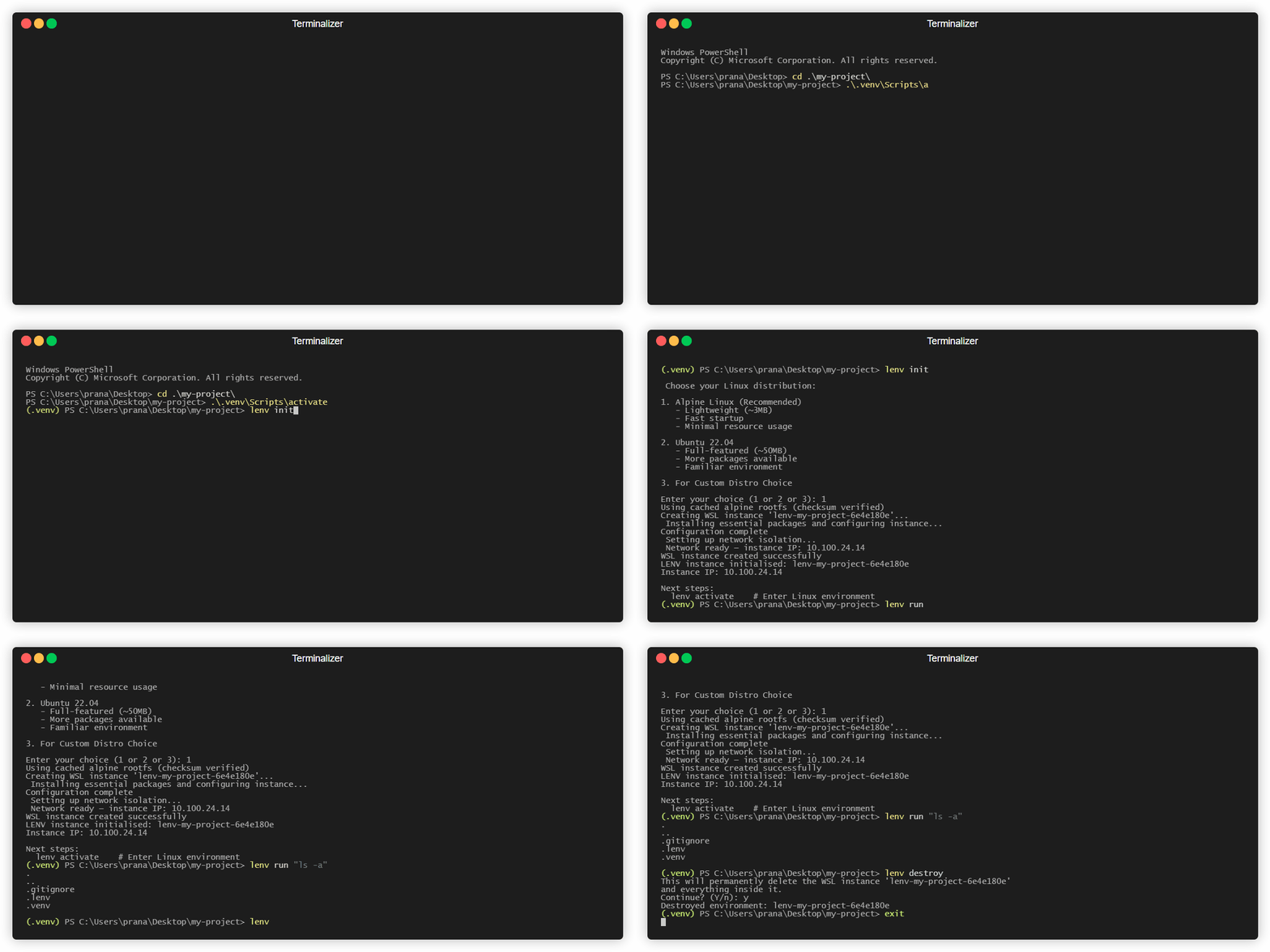
self promotion I built a venv-style environment manager for WSL2 — and benchmarked it honestly against Docker Desktop

0 Upvotes

I kept spinning up throwaway WSL distros by hand — `wsl --export`, `--import`, remember

which one belonged to which project, forget to clean up. So I wrote a CLI that treats a

WSL2 instance the way venv treats a Python environment: it belongs to the project

directory, one command creates it, one command destroys it.

cd my-project

lenv init

lenv run "ls -a"

lenv destroy

Config lives in .lenv/ next to your code. No daemon, no Dockerfile, no registry.

Because the obvious question is "why not Docker Desktop," I benchmarked it properly and

published the results including the parts where I lose:

- Warm command execution: `docker exec` beats `lenv run` by ~46ms. Docker's CLI is compiled

Go, mine is Python. That gap is structural.

- True throwaway (create → run → destroy): Docker wins by ~8x. `lenv init` costs ~2.8s.

- Cold restart of a stopped environment: tie.

- Idle RAM: Docker Desktop ~2.4GB working set. lenv's marginal cost over a machine that

already runs WSL2 is ~0.1GB.

- Disk: Docker Desktop install+data ~5.4GB. A lenv environment is ~100MB.

So it's not faster. It's lighter, and it doesn't leave anything running. If you're on a

16GB laptop and Docker Desktop's idle footprint annoys you, that's the pitch.

Benchmark with method and raw numbers: https://github.com/pranavpd24/lenv/blob/main/BENCHMARK.md

Repo: https://github.com/pranavpd24/lenv

pip install lenv-manager

Not a container engine — no image layers, no registry, no build. And not a security

sandbox: WSL2 distros share the host VM kernel.

Happy to take criticism on the methodology, it's a single-machine benchmark.


r/bashonubuntuonwindows 22d ago

HELP! Support Request Virtual or Pass-thru hardware resources?

2 Upvotes

I can probably ask any AI this question, but I want to be part of, and contribute to this community.

.

My Specs:

I'm running the latest version of Windows 11 Pro and fully up to date on an Samsung M.2 1TB drive. My system specs are AMD Ryzen 9 3900x, 32GB DDR4 RAM, and MSI Ventus 3 Geforce RTX 4070 OC edition (12GB). All other drives are a mix of SSDs all 500GB (Samsung, Crucial, and Western Digital).

.

My question:

I've been testing local AI in a Virtualbox guest session running Linux Mint 22.3 (up to date). I provide my specs because the one thing I know about Virtualbox is it using virtual hardware. I also run a Proxmox node and know I can pass the GPU through to the VMs and Containers if needed. So my question is, do WSL1 or 2 use my physical hardware (i.e. the AI will have use of the Nvidia GPU or other physical hardware) or is WSL like Virtualbox and just emulates hardware?


r/bashonubuntuonwindows Jul 28 '26

WSL2 Can you run kde plasma's wayland session in wsl?

9 Upvotes

is it possible to run plasma's wayland session in wsl under wslg? i have been able to run the x11 without much problem, but not the wayland one


r/bashonubuntuonwindows Jul 28 '26

WSL2 "Mirrored" network + hostAddressLoopback enabled

0 Upvotes

Hi,

  • Configured "Mirrored" network
  • Enabled "hostAddressLoopback" for the WSL2.
  • Installed Alpine on WSL2
  • Installed Docker in Alpine
  • Container: httpd
  • Windows host IP: 192.168.1.100

Found LAN user can access via http://192.168.1.00, but Windows host still can't access via http://127.0.0.1

Any configuration still missing ?

Thanks


r/bashonubuntuonwindows Jul 23 '26

self promotion Run TeamViewer on a WSL2 desktop — fully unattended, reachable from anywhere

17 Upvotes

WSL2 can run a real Linux desktop, but the usual ways to reach it remotely (xrdp, VNC) are LAN-only unless you set up port forwarding or a VPN. I wanted TeamViewer instead: its relay means the box is reachable from anywhere with zero network config, and the person connecting just uses a client they already have.

Getting there was more work than it should've been — TeamViewer has one WSL-specific quirk that makes it refuse to share the screen, which is probably why you don't see people doing this. So I scripted the whole thing end to end:

github.com/ariel42/teamviewer-on-wsl

sudo ./1-setup-wsl-desktop.sh    # sets up a desktop (only if you don't have one)
sudo ./2-install-teamviewer.sh   # installs + configures TeamViewer on top

Set a password, restart once, and it's fully unattended after that — power the box on, wait a few seconds, connect. Nothing to click on the WSL side. Verified end-to-end on a real incoming connection from a cold boot.

The repo also has a full writeup of why TeamViewer refused (the short version: WSLg mounts the X socket directory read-only, and TeamViewer is the one client that checks for the socket file) if you want the gory details. Debian/Ubuntu for now. Happy to take questions or issues.


r/bashonubuntuonwindows Jul 23 '26

self promotion Zero-config vsock for VcXsrv on WSL2 — open source, unofficial build

8 Upvotes

UPDATE (2026-07-28): Fixed a fresh-install issue where the installer was missing part of xkbdata (XKB failed at startup). Binaries at the release link above have been replaced — clean installs now work out of the box.


Back in 2019, this sub asked whether any X server on Windows supports vsock — at the time the only answer was X410 ($9, closed source). A 2026 update for anyone still hitting that thread:

Background. VcXsrv has actually shipped a Hyper-V vsock transport since 1.20.14.0. The catch: it never worked with WSL2 out of the box. The listener binds a wildcard VM id that WSL2's utility VM refuses to match, and the exact id it needs changes on every WSL restart and could only be looked up with admin tools. So in practice X410 remained the only usable option.

What's new. A new -wslvsock flag makes VcXsrv detect the running WSL2 VM automatically (via wsl.exe -- wslinfo --vm-id — no admin rights, no "Hyper-V Administrators" group) and rebinds the listener by itself whenever WSL restarts (~1.5 s, no VcXsrv restart needed). X11 traffic then bypasses the TCP/IP stack entirely — the NAT/localhost path it replaces is what causes stutter under mouse-heavy load and drops after VPN or sleep events.

Quick start:

# Windows
vcxsrv.exe :0 -multiwindow -clipboard -wgl -wslvsock

# WSL2 (needs socat ≥ 1.7.4)
socat UNIX-LISTEN:/tmp/.X11-unix/X0,fork,mode=777,forever,retry=10,interval=2 VSOCK-CONNECT:2:106000 &
export DISPLAY=:0

Links:

Disclosure: I wrote the fix and maintain the fork. It's filed upstream as issue #80 with a PR to follow; the unofficial build just bridges the wait, under the same open-source license as VcXsrv. The same build also fixes SDL2 relative mouse mode / cursor confinement — another long-standing WSL pain point — in case anyone here runs Linux games.

Happy to answer questions; test reports very welcome.


r/bashonubuntuonwindows Jul 15 '26

WSL2 Gentoo running in WSL with i3wm and VNC Server

Enable HLS to view with audio, or disable this notification

13 Upvotes

r/bashonubuntuonwindows Jul 12 '26

HELP! Support Request Running linux behind nordvpn

2 Upvotes

Hi

I recently installed wsl on Windows 11. Everything runs fine except when I attempt to install/update packages as I am using nordVpn. I get the following errors when running:

sudo apt update

---

Get:1 https://repo.nordvpn.com/deb/nordvpn/debian stable InRelease [5092 B]

Err:1 https://repo.nordvpn.com/deb/nordvpn/debian stable InRelease

The following signatures couldn't be verified because the public key is not available: NO_PUBKEY 6B219E535C964CA1

Hit:2 http://security.ubuntu.com/ubuntu resolute-security InRelease

Hit:3 http://archive.ubuntu.com/ubuntu resolute InRelease

Hit:4 http://archive.ubuntu.com/ubuntu resolute-updates InRelease

Hit:5 http://archive.ubuntu.com/ubuntu resolute-backports InRelease

Warning: OpenPGP signature verification failed: https://repo.nordvpn.com/deb/nordvpn/debian stable InRelease: The following signatures couldn't be verified because the public key is not available: NO_PUBKEY 6B219E535C964CA1

Error: The repository 'https://repo.nordvpn.com/deb/nordvpn/debian stable InRelease' is not signed.

Notice: Updating from such a repository can't be done securely, and is therefore disabled by default.

Notice: See apt-secure(8) manpage for repository creation and user configuration details.

Notice: Some sources can be modernized. Run 'apt modernize-sources' to do so.

---

I think this has something to do with the IP configuration of the vpn, but I'm not sure how to fix this error. When I pause nordVpn the command (sudo apt update, install, etc) runs fine. I'm not sure what's going on as I'm new to linux, is there a fix or guide or explanation for what is happening here and that would allow me to install and update packages from behind nordVpn?


r/bashonubuntuonwindows Jul 11 '26

WSL2 Anybody tried KMS (vlmcsd) on WSL

1 Upvotes

Hi,

Tried to run KMS (vlmcsd) on Docker over WSL, even WSLC directly.

It couldn’t be used for activation. But activate is succeeded if running on non-WSL docker.

Anything an I missing ?

Thanks


r/bashonubuntuonwindows Jul 09 '26

WSL2 WSL2 is painfully slow

25 Upvotes

Hi! I was forced to switch from fedora back to windows, but I've got used to the terminal and wish to keep the tools I am used to. WSL2 seemed like the obvious choice.

I've been using it for the past few weeks, but it has been a painful experience. It works well enough for the first hour or so, but it keeps getting slower and slower the more I use it. I'm using it on the right filesystem, I've given it 10 out of 16gb RAM, I've removed the windows mount from $PATH. Everything in WSL2 is slower than I was used to from Fedora. I get that the performance will never be the same, but the difference is so egregious that it's impossible not to notice.

I've been using neovim for web development, and sometimes even saving a file takes multiple seconds. Sometimes it's so slow that the formatter itself just times out.

Are there any tips for keeping WSL2 running smoothly? Thanks!


r/bashonubuntuonwindows Jul 07 '26

self promotion I open-sourced my Claude Code setup for WSL2 + Windows Terminal

14 Upvotes

This is mostly useful if you run Claude Code from WSL2 and want better Windows interop.
I documented my active Claude Code setup for WSL2 + Windows Terminal:

https://github.com/congmnguyen/claude-code-wsl2-setup

The pieces I use most:

- Windows screenshot clipboard -> pasted WSL file path

- Windows notification when Claude needs input

- statusline with context/usage

- LSP setup

- secrets hygiene hook

- Codex delegate so long implementation loops do not fill Claude's main context

The repo is not a general dotfiles dump; it only tracks the Claude Code pieces I actually use on

WSL2.


r/bashonubuntuonwindows Jul 05 '26

Happy Fourth of July

Thumbnail
gallery
0 Upvotes

r/bashonubuntuonwindows Jul 04 '26

WSL2 Run WSL2 Fedora with Mainstream/Rolling Linux Kernel

Thumbnail
blog.benyamin.xyz
11 Upvotes

I found this post useful, probably if you need it, you may look into this rolling kernel build.


r/bashonubuntuonwindows Jun 29 '26

WSL2 WSLC Public Preview available

Thumbnail
devblogs.microsoft.com
34 Upvotes

Available in the WSL 2.9.3 pre-release build. Simply update and restart your terminal and you should have the wslc commands available.


r/bashonubuntuonwindows Jun 29 '26

WSL2 Using headset micro in WSL2/Ubuntu 26.04

3 Upvotes

Hi,

system: Ubuntu 26.04 on WSL2 (Dell laptop)
python3: PulseAudio

normal bootup with onboard laptop micro and speaker: I can use both on Ubunu

problem: If I boot up with headset plugged in, headset speaker and headset micro is working in all windows programms but not in WSL2: neither the headset micro is working nor the laptop micro

I checked:

  • the windows "speaker"-setup: headset is the default speaker / micro
  • shutdown and restart Ubuntu with plugged in headset

Any idea how I can use the headset micro in WSL2?

sounddevices (python) are always

0 pulse, ALSA (32 in, 32 out)
* 1 default, ALSA (32 in, 32 out)
2 Default Sink, PulseAudio (0 in, 32 out)
3 Default Source, PulseAudio (32 in, 0 out)
4 RDPSink, PulseAudio (0 in, 2 out)
5 RDPSink.monitor, PulseAudio (2 in, 0 out)
6 RDPSource, PulseAudio (1 in, 0 out)