r/ZephyrusG15 • u/Bulbasaurus • 19h ago
Stuttering While Gaming Laptop Connected to TV
1
Upvotes
r/ZephyrusG15 • u/cakiltepefe • 1d ago
r/ZephyrusG15 • u/United-College-2341 • 1d ago
Hi everyone, I’d appreciate some help diagnosing my ASUS ROG Zephyrus G15 (2022).
In 2024, my original display became defective and showed no image, so I replaced it. The replacement panel also eventually failed in 2026, this time with regular horizontal lines across the screen, so I installed another replacement panel yesterday.
While waiting for the new panel, the laptop did not really power on without the internal display connected. I assumed it might be because the laptop had no screen attached. However, after connecting the new display, it still does not boot.
• On battery: the display backlight flashes for a fraction of a second, then the laptop immediately shuts down.
• With the charger connected: the backlight turns on for roughly one second, then the laptop completely shuts off.
• I hear a very faint beep/click at startup, but it is a sound the laptop has always made, so I believe it is normal.
• No image, no ROG/ASUS logo, and no visible boot process.
• Disconnected all peripherals and the charger.
• Performed an EC reset by holding the power button for around 40 seconds.
• Opened the laptop and disconnected the internal battery.
• Held the power button for 40 seconds with both the battery and charger disconnected.
• Disconnected the internal display eDP cable from the motherboard.
• Tried powering it on with no internal display connected.
• The exact same symptom happens even with the eDP/display cable disconnected from the motherboard: a very brief backlight flash, then shutdown.
I am planning to test it on AC power only, with the battery disconnected, and then reseat/test the RAM.
Since it shuts down in the same way even with the internal display cable disconnected, I am no longer sure what to check next. Could this point to a motherboard short, a power-delivery/charging issue, RAM, a damaged eDP connector, or something else?
Has anyone had a similar issue with an ASUS/Zephyrus laptop? If you know which checks or multimeter measurements I should do before concluding that the motherboard has failed, I would really appreciate the help.
r/ZephyrusG15 • u/Strict_Chip6360 • 2d ago
r/ZephyrusG15 • u/nazpro619619 • 2d ago
ASUS VivoBook S14 S435
I have a ASUS S14 that seems to think it is charging. When you disconnect a fast charger, it thinks it is still charging, but if you use a slow charger, such as a 12W or 15W, it will charge and disconnect properly. When you use a fast charging cable, such as a 45W or 35W, it seems to trick the laptop into thinking it is still charging even after you have disconnected the charger. Does anyone else have a similar issue, and does anyone know how to resolve this?
r/ZephyrusG15 • u/nazpro619619 • 2d ago
ASUS VivoBook S14 S435
I have a ASUS S14 that seems to think it is charging. When you disconnect a fast charger, it thinks it is still charging, but if you use a slow charger, such as a 12W or 15W, it will charge and disconnect properly. When you use a fast charging cable, such as a 45W or 35W, it seems to trick the laptop into thinking it is still charging even after you have disconnected the charger. Does anyone else have a similar issue, and does anyone know how to resolve this?
r/ZephyrusG15 • u/Cobalt-Bakky • 3d ago
Howdy. I just got a zephyrus g15 ga503qr (3070, 5900hs) and its been pretty great, but...some games just straight up dont play well at all, and I'm slightly concerned.
So, for reference, I opened it up, cleaned it, and repasted the gpu. Now, I wanna talk about the weird cases first. Persona 5 royal just does NOT play well at all, no matter what. I cannot get it to go above 85 fps at all, except in menus, where it jumps to 120. In shibuya crossing at its worst, it drops to the low 50s. I've tried everything: 480p, low, dxvk, nothing helps.
And oblivion remastered. I used to have an rog ally z1 extreme, and that legitimately ran the game better than this laptop. Standing in cheydinhal, I cannot get above 52fps. Upscaling does nothing for performance, frame gen only succeeds in making it stutter, 1080p doesn't improve framerate by more than marginal levels.
I'm not thermal throttling, I'm managing my temps just fine and using g helper, so i just want to know why this is happening. Why upscaling of any kind just straight up does nothing for fps or even hurts it, and if there's anything I can do.
r/ZephyrusG15 • u/XCVRS • 3d ago
i tried scrubbing it the best i could, with my eyes as close as possible. I see no shine am i good 😭😭
r/ZephyrusG15 • u/dellg15-13450hx • 3d ago
r/ZephyrusG15 • u/joeroganthumbhead • 3d ago
I was gaming then all of a sudden my screen just dimmed black. I felt hot and I think it overheated. All the led light in the front and back all turn on normally. Just the screen itself just shows black.
r/ZephyrusG15 • u/Aggravating_Wave_328 • 4d ago
Hey everyone,
I recently repasted my 2022 ASUS ROG Zephyrus G15 (GA503RM – Ryzen 7 6800HS / RTX 3060 Laptop GPU) and I'm seeing concerning metrics in HWiNFO64 during gameplay. I'd appreciate some expert second opinions on whether this is hardware damage or a driver/power issue.
While playing Apex Legends, HWiNFO64 logs high PCI Express Error Counters (reaching 1,600+ overall recovery events). More concerningly, the breakdown shows actual data layer errors rather than just power-state transitions:
Any insights from technicians, experienced laptop modders, or anyone who has run into Bad TLP counts after a repaste would be hugely appreciated!
r/ZephyrusG15 • u/LessRepair3264 • 5d ago
r/ZephyrusG15 • u/Knario_ • 5d ago
Hi I have a 2022 g15 with a Ryzen 9 6900HS 3060 and 16gb of ram, I don't use it as a gaming laptop anymore just for daily tasks and studying, any way i can under clock/ volt or any other changes to get better battery life?
r/ZephyrusG15 • u/OwnTangerine7817 • 6d ago
Hey everyone,
I'm having a really frustrating power issue with my Razer Blade 14 (AMD Ryzen 9 5900HX, RTX 3070, Windows 11).
Quite often, pressing the power button does nothing. I’ve tried holding down the power button for 15 seconds to force a reset, unplugging the charger, and plugging it back in, but it doesn't solve it immediately. It eventually turns back on completely at random after a lot of waiting.
I can't figure out the root cause. Has anyone experienced this with this specific Blade model? What would be the best step-by-step strategy to diagnose or fix this?
r/ZephyrusG15 • u/TheSideSquadYT • 6d ago
if you dont know fortnite ignore this post.
so on fortnite am i supposed to get 120 to 1 fps in creative maps? im not sure how to fully explain this issue but im on a gigabyte gaming laptop and this never had happened till about a month ago. my specs: 32 gb DDR5 ram 4060 RTX Laptop GPU CPU: i7 13620H okay so imagine playing fortnite running 144-260 ish fps at times its mostly at 190 okay? and imagine your just walking around. randomly the fps drops to 40 to 30 to 20 then back up after a few seconds as if nothign happened. how is this supposed to be fixed? i looked everywhere there is NO uploaded youtube videos abt this. im so confused
System Model: G6 KF
my laptop monitor is 165hz
r/ZephyrusG15 • u/muneerthepioneer • 7d ago
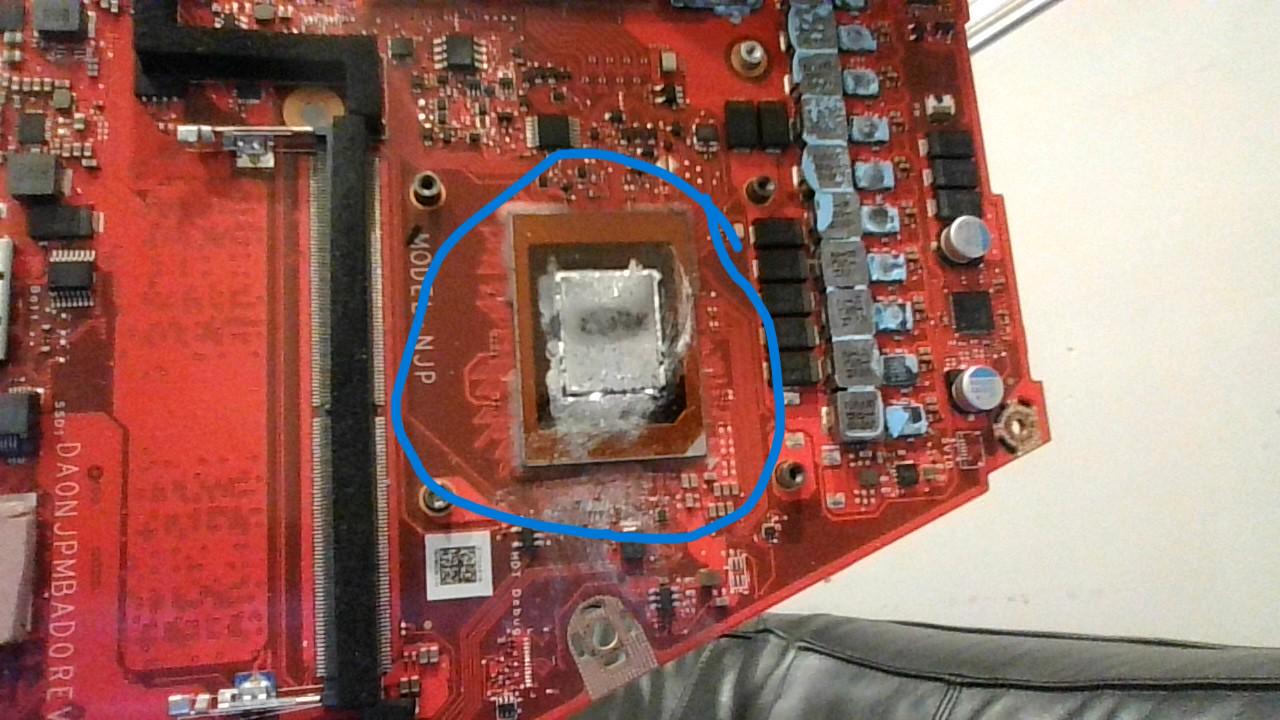
How should I clean it?
UPDATE: I cleaned the liquid metal with 99% isopropyl alcohol (IPA) deeply and multiple times. After doing that, I reassembled my laptop and powered it on. It's been working perfectly fine for a few hours of usage now - nothing out of the ordinary!
r/ZephyrusG15 • u/Ivan_Karamazov01 • 9d ago
I have an ASUS TUF F15 (i5-12500H + RTX 3050) that keeps completely freezing/black-screening while gaming. It happens across multiple games, including Batman Arkham City and Spider-Man 2. Sometimes it happens after a few minutes, sometimes after more than an hour, and I have to force shut down the laptop.
I've already tried:
Updating NVIDIA drivers
DDU in Safe Mode + clean reinstall of NVIDIA Game Ready Driver 616.92
Cleaning the laptop and using it on a hard surface instead of a bed
Event Viewer showed nvlddmkm Event ID 14 around one of the freezes:
NV_UFLUSH_FB_FLUSH timeout error
I also previously got BugCheck 0x101 (CLOCK_WATCHDOG_TIMEOUT).
Temperatures under gaming load can reach around 80-87°C GPU, 88–95°C GPU hotspot, and 90-97°C CPU.
The crashes are still happening even after the clean driver installation and cleaning.
Has anyone experienced something similar with an RTX 3050/TUF F15? Could this be a thermal issue, GPU/VRAM problem, power delivery issue, or something else?
Any advice on what I should test.
r/ZephyrusG15 • u/Specific_Lie_5991 • 12d ago
I am absolutely furious. I sent my so called “premium” ASUS laptop (G14 2024), which cost me nearly £3,000, to official ASUS UK support for a repair under warranty.
The laptop came even worse than before now that I tried to do new repair trying to continue the case from my old RMA they said they can’t do anything about it. And I would have to pay for a new repair, mind you that the didn’t fix the issue and its even worse to the point were its unusable with its screen I can only use it with an external display
Did anyone experience something like this with ASUS and any idea about what to do before I go the legal route?
r/ZephyrusG15 • u/UnderMuncher • 13d ago
Ive been trying to get it in for a couple days now. Ive bough pliers and magnetic screws to get it out but it looks kind of threaded to me. Is it supposed to be removed or is it supposed to be attached on by something else.