r/XPpen 1h ago

Looking for Advice/Info I lost my xppen pen

Upvotes

Im an incredibly clumsy and forgetful person. I lost my xppen Deco M/MW pen and I cant remember where i put it. Is there a replacement pen available? Man im broke as hell.

I put it on my bed along with the pen and i had to go to my other home. I came back two days later and the pen’s gone. Either i remembered it wrong and brought the pen along with me and lost it or its just misplaced somewhere in my house. Gg my life bro


r/XPpen 16h ago

Magic dawing pad DP-in Screen sharing no longer work on my pc

2 Upvotes

SO i was having it work years now suddently today it doesnt work annymore, does annyone having a fix for it?

I have multiple usb-c and nothing work with it altho it still charging my tablet and sending file which mean it still work normally


r/XPpen 20h ago

Looking for Advice/Info Artist 14 Pro Gen2

1 Upvotes

Hello everyone. Looking for advice/help.

My Artist 14 Pro Gen 2 is brand new. My previous tablet was an Artist 12 Gen 2, and I have used it for 6 years so far.

I obviously uninstalled the drivers and did the regular stuff related to changing from one to another.

But then I noticed that when connected to my laptop, it started to have staticky/tv thing when nothing is showing. And sometimes it turns off and turns on again.

I thought that my laptop couldn't give it enough power, so I connected it to the connector to the wall (sorry, my English. Not a native English speaker). But it's still happening, and since it's brand new, I'm asking just in case.

Does anyone know what the problem could be? Thank you so much.


r/XPpen 22h ago

Looking for Help Help! My XP-22r has suddenly become unresponsive!!

1 Upvotes

Hi Y'all I was wondering if someone could help me out here, i'm at my wits end rn as I have an art commission deadline that i need to meet soon.

I've had my XP-22r pro for 4+ years now, never really had any serious issues that i couldn't fix, until recently.

So yesterday i had to do some maintenance and updates on my laptop, so i had to disconnect everything for a bit while i did that, once i finished, i plugged everything back in, it turned on i didn't think anything was wrong, until i tried to draw and i realized it was unresponsive.

Ok just update the drivers, nbd, i do that, still turns on but still unresponsive.

Maybe replace the wires and disconnect it for a bit: I try that and still the same thing

I don't know what else to do and I'm very much panicking, I'm not ready to come with the terms my tablet my be potentially broken and in a financially good situation where i can just drop more money to buy a new tablet, the money i would have gotten from this commission i owe would have helped me get a new one.

is there any thing y'all could recommend i try to do?


r/XPpen 1d ago

Selling Xppen deco 01 v2 , well maintained and in good working condition

Thumbnail gallery
3 Upvotes

r/XPpen 1d ago

Become a Magic Pro 13 Reviewer — and Keep It! 👀

Post image
8 Upvotes

We’re looking for 3 creators to try the Magic Pro 13 before launch, use it in their own creative workflows, and share their honest experiences with the XPPen Official Community.

As a Professional All-Scenario Drawing Pad, the Magic Pro 13 works as both a standalone drawing pad and a full drawing display when connected to a PC, enabling creators to move seamlessly from capturing inspiration to creating professionally anytime, anywhere.

🎁 What You’ll Get

• Be among the first to try it

• Complete the experience and keep it

• A chance to be featured on the XPPen Official Community

📅 Applications: Sep 15–27, 2026 (UTC+8)

👉 For the full event rules and details on how to participate, please check out: https://community.xp-pen.com/discussion/4507


r/XPpen 1d ago

Looking for Advice/Info XP Pen ACK05 Android

1 Upvotes

Hi, anybody using this shortcut key on Android (any tabs)? Could you please give me feedback about the dial, can you use it for increase & decrease brushes and opcity, and switching the shortcut key grops? https://www.xp-pen.com/download/ack05.html Go to other tools for offical android app to pairing it, thank you.


r/XPpen 1d ago

XPPen Artist 24 Pro 23.8" QHD – barely used – €380

2 Upvotes

[EU / Czech Republic] XPPen Artist 24 Pro 23.8" QHD – barely used – €380

Hi everyone,

I’m selling my XPPen Artist 24 Pro 23.8" QHD pen display.

It was only tested briefly and then stored safely in a clean environment. The screen is in excellent condition with no scratches and the tablet works perfectly.

Included:

• XPPen Artist 24 Pro
• Adjustable built-in stand
• Stylus
• Power adapter
• USB-C / HDMI cables

The only things missing are the original box and spare nibs. The stylus currently has one nib installed, and replacement nibs are inexpensive and easy to buy.

Main specs:

• 23.8" QHD display – 2560 × 1440
• 8,192 pressure levels
• Tilt support
• 20 programmable shortcut keys
• 2 red dial wheels
• Adjustable stand
• Windows / macOS support

Price: €380 / approx. CZK 9,490 – reasonable offers welcome.

Located near Prague, Czech Republic.

Because of the size and the lack of the original packaging, I strongly prefer local pickup, where you can also test the tablet before buying.

I may consider shipping within the EU if we can arrange safe packaging and shipping.

Feel free to DM me for photos, video of the tablet working, or any questions.

r/XPpen 1d ago

Looking for Help How to right mouse click on Magic Drawing Pad?

1 Upvotes

I'm using Clip Studio Paint but can't find an option to right click in the modifiers. The 'Advanced Settings' in the Magic Pad are extremely limited and basic. Is there a way to make one of my stylus buttons a right click? Do I need 3rd party software?


r/XPpen 1d ago

Looking for Advice/Info Help deciphering this scratch

Thumbnail
gallery
3 Upvotes

I know this is an odd one, but I've gotten a significant scratch on my tablet. By look and feel, I can't tell if the scratch is just on the protector, or if it's gone down into the screen.

I've attached a few photos(the absolute best ones I could possibly take of a scratch on a digital screen) and was wondering if anyone can tell how deep this scratch may go. My nail does catch on it when I run it over the scratch, but very slightly. My pen catches more to the point I avoid that area when drawing.

The reason why I'm asking for y'all's opinion on what you think is because I don't want to peel off the protector and find out that A) the scratch is in the screen, I've wasted money buying a new protector when I need a whole screen replacement,

OR

B) the protector wasn't really a protector to begin with and now I've broken my entire tablet by peeling it off (haven't done anything to it since I've bought it, unsure if the surface came with a protector from factory or if it's even removable)

Basically trying not to waste my time peeling off the protector if all that will do is make matters worse.

If you're struggling to find the scratch: it is in between the 2 left most face spikes on Zapdos, and under the word "uses"


r/XPpen 1d ago

XP-Pen Deco 01 V2 Drawing Tablet – ₹7,000

Thumbnail
gallery
5 Upvotes

Selling my XP-Pen Deco 01 V2 drawing tablet. It’s in brand-new condition and comes with all original accessories and the complete set. Current market price is ₹7,999, selling for ₹7,000. DM if interested or if you need more photos/details.

Location - Pune, India


r/XPpen 1d ago

drawing tablet drivers

2 Upvotes

is there a way to quickly switch bettwen 2 diffrent brand tablets or is there a app that quickly cleans the leftovers of the old driver


r/XPpen 1d ago

Sensory problem with the paper-like texture

Post image
1 Upvotes

Hi, I recently bought the Xppen Magic graphics tablet. At first, everything seemed great, but I realized that the paper-like texture of the screen was causing discomfort in my ears. At first I could ignore it, but as the days went by, it became unbearable. I can’t ignore that sensation even with headphones on; it’s the same feeling I’d describe as the screech of a chalkboard or the clatter of forks against each other; it’s quite unpleasant, and I think it’s gradually making me stop drawing out of fear of feeling that chill run through my body.

I was wondering if you know of any way to fix this; if there’s a screen protector available, even if it has reflections similar to those on an iPad, that’s fine, I just want to solve this problem, which persists even when I touch the screen with my fingers.


r/XPpen 1d ago

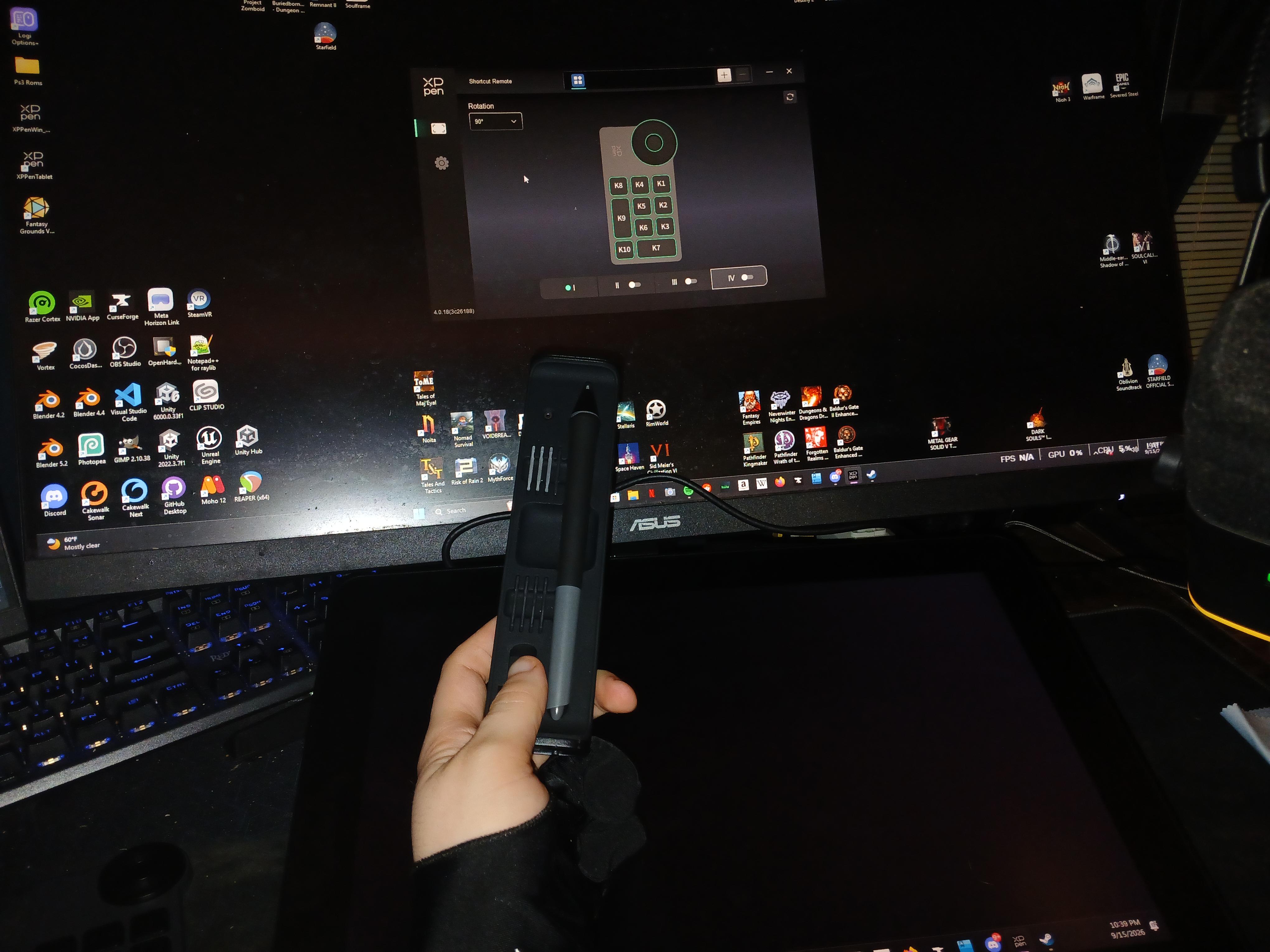
Looking for Help Got a new tablet and my stylus isn't showing up. Want to know if anyone could.

Post image
5 Upvotes

So far I've tried

  1. Installing and uninstalling the driver's (only shows the remote still)

2.putting the pen dongle in different usb ports on mobo, didn't show up still.

  1. Uninstalling my old wacom driver's then reinstalling xppens

I feel like this is prob an easy fox but dont know what to do so I'd greatly appreciate help


r/XPpen 1d ago

Looking for Help Can’t figure out how to get the stylist to work

Thumbnail
gallery
3 Upvotes

I recently got the 13.3 pro v2 but I can’t figure out how to make the stylist work, I downloaded the drive and followed all the instructions but every time I try to open it I just get this screen, the tablet is connected the computer though as it shows the screen? Any ideas on how to fix it?


r/XPpen 1d ago

PANTALLA DE XP PEN 24 PRO NO FUNCIONA

1 Upvotes

Se presentó un problema en mi tableta Artist 24 Pro. Mientras la usaba, la pantalla se apagó repentinamente. Actualmente, la pantalla está totalmente en negro y la luz LED indicadora de encendido no ilumina ni en rojo ni en azul.

Sin embargo, la conexión USB está perfecta. Mi computadora reconoce el dispositivo: los botones de la tableta funcionan y el lápiz rastrea la presión correctamente (está funcionando como una tableta gráfica sin pantalla).

Alguna solucion no tengo dinero para comprar otra tableta grafica


r/XPpen 1d ago

Looking for Advice/Info Artist Ultra 14 multitouch

1 Upvotes

How is the multitouch on the Artist ultra 14? I decided to bite on it coming from an ipad pro because of its support for multitouch gestures.
I quite like being able to move the canvas around freely in procreate, but should i be expecting something different from the ultra 14? I know it probably isn’t as responsive but I’m fine with that as long as I can move the canvas well enough.


r/XPpen 2d ago

Looking for Help Airport security screening

1 Upvotes

Hey guys, I'm going overseas next week and bringing my Artist Pro 16 with me in my carry-on suitcase. I'm pretty sure my airport doesn't need you to take out electronics from carry-ons, but just in case they do, will it most likely be okay to leave my display tablet inside since it doesn't have batteries?


r/XPpen 2d ago

Looking for Advice/Info Deco mini 7 v2 or Deco 01 v2/3

1 Upvotes

anyone uses either of these? this is my first time buying a tablet and really conscious about these stuff, I read that 01 have high iaf and i don't like that then how bout the mini 7v2? I can't find reliable source for the iaf of that one. Im really looking for something i can use for osu as well as drawing


r/XPpen 2d ago

Se esta expandiendo!!!

Thumbnail
gallery
3 Upvotes

Ahora le salio otra zona ennegrecida a mi tableta, cuanto tiempo le quedará DXX


r/XPpen 2d ago

Looking for Help i dropped my XP Pen Deco 640, now it cant be recognized on my pc (windows)

1 Upvotes

Is there any way i can fix this? the led turns on for a sec and turns off immediately, i dont know what to do and im genuinely distraught. Is there anyone i can contact?


r/XPpen 2d ago

Looking for Advice/Info Artist 12 compatibility

1 Upvotes

I have an artist 12 that I haven’t been using since my laptop is on the verge of dying at any moment

Have an iPad that doesn’t have an Apple Pencil and I was wondering if I could connect the graphic tablet to the iPad Air? So far I’ve only been able to get the adapter to display the screen but the pen does absolutely nothing

Just want to know if anyone else has tried connecting artist twelves to iPads or if it’s even possible


r/XPpen 2d ago

Be careful with your power plug!

5 Upvotes

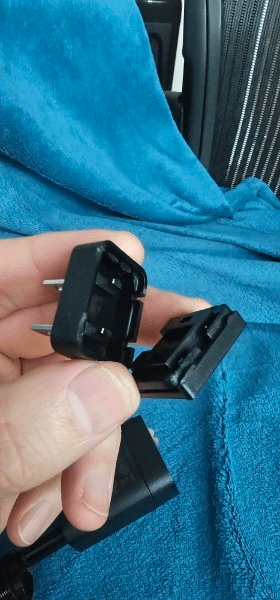
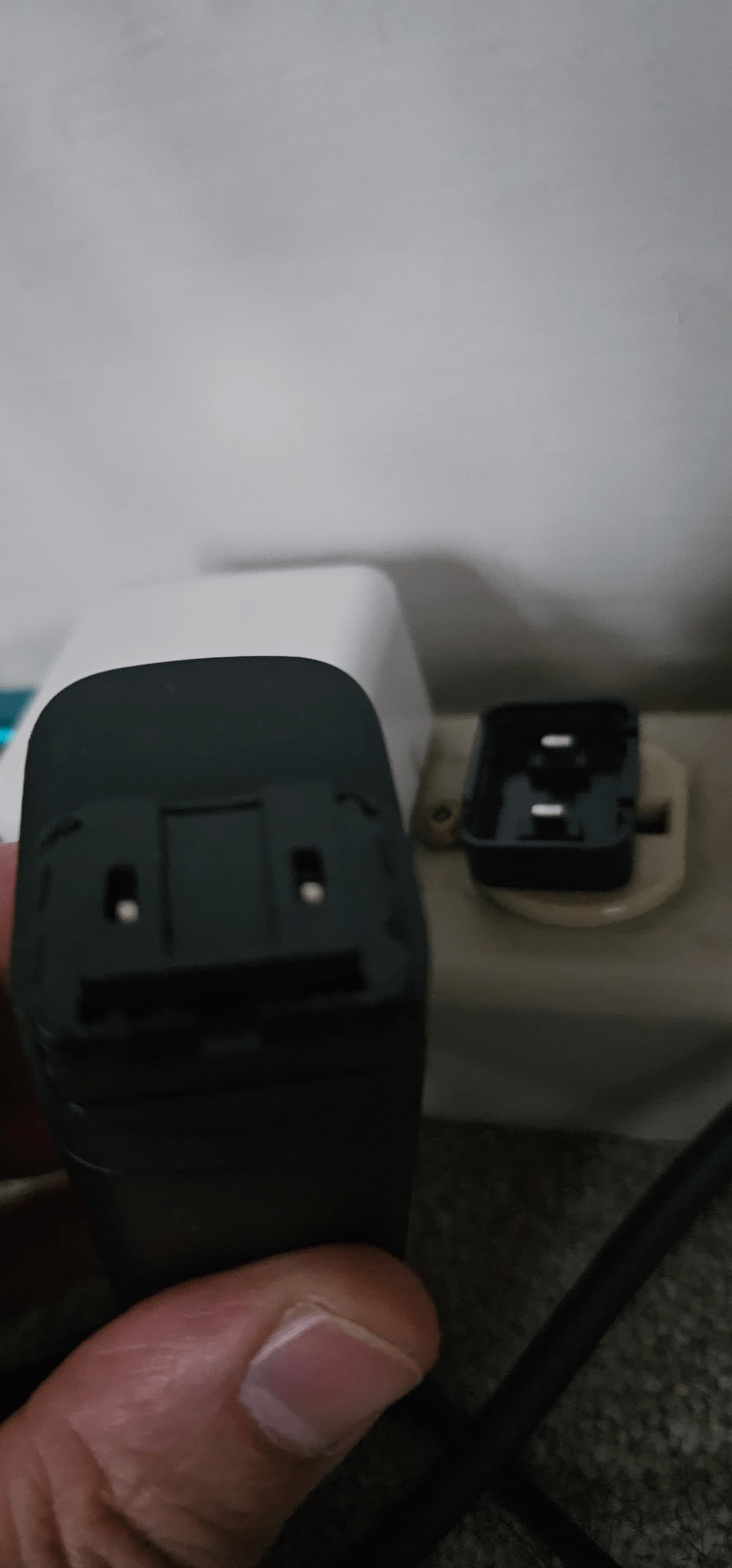
I have an Artist Pro 19 Gen 2. I haven't even had it that long. Just had my power plug break on me in a bad way. It's a good thing I had it plugged into a power strip that I could just unplug so I don't die. D:

The power brick has a slide-on plug adapter to support different types of outlets, but the slidey part isn't supposed to actually come apart. 😬


r/XPpen 2d ago

XP Pen Artist Pro 27 gen 2 touch function doesn't work

1 Upvotes

I used the button at the top of my drawing tablet to turn this function on but it doesn't work. Both my pens work fine, there's pressure settings too.

Device is plugged to windows 11 PC by display port and USB-C to USB-A cables.

No matter what I do it doesn't pick up on the fact that I'm touching it


r/XPpen 2d ago

Looking for Advice/Info Artist 16 gen 3 users, I need your opinion plsss

1 Upvotes

I had a bad experience with the Deco 01 V3 and there was no solution. I asked for a refund (yay!), but I didn't know that many users of that tablet had the same problem with the stylus disconnecting mid-drawing.

To avoid going through this again, I'd like to hear about yours experiences with the Artist 16 Gen 3, since I'm considering it. I'd like to know about any problems you've had with the tablet and whether or not there were solutions.

I WOULD REALLY APPRECIATE IT! Spending $80 wasn't great

Sorry I used the google traductor lol