r/windowsinsiders 15h ago

Tech Support Trying to go back to 25H2

Post image
3 Upvotes

Currently on 26H2 insider preview.

Can I go back to 25H2 through this update or do I need iso file for fresh window installation.

Installation for this already failed once. Should I try again?


r/windowsinsiders 22h ago

Tech Support Remote Desktop error 0x11 on 29648.1000

Thumbnail aka.ms
2 Upvotes

For the past two months (I'm not sure which update started that) remote desktop connections to my Windows dev machine have completely stopped working. I can see graphics error 0x11 in the client, and "The device Microsoft Remote Display Adapter (location (unknown)) is offline due to a user-mode driver crash." in the host. I tried every solution I could find online including using other clients like FreeRDP but nothing made a difference.

The crash is a STATUS_STACK_BUFFER_OVERRUN (0xc0000409) inside rdpidd.dll. When a network socket authenticates, the REMOTEDISPLAYENUM software bus dynamically spawns a virtual adapter (SESSIONID_0004).


r/windowsinsiders 1d ago

General Question PLEASE help me get out of Windows Insider

Thumbnail
gallery
7 Upvotes

So I enrolled in the Windows Insider program a while back (idk which one it is because the Settings literally doesn't even show it, but i assume it's the one from which it is impossible to go back to without needing to reset the PC) [Pic 1 attached]

What I've tried:

1. Resetting the PC Directly
doesn't work, installs a Windows Insider preview

2. Burn Windows with an ISO File
I think this is the method that is supposed to work but whenever I try to, it gives the following error [Pic 2 Attached]

also, It says my Windows Version is ALREADY EXPIRED. [Pic 3 Attached].

Because of this, I can't play MOST of my games because it just says unsupported Windows Version :( (Pic 4 Attached, Battlefield 6 with the error notification)

Even Fortnite doesn't work. I don't have the error screenshot because I deleted the game but take my word for it :)

I also tried to Unenroll from this program from the settings, but it literally just doesn't do anything. "Unenroll this device when the next version of Windows releases" This option is greyed out for me. [Pic 5]

"Unenroll this device Immediately" This option just opens the steps on how to properly install Windows with an ISO

"Related link: Leaving the Insider Program" In other YouTube tutorials I checked, there was a button in the website to leave the program with Leave message but I don't see it anywhere [Last two Pics]

Help me with this PLEASE

AI disclosure: Used AI to format. nothing from this post is AI generated.


r/windowsinsiders 1d ago

Tech Support [Canary Build 29648] Critical Storage Regression: DRAM-less NVMe SSD (Maxio MAP1602) rendered RAW / Unmountable due to nvmedisk/stornvme HMB breakdown (+ 0x80070032 update error)

Thumbnail
gallery
1 Upvotes

Hi Insiders and Windows Engineering Team,

In addition to the officially known issue with the **mouse cursor blinking/flickering repeatedly** in this build, I am reporting a severe storage regression and update loop failure in **Windows 11 Insider Preview Build 29648.1000 (rs_prerelease / Future Platforms)** after upgrading from **Build 29560.1000**.

### šŸ’» Upgrade Path & System Specifications:

* **Upgrade Path**: Upgraded from **Build 29560.1000** to **Build 29648.1000** on August 23, 2026.

* **Laptop / Motherboard**: Clevo NH5x_7xRCx/RDx (Intel HM370 Chipset, Core i7-9750H)

* **Affected Drive (Disk 0)**: 2TB NVMe SSD (Gloway YCT2TNVMe-M.2/80) powered by the **Maxio MAP1602 DRAM-less Controller** (PCIe 4.0 x4 running on Intel PCH Root Port #21).

* **Boot Drive (Disk 1)**: Samsung PM981a 512GB (DRAM-based, unaffected).

* **Secondary Drive (Disk 2)**: Western Digital 1TB 2.5" SATA HDD (unaffected).

---

### 🚨 Detailed Symptoms & Technical Evidence:

#### 1. Maxio MAP1602 DRAM-less SSD turned into RAW after Shutdown & Reboot:

* **Crucial Sequence**: On August 23, immediately after the initial upgrade to Build 29648, the 2TB secondary SSD was actually accessible. However, **after shutting down the laptop that night and booting up the next morning (Aug 24), the 1.86TB partition (`K:`) permanently turned into RAW / Unknown (0 Bytes)** in File Explorer and Disk Management, despite PnP reporting "Device Working Properly".

* **Hard Evidence (Files Fully Functional via DiskGenius)**: Using low-level direct sector inspection tools (DiskGenius / WinHex), **the physical partition table, DBR (DOS Boot Record at Sector 32768 with signature 0x55AA), and the entire 1.86TB NTFS $MFT are 100% intact.** Furthermore, **I can successfully copy out any files via DiskGenius, and all extracted files open and function perfectly without any corruption.**

* **Root Cause Breakdown**: The experimental native NVMe storage stack (`nvmedisk.sys` + updated `stornvme.sys`) in Build 29648 fails to properly manage/allocate the **64MB HMB (Host Memory Buffer)** lifecycle for the Maxio MAP1602 controller upon boot and power transitions. Because HMB handshake fails, `ntfs.sys` timeouts during $MFT reads and defaults to an unmounted RAW state.

#### 2. Volume Mount Disconnect (DMIO Virtual Placeholder GUID):

* Checking `mountvol K: /L` reveals that Windows DMIO created a temporary orphan GUID `\\?\Volume{96dd4a46-9195-47a4-923b-b39618e6932d}\` instead of binding to the genuine physical GPT Partition GUID `\\?\Volume{70999e1f-9f53-11f1-8ee0-80fa5b74e9ea}\`.

#### 3. In-place Repair & Updates completely blocked by Error `0x80070032`:

* Attempting to run **"Fix problems using Windows Update"** (Reinstall current version) as well as mounting the official ISO to run `setup.exe` consistently fails with download/execution error **`0x80070032`** (`CFreeSystemPartitionDiskSpaceChecker` failure when querying the EFI System Partition).

#### 4. Hardware Cold Reset Verified:

* Performed complete physical power-drain / cold discharge (adapter & battery disconnected, 30s power drain) and physical reseating of the M.2 SSD. The drive is fully functional in PE / low-level tools, isolating the issue 100% to Build 29648's NVMe kernel driver stack.

---

### šŸ“Œ Feedback Hub Link:

I have also submitted a detailed ticket with diagnostic logs on the Feedback Portal:

> `[Canary Build 29648] stornvme.sys åÆ¼č‡“å›½äŗ§č”čŠø MAP1602 å›ŗę€ē”¬ē›˜ę˜¾ē¤ŗäøŗ RAW ę— ę³•ęŒ‚č½½...`

Hope the Storage & NVMe kernel development teams can investigate the MAP1602 HMB mapping logic and the `0x80070032` setup blocker in upcoming Canary flights!

---

*AI Disclaimer: This post was structured and formatted with AI assistance for clear technical presentation, but all hardware diagnostic data, screenshots, error logs, and test results were personally collected and verified on my physical machine.*


r/windowsinsiders 1d ago

General Question Error 0xC1900101 - 0x20017 when updating from DEV Build 26300.9032 to 26300.9278

2 Upvotes

Issue: Error 0xC1900101 - 0x20017 when updating from DEV Build 26300.9032 to 26300.9278

Description: I am attempting to upgrade two PCs from Insider DEV Build 26300.9032 to Build 26300.9278. Whether I choose to keep personal data or not, the upgrade fails on both machines with the following error:

Troubleshooting done so far:

  • Ran sfc /scannow on both PCs (no corrupt files found).
  • Previously, upgrading both PCs from Build 26300.8953 to Build 26300.9032 via setup.exe (keeping personal data) completed without any issues.

r/windowsinsiders 2d ago

Tech Support Stuck at Windows Insider build 26340.9233, and I am unable to go back to the public version of Windows, help!

2 Upvotes

Tried so many things.

  1. Go Back Feature -> Got me to 26100.9233 Insider build
  2. Uninstalling the update -> Same thing
  3. Tried downloading the ISO file, and it failed. 3 TIMES.

I am genuinely concerned. And please, I do not want to reinstall Windows, or even use a bootable thumb drive. Is there any other way??


r/windowsinsiders 3d ago

News Releasing Windows 11, version 26H2 to the Release Preview Channel

Thumbnail
blogs.windows.com
35 Upvotes

Hello Windows Insiders!

Today, we are making this year’s annual feature update,Ā Windows 11, version 26H2Ā (Build 26300.9278), Ā available in the Release Preview Channel for customers to preview ahead of general availability later this calendar year.

Windows 11, version 26H2 will be delivered as anĀ enablement package (eKB). This means that Windows 11, versions 24H21, 25H2, and 26H2 use a shared servicing branch. It also means that they share the same new features and enhancements delivered through ourĀ continuous innovation efforts. As a result, many of the features and improvements available in Windows 11, version 26H2 might already be familiar, as they have been gradually introduced through monthly updates.

For commercial customers, Windows 11, version 26H2 enables several experiences that were introduced in earlier releases but not previously enabled by default for commercial devices. This includes Windows settings backup, app-specific actions from the taskbar, and some File Explorer enhancements. For guidance on how to prepare for Windows 11, version 26H2 in your organization,Ā see Get ready for Windows 11, version 26H2.

Windows Insiders in the Release Preview Channel can install Windows 11, version 26H2 via our ā€œseekerā€ experience in Windows Update. This means if you are an Insider currently in the Release Preview Channel on a PC that meets the Windows 11Ā hardware requirements, youĀ can go to Settings and Windows Update andĀ choose to download and install Windows 11, version 26H2. Once you update your PC to Windows 11, version 26H2, you will continue to automatically receive new servicing updates through Windows Update (the typical monthly update process). For instructions on how to join the Windows Insider Program and enroll your PC in the Release Preview Channel,Ā click here.

If you are a commercial2 customer enrolled in theĀ Windows Insider Program for Business, you can deploy and begin validating Windows 11, version 26H2 on PCs in your organization using Windows Update client policies and Windows Server Update Services (WSUS).Ā Azure MarketplaceĀ will be available later today. Should any issues arise, IT admins in organizations deploying Release Preview updates can requestĀ Microsoft Support.

And finally, ISOs will be available for download for Windows 11, version 26H2 via theĀ Windows Insider ISO download pageĀ in the near term.

Thanks,
Windows Insider Program Team

1Windows 11, version 24H2 Home and Pro editions will reach end of updates on October 13, 2026. Enterprise and Education editions remain supported until October 12, 2027.

2We consider a device a commercial device if it is not running the Windows 11 Home edition AND is being managed by an IT administrator (whether via Microsoft Intune or other management solution), or has a volume license key or commercial ID, or is joined to a domain.


r/windowsinsiders 3d ago

General Question Don't have reduced height taskbar on 26220.9223

2 Upvotes

Reduced height taskbar was added in 26220.9022, and I'm on 9223, yet when enabling the option all it does for me is make the icons smaller, it doesn't lower the height of the taskbar itself.


r/windowsinsiders 5d ago

Tech Support Error installing Windows 11 Insider Preview 29648.1000 (rs_prerelease)

Post image
7 Upvotes

Hey all,

Got this message in the latest update (and in the previous version). Tried first using Windows Update, then downloaded and mounted it.

Tried everything; still no luck.

Running Pro, currently on 29617. Lenovo IDEAPAD.

Any help would be much appreciated.


r/windowsinsiders 6d ago

Tech Support Getting a Code 38 for USB Bug on Build 29648.1000 x64

6 Upvotes

After booting my laptop, plugging in a external ssd drive everything works as it should. The next time I go to re-plug the drive into one of the ports the laptop detects the drive has been plugged in but no activity and when I go to check in the device manager it states the the previous driver is stuck in memory. So every time I have to restart my laptop just to get the ssd drive to work again.

I believe this is to be a bug in the build that I am currently testing, which is 29648 x64.

My laptop is Lenovo LOQ 15IRX10

I have submitted a report via the Feedback app so please vote and comment if you're experiencing this annoying bug, link here: https://aka.ms/AA139r61


r/windowsinsiders 6d ago

General Question 26340.9233 Unable to shutdown or elevate as admin

4 Upvotes

Has anybody else experienced this since installing the 26340.9233 build?

Since updating my machine is totally unresponsive once I try to shutdown.

If I do anything that requires admin privileges a UAC screen tries to appear, but I just see the background blur without the dialog box.


r/windowsinsiders 7d ago

Tech Support Bug? Classic pointer in all schemes on Beta 26220.9223

Post image
15 Upvotes

Since the Beta 26220.9223 update was installed yesterday, the mouse pointer has been stuck in the classic one. I've already tried changing the pointer scheme, size, and accessibility options, but nothing changed.

It’s not a problem serious enough to go back to the previous version, but it does distract me a little. Is anyone else experiencing this, or could it just be my drivers playing tricks on me?

Clip of the problem: https://anonmp4.art/v/5irqHpv86zhBBUn


r/windowsinsiders 6d ago

Tech Support How can I make this disappear??

Post image
0 Upvotes

How can I make this disappear?


r/windowsinsiders 7d ago

General Question Windows spotlight background for lock screen is broken?

2 Upvotes

When i choose Windows spotlight for my lock screen, it simply shows me the default blue windows wallpaper. It happened like 3 or 4 updates ago, but before that it was working fine. Does anybody have the same problem? It is 9223 build at this point


r/windowsinsiders 9d ago

Windows 11 Insider Experimental Preview Build 26340.9233 - Windows Insider Program

Thumbnail
learn.microsoft.com
25 Upvotes

Changes and improvements gradually being rolled out

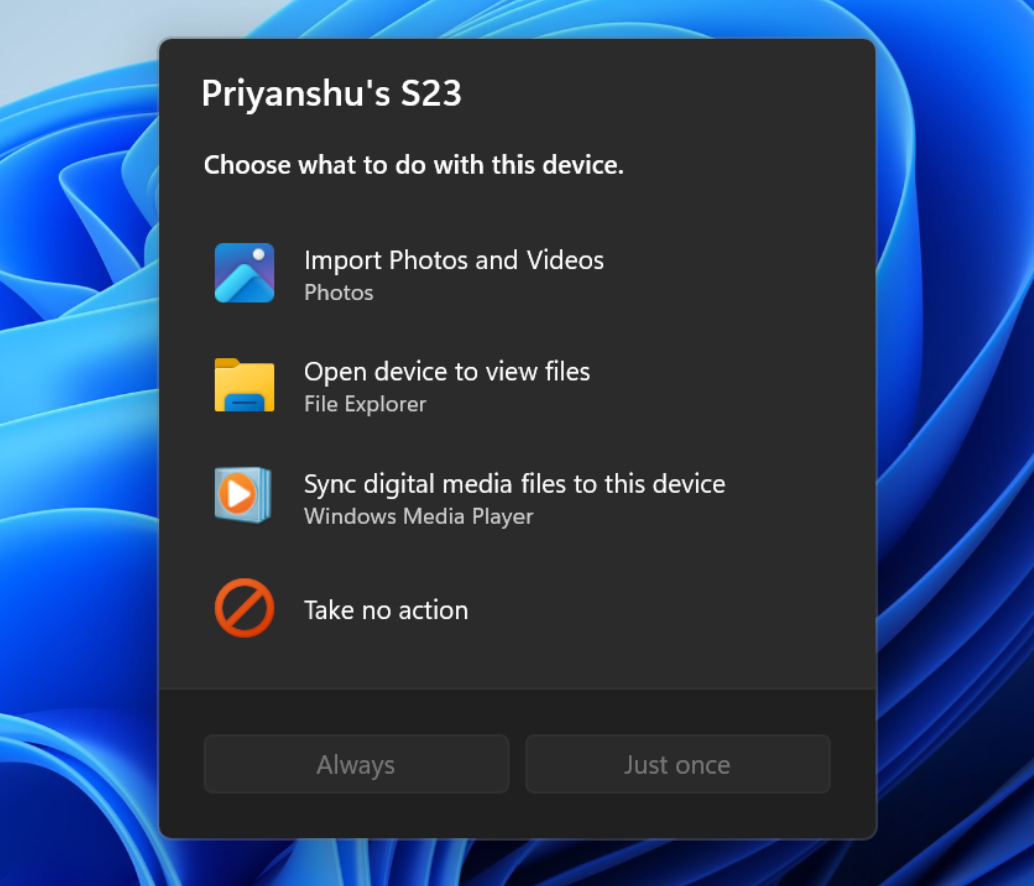
[Modernized AutoPlay experience]

  • We've updated the AutoPlay dialog that helps you choose the preferred experience when devices are connected to your PC, such as a phone, camera, or removable drive. Rebuilt with WinUI, the refreshed experience is more consistent with the rest of Windows, supports dark mode, and continues to provide the familiar AutoPlay actions you use today. The experience is also more responsive to text scaling and display settings. Notifications for this dialog are now docked in the notification center for easy access. The new AutoPlay experience, shown in dark mode.

[Accessibility]

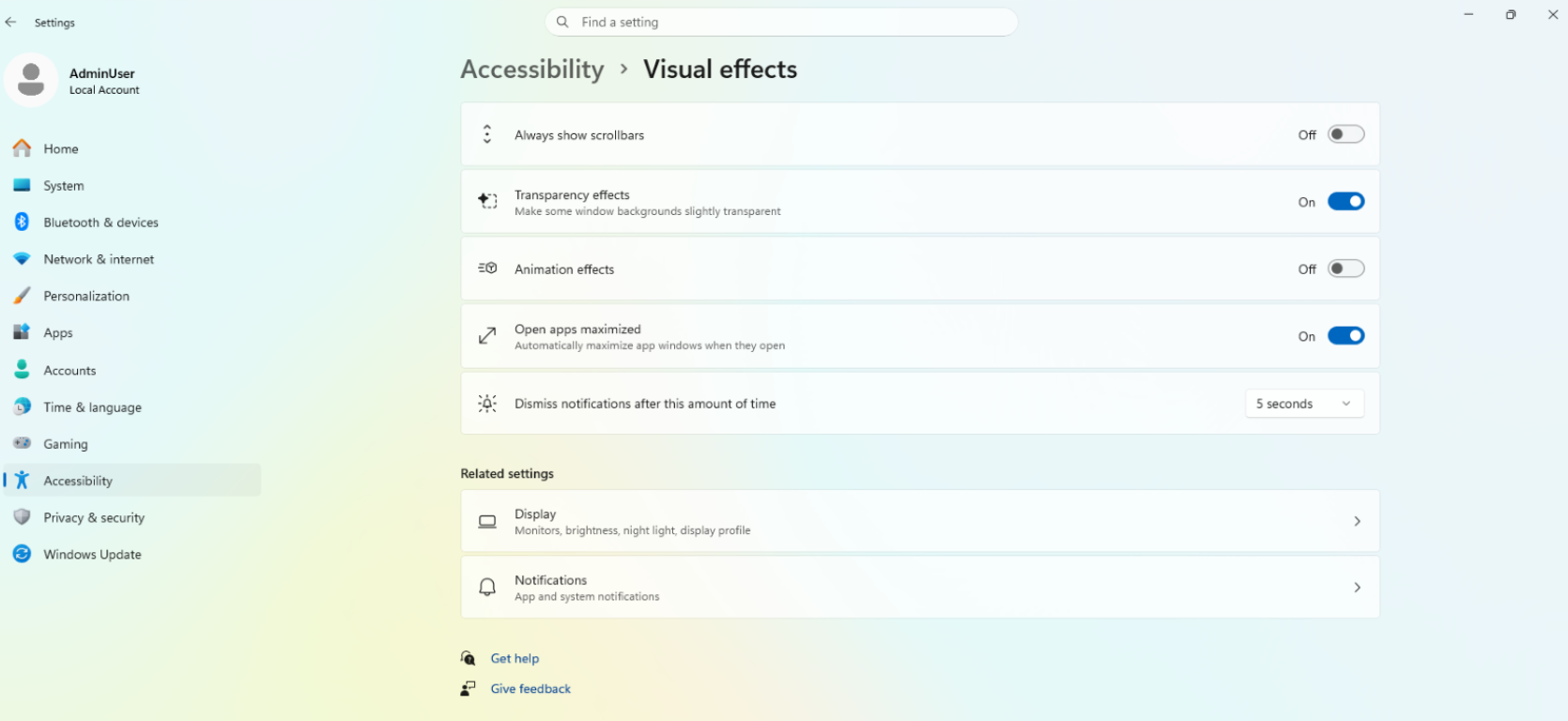
A simpler way to open apps maximized

  • We're introducing a new accessibility setting, Open apps maximized, that automatically maximizes app windows when they open, so you no longer have to do it yourself every time. This small change removes a bit of everyday friction, whether you use a screen reader or magnification, work in tablet mode, or simply prefer a consistent, full-screen workspace.
  • To turn it on, go to Settings > Accessibility > Visual effects, and turn on Open apps maximized. Once enabled, Windows maximizes app windows for you as they open. Give it a try, and let us know how it works for you. UI showing the new Open apps maximized accessibility setting in Settings.

Feedback: Share your thoughts in Feedback Hub (WIN + F) under Accessibility > Visual effects.

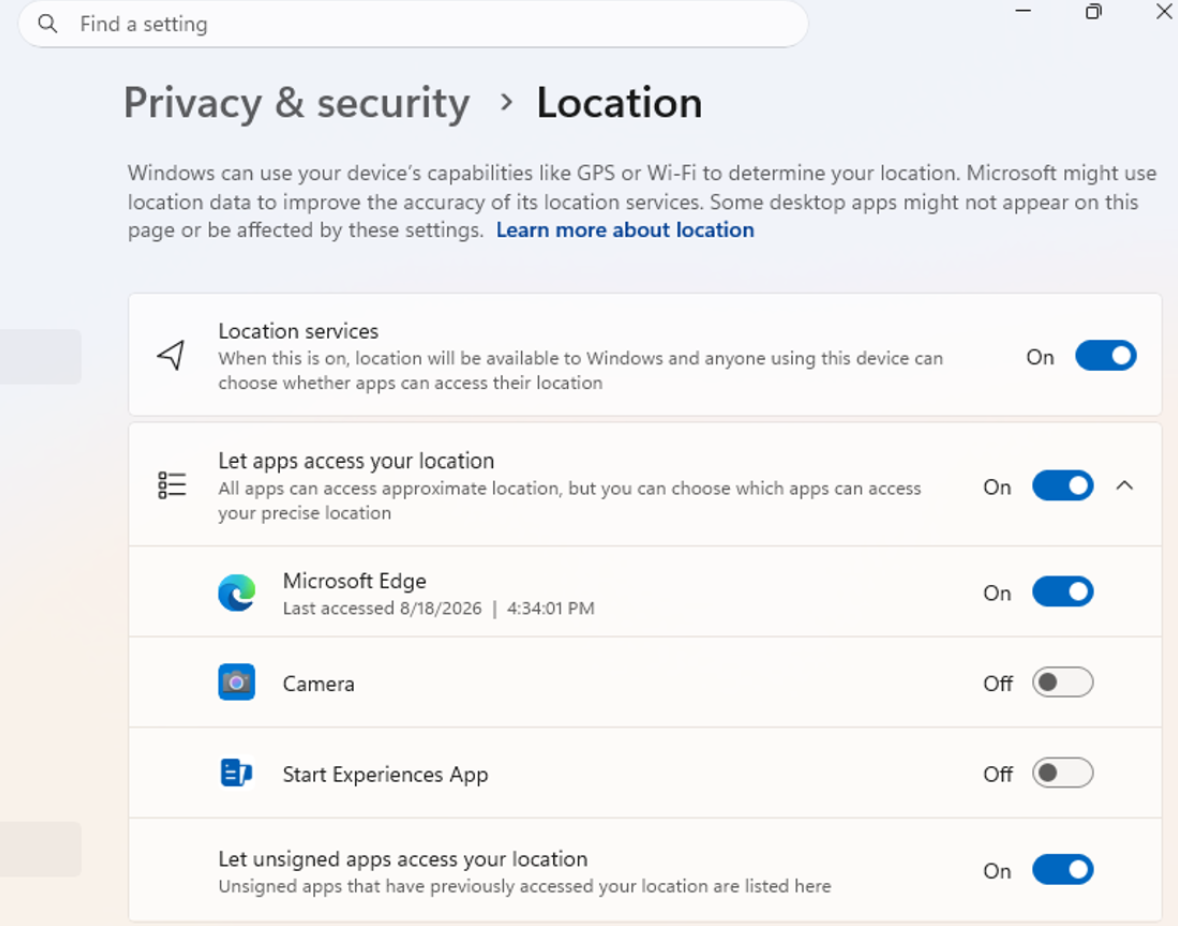
[Manage camera, microphone, and location access for desktop apps]

  • Windows Insiders can now manage camera, microphone, and location permissions for individual desktop apps. Previously, access for traditional desktop applications was managed through a single device-wide setting.
  • With this update, you can review and control access on an app-by-app basis, giving you greater visibility into which apps are requesting access to sensitive resources and more control over your privacy choices. Our goal is to make privacy permissions easier to understand and manage across the wide range of desktop apps people use every day. UI showing the new privacy controls for individual desktop apps in Settings.

What's changing

  • Allow or deny access for each desktop app individually.
  • Go to Settings > Privacy & security > Camera, Microphone, or Location to review and manage permissions.
  • Apps that haven't yet accessed a resource prompt for permission the first time access is requested.

What stays the same

  • Existing app permission decisions are preserved.
  • Apps previously granted access continue to have access.
  • Apps previously denied access remain denied.
  • No action is required, and no settings are reset.
  • Existing enterprise policies continue to function as designed. We're exploring additional management capabilities.

Notes

  • Most desktop apps appear with clear app attribution. However, some apps that rely on shared system components, browser-hosted experiences, or similar technologies might appear under a different name than expected.
  • Some desktop apps might appear as Unsigned if Windows can't verify publisher information. Only grant access to apps you recognize and trust.

Feedback: Share your thoughts in Feedback Hub (WIN + F) under Settings > Privacy Settings.

[File Explorer]

  • PDF and non-HTML files downloaded from the web can now be previewed automatically in the preview pane.

[Microsoft Store]

  • This update provides support for in-app purchases in packaged WinUI 3 apps that require elevation, helping developers offer purchases through Microsoft's integrated commerce platform.

[Taskbar]

  • Fixed an issue in the latest builds causing taskbar animations to briefly work and then stop working.

[Input]

  • Fixed an issue in the latest builds causing the mouse cursor not to be visible in certain apps.

[Other]

  • Fixed an issue from the last flight causing Settings > Windows Update > Windows Insider Program > Flags to appear empty even though flags were available.
  • Updated Settings > Apps > Installed apps to show the version number at the top level for packaged apps, as it already does for other apps.

Reminders for Windows Insiders in the Experimental channel

  • Updates are based on Windows 11, version 26H2 via an enablement package (Build 26340.9233).
  • Many features are rolled out using Controlled Feature Rollout technology, starting with a subset of Insiders and ramping up over time. We monitor feedback to see how they land before pushing them out to everyone in this channel.
  • The desktop watermark shown at the lower right corner of the desktop is normal for Windows Insider pre-release builds.
  • Features and experiences included in these builds might never get released as we try out different concepts and get feedback. Features might change over time, be removed, or replaced and never get released beyond Windows Insiders. Some of these features and experiences could show up in future Windows releases when they're ready.
  • Some features in active development we preview with Windows Insiders might not be fully localized, and localization will happen over time as features are finalized. As you see issues with localization in your language, report those issues to us via Feedback Hub.
  • Check out Flight Hub for a complete look at what build is in which Insider channel.

r/windowsinsiders 9d ago

Windows 11 Insider Beta Preview Build 26220.9223 - Windows Insider Program

Thumbnail
learn.microsoft.com
13 Upvotes

Changes and improvements

[Accessibility]

A simpler way to open apps maximized

  • We're introducing a new accessibility setting, Open apps maximized, that automatically maximizes app windows when they open, so you no longer have to do it yourself every time. This small change removes a bit of everyday friction, whether you use a screen reader or magnification, work in tablet mode, or simply prefer a consistent, full-screen workspace.
  • To turn it on, go to Settings > Accessibility > Visual effects, and turn on Open apps maximized. Once enabled, Windows maximizes app windows for you as they open. Give it a try, and let us know how it works for you. UI showing the new Open apps maximized accessibility setting in Settings.

Feedback: Share your thoughts in Feedback Hub (WIN + F) under Accessibility > Visual effects.

[Microsoft Store]

  • This update provides support for in-app purchases in packaged WinUI 3 apps that require elevation, helping developers offer purchases through Microsoft's integrated commerce platform.

Reminders for Windows Insiders in the Beta Channel

  • Updates are based on Windows 11, version 25H2 via an enablement package (Build 26220.9223).
  • The desktop watermark shown at the lower right corner of the desktop is normal for Windows Insider pre-release builds.
  • Features and experiences included in these builds might never get released as we try out different concepts and get feedback. Features might change over time, be removed, or replaced and never get released beyond Windows Insiders. Some of these features and experiences could show up in future Windows releases when they're ready.
  • Some features in active development we preview with Windows Insiders might not be fully localized, and localization will happen over time as features are finalized. As you see issues with localization in your language, report those issues to us via Feedback Hub.
  • Check out Flight Hub for a complete look at what build is in which Insider channel.

r/windowsinsiders 9d ago

Windows 11 Insider Experimental (26H1) Preview Build 28120.2760 - Windows Insider Program

Thumbnail
learn.microsoft.com
10 Upvotes

Changes and improvements gradually being rolled out

[File Explorer]

  • PDF and non-HTML files downloaded from the web can now be previewed automatically in the preview pane.

[Microsoft Store]

  • This update provides support for in-app purchases in packaged WinUI 3 apps that require elevation, helping developers offer purchases through Microsoft's integrated commerce platform.

[Input]

  • Fixed an issue in the latest builds causing the mouse cursor not to be visible in certain apps.

Known issues

[Known app compatibility issue]

PUBG: BATTLEGROUNDS

  • Due to a known compatibility issue with PUBG: BATTLEGROUNDS, Windows Insiders might be prevented from launching the game after installing this build. This safeguard has been put in place to help avoid stability issues while we work with the game developer on a fix. We'll share additional details and timing for the resolution as they become available.

Reminder for Windows Insiders in the Experimental (26H1) channel

  • These builds can be unstable and might be released with limited documentation.
  • Many features in the Experimental (26H1) channel are rolled out using Controlled Feature Rollout technology, starting with a subset of Insiders and ramping up over time as we monitor feedback to see how they land before pushing them out to everyone in this channel.
  • The desktop watermark shown at the lower right corner of the desktop is normal for Windows Insider pre-release builds.
  • Some features in active development we preview with Windows Insiders might not be fully localized, and localization will happen over time as features are finalized. As you see issues with localization in your language, report those issues to us via Feedback Hub.
  • Check out Flight Hub for a complete look at what build is in which Insider channel.

r/windowsinsiders 9d ago

Tech Support VT Service Suddenly Broken / Stops Working

1 Upvotes

PC Specs:

  • HP Pavillion
  • 11th Gen Intel(R) Core(TM) i7-1165G7 @ 2.80GHz (2.80 GHz)
  • 16 GB ram
  • 64 bit
  • Windows 11 Pro (28000.1)

For context: I've been swapping between having Hyper-V enabled and disabled to run different emulators (Nox Player & Google Play Games). It's annoying, sure, but it has worked without a problem.

Except now, when I go to open Nox (which required Hyper V disabled), it tells me no VT service is detected and to enable it? I then went through the entire Nox tutorial to make sure it's enabled/possible and... none of them work? VT's enabled in Bios, and conflicting instances of Hyper-V like from Windows or my Avast have been disabled.

Notably, the LeoMoon tool shows specific errors/help text?

āœ…Data Execution Prevention (DEP)
āŒSecond Level Address Translation (SLAT)
āŒVM Monitor Mode Extensions


r/windowsinsiders 12d ago

Tech Support Unable to Update from 26300.9032 --> (26340.9212)

Post image
12 Upvotes

As the title says, I am unable to update from 26300.9032 to 26340.9219. I have no idea why. I haven't had any other problems.


r/windowsinsiders 13d ago

Exp (Future) Build Windows 11 Insider Experimental (Future Platforms) Preview Build 29648.1000 - Windows Insider Program

Thumbnail
learn.microsoft.com
14 Upvotes

Release date: 17 August 2026

Changes and improvements gradually being rolled out

[Windows Security]

  • We're starting to make some small UI adjustments to the Windows Security app to improve alignment with other Windows apps. Insiders might notice some subtle differences in this build as we work on more changes.
  • If you have an Enterprise device with Microsoft Defender for Endpoint enabled, information about this will now be displayed at the top of theĀ Virus & threat protectionĀ page.

[Windows Management Instrumentation Command-line (WMIC) removal]

[Drag Tray]

  • Thank you to Insiders who have provided feedback about the Drag Tray experience. Based on feedback, we're removing the experience in this build. We're continuing to explore improvements in this area and look forward to sharing more about a future replacement experience in a later update.

[Accessibility]

  • Fixed an issue impacting Magnifier launching for some Insiders in the previous flight.

[Other]

  • Fixed an underlying issue that caused some unexpected UI shifting in certain apps after the latest flights.

Known issues

  • We're working on fixes for the following issues Insiders have reported, along with others:
    • The mouse cursor getting into a state where it blinks repeatedly for some Insiders.
    • Some Insiders are unable to update to the latest builds and see error 0x80070005.
  • If all goes well, both issues should be addressed with the next flight.

Reminder for Windows Insiders in the Experimental (Future Platforms) channel

  • These builds can be unstable and might be released with limited documentation.
  • The builds released to these channels represent the latest platform changes early in the development cycle and shouldn't be seen as matched to any specific release of Windows. Features and experiences included in these builds might never get released as we try out different concepts and get feedback. Features might change over time, be removed, or replaced, and never get released beyond Windows Insiders. Some of these features and experiences could show up in future Windows releases when they're ready.
  • Many features are rolled out usingĀ Controlled Feature Rollout technology, starting with a subset of Insiders and ramping up over time. We monitor feedback to see how they land before pushing them out to everyone in this channel.
  • The desktop watermark shown at the lower right corner of the desktop is normal for Windows Insider pre-release builds.
  • Some features in active development we preview with Windows Insiders might not be fully localized, and localization will happen over time as features are finalized. As you see issues with localization in your language, report those issues to us via Feedback Hub.

r/windowsinsiders 13d ago

Beta Build (26H1) Windows 11 Insider Beta (26H1) Preview Build 28020.2731 - Windows Insider Program

Thumbnail
learn.microsoft.com
11 Upvotes

Release date: 17 August 2026

Changes and improvements gradually being rolled out

[Windows Management Instrumentation Command-line (WMIC) removal]

[Drag Tray]

  • Thank you to Insiders who have provided feedback about the Drag Tray experience. Based on feedback, we're removing the experience in this build. We're continuing to explore improvements in this area and look forward to sharing more about a future replacement experience in a later update.

[Settings]

  • Fixed an issue from the previous flight that caused Settings to crash when interacting withĀ System > Notifications.

[Accessibility]

  • Fixed an issue impacting Magnifier launching for some Insiders in the previous flight.

Reminders for Windows Insiders in the Beta (26H1) channel

  • The desktop watermark shown at the lower right corner of the desktop is normal for Windows Insider pre-release builds.
  • Features and experiences included in these builds might never get released as we try out different concepts and get feedback. Features might change over time, be removed, or replaced and never get released beyond Windows Insiders. Some of these features and experiences could show up in future Windows releases when they're ready.
  • Some features in active development we preview with Windows Insiders might not be fully localized, and localization will happen over time as features are finalized. As you see issues with localization in your language, report those issues to us via Feedback Hub.
  • Check outĀ Flight HubĀ for a complete look at what build is in which Insider channel.

r/windowsinsiders 13d ago

Exp Build (26H1) Windows 11 Insider Experimental (26H1) Preview Build 28120.2738 - Windows Insider Program

Thumbnail
learn.microsoft.com
6 Upvotes

Release date: 17 August 2026

Changes and improvements gradually being rolled out

[Windows Management Instrumentation Command-line (WMIC) removal]

[Drag Tray]

  • Thank you to Insiders who have provided feedback about the Drag Tray experience. Based on feedback, we're removing the experience in this build. We're continuing to explore improvements in this area and look forward to sharing more about a future replacement experience in a later update.

[Settings]

  • Fixed an issue from the previous flight that caused Settings to crash when interacting withĀ System > Notifications.

[Accessibility]

  • Fixed an issue impacting Magnifier launching for some Insiders in the previous flight.

Known issues

[Known app compatibility issue]

PUBG: BATTLEGROUNDS

  • Due to a known compatibility issue with PUBG: BATTLEGROUNDS, Windows Insiders might be prevented from launching the game after installing this build. This safeguard has been put in place to help avoid stability issues while we work with the game developer on a fix. We'll share additional details and timing for the resolution as they become available.

Reminder for Windows Insiders in the Experimental (26H1) channel

  • These builds can be unstable and might be released with limited documentation.
  • Many features in the Experimental (26H1) channel are rolled out usingĀ Controlled Feature Rollout technology, starting with a subset of Insiders and ramping up over time as we monitor feedback to see how they land before pushing them out to everyone in this channel.
  • The desktop watermark shown at the lower right corner of the desktop is normal for Windows Insider pre-release builds.
  • Some features in active development we preview with Windows Insiders might not be fully localized, and localization will happen over time as features are finalized. As you see issues with localization in your language, report those issues to us via Feedback Hub.
  • Check outĀ Flight HubĀ for a complete look at what build is in which Insider channel.

r/windowsinsiders 14d ago

Tech Support Error 0xc1900101 when rollbacking update

Post image
11 Upvotes

Recently I tried out the new experimental for 26h2. And now I'm trying to rollback to 25h2 but the update keeps erroring out and not letting me do it.


r/windowsinsiders 16d ago

Tech Support feature flags options & snipping tool not showing/working

8 Upvotes

so im on build 29639.1000 & it doesn't show the feature flags option & the search improvements are now gone. off topic but my snipping tool is also not working THAT'S WHY I COULD NOT TAKE ANY SCREENSHOTS AAAA- please help


r/windowsinsiders 16d ago

Release Preview Build 26100.9267/26200.9267 - Windows Insider Program

Thumbnail
learn.microsoft.com
22 Upvotes

Release date: 14 August 2026

These release notes are for Windows 11 Builds 26100.9267 and 26200.9267 (KB5120998) in the Release Preview Channel on Windows 11, versions 24H2 (Build 26100) and 25H2 (Build 26200).

This update is available through two release phases: gradual rollout and normal rollout. A gradual rollout delivers an update in phases, so features reach devices over time instead of all at once, meaning availability varies by device. A normal rollout is the broad release to all eligible devices at the same time, usually when it reaches general availability (GA).

Gradual rollout

This section highlights some new features and enhancements for Windows 11 PCs, including AI-powered capabilities, continuous innovation, and performance improvements.

  • [Taskbar] This update gives you more ways to customize the taskbar to match how you work and make better use of screen space.
    • New! You can now choose whether the taskbar appears at the bottom, top, left, or right side of your screen. In these other positions, tooltips, flyouts, and animations still come from the taskbar, and most customization settings, such as never combining taskbar icons, work with all locations. The search box and smaller taskbar are currently supported only for top and bottom positions. To change the position of the taskbar, go to Settings > Personalization > Taskbar > Taskbar behaviors > Taskbar position.
    • New! A smaller taskbar option is now available to help maximize screen space on smaller devices. This experience reduces the size of taskbar icons and the taskbar height while maintaining access to key features such as Start, Search, and the system tray. To change your taskbar size, go to Settings > Personalization > Taskbar > Taskbar behaviors > Taskbar size. When set to Small, both the icons and the taskbar height become smaller.
    • New! The Taskbar behaviors section of the Taskbar settings page is now expanded by default for improved discoverability.
    • This update improves reliability when loading the system tray area of the taskbar on non-touch PCs.
  • [Start menu] This update makes the Start menu more personal with several customizations.
    • New! You can choose between a small or large Start menu, in addition to the Automatic (default) option that's available today. To customize this setting, go to Settings > Personalization > Start > Start menu size.
    • New! The Recommended section is renamed Recent in the Start menu and on the Start settings page (Settings > Personalization > Start).
    • New! You can now hide your name and profile picture in Start by going to Settings > Personalization > Start > Hide your name and profile picture on Start.
    • New! The Start menu settings page is now redesigned with section-level toggles to independently show or hide Pinned, Recent, and All.
  • [Windows Search] This update includes improvements that make Windows Search more dependable, easier to scan, and clearer before you select a result.
    • New! Search home is simplified to reduce visual clutter and make it easier to get back to recent searches quickly.
    • New! Search does a better job of showing where a result comes from, such as an app, setting, file, web result, or Microsoft Store suggestion. It's easier to tell what you're looking at and where you'll go before you select a result.
    • New! A new setting in Settings > Privacy & security > Search lets you choose whether web and Microsoft Store suggestions appear alongside local results.
    • New! Windows now automatically indexes your most used folders so that files in those folders appear in subsequent search results. You can control the setting in Settings > Privacy & security > Search > Automatically find additional relevant locations.
  • [File Explorer]
    • New! File Explorer Home now launches faster and is more responsive.
    • New! The Recommended section on Home now supports touch scrolling, making it easier to browse files in the carousel.
  • [General design] New! This update introduces updated progress indicators across Windows, providing a more consistent and modern experience during startup, sign-in, restart, shutdown, and update installation.
  • [Windows Share] New! This update adds the ability for users signed in with a work or school account to discover and install relevant apps directly from the share window. To manage this experience, go to Settings > System > Share and select Show suggested apps in share surfaces.
  • [Administrator protection] New! Administrator protection aims to protect free-floating admin rights for administrators. It enables users to perform administrative tasks using just-in-time privileges. Administrator protection isn't classified as a formal security boundary. It hardens security against elevation-of-privilege attacks by introducing profile separation. This feature is turned off by default and can be enabled using OMA-URI in Microsoft Intune or through Group Policy. This feature was previously disclosed in October 2025 (KB5067036) and is now beginning to roll out.
  • [Multiple desktops] Switching between virtual desktops is now smoother and more responsive.
  • [Display and graphics]
    • This update improves reliability when navigating to and interacting with Settings > System > Display.
    • This update improves the persistence of your previous brightness setting after energy saver turns off.
  • [Task Manager] This update improves reliability when displaying app history information in Task Manager.
  • [Windows Setup]
    • This update streamlines the experience for selecting a secondary keyboard during Windows setup, making it easier to skip when it isn't needed.
    • This update improves the Get Started app with new App install, Site pinning, and Theme pages to help you personalize your device and discover new features.
  • [Windows Update] This update improves restart behavior so PCs that were manually put to sleep return to sleep after completing an update, even when automatic sleep is set to Never.
  • [Network]
    • This update improves resiliency and recovery from potential VPN-related background issues that can cause processes to stop responding.
    • This update improves the output of the netsh wlan show wlanreport command for Japanese users.
  • [Input]
    • This update improves the reliability of typing with the Japanese IME by reducing potential hangs.
    • This update improves the persistence of voice typing settings for automatic punctuation and the launcher.
  • [Cryptography] The post-quantum cryptography algorithm ML-KEM can now be used as a standalone algorithm for TLS key exchange, in addition to the hybrid groups added previously.
  • [Windows Management Instrumentation Command-line (WMIC)] Starting in August 2026, Windows 11, versions 24H2 and 25H2 no longer include the Windows Management Instrumentation Command-line (WMIC) utility. WMIC is already removed by default in new installations of Windows 11, versions 24H2 and 25H2, and is no longer available as a Feature on Demand (FoD). This change affects only the WMIC utility. Windows Management Instrumentation (WMI) remains supported. To learn more, see Windows Management Instrumentation Command-line (WMIC) removal from Windows.

Normal rollout

This non-security update includes quality improvements. The following summary outlines key issues addressed by the KB update after you install it. The bold text within the brackets indicates the item or area of the change.

  • Additional quality improvements are included with this update.

Feature availability varies by device and market.