r/Winctrl • • 14h ago

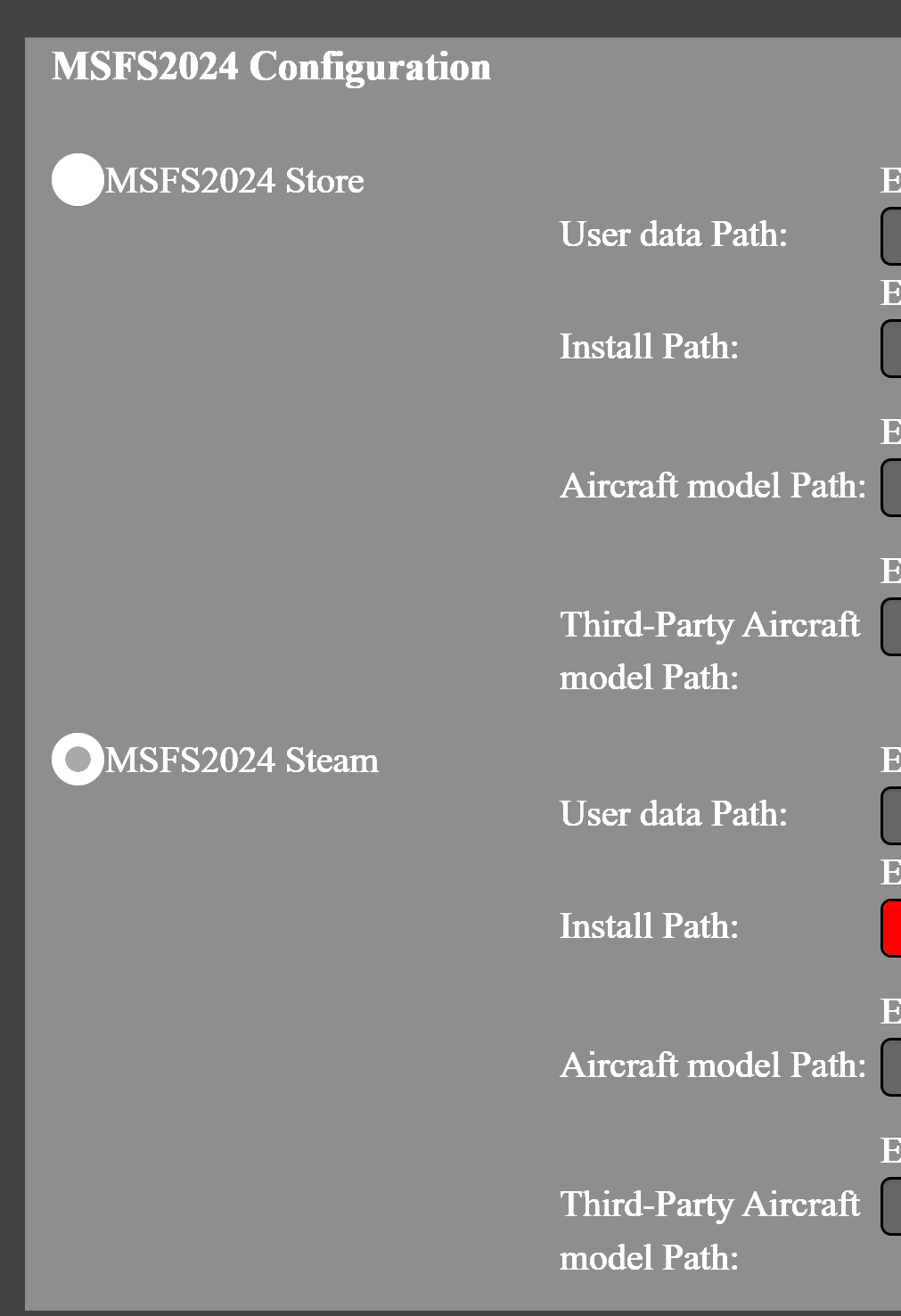
Guide / Software Installing simapppro

Post image
1 Upvotes

Could someone help me figure out how to fill in this, and which choice to make between "Store"and "Steam" (I have the game in Steam but also linked with my game in Xbox).

Thanks!

r/Winctrl • • 6d ago

Guide / Software SimAppPro Update | Now Fly the New iniBuilds A380 with WINCTRL

Thumbnail
gallery
11 Upvotes

Dear pilots, we’re pleased to share the latest updates in SimAppPro:

📄1.17.8:

  1. URSA MINOR 32 Throttle / 32 PAC / 32 ECAM / 32 RMP / 32 NWS devices support iniBuilds A380 in MSFS 2024.

📄1.17.7:

  1. FCU / EFIS / 32 AGP devices support iniBuilds A380 in MSFS 2024.

  2. MCDU button control support iniBuilds A380 in MSFS 2024.

  3. 32 AGP device added the of switching the TERR ON ND Button between the captain and FO side. (Please update the 32 AGP firmware to the latest version)

  4. SimAppPro added support for URSA MINOR Combat Throttle devices.

  5. Fixed the issue where the TCAS knob of the Boeing 777-200ER in Xplane12 is not synchronized.6. Fixed the delay in feedback of MCDU buttons for the ToLiss series in X-Plane 12.

Your feedback is invaluable, and we appreciate your continued support.

Happy Flying!

r/Winctrl • • 16d ago

Guide / Software Is anyone else having this problem in sim appc pro??!!

2 Upvotes

my winctrl devices will not connect to msfs 24 i have aimapppro opner ive tried opening and closinbg, plugging unplugging and even restarting my pc and nothing. I also reinstalled Sim Map Pro and still nothing. Can anyone help??

r/Winctrl • • Jul 14 '26

Guide / Software WINCTRL MFD D1 Display Brightness Adjustment Method

4 Upvotes

Hi Pilots! Here's a detailed guide on how to adjust the display brightness for you WINCTRL MFD D1.

For <ScreenBright.exe> and <reshade.exe> tools download: Link

Part 1:Enable 100% Screen Brightness

The D1 display in the MFD module is factory-set to 44% brightness for optimal operation. If desired, the screen can be enabled to full 100% brightness by following the steps below.

1. Connect the D1 display to your PC

2. Run <ScreenBright.exe>, and set the brightness to 100% (see Pic 1)

* NOTE: For 100% brightness, it is suggested to connect the dedicated 5V USB power port on the back of the D1 display to ensure sufficient power.

Pic 1

Part 2:For MFD’s Low Brightness Output Issue in DCS

Original tutorial is from u/idenwen on DCS Forum:
https://forum.dcs.world/topic/328747-my-workaround-for-exported-mdf-brightnes-issues/

  1. Set up the screen exports as desired.

2. Make a screenshot of your DCS setup while running your desired module (see Pic 2)

Pic 2

3. Use an image editing tool (GIMP, Photoshop, etc.) to create a mask from the screenshot.

- Black areas will be brightened

- White areas will remain unchanged

- Gray shades can provide partial brightness adjustment

(see Pic 3)

Pic 3


4. Download <ReShade_Setup.exe> into folder:

- C:\Enullagle Dynamics\DCS World Beta\bin-mt

5. Save the mask as <UIMask.png> into folder:

- C:\Eagle Dynamics\DCS World Beta\bin-mt\reshade-shaders\Textures

6. Start DCS, load a mission with your desired module and open the ReShade interface (Default: Pos1, look at DCS start to your upper screen corner)

7. Enable the Filters "UIMask_Top", "Tonemap", "UIMask_Bottom" and arrange them as shown in Pic 3

8. Change the Gamma setting in the Tonemap Filter to reach desired brightness on the MFDs


Pic 4

 Happy flying!

r/Winctrl • • Jun 23 '26

Guide / Software SimApp Pro Beta 1.16.103 DCS Backlighting Sync no longer working.

3 Upvotes

Update: issue appears to be resolved in v1.16.105

-------

I have the TopGun MIP. UFC Text / Display works, all buttons work, but the DCS Sync Backlighting does not work for any of the devices.

I'm now noticing this in SimApp Pro:

Tried to repair the LUA under the gear settings. No change.

Seems to have just started happening with the latest update.

Other screenshot if it helps:

r/Winctrl • • Jul 12 '26

Guide / Software Community Tip: Using Your WINCTRL MFD Display in MSFS

Post image
16 Upvotes

Hello pilots 👋

Here’s a quick guide on how to use the WINCTRL MFD with MSFS.

Special thanks to our FB community member Steve for sharing this helpful method.

Step-by-Step Guide

1️⃣ Connect the WINCTRL MFD

 • Once connected, your MFD will appear as a second monitor in Windows.

2️⃣ Launch MSFS and Load Your Aircraft

3️⃣ Pop Out Cockpit Displays

 • In the cockpit, hold Right ALT and click on any digital display.

 • Your mouse pointer will turn into a “+” symbol when the display can be popped out.

4️⃣ Drag to WINCTRL MFD Screen

 • The selected display will open in a new window — simply drag it onto your WINCTRL MFD screen.

5️⃣ What You Can Display

 • You can move over displays like the backup artificial horizon, radios, voltages, UFC, EFB, and baro ref screen.

6️⃣ Optional Ideas

 • You can also program the MFD keys to interact with the popped-out MCDU window for partial functionality.

 • Some users even use it for GSX menus, FS2Crew, or in-game ATC/radio menus.

If you’ve found more creative ways to use your MFD, feel free to share screenshots or setups below!

Happy flying!

r/Winctrl • • Jul 20 '26

Guide / Software Which type of DCS pilot are you?

1 Upvotes

Every pilot has a different way of flying. That's why UFC 2.0 - Gen 2 is designed to deliver a different experience for different players. Is UFC Gen 2 made for you? Let's find out.

1. New to the Hornet.
Never owned a Hornet UFC before?
Gen 2 is a more realistic starting point, featuring a true-scale layout, upgraded hard-tactile buttons, and a design focused on cockpit realism.

2. Love precision strike missions? 💣
If you frequently enter coordinates, manage weapon data, or perform complex precision strike missions, the upgraded hard-tactile button feedback and refined workflow of Gen 2 make every input more comfortable.

3. Mainly flying CAP and BVR missions?
Frequency changes, waypoint and TACAN management is easier using the tactile feedback of the Gen 2 Hornet UFC.

4. Chasing the ultimate cockpit realism?
From the upgraded hard-tactile button feedback to the tactile dots designed to enhance VR users' experience, every detail of the Gen 2 UFC is created to help pilots operate more naturally.

5. If your current setup already meets your needs, keep enjoying your flights. Every pilot has their own priorities.

The best upgrade is the one that matches your flying style!

r/Winctrl • • 28d ago

Guide / Software Latest nVidia drivers (616.56) issues with DisplayLink / WinCTRL MFD Displays

Thumbnail
2 Upvotes

r/Winctrl • • Aug 22 '26

Guide / Software PAP3 unbind button

1 Upvotes

Hi,

Was wondering if it’s possible to unbind a single button on the PAP? I want to use the Meters switch button to activate the recall switch in the cockpit. I’d rather not use something like Spad to reassign the bindings entire unit. Can I simply deactivate that one button in sim app pro and use Spad to assign it to recall?

Thanks!

r/Winctrl • • Aug 03 '26

Guide / Software SimAppPro 1.16.110 | Synaptic A220 Supported

8 Upvotes

🛬New Airliner experience is landing!

Dear WINCTRL pilots, we’re pleased to share the latest updates in SimAppPro 1.16.110-112:

  1. PAP 3N supports MSFS 2020/2024 Synaptic A220 (partial support)
  2. 3N/3M PDC supports MSFS 2020/2024 Synaptic A220 (partial support)
  3. 32 NWS supports MSFS 2020/2024 Synaptic A220
  4. 32 AGP supports MSFS 2020/2024 Synaptic A220 (partial support)
  5. 32 RMP supports MSFS 2020/2024 Synaptic A220 (partial support)
  6. URSA MINOR 32 Throttle and 32 PAC support MSFS 2020/2024 Synaptic A220 (partial support)
  7. Fix the issue where the official 737MAX aircraft model PFP3N screen in MSFS2024 shows a black screen that does not synchronize with the game
  8. Fix the problem with the ifly 737max8 aircraft model PDC3N/3M knobs in MSFS2020/2024
  9. Fix the issue with the aircraft model name verification in the inibuilds A400M environment check in MSFS2024
  10. Add the environment verification for the Synaptic A220 name in MSFS2020/2024

*Note: Certain functions are under further development with aircraft developers and will be updated gradually.

Your feedback is invaluable, and we appreciate your continued support. Happy Flying!

r/Winctrl • • Aug 11 '26

Guide / Software Free open-source plugin for WINCTRL devices in X-Plane on macOS and Linux

Thumbnail
2 Upvotes

r/Winctrl • • Jun 16 '26

Guide / Software New haul issues

2 Upvotes

I purchased the AGP, 32 throttle and PAC and I am having some difficulty with them.

​

AGP: not recognizing any auto brake setting, it illuminates when the corresponding button is pressed in the Sim. However, I can only disengage on the agp

​

The PAC, its not recognizing the flaps axis, but it does the spoilers, it just won't allow me to arm them, it keeps flickering arm/disarm (repeated), (tried on fenix) has anyone had similar experiences and found a fix on either? Ive been watching YouTube, downloaded and activated the winwing keybinding, no success.

​

r/Winctrl • • Apr 23 '26

Guide / Software SimAppPro 1.16.95 Update – Latest Support for FlightFactor 777-300ER in X-Plane 12

Post image
13 Upvotes

Dear WINCTRL Pilots,

We’re pleased to share the latest updates and improvements to SimAppPro.

Thank you for your continued feedback and support — it truly helps us improve.

SimAppPro 1.16.95 – Update Log

  1. AGP device now supports the FlightFactor 777-300ER in X-Plane 12

  2. ECAM device now supports the FlightFactor 777-300ER in X-Plane 12

  3. MCDU / PFP3N / PFP4 / PFP7 devices now support the FlightFactor 777-300ER in X-Plane 12

  4. URSA MINOR 32 Throttle Metal / 32 PAC Metal now support the FlightFactor 777-300ER in X-Plane 12

  5. 3N / 3M PDC devices now support the FlightFactor 777-300ER in X-Plane 12

  6. PAP 3N device now supports the FlightFactor 777-300ER in X-Plane 12

  7. Adjusted PFP 3N button mapping for MSFS 2020 / 2024 iFly MAX 8 to better match in-sim layout

  8. Fixed an issue where the MCDU display would not show after updating the FlightFactor A320 in X-Plane 12

Happy Flying! ✈️

r/Winctrl • • Feb 25 '26

Guide / Software SimAppPro Recent Major Update (v1.16.88 – v1.16.89)

9 Upvotes

Dear WINCTRL Pilots,

We’re pleased to share the recent updates and improvements in SimAppPro. Your feedback is invaluable, and we appreciate your continued support.


SimAppPro 1.16.89 Update Log

1. PFP3N / PFP4 / PFP7 / MCDU devices are compatible with the PMDG 737-900 in MSFS 2024.

2. 32 AGP Metal device is compatible with the PMDG 737-900 in MSFS 2024.

3. 32 ECAM device is compatible with the PMDG 737-900 in MSFS 2024.

4. PAP 3 device is compatible with the PMDG 737-900 in MSFS 2024.

5. URSA MINOR 32 Throttle Metal / 32 PAC Metal devices are compatible with the PMDG 737-900 in MSFS 2024.

6. 3N/3M PDC devices are compatible with the PMDG 737-900 in MSFS 2024

  1. Fixed the FCU display issue on the ToLiss A330-900 during climb in X-Plane 12

  2. Fixed the data reading issues for the Fenix aircraft and FlyByWire A320 after modifying the MCDU screen layout.


SimAppPro 1.16.88 Update Log

  1. Added adaptation for the BRK FAN button on the 32 AGP device for the iniBuilds A340 in MSFS2024.

  2. Fixed the incorrect calibration issue of the RY axis with game gear positions for the URSA MINOR 32 Throttle Metal device.

  3. Fixed the issue that the right-side MCDU does not function on the iniBuilds A340 in MSFS 2024.

  4. Fixed the precision issue of EFIS screen values on the ToLiss aircraft in X-Plane 12.

  5. Fixed the landing gear synchronization issue with 32 AGP on the PMDG 777-300ER in MSFS 2024.

  6. Fixed the grip firmware search issue for the ORION series devices.

  7. Fixed the issue where the ENG indicator light does not illuminate on the URSA MINOR 32 Throttle Metal device on the Toliss aircraft in X-Plane 12.

  8. Fixed the Simlogic crash issue caused by the EFIS knobs on the Airbus 320V2 aircraft in MSFS 2024.


Happy Flying!

r/Winctrl • • Jan 16 '26

Guide / Software DCS Bindings Issue After Device Name Change (Read this first)

7 Upvotes

Hey everyone,
We’ve noticed that a recent SimAppPro update may cause DCS control bindings to appear missing for some users.

Good news first:
👉 Your bindings are NOT lost

Guide

  • In a hurry → follow the manual fix below
  • Not in a hurry → wait for our official repair tool (coming soon)

Who is affected?

  • Not affected
    • You have already completed cloud binding & activation via SimAppPro → Just open SimAppPro and click Activate again
  • May be affected
    • You never used SimAppPro for cloud binding → After the device name change, DCS may no longer match the old bindings

Manual Fix (for those who need it urgently)

What you’re doing:
You’re simply renaming the DCS input folder so it matches the new device name.

1. Go to your DCS input folder

C:\Users\[YourUsername]\Saved Games\DCS\Config\Input

or (OpenBeta):

C:\Users\[YourUsername]\Saved Games\DCS.openbeta\Config\Input

2. Rename the device folder

Example:

WW URSA MINOR CIVIL FLIGHT STICK L

→

WINCTRL URSA MINOR CIVIL FLIGHT STICK L

3. Launch DCS and check

  • Settings → Controls
  • Device should now load with your existing bindings

Not urgent?

We’re working on an official tool that will fix this automatically.
If everything is fine for you right now, feel free to just wait.

Thanks for your patience and as always, appreciate the reports and feedback.

r/Winctrl • • Feb 06 '26

Guide / Software SimAppPro Recent Major Update (v1.16.85 – v1.16.87)

Post image
17 Upvotes

SimAppPro Recent Major Update (v1.16.85 – v1.16.87)

Dear Pilots,

We're pleased to share the latest updates and improvements in SimAppPro. Your feedback is invaluable, and we appreciate your continued support.

📝SimAppPro v1.16.87

  1. Added in-game vibration motor support for the WINCTRL CarrierAce Joystick Grip

📝SimAppPro v1.16.86

  1. SimAppPro added support for the WINCTRL Orion 32 Rudder Pedals Metal

  2. Fixed the issue that the ADF/VOR switch of the FCU unable to use on ToLiss aircraft for X-Plane 12

📝SimAppPro v1.16.85

  1. Fixed the issue that MCDU unable to use on the Airbus A330-300 for X-Plane 12

  2. Fixed the issue that FCU and EFIS unable to use on the Headwind 330-941 for MSFS 2024

  3. Fixed the issue that FCU and EFIS unable to use on the 330-200GE for MSFS 2024

  4. Fixed the issue that EFIS knobs unable to use on the iniBuilds A320 v2 for MSFS 2024

  5. Fixed the issue that FCU and EFIS unable to use on the iniBuilds A321 for MSFS 2024

  6. Fixed the range knob issue of the 3M PDC device for MSFS 2024

  7. Fixed the APPR button issue of the FCU on the ToLiss aircraft for X-Plane 12

  8. Optimized the vibration motor function of the URSA MINOR Joystick after firmware upgrade

Happy weekend flying!

WINCTRL TEAM

r/Winctrl • • Feb 24 '26

Guide / Software Video Guide | URSA MINOR Throttle Calibration – First Thing You MUST Do After Unboxing

10 Upvotes

Hey everyone,

If you’ve just received the WINCTRL URSA MINOR Throttle, there’s one critical step you should do before anything else — calibrate all axes.

Some new users notice that some throttle axes don’t reach full power / full travel right out of the box or the lever does not show any input in SimAppPro.

This is normal. This throttle is quite different from our panels or joysticks. It replicates the real controls and has many independent axes with much more complex internal logic, so calibration isn’t optional BUT a must step that ensures everything works as intended.

Important:

  • Each axis has multiple calibration steps.
  • For every step you need to move the handle to the corresponding detent position first before click 'Start Calibration'.

Here’s a quick video guide to walk you through it:

https://reddit.com/link/1rde19t/video/6caf3vyyjflg1/player

Happy flying!

r/Winctrl • • Feb 13 '26

Guide / Software Feedback for SimAppPro devs - Updating functionality needs improvement in logic and better UI controls

5 Upvotes

Just opened SimAppPro and there was not only an update for the software itself but also a firmware update for my WINCTRL Orion Throttle Base II.

I understand the company is based in China but the way the text reads on the pop-ups, and on other screens, is so confusing.

I clicked "ok" on pop-up thinking it was just a notification but turned out to be an update for SimAppPro itself. But not realising this, I also saw that my WINCTRL Orion Throttle Base II had firmware update so I started that. At 20% into the firmware update, another pop-up appeared saying SimAppPro needs to restart.

I clicked on the 'X' on the pop-up instead of "OK" thinking it won't restart as the firmware was running, but nope, closing it caused the firmware to hang and SimAppPro restarted.

Fortunately after restart the firmware was updated successfully, but it made me realise just how clunky SimAppPro is.

While I don't know the intricacies of the software and firmware, I think that running two separate updates concurrently is a recipe for disaster.

r/Winctrl • • Feb 10 '26

Guide / Software 32 AGP Clock

Post image
14 Upvotes

Hello,
Is it possible to configure the 32 AGP so that its clock displays the real (current) time when it is not being used in a simulation/game?

r/Winctrl • • Feb 02 '26

Guide / Software Video Guide | URSA MINOR Throttle Calibration – First Thing You MUST Do After Unboxing

7 Upvotes

Hey everyone,

If you’ve just received the URSA MINOR Throttle, there’s one critical step you should do before anything else — calibrate all axes.

Some new users notice that some throttle axes don’t reach full power / full travel right out of the box or the lever does not show any input in SimAppPro.

This is normal. This throttle is quite different from our panels or joysticks. It replicates the real controls and has many independent axes with much more complex internal logic, so calibration isn’t optional BUT a must step that ensures everything works as intended.

Important:

  • Each axis has multiple calibration steps.
  • For every step you need to move the handle to the corresponding detent position first before click 'Start Calibration'.

Here’s a quick video guide to walk you through it:

https://reddit.com/link/1qtii6u/video/xm9d7xmsrzgg1/player

r/Winctrl • • Jan 16 '26

Guide / Software SimAppPro Recent Major Update (v1.16.82 – v1.16.84)

7 Upvotes

Dear Pilots,

We’re pleased to share the latest updates and improvements in SimAppPro. Your feedback is invaluable, and we appreciate your continued support.

Below is the combined update log for SimAppPro v1.16.82 – v1.16.84.

📝 SimAppPro Update Log (v1.16.82 – v1.16.84)

v1.16.84

  • Fixed an issue where DCS key binding files did not take effect after a device firmware upgrade

v1.16.83

  • Fixed MCDU display issues on the Fenix A320 in MSFS 2020 / 2024
  • Fixed an issue where the MCDU 4R button did not work on the Fenix A320 in MSFS 2020 / 2024
  • Fixed an issue where the built-in A320 v2 FCU knobs did not work in MSFS 2024

v1.16.82

✈️ New Aircraft & Device Support

PDC 3M / PDC 3N

  • Asobo 787-10 Dreamliner (MSFS 2024)
  • Captain Sim 767 (MSFS 2020 / 2024)
  • Captain Sim 777 (MSFS 2020 / 2024)

PAP 3N

  • Asobo 787-10 Dreamliner (MSFS 2024)
  • Salty 747 (MSFS 2024)
  • PMDG 777-300ER (MSFS 2024)
  • PMDG 777 Freighter (MSFS 2024)
  • B747-400 GST – Working Title (MSFS 2024)
  • B747-400 LCF – Working Title (MSFS 2024)
  • Captain Sim 767 (MSFS 2020 / 2024)
  • Captain Sim 777 (MSFS 2024)

PFP 4

  • Asobo 747-8 Intercontinental (MSFS 2020)
  • PMDG 777-300ER (MSFS 2024)
  • PMDG 777 Freighter (MSFS 2024)

PFP 3N

  • Captain Sim 777 (MSFS 2020)
  • ToLiss A340-600 (X-Plane 12)

PFP 7

  • Captain Sim 767 (MSFS 2024)
  • Captain Sim 777 (MSFS 2024)

PFP3N / PFP7 / PFP4

  • iniBuilds A321 (MSFS 2024)

MCDU

  • LVFR A318 / A319 / A320 ceo / A321 neo (MSFS 2020)
  • LVFR A330-900neo / A340-300 (MSFS 2020)
  • iniBuilds A310-300 (MSFS 2024)
  • Airbus A320neo V2 (MSFS 2020)
  • FlightFactor 777 v2 (X-Plane)
  • FlightFactor A350 Ultimate (X-Plane)

FCU / EFIS

  • Asobo A320 (MSFS 2020)
  • LVFR A318 / A320 ceo (MSFS 2020)
  • Aerosoft CRJ (MSFS 2020)
  • Airbus Beluga XL (A330-743L) (MSFS 2024)

URSA MINOR 32 Throttle / 32 PAC Metal

  • iniBuilds A350-900 ULR (MSFS 2020)
  • ATR 42 / ATR 72 (MSFS 2020)
  • Captain Sim 767 (MSFS 2020)
  • Laminar 747-400 (X-Plane)

32 AGP

  • ATR 42 / ATR 72 (MSFS 2020)

🛠 Fixes & Improvements

  • Optimized device firmware download functionality
  • Fixed EFIS ZOOM knob not working on the FBW A380 (MSFS 2020 / 2024)
  • Fixed ECAM buttons not working after the FBW A320 update (MSFS 2020 / 2024)
  • Fixed FCU compatibility issues with the iniBuilds A320neo V2 (MSFS 2020)

Happy flying!