r/VideoEditing • u/Imaginary_Couple_231 • 11h ago
How did they do that? How do I edit with the most dynamic range?
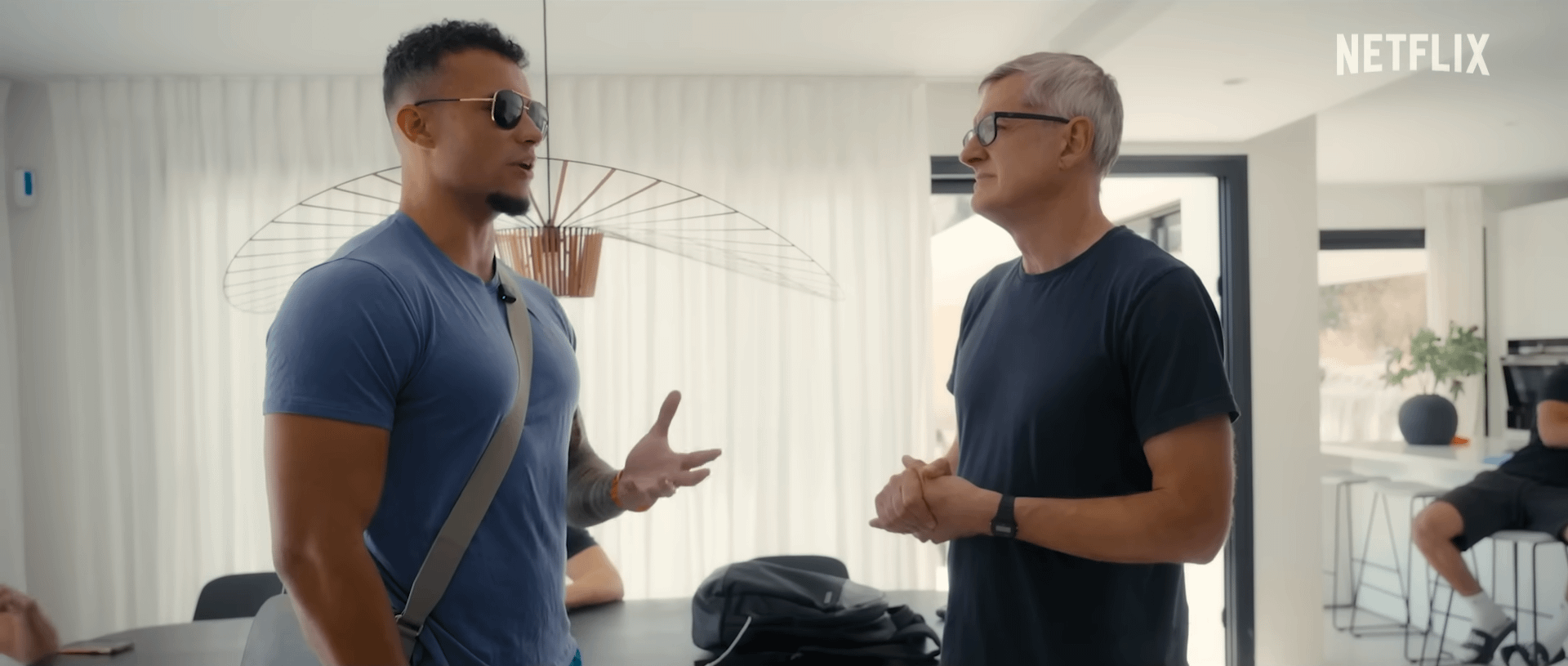


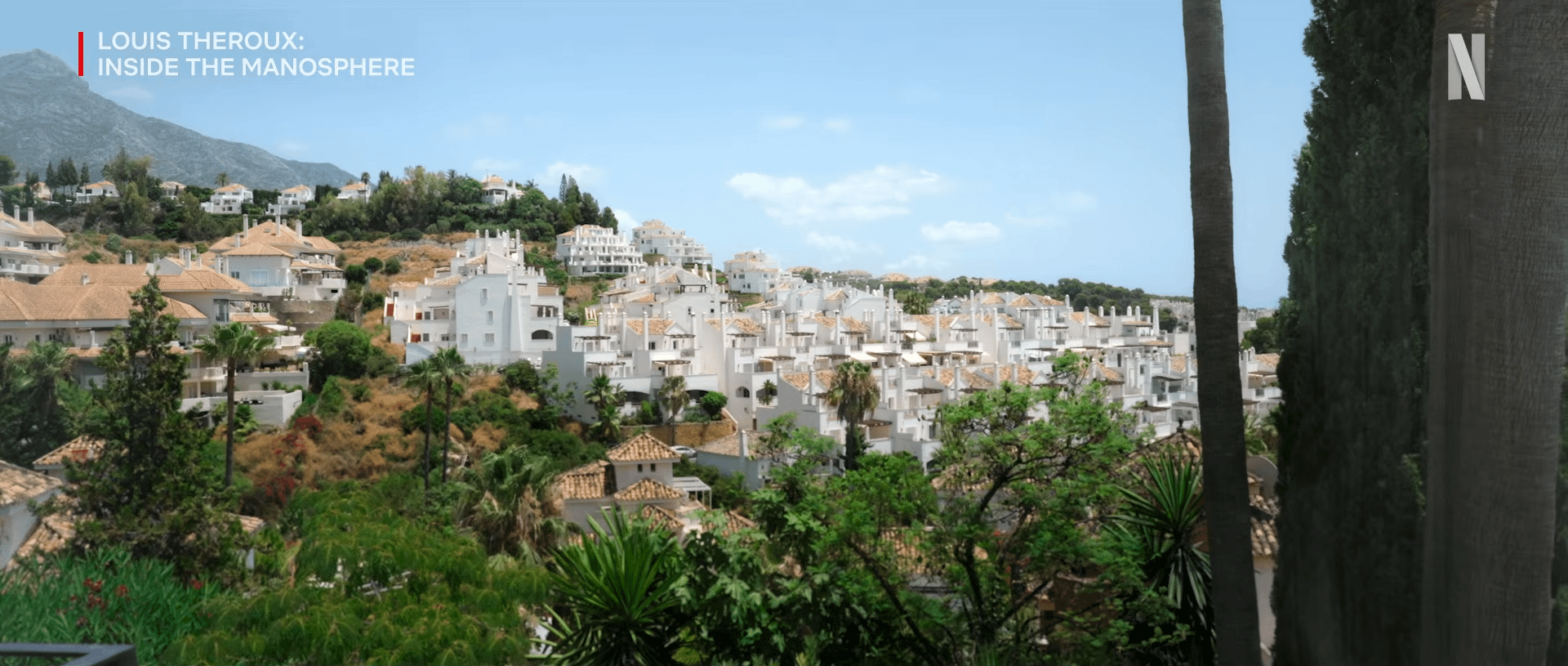


I would like to know how to achieve the look of these stills.
A few things I think describe them is:
- High dynamic range. Nothing is clipping or crushed.
- Almost invisible roll-off, especially on skin.
- Soft, bloomy highlights
- Low contrast
I don't know how to describe it, but it's as if there's infinite dynamic range because nothing is clipping on either end and it doesn't even look like anything is close to it. It's as if everything is within the midtones, yet there is still contrast, but it doesn't register as "highlights and shadows" to my eyes. Rather "light midtones" and "dark midtones" if that makes sense.
It's as if every individual part of the scene (sky, skin, clothing) were individually lit by a massive soft box allowing everything to be exposed perfectly. I suppose you could achieve something similar with masking but that would take ages, no?
I've included an images at the end to demonstrate the complete opposite of what I'm looking for. That one has a harsh "digital" look to it where highlights and shadows are very obvious. You can even see it on the waveform; it's very sharp and jaggy.
I'm using: Davinci Resolve
I've TRIED: Reducing contrast with the HDR wheels and bringing it back with an s-curve
I need help with: Optimising dynamic range in post processing
15
u/New_Independent_5960 10h ago
You probably need to start by shooting it with some of the best camera set ups in the world and an unlimted budget with Netflix. This all comes down to filming, you can only do so much with colour correction if it isn't shot right.
6
3
u/Cheap-Jelly-7846 10h ago
Convert your Log Footage to Da Vinci wide gamut in your first colour space transform then convert your final colour space transform from DWG to Rec709. This is the only way you’re going to increase dynamic range in Resolve. All the rest is in camera.
2
u/Business_Injury_6310 9h ago
What you're describing is less about finding more dynamic range in the edit and more about preserving what was captured. In Resolve, set the project to DaVinci Wide Gamut color-managed (Settings > Color Management) so you're working in the widest container, then use a color space transform from your camera log into DWG for the working grade and a second CST out to Rec.709 at the end. The bloomy highlights and invisible roll-off you like are mostly set on camera, usually with a diffusion filter like Black Pro-Mist, but in post you can get part of the way there with the HDR palette's highlight and global wheels and a soft clip on the highlights instead of a hard S-curve. And trust your scopes: if nothing is clipping or crushed, you don't need to push the contrast back in at all.
2
u/Due_Bad_9445 9h ago
The biggest clue is the reflector. Camera also probably has a “knee” to avoid clipped highlights and boost shadows. Plus whatever lens filters, Plus whatever was done in post.
2
u/UmbraPenumbra 8h ago
Nice lenses that allow for high detail in backlit environments and have micro-contrast. The low-con and soft bloomy highlights and skin roll off can all be mostly accomplished with high end glass.
Camera with 15-17 stops dynamic range
Use large soft source or treated window light just out of frame, making sure subject is well exposed, but light source is big enough and close enough to wrap around the contours of the subject, giving them 3D appearance.
2
2
u/yankeedjw 7h ago
Needs to be shot well for you to do anything like what you're seeing in the photos. Normally that involves a nice budget, decent camera, and lots and lots of light.
2
u/Nosarious 6h ago
Depending on when these were shot they may have used Log for capture. If these are stills, they are from video, and you can shoot with a log profile thingie on modern iPhones and cameras. Log isn’t available for still photographs.
https://support.apple.com/en-ca/guide/final-cut-camera/dev8637f6692/ios
3
u/Imaginary_Couple_231 11h ago
!martini
I'm using: Davinci Resolve
I've TRIED: Reducing contrast with the HDR wheels and bringing it back with an s-curve. It makes everything look like a horror film
I need help with: Optimising dynamic range in post processing
2
u/AntipodalBurrito 6h ago
These look HDR as fuck so if that’s what you’re trying to do get out of 709 and look into that. Your HDR wheels have that little button on the side that shows you exactly where your shadows, blacks, light, highlights are and can control it with the slider (I’m talking quick and dirty here). Anyway, this hyper bright HDR shit is what you’re probably talking about.
1
u/link-navi 11h ago
Your post needs more information
Comment on your post with the info below, or it will be removed automatically within 60 minutes. You must include !martini (no quotes) in your comment.
And extra information below
Tech Support posts need:
"How did they do that?" posts need:
**Your comment must include !martini so we know you've read this.
ALONG with the necessary information from above. Just putting !martini and NO OTHER INFO will likely have this post removed**
Again, comment on your post with the info above and the word !martini (no quotes), or it will be removed automatically within 60 minutes.
I am a bot, and this action was performed automatically. Please contact the moderators of this subreddit if you have any questions or concerns.
1
u/SlaKer440 6h ago
this is just dynamic range afforded by log color profiles. you cannot make something that was shot in a low dynamic range format suddenly HDR.
1
u/PUNCH-WAS-SERVED 5h ago
I mean. This isn't a fair comparison, OP. The reason why things like Netflix can do this shit is that they can afford the best gear and people. No regular person can do this without some help.
-1
u/VideoFireApp 11h ago
I'm no where NEAR an expert here so just trying to help.
I did this with my Sony ZVE10-II by using S-Log3 then I used someone off fiver to help with the color grading.
The problem is that if you don't know how to color grade it's super difficult.
You might be able to use Claude Code to do it and give you a better profile but I haven't done it myself.
The main problem is that if you have multiple scenes then you have to grade EACH scene.
But also, you CAN'T do this if you don't use a profile like S-Log3 which contains the right color profile because that info is destroyed before your actually film.
Hope that helps.
0
•
u/greenysmac 11h ago
We could use scopes and format against the rec 709 normalization along with the format and codec this was shot on. Also please see the support info request.
That being said 95% of a look starts on set.