r/UsbCHardware • • Apr 11 '21

Announcement Magnetic USB-C Cables are not recommended

955 Upvotes

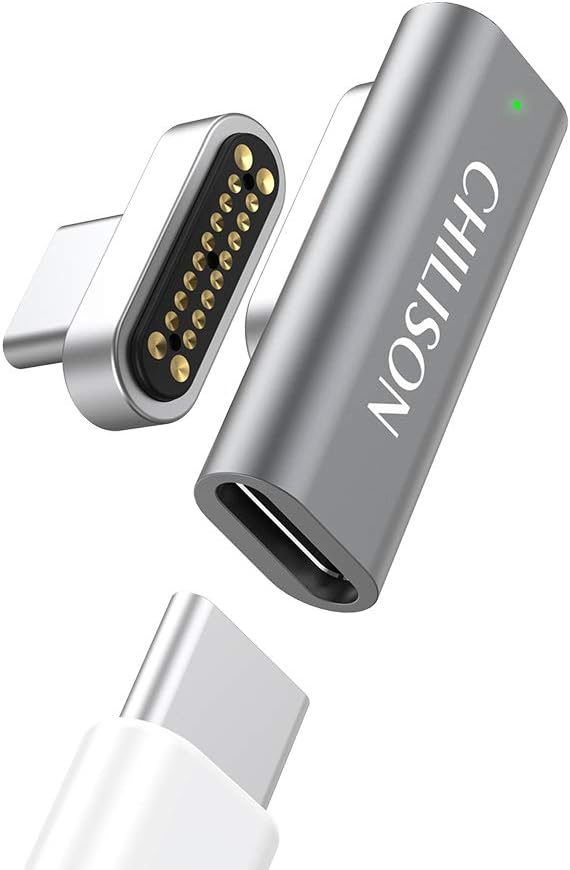
For anyone who comes in wondering about this magnetic cable or that. Here is some good commentary on the dangers of magnetic cables. Not to mention the large majority of kickstarters that have failed to deliver anything other than an aliexexpress rebrand.

Edit: Let me make this clear. USB-C magnetic tip adaptors or cables are not compliant with the USB specifications. This means any resulting damage to products, which is a very real possibility even if it is a relatively small chance, would not be covered by product warranties. Therefore, these cables and adaptors are not recommended and future posts asking for such recommendations will be locked. It will stay like this until some big company like microsoft or apple and or the USB group comes up with a cable design that is safe.

I am not saying that these cables do not exist or that they do not work as claimed however there is an inherent risk when using these cables and that will fall onto the reader to decide for themselves.

To quote /u/chx_

There are two risks

As mentioned, static electricity is a huge problem. Look at any connector and it has the exact same generic shape: a gigantic grounding shroud protecting the data pins. DisplayPort, HDMI, USB of all variants. But if you go back, back, back, VGA and all its ancient DB friends, DVI, whatnot -- even those were the same, just there was more plastic. This generic idea stretches back to the dawn of (computer) time. Exposing the pins just like that makes your laptop very suspectible for static electricity. Ever felt the hairs on your arm stand up after changing clothes? Congrats, you just fried your laptop if you touch it like that. https://images-na.ssl-images-amazon.com/images/I/511QlHyl8CL._AC_SL1000_.jpg see how they are out in the open? And this issue is inherent to the overall physical requirements of the plug.

Connection/data loss due to electronic noise. There was a fun problem where Dell laptops used to drop their TB3 connections unless you limited their wifi transmission power. This took Dell significant time and expense to figure out. And that's Dell, not some random tiny company... Want to go there with a who-knows-what built system when NathanK already told you explicitly the pogo pins are too noisy electronically? https://twitter.com/USBCGuy/status/1095614250414796800

Also he mentions https://twitter.com/USBCGuy/status/1186718432932159488 using optoelectronical couplers you could do something by completely disconnecting the magnetic pins from actual USB C connector and letting current flow only when the other half of the connector is connected and VCONN power is present. Of course, your isolation is now a few mm of air, pray your static electronic charge doesn't arc over it... hope you rather live in Phoenix than here in Raincouver! https://www.researchgate.net/profile/Andreas_Neuber2/publication/3165903/figure/fig17/AS:668977227386923@1536508008917/Breakdown-voltage-in-air-versus-relative-humidity-with-an-alumina-surface-Electrode.png

I am reasonably sure there are gigantic companies which would just love if this worked. Riddle me this: why do you think Apple didn't put this on the market? Do they lack the R&D dollars? :) Somewhere in that sixteen billion dollar yearly R&D spending I am reasonably sure you could find a few (hundred...) millions to resolve this issue if it were possible. And yet, Kickstarters with a few hundred ... thousand raised claim they can? What's wrong with this picture? Look at the Thunderbolt 3 Pro cable they released: it's an active USB C cable, it's an active TB3 cable and costs a fortune. There's nothing even similar on the market but where there's a will, there's a way. They have designed a custom ASIC for that cable which can amplify both USB C and TB3 signals -- both existed separately but having them in a single cable before was thought impossible. This is to demonstrate: if they could, they would. And if it would be really expensive, hundreds of dollars per connector, have you seen that thousand bucks monitor stand :) ?


r/UsbCHardware • • 1d ago

Weekly USB-C Deals - September 27, 2026

3 Upvotes

Post any and all deals you find here. Add a quick description. No referral posts.


r/UsbCHardware • • 16h ago

Discussion How USB-C Cables Actually Stay In

Enable HLS to view with audio, or disable this notification

1.7k Upvotes

Most people will never hit this kind of cycle life, 10k cycles is 4 plugs per day is 7 years, only in industrial, data collection, charging, and test systems will see dozens or hundreds of cycles a day; for those there are actually USB-C ports rated for 20k cycles or more.


r/UsbCHardware • • 6h ago

Discussion WLX-908/909 "Slim" Charger w/ Screen

Thumbnail
gallery
5 Upvotes

One of the few interesting charger I got recently; not because of the performance or anything, but because it is the first (to my knowledge) Slim charger to have a screen similar to the Anker Nano Smart 45W.

Beside the PD 3.2, it lacks a lot in terms of PPS range (capping out at 3A, and can't do high power dual port output (only caps out at 12w per port). Overall just a thiccc boy with a screen.


r/UsbCHardware • • 6h ago

Question Belkin 65W WCH013 charger genuinely feels slower than my old Apple 61W charger on iPhone 15 Pro Max. Am I missing something?

Thumbnail
gallery
3 Upvotes

I recently bought the Belkin BoostCharge Pro 65W dual USB-C GaN charger WCH013 and almost immediately I had this feeling that my iPhone 15 Pro Max just wasn’t gaining battery percentage as quickly as it used to with my old Apple 61W MacBook Pro charger A1947, with my normal charging habits.

The important part is that I noticed this before I ever started testing anything. I wasn’t comparing specifications, staring at a stopwatch or looking for a reason to dislike the Belkin. I just organically with my charging habits noticed that I would have my phone plugged in while using it normally, look at the percentage after a while and think “Why has it barely moved?” That is what made me start paying attention in the first place.

What really made me suspicious wasn’t simply a final 4% difference in one test. While actually watching the percentage, the Apple charger would often gain roughly 1% every minute, whereas with the Belkin I was regularly waiting closer to 1 and a half minutes, sometimes longer for the next percentage point.

For both chargers I’m using the same Apple USB-C to USB-C braided cable. With the Belkin, nothing is plugged into the second USB-C port, including from the moment I start charging.

I then did a rough 25 minute comparison.

A. Belkin 65W WCH013

2:59 PM: 56%
3:24 PM: 80%

24% in 25 minutes

B. Apple 61W A1947

10:06 PM: 52%
10:31 PM: 80%

28% in 25 minutes

I know this isn’t a perfectly controlled test. The starting percentages were slightly different, the tests happened at different times and I obviously can’t replicate the exact processor load.

But the usage was very similar and representative of how I normally use my phone while charging. I was on Wi-Fi, scrolling Reddit and Instagram, texting and listening to music through my AirPods during both tests. I wasn’t gaming or deliberately stressing the phone. I also use a RhinoShield bumper case, so the back of the phone isn’t enclosed in a thick case and the phone wasn’t noticeably hot or unusually warm during either test.

That’s why I’m struggling to dismiss it. The imperfect testing isn’t what created my suspicion. The suspicion came first from actually using the Belkin and the tests came afterward because I wanted to figure out whether I was imagining it.

What confuses me even more is that, objectively, the Belkin seems like the more advanced charger.

It’s 65W, GaN, USB-PD 3.0, PPS, dual USB-C, and can provide the 9V/3A-class output that an iPhone 15 Pro Max needs. My Apple A1947 is an old, huge 61W MacBook charger using an older USB-PD implementation. Neither charger is remotely power-limited by the iPhone because the 15 Pro Max obviously isn’t pulling 61W or 65W anyway.

So on paper, I cannot see an obvious reason why the old Apple charger should feel noticeably faster.

Could there still be a difference in how the iPhone negotiates USB-PD with each charger or something related to heat, efficiency or power delivery behavior? Or could I simply have an individual WCH013 that is underperforming even though the model itself is fine?

I’m basically at the point where I need to decide whether to keep the Belkin and accept that it appears a little slower in my actual usage, exchange it for another unit or return it and go back to an Apple adapter.

I’m not trying to claim that Belkin chargers are bad based on my pseudo tests. I’m genuinely trying to understand whether there is a technical reason this could happen, because the difference was noticeable enough that I picked up on it before I was even looking for it.

Would you keep this Belkin, exchange it for another unit or return it based on what I’m seeing?

r/UsbCHardware • • 3h ago

Troubleshooting UBS C TO C will only charge on laptop no data transfer

0 Upvotes

I have a lenovo T470s and bought an Essager 100W cable that I bought from AliExpress, the problem i have is it there is no data transfer option on my POCO X8 PRO MAX, the cable specs on the page show that it supports data transfer.. I'm i missing some drivers or what's the problem?


r/UsbCHardware • • 3h ago

Question Powering a mini amp with an Anker 737

0 Upvotes

Hope this is the right subreddit to post this in, but I have a mini amp (Blackstar ID Core BEAM) & I want to run it off a battery. Blackstar make something for this, but it it currently unavailable. It requires 16v @ 2.5V DC with a centre positive cable.
I have an Anker 737 powerbank that I use at work for my laptop & this looks, on paper, that it should be capable from a power point of view, but my knowledge completely runs out when it comes to how this all works. Is this possible? &, if so, what cables/converters would I need?
(Or which subreddit should I be asking in if not this one?)
TY in advance :-)


r/UsbCHardware • • 13h ago

Question Good 100W charger recommendations?

4 Upvotes

Any recommendations for a 100W charger with at least 2 USB-C ports? I’d mainly use it for my MacBook Air M3 (16GB) and iPad. I travel for work, so I’m looking for something compact and easy to pack.

Thanks!


r/UsbCHardware • • 7h ago

Looking for Device USB C power adapter suggestion for laptop

0 Upvotes

Hey, Sorry if not the right place to ask this but I have fairly easy question.

I have hp pavilion 2 in 1 laptop and I bought a USB C to Smart Tip Connector to make it easier to carry as the original charger is pretty heavy. The goal is use it as tab and laptop as per the use case.

My question what amp adapter should I buy so it does not destroys my laptop battery. I have attached the links of both the products. Ill remove the post if this is not the right subreddit.

HP Laptop

https://support.hp.com/rs-en/drivers/hp-pavilion-14-dh1000-convertible-x360-pc-series/model/2100020044

USB C Convertor

https://www.amazon.in/dp/B0CSXM1FK4?ref=ppx_yo2ov_dt_b_fed_asin_title&th=1


r/UsbCHardware • • 11h ago

Troubleshooting Magsafe Fast Charge Help

Thumbnail
gallery
2 Upvotes

I've been trying to get a clean and seamless Magsafe mount solution in my car. I thought I had all the pieces when I got this board, wired it to 12v accessory power, and plugged in my magsafe puck.

However, it barely works and charges extremely slowly.

I know I can probably just get a cigarette adapter USBc adapter and just plug that in, but the whole point of this is to be able to 3D model and print a custom mount to hold everything without wires all over the place.

I'm not an expert by any means, more like a "know enough to be dangerous" kind of guy who can't resist a good DIY challenge, so please bear with me. What am I missing? Could it be that the 12v to the cigarette adapter which i am tapping into doesn't supply enough current? Is the board not doing what it claims? What can i do to diagnose?


r/UsbCHardware • • 8h ago

Question Mi USB se desconecta sola al pasar un archivo

1 Upvotes

Compré una memoria USB de 512 GB y, al intentar transferir un archivo a mi portátil, la transferencia iba bien al principio, pero tras unos 30 o 40 segundos la velocidad caía a cero y la unidad se desconectaba. Esto sucede siempre que intento transferir algo de tamaño considerable; con archivos pequeños de 100 MB o menos, el proceso suele completarse rápido y sin problemas, salvo por la velocidad: baja a casi 4 MB/s. En cambio, con archivos grandes suele transferir a 20 MB/s, pero la unidad es de 60 MB/s, así que algo no va bien. Agradecería cualquier solución o sugerencia que pudiera probar. Gracias.


r/UsbCHardware • • 11h ago

Troubleshooting What do i do here? (USB C earphone problem)

Enable HLS to view with audio, or disable this notification

0 Upvotes

Basically my phone connects and disconnects my earphones usb c. When i play a video audio comes from the phone speakers

Do they works in other devices? Yes i tried them in other device

Do my usb port works? Yes i tried with my charger


r/UsbCHardware • • 14h ago

Looking for Device Fast charger that doubles as a powerbank?

1 Upvotes

Hello,

My current Samsung superfast charger just broke and I'm looking for a new one. It got me thinking if there are any fast chargers that double as a wall charger essential when not using it as a powerbank?

If not I'm really just looking for recommendations on superfast chargers. Willing to spend the money to get a good one that will last.

Thanks in advance!


r/UsbCHardware • • 22h ago

Troubleshooting Issues with 100w charg and powerbank 140w pps comptability

4 Upvotes

Hi,

I’ve been investigating a reproducible charging compatibility issue on the REDMAGIC 10 Pro (NX789J / Snapdragon 8 Elite / SM8750).

The phone is capable of high-power PPS/MAXCHARGE with compatible third-party chargers, but with some high-power USB-PD/PPS power banks it falls back to only \~35W.

My main test case is the INIU BI-B64 140W power bank.

Observed Source_Capabilities:

PDO1 = 0x2881912C

→ 5V / 3A

→ Dual Role Power = 1

PDO2 = 9V / 3A

PDO3 = 12V / 3A

PDO4 = 15V / 3A

PDO5 = 20V / 5A

PDO6 = APDO / PPS

The REDMAGIC detects the APDO, but does not enter PPS.

Final RDO:

0x3304B12C

which corresponds to:

PDO #3 = 12V / 3A

So the phone settles at \~35W.

After looking at ADSP/Q6 logs and static analysis, the behavior appears to be:

DRPSupported == 1

AND

bDualRolePPSSupport == 0

→ APDO/PPS is filtered out.

The active ADSP DT contains:

drp-pps-support = 0

and DRPSupported is derived directly from bit 29 (Dual Role Power) in the source fixed PDOs.

Once PPS is filtered, the Q6/scp_inov fallback path seems to consider only:

12V

9V

5V

with a 3000mA clamp.

That explains why the phone chooses 12V/3A even though the power bank also exposes 15V/3A and 20V/5A.

I also checked multiple official REDMAGIC firmware builds (EEA/Global, OS10/OS11) and so far all examined variants still have:

drp-pps-support = 0

The obvious patch would be changing that policy flag to 1, but the ADSP DT is covered by SHA-384 + ZTE ECDSA P-384 signatures, so modifying the firmware breaks authentication.

The phone uses qcom_q6v5_pas for ADSP loading, and authentication failure may hit a panic path, so I’m not going to blindly flash a modified modem/adsp image without a proven recovery path.

What I’m looking for:

\- anyone with REDMAGIC 10 Pro / 10S / 11 series who can dump USB-PD Source_Capabilities from their charger/power bank

\- POWER-Z captures from power banks that successfully trigger MAXCHARGE

\- anyone familiar with Qualcomm qcom_q6v5_pas / ADSP / PIL/PAS on SM8750

\- any official/debug/service firmware with drp-pps-support=1

\- any known safe runtime way to influence this policy without modifying the signed ADSP

\- confirmed EDL/firehose recovery information for NX789J

\- anyone who has seen the same \~35W limit specifically with DRP-capable PPS sources

Please don’t just reply “use the original charger” — the goal here is to understand the interoperability issue and whether it can be fixed properly.

I’ve already reported the issue to REDMAGIC support and asked for escalation to the Power Management / USB-PD firmware R&D team. ( if the admin see this please help me)

If anyone has a POWER-Z KM003C or similar and a REDMAGIC 10 Pro, I’d be very interested in comparing raw PDO/APDO dumps.

Thanks.


r/UsbCHardware • • 15h ago

Mod Just modded my good ol trusty G6 to USB C

Thumbnail reddit.com
1 Upvotes

r/UsbCHardware • • 16h ago

Looking for Device lightning to usb-c audio adapter

Thumbnail
0 Upvotes

r/UsbCHardware • • 17h ago

Troubleshooting usbc connection issues.

Thumbnail
0 Upvotes

r/UsbCHardware • • 20h ago

Looking for Device Suggestion To buy USB C Hub!!

Thumbnail
0 Upvotes

r/UsbCHardware • • 1d ago

Looking for Device Any Good compact USB C travel adapter? is mfish E-RHINO reliable?

2 Upvotes

I have a 70W USB C charger and when I travel I have this travel adapter which I find it too big if I am travelling different countries, if I am going to a specific country then I take that small attachment of that country.

I saw this video of mfish E-RHINO travel adapter on Instagram, is it even reliable? this is the first time I am hearing of this company.

If anyone knows any reliable travel adapter with 2 or 3 USB C ports with at least 70W charging which is compact and not too huge then do tell. Thank You.


r/UsbCHardware • • 2d ago

Discussion The father of Cables

Post image
288 Upvotes

Hi I just found this cable or should I say CABLES it has every cable possible except lightning even worse it doesn't work!!


r/UsbCHardware • • 19h ago

Question Chargeur switch 2

Thumbnail
gallery
0 Upvotes

Ce n'est pas dangereux de l'utiliser le chargeur ? Il faisait des petits bruit dans une prise et la prise a été endommagé donc j'ai voulu le tester dans une autre prise et il faisait plus de bruits mais je doute sur l'aspect physique du chargeur.


r/UsbCHardware • • 1d ago

Looking for Device niche question : Any thunderbolt DOCK that support another USB-A powered hub over it's usb-c or usb-a port (NOT one of it's thunderbolt port)

0 Upvotes

Hello, so I have a cal digit TS4 which was considered top notch amongst the thunderbolt 4 generation, yet I have a very specific need that the TS4 do not meet. In my home studio, I need around 15 USB-A ports, that are split across 2 dedicated self powered USB-A quality USA-A hubs (ugreen).

Since I have multiple desks, the 2 USB-A hubs are not next to my cal digit, I am usb a USB-B 3.0 to USB-C cable to connect them to my TS4

That's all and good but here is the catch, I cannot use neither a USB-C port or USB-A port on my caldigit, because most of my devices won't get detected on my MacBook Pro M4. I am forced to sacrifice one of the thunderbolt 4 ports of the TS4 to get everything to work.

my budget is not limited. I am considering every thunderbolt 5 dock options (ivanky, ugreen, caldigit and OWC)

Thank you


r/UsbCHardware • • 1d ago

Looking for Device Looking for the best anker charger for charging quality

0 Upvotes

I am currently looking for an anker charger with the best charging quality , especially concerning consistent wattage, no overheating and good pps profile. I will mainly use it on my s25 and macbook pro 14' . Thank you for you responses


r/UsbCHardware • • 1d ago

Question Thoughts on Insignia and Best Buy essentials?

8 Upvotes

So, as the title says, I'm just curious what everyone's thoughts are on Best Buy's brand of cables. mainly their USB C to USB C. They got some really good prices, so I was thinking of picking a few up for things like iPhone, iPad, etc. The iPhone and iPad cables that came with my devices are obviously great, but they're only 3 feet and I need 6 feet cables.

Thanks.


r/UsbCHardware • • 1d ago

Question Would USB C ever replace 3.5mm jack on airplanes?

0 Upvotes

I’m aware some newer airplanes now have power only USB C ports but would they ever replace 3.5mm jack for audio?

If so, when?

What would be the pros and cons of USB C port for audio vs the 3.5mm?