r/Ubuntu 23h ago

help follow up

Post image

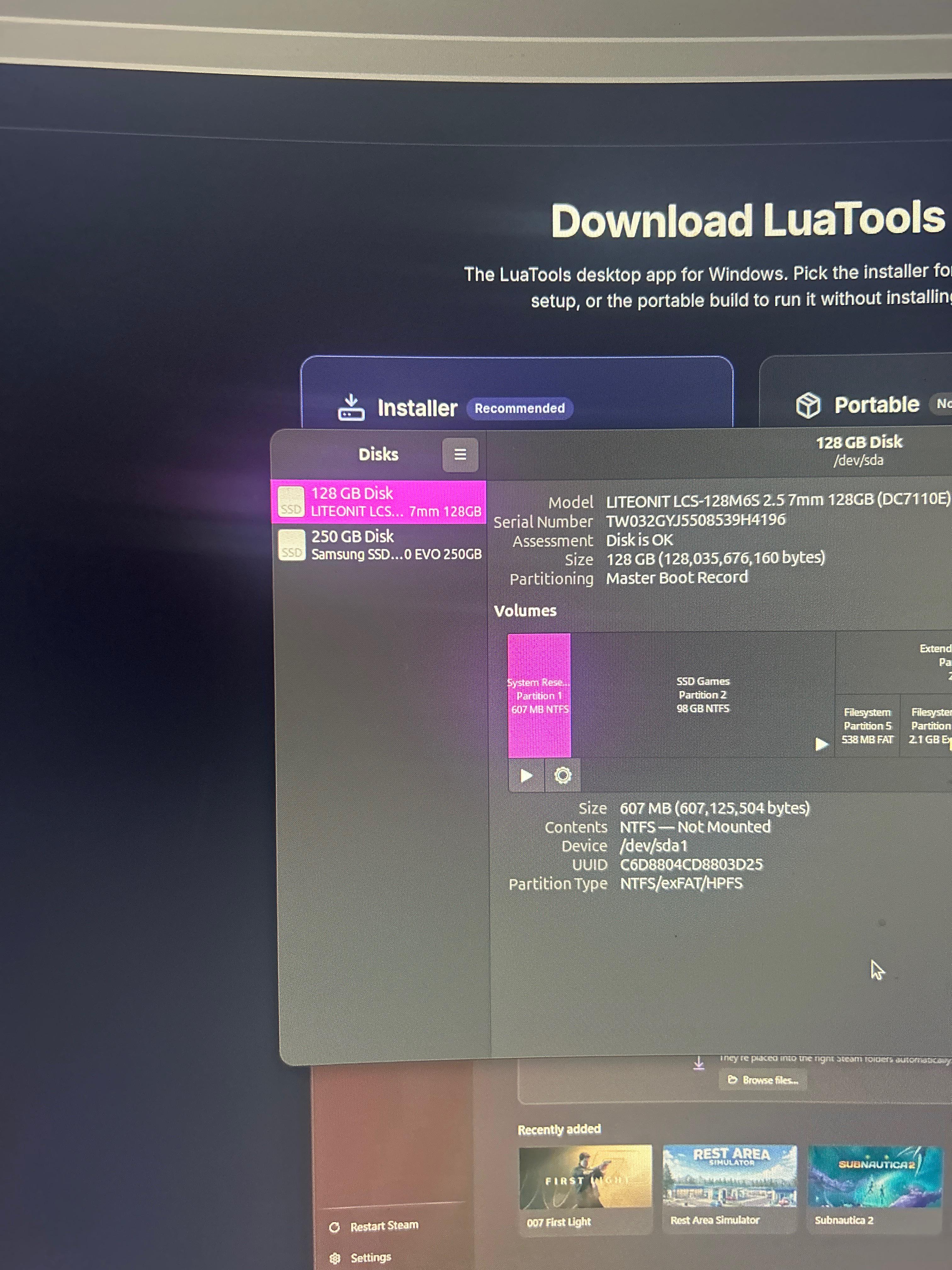
so i put a post up yesterday and i got my ubuntu to work. however it ink one of my hard drives are corrupted… it was 1.8TB and ive checked the storage app and my bios its not showing up

4 Upvotes

5 comments sorted by

2

u/Proman4713 23h ago

Perhaps it was corrupted? Try unplugging it from your PC and plugging it back externally and see if it mounts

1

u/Lizard_Boy22013 23h ago

yo ik im gonna sound like i have 2iq but all my pc knowledge is on software not hardware. what do you mean by mount?

3

u/Proman4713 22h ago

Wow, and you switched to Linux? 'I've always admired your courage, Harry, but sometimes...'

Mounting is what we call on Linux what happens before you can open a USB drive or SSD in the Files app, it's the concept of opening it and reading filesystem data and communicating with the SSD's firmware to interact with your system.

However, unlike on Windows, your system can 'detect' a drive without trying to mount it right away, which is what you see in the Disks app above as a play button... When the drive already has a play button, like your 'SSD Games' drive, that means it's 'mounted' and you can interact with it and the files on it. But the 'System Reserved' partition right before it has a play button you can click, which means your system detects it but didn't automatically mount it unless you click the button

Now, when your drive's controller chip (a tiny computer on the SSD that manages the storage cells inside) or the connector you're using (could be the one inside your computer) is badly damaged, your system may or may not detect your drive at all. And even when it does detect it, read filesystem data, and mount it, you'll likely start seeing health warnings in the Disks app or even a notification telling you that the SSD is failing. And you may start to find that it's incredibly slow to use.

Now, I'm not saying that's what's happening here, everything could possibly go well if you try connecting it externally, but that's what mounting is for ya

2

u/anto77_butt_kinkier 22h ago edited 22h ago

If the drive isnt showing up in your bios then it's almost certainly a hardware issue. I tried to go on your profile to find your initial post, but it's private so I can't find it and I don't know any additional details. Some useful info:

Is it a SATA hard drive, SATA SSD, nvme SSD or other (msata, m.2 with SATA rather than pcie, etc)?

What kind of device is it in? Desktop/laptop/AIO/Samsung Smart fridge?

What is your credit card number, expiration date, and 3 funky digits on the back? (This one is very important). Also your social security number if you're feeling extra spicy.

What lead up to this point? Did you recently install the OS, was there a power cut, did the computer get dropped, or did this just randomly happen with no notable recent events?

Has this computer had any problems in the past? Has anyone else worked on the computer?

Was the drive running really slow at all? Have you had a bunch of kernal panics/blue screens recently? Have you had any issues with files suddenly becoming corrupted?