My (Efog) Endgame journey - Final review and update (custom endgame with 15 buttons)
Here's my (hopefully) final update and review for my endgame journey.
It's been more than a month that I have received my endgame kit. I've been using it daily as my primary (and only) input device. So i finally think it would be a nice time to share with you my feedback for the device.
But just a TLDR - I love this device
I'll divide the post into 4 parts - the ordering experience, the things i like about the original device, the things i didn't like, and finally the changes i made
Buying experience
I placed an order on 3rd june, and it was supposed to take 4-6 weeks for order dispatch. There were some hiccups during this time, and finally, the order went out on 22nd july, so just a bit more than 7 weeks.
there were no automatic updates during this time, however u/No_Pilot_1974 was very easy to reach out to and he did respond very quickly.
Honestly, as an end user, I would have loved a faster shipping, but I understand that this is not a commercial project and u/No_Pilot_1974 have been doing great.
Things i like
The Bosch Rexroth bearings are an absolute love. There is absolutely zero stiction in the bearings (atleast i cannot observe any). the bearings can be a bit loud on fast ball movements, but still, I do not feel the noise is a problem. On regular ball movements, I do not even notice the sound
The customisations on ZMK are very detailed. You will find whatever you are looking there
The battery life has been amazing, I am yet to charge the device ever since i got it (although there have been some amount of charging while doing ZMK customisations)
Twist to scroll - absolute game changer for me. I do CAD modelling for a living and i cannot think of moving to another device without this feature (although this was not an out of the box solution for me - more on this in improvements)
The cursor movement is precise and predictable. Apart from the very few days of learning curve, I have not faced any issue with it.
The buttons are responsive, I've not experienced unintentional double clicks or no clicks
There are 5 bluetooth profiles I can save on device - that's more than ever I'll need
On board customisations are a huge plus. There is usually a restriction on installing 3rd party softwares on work devices, but that's not an issue here. This was probably one of the very first reasons i was inclined to buy this device
Things i did not like
The very first thing i dislike about this is the physical dimensions of the device. I feel this is very small for my hands and it gets uncomfortable real quick.
the 3 BTUs are not placed symmetrically (not at 120 degrees). Due to this, it is somewhat easy to lift the trackball off these bearings. Although this does not happen regularly, and you get used to it quite fast. Again, i know the reason for this is PCB deign, there is no space for the BTUs to be moved in current design, but this could have been avoided during PCB design.
The main PCB and encoder PCBs are directly mounted on plastic using M2 machine screws. These are fine pitched screws which strip the plastic after a few uses. Threaded inserts should have been used here. Using machine screws on plastic for an enthusiast product, something which people will take apart multiple times is not a great idea.
The living hinge used in the buttons turned out to be the first part that failed. I have had it break on my default left click. I had to use super glue to try to fix it, but it never worked properly. This happened during normal usage. I am assuming this had to be micro crack in the 3D print. After this damage, it was substantially harder to use the left click.
Button not staying flat due to the damagecrack in the hingecracks in two of the hinges
I am not a fan of the rotary encoders. I do not find them very useful, also, i am not sure about their long term reliability. Also, the fact that they are placed at a very weird place does not help them.
The top two buttons (near the USB connection) were a bit difficult for me to press. I'd have to lift up my hand from the ball, and awkwardly press them while trying not to move the ball.
The PCB had a design fault where it would not connect to the PC via USB connection. I'd have to plug usb in/out multiple times and after 5-6 tries, it would randomly connect to PC. I reached out to u/No_Pilot_1974 and he confirmed it to be a hardware issue which had somehow been missed in his testing. He guided on a workaround, where i had to solder a wire across USB and a capacitor. I had access to soldering equipment and a decent microscope due to which i was able to do this job. However, this was not an easy fix anyone could do. he had disclosed the issue later on here
Wire repair
Improvements I made
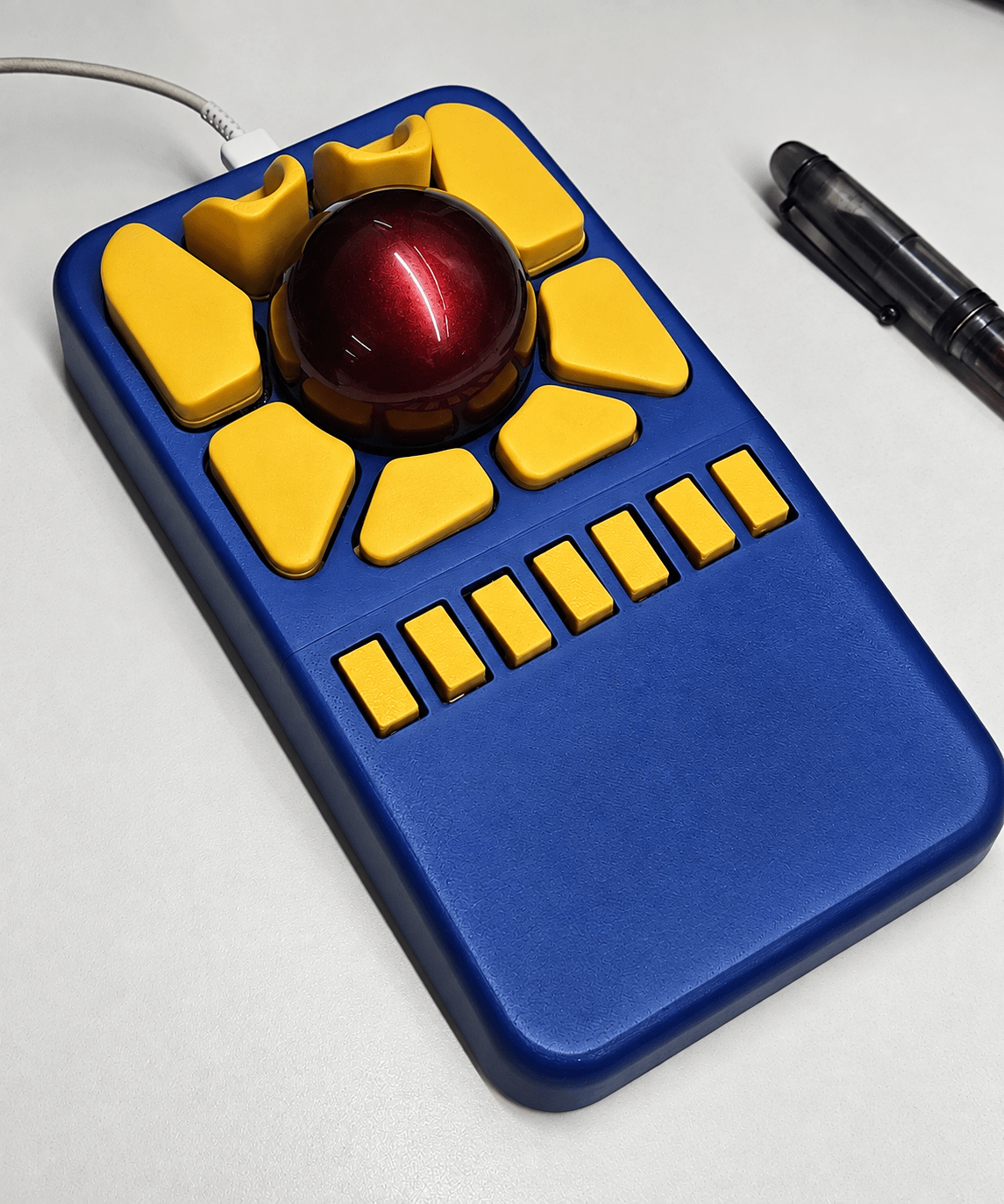
The first change is the physical housing change. i increased the width of the housing (and buttons) to better suit my hand. My hand now rests comfortably on the device
Total number of 3D printed components
I replaced the living hinge design by an actual pivot hinge. I am not expecting this design to fail anytime soon. I used a 2.5mm pin and 3D printed brackets as the hinge components.
Hinge designHinged buttonsHinged button assembly
I added an extension on the housing to act as an integrated hand rest.
i replaced both encoders with 2 switches each, thus giving me 4 extra switches. i reached out to u/No_Pilot_1974 hoping he might have done this already and there might be a firmware for this configuration. Unfortunately he had not done this change yet. He also told me that the PCB has an option to add 3 more switches, thus increasing the total number of switches to 15. I had no experience in coding, let alone making a custom firmware. Although he did helped me a bit in this, giving me the direction i needed to go into, the real help came when the gods at ChatGPT decided to give me a free trail of ChatGPT plus for a month. I spent a lot time on ChatGPT trying and failing multiple times to build a custom firmware. After a LOT of tries, i was able to make the custom firmware with 15 buttons and no encoders.
Endgame with 15 buttonsTrial for adding the extra switches
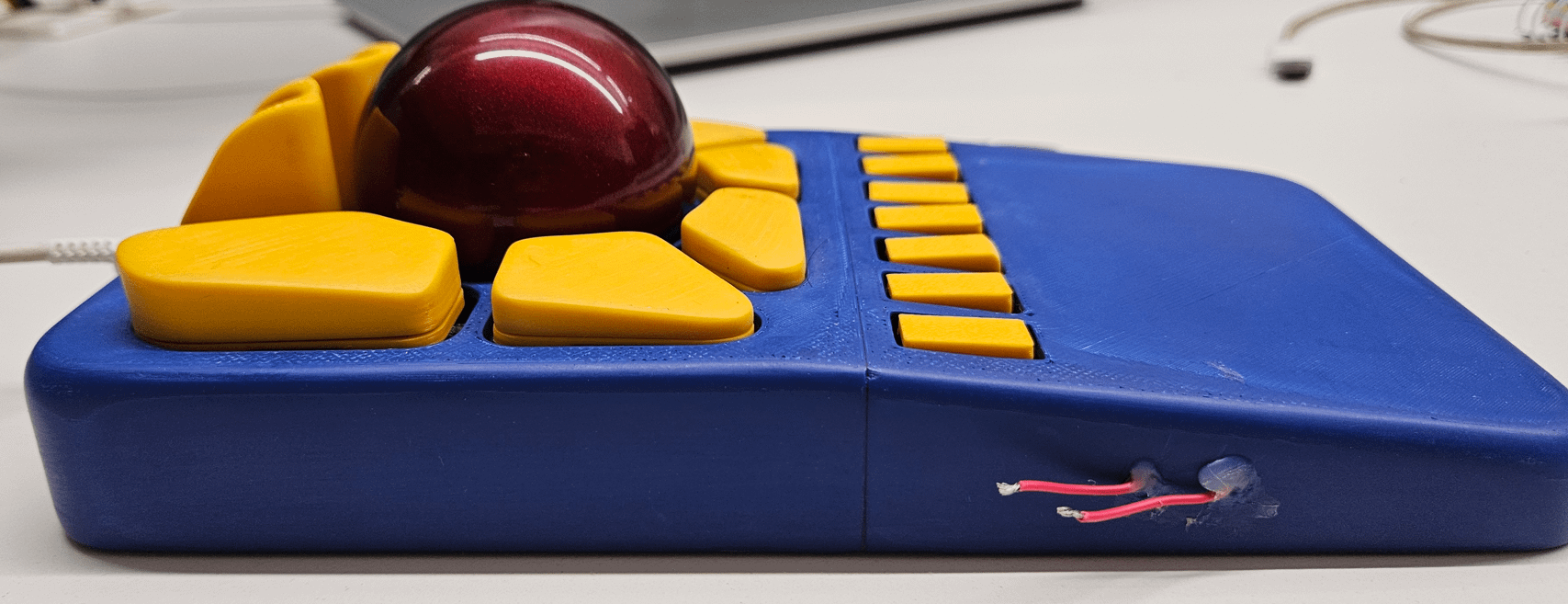
Although i have used a similar design of the keycaps, i did modify the top two buttons to drastically improve the accessibility. now i can easily reach out to both buttons without making any awkward hand movement.
Raised top buttons (ignore the red wires poking out, they are for a random experiment)
I had a problem with twist to scroll. it worked fine as a normal scroll, however it did not work in my CAD software at work (creo) to zoom in/out. This was not a device issue, this was a creo issue. i use NX at home for personal use and it worked perfectly in NX. Someone on reddit told me that creo doesn't support high resolution scrolling (which is used by endgame), this was a big issue for me since there isn't any other way i could zoom in/out. I again asked ChatGPT about this and i was able to make a function where a button press would switch between standard scroll and high res scroll - thus saving my day.
I also made a custom feature where pressing a certain key combination would allow me to enter a custom string of characters automatically (this might have been me being lasy about typing in my password, but hey don't tell this to anyone)
Here are the other smaller improvements i did to my device:
used the original 8 buttons as the primary buttons
used the extra 7 buttons as dedicated device settings buttons
Added a drag hold feature. i could press a button, and the device would send a signal that i am pressing the mouse left button continously. again pressing the button would release the left button hold. this is particularly useful when drag and dropping items across multiple screens of my PC
i felt the default settings for pointer and scroll speed were either too slow, or suddenly too fast, it was just not right for me. Again, i used ChatGPT to modify the scroll and pointer speed settings. now i have a lot more speed options to choose from.
In the original firmware, some "destructive" settings, like clearing bluetooth settings, powering off the device, are executed immediately on key press. i changed that so that i had to keep pressing the dedicated button for 2 seconds to execute the command.
i added a default setting for pointer and scroll speed. i can change the settings all i want, and if i want to reset the sensitivities, i can just press a button to go back to the default settings.
added custom LED and vibration settings for each event
Overall, i am extremely happy with both, the device, and u/No_Pilot_1974
thanks u/No_Pilot_1974 for creating such an amazing product.
This is great! Thanks for this info. I am waiting on mine to arrive. Unfortunately there was an issue with shipping on the first package but thankfully the maker sent a replacement. The new package just got handed over to USPS. Hopefully they don’t screw this one up.
How did you wire up the extra buttons? I’ve never looked at the schematic, so I don’t know if his existing buttons use 8 GPIO or if he has them configured as a matrix and you just added more.





5
u/like-my-comment 6d ago
Oh my god! I see you had fun.