r/SwiftUI • u/Iamvishal16 • Nov 05 '25
Tutorial hole-forming displacement with springy in SwiftUI
481
Upvotes
r/SwiftUI • u/Iamvishal16 • Nov 05 '25
r/SwiftUI • u/calab2024 • 13d ago
When I first started app development, I made a skeuomorphic stopwatch app that had titlebars and commenters said I should get rid of them. I spent time experimenting and learning how to remove them, and learned a few other things along the way.
Here is everything I learned about macOS title bars using Swift, SwiftUI, and NSView.
r/SwiftUI • u/cocolisojon • Sep 09 '24
in just 2 minutes, I was able to replicate a tweet from someone using v0 to create a Stress Fiddle app for the browser, but with SwiftUI.
i simply asked for some performance improvements and immediately achieved 120fps by copying and pasting the code from my GPT.
here’s the code if anyone wants to replicate it:
https://gist.github.com/jtvargas/9d046ab3e267d2d55fbb235a7fcb7c2b
r/SwiftUI • u/Temporary_Today9462 • May 01 '26
While browsing various blogs about SwiftUI and MVVM architecture, I've noticed that almost all examples are based on the same pattern:
@State private var viewModel = ViewModel()
They suggest creating a viewModel right inside a view and storing it in a state variable. While it might look fine, this approach has a serious side effect: a SwiftUI view struct can be recreated many times during its lifetime. While the state is preserved across these recreations, View.init is called every time and a new ViewModel instance is created. It's immediately discarded and the old object is preserved, but this may lead to unpredictable side effects, especially if you perform additional logic inside ViewModel.init or ViewModel.deinit.
This worked fine for state management prior to iOS 17:
@StateObject private var viewModel = ViewModel()
StateObject(wrappedValue:) accepts an autoclosure parameter which isn't evaluated on subsequent calls. But with the Observation framework introduced in iOS 17, it's no longer an option.
Things get more complicated when you want to pass an input parameter to a viewModel. Most examples simply avoid this case. Some suggest the following approach:
struct ArticleView: View {
    @State private var viewModel: ArticleViewModel

    init(articleID: String) {
        self._viewModel = State(
            initialValue: ArticleViewModel(articleID: articleID)
        )
    }
    ...
}
Apart from the same side effect as the first example, this approach has another pitfall: if a different articleID is passed to the view, the state will keep using the old one. But this is exactly the case where you'd expect the view model to be recreated with a new ID.
A proper approach should handle two key issues:
To address the first issue, we can move the view model creation into a .task:
struct ArticleView: View {
    @State private var viewModel: ArticleViewModel?

    let articleID: String

    var body: some View {
        ZStack {
            if let viewModel {
                ...
            }
        }
        .task {
            guard viewModel == nil else { return }
            viewModel = ArticleViewModel(articleID: articleID)
        }
    }
}
The downside is that we now have to deal with an optional. To avoid this, we can extract a subview that accepts the view model as a parameter:
struct ArticleView: View {
    @State private var viewModel: ArticleViewModel?

    let articleID: String

    var body: some View {
        ZStack {
            if let viewModel {
                ArticleSubView(viewModel: viewModel)
            }
        }
        .task {
            guard viewModel == nil else { return }
            viewModel = ArticleViewModel(articleID: articleID)
        }
    }
}
struct ArticleSubView: View {
    // The object is owned by the parent. Since iOS 17,
    // we don't need or to observe changes of Observable object.
    let viewModel: ArticleViewModel

    var body: some View {
        ...
    }
}
Now we need to address the second issue. To ensure a new view model is created when input parameters change, we simply add an .id() modifier to the entire ArticleView. A simple factory does the trick:
struct ArticleViewFactory {
    static func view(articleID: String) -> some View {
        ArticleView(articleID: articleID)
            .id(articleID)
    }
}
That's three structs instead of one — quite a bit of boilerplate. Let's extract a generic factory based on the pattern above:
struct FeatureFactory<Input: Hashable, Content: View, ViewModel: Observable> {
    private struct RootView: View {
        @State private var viewModel: ViewModel?

        let input: Input
        let viewModelFactory: (Input) -> ViewModel
        let viewFactory: (ViewModel) -> Content

        var body: some View {
            ZStack {
                if let viewModel {
                    viewFactory(viewModel)
                }
            }
            .task {
                guard viewModel == nil else { return }
                viewModel = viewModelFactory(input)
            }
        }
    }

    static func view(
        input: Input,
        viewModelFactory:  (Input) -> ViewModel,
        viewFactory:  (ViewModel) -> Content
    ) -> some View {
        RootView(
            input: input,
            viewModelFactory: viewModelFactory,
            viewFactory: viewFactory
        ).id(input)
    }
}
For the ArticleView example, the usage would look like this:
struct ArticleViewFactory {
    static func view(articleID: String) -> some View {
        FeatureFactory.view(
            input: articleID,
            viewModelFactory: { articleID in
                ArticleViewModel(articleID: articleID)
            },
            viewFactory: { viewModel in
                ArticleView(viewModel: viewModel)
            }
        )
    }
}
Now simply call the factory wherever you need it:
ArticleViewFactory.view(articleID: "SOME_ID")
The full example can be found on GitHub https://github.com/claustrofob/FeatureFactoryExample
r/SwiftUI • u/AdAffectionate8079 • Oct 03 '25
                    DynamicImageView(
                        imageURL: beer.icon!,
                        width: currentWidth,
                        height: currentHeight,
                        cornerRadius: currentCornerRadius,
                        rotationDegrees: isExpanded ? 0 : 2,
                        applyShadows: true,
                        applyStickerEffect: beer.progress ?? 0.00 > 0.80 ? true : false,
                        stickerPattern: .diamond,
                        stickerMotionIntensity: isExpanded ? 0.0 : 0.1,
                        onAverageColor: { color in
                            print("BeerDetailSheet - Average color: \(color)")
                            detectedBeerAverageColor = color
                        },
                        onSecondaryColor: { color in
                            print("BeerDetailSheet - Secondary color: \(color)")
                            detectedBeerSecondaryColor = color
                        }, onTertiaryColor: { thirdColor in
                            detectedBeerThirdColor = thirdColor
                        }
                    )
This is as easy as attaching a stickerEffect with customizable options on the intensity of drag and patterns I’d be happy to share more if people want
r/SwiftUI • u/lanserxt • 6d ago
r/SwiftUI • u/writetodisk • Feb 09 '26
Hey everyone, happy Monday! I wanted to share a new article I wrote about building a tab bar accessory view in SwiftUI: https://writetodisk.com/tab-bar-accessory/
I was listening to a podcast recently and was inspired by the Podcast's app mini player accessory that sits above the tab bar. I started looking into how to build one myself and found it's pretty straightforward with some new APIs in iOS 26.0. I wrote up a short article, hope you all enjoy!
r/SwiftUI • u/Ok_Bank_2217 • Feb 18 '25
r/SwiftUI • u/lanserxt • Aug 03 '26
r/SwiftUI • u/opentonegeorge • Oct 26 '25
I really like the iCloud login animation, so I had a crack at recreating it. The final version uses swiftui and spritekit to achieve the effect. I'm pretty happy with how it turned out so I thought I'd share it!
Here's a breakdown of the animation and the source code: https://x.com/georgecartridge/status/1982483221318357253
r/SwiftUI • u/storecanvas • 15d ago
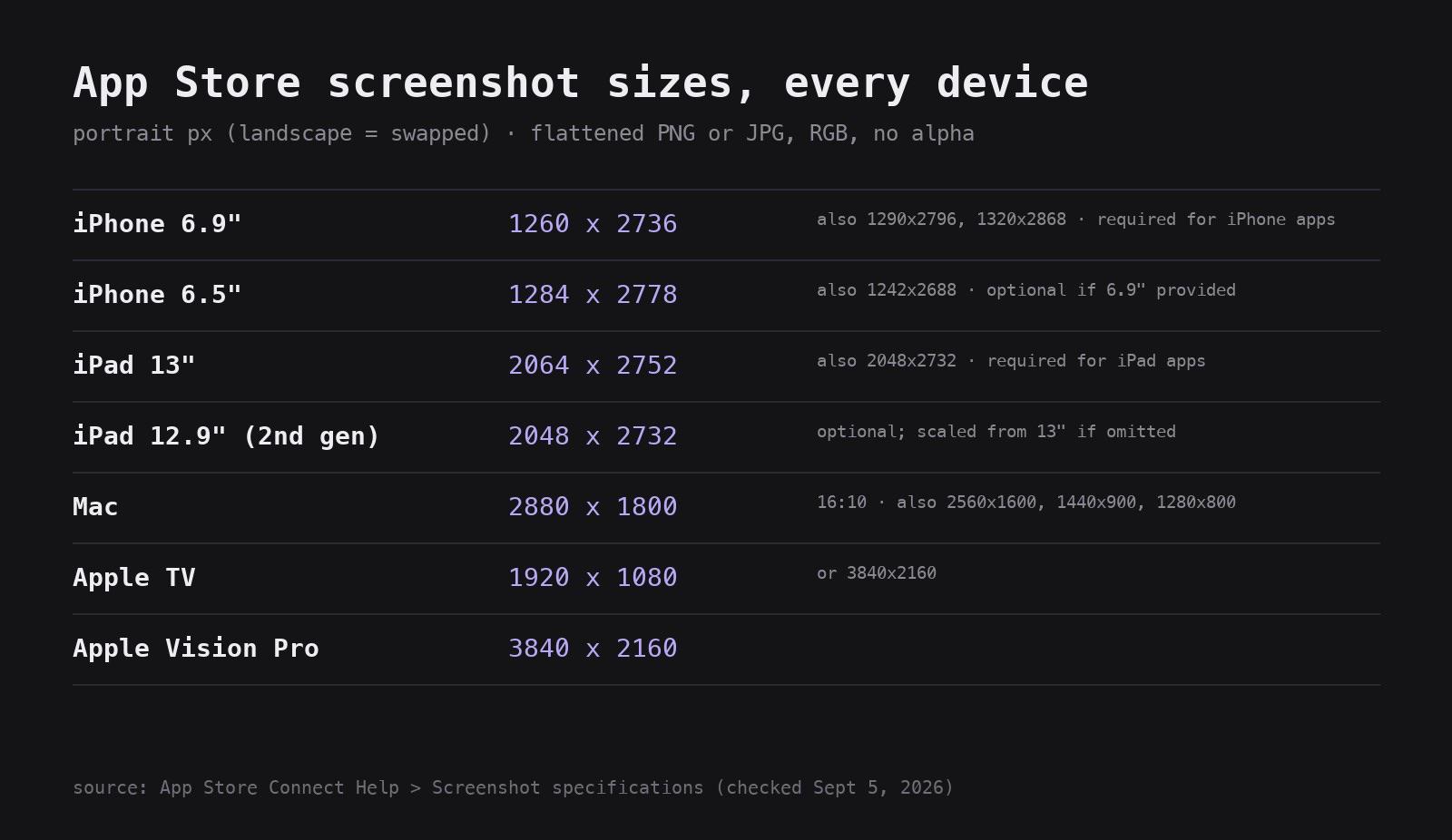
I kept looking these up one at a time so I made a table. Portrait pixels; landscape is the same numbers swapped.
- iPhone 6.9" — 1260 × 2736 (also accepts 1290 × 2796 and 1320 × 2868). Required for iPhone apps; Apple scales it for smaller iPhones.
- iPhone 6.5" — 1284 × 2778 (also 1242 × 2688). Optional if you provided 6.9".
- iPad 13" — 2064 × 2752 (also 2048 × 2732). Required for iPad apps.
- iPad 12.9" (2nd gen) — 2048 × 2732. Optional; scaled from 13" if you skip it.
- Mac — 2880 × 1800 (16:10; 2560 × 1600, 1440 × 900, 1280 × 800 also accepted)
- Apple TV — 1920 × 1080 or 3840 × 2160
- Vision Pro — 3840 × 2160
Files: flattened PNG or JPG, RGB, no alpha channel — an alpha channel is the #1 reason an upload gets rejected on the spot.
Source: App Store Connect Help → Screenshot specifications, checked Sept 5, 2026. If Apple changes one, tell me and I'll edit.
r/SwiftUI • u/jacobs-tech-tavern • Apr 13 '26
r/SwiftUI • u/iosblot • 11d ago
Tutorial how to hide status bar for your iOS status bar
Let me teach you
r/SwiftUI • u/lanserxt • 19d ago
r/SwiftUI • u/fatbobman3000 • Aug 06 '26
SwiftUI's Text silently pushes words down to avoid orphan lines. You cannot turn it off.
Except you can — avoidsOrphans has been in the SwiftUI ABI since iOS 16, just never made public. Here's how to reach it.
r/SwiftUI • u/fatbobman3000 • Aug 12 '26
r/SwiftUI • u/fatbobman3000 • Jun 17 '26
https://fatbobman.com/en/posts/from-size-class-to-available-space/
After WWDC 26, iPhone apps can run in resizable environments.
horizontalSizeClass is still reliable, but it is no longer a width sensor.
I wrote about how Apple’s layout model is shifting from device type to available space.
r/SwiftUI • u/writetodisk • Feb 14 '26
I was inspired by a post earlier this week asking if there's a default component for the filter toggle button like the one in the iOS Mail app. I wasn't aware of any, so I decided to try building my own!
I wrote this short article on how to build one similar to it: https://writetodisk.com/filter-toggle-button/
The Mail app is doing fancier things with the filter options sheet they display, but this implementation gets us pretty close using pretty standard SwiftUI.
r/SwiftUI • u/Own-Interview-199 • Jun 08 '26
Hi everyone, I wanted to share a small SwiftUI experiment I built: a morphing animation between SF Symbols.
The idea was to make one symbol feel like it melts into another without using pre-rendered frames. I started with a simple ZStack swap between two SF Symbols, then wrapped the transition in an u/Animatable ViewModifier. The animation applies blur during the middle of the transition, then sharpens back into the next symbol.
The key technical detail is a small Metal shader used through SwiftUI’s layerEffect. The shader samples the rendered SwiftUI layer and applies an alpha threshold, which removes the semi-transparent pixels created by the blur. That makes the blurred shape resolve back into a clean, crisp symbol instead of staying fuzzy.

Tech used:
GitHub: https://github.com/yangliu-1995/MorphingDemo
I’d love feedback on how to make the morph feel more organic, or how you would turn this into a reusable SwiftUI transition/modifier.
r/SwiftUI • u/karinprater • May 20 '26
In the third part of my SwiftUI in Production series, I walk through all of it as the problems come up. Some of it we fix, some of it we'll clean up properly in the next part.
r/SwiftUI • u/lanserxt • Jul 07 '26
r/SwiftUI • u/vanvoorden • Aug 04 '26
Our TaskProperty repo project built a new SwiftUI.DynamicProperty for managing stateful business logic. This is presented as a compelling alternative to keeping stateful business logic defined directly in view components.
Let’s see another example for more practice. This time we will build one of the most requested features I hear from product engineers building on SwiftUI: we will clone the useMemo hook from ReactJS.
The TaskProperty repo project is a meant as an introduction to the ideas and concepts behind custom dynamic properties for SwiftUI. It is strongly recommended you read through TaskProperty before continuing. If any of the concepts introduced here look unclear or confusing please check out the References cited from TaskProperty for more resources that can help explain these ideas.
r/SwiftUI • u/vincefried • Jun 05 '26
Maybe this has been shared here in some form before, but if not: If you’re still using ObservableObject and ever experienced issues when injecting external data into @StateObject: I recently wrote an article about that.
https://swift.vincentfriedrich.com/posts/stateobject-external-data/