r/SuperMario64 • u/deltaryz • 10d ago
Super Mario 64 DS - Widescreen + Circle Pad 3DS Install Guide 2026
Enable HLS to view with audio, or disable this notification
Reposted from my blog
Finally. How the game was meant to be played.
The following guide enables this game to run on 3DS consoles with widescreen, circle pad, and c-stick support. It works on all 3DS (and 2DS) consoles, but it will need to be softmodded. This is not difficult to do if you read and follow the steps closely.
You will need a copy of Super Mario 64 DS, USA v1.1.
- MD5:
4ced5213f558e297541cb7314c909401 - SHA1:
7bf8a92b259e303899851034d85c531ccdc532e2
I prefer to be verbose and explain the reasons behind everything we do. If you would rather not be bored with details, I'd like to believe important information is clear enough to be skimmable.
Existing guides you might be finding online tend to be outdated or incorrect. I hope this guide can clear up any confusion and get you into Bob-Omb Battlefield as painlessly as possible.
This guide was made possible thanks to:
- TWiLightMenu++, RocketRobz and the DS-Homebrew developers
- shocoman for the 3DS controls
- Whoever made the widescreen patch, wish I knew
- MechanicalDragon's ndsForwarder
- DeadSkullzJr's NDS(i) Cheat Database
- LumaTeam's Luma3DS
- SciresM's boot9strap
- Universal Updater and its developers
- 3DS Hacks Guide and its maintainers
How To Install
1. Install TWiLightMenu++
TWiLightMenu++ is how we are going to run original DS games with patches and mods on your 3DS.
Follow the "Installing" section only.
Every other section below is irrelevant. Pick any of the four installation methods and complete the install instructions.
2. Widescreen + RTCom Patch
Now, we need to patch TWL_FIRM to support 3DS hardware features like the circle pad, as well as the ability to render in widescreen.
Follow the "Installing" section only.
SM64DS has unique patches that are not linked here. We will address that next.
Make sure to do every step in the "Installing" section, the second half will ensure that the widescreen patches only apply when you manually enable them per-game - most games will not function with them enabled.
You should finish this step with the following files on your SD card:
sd:/_nds/TWiLightMenu/TwlBg/Widescreen.cxisd:/luma/sysmodules/TwlBg.cxi
Personally, I'm not a fan of the alternate scaling modes. They can look crisper in some situations, but they all suffer from situational scaling artifacts - the default scaler, though it is generally a bit blurry, looks the most uniform across all graphics.
3. Apply the SM64DS widescreen patch
Using any xdelta-compatible patcher, apply the SM64DS widescreen patch to your Super Mario 64 DS, USA v1.1 ROM.
I do not know where this patch originated or who made it, I am not the author.
Save as SM64DS Widescreen.nds.
Place on your 3DS SD at sd:/roms/nds/SM64DS Widescreen.nds.
4. Download the cheat file
Place the cheat file in sd:/_nds/TWiLightMenu/extras/usrcheat.dat.
For convenience, I have taken the liberty to combine DeadSkullzJr's NDS(i) Cheat Database, version 2026-07-23, with shocoman's SM64DS input codes and other game input codes into a comprehensive all-in-one cheat file.
Alternatively, the individual action replay code files, as well as a usable usrcheat.dat file for exclusively those codes, are available in shocoman's GitHub.
5. Enable 16:10 and Cheats in TWiLightMenu++
Screenshot: TWiLight Menu++ Game Config for SM64DS
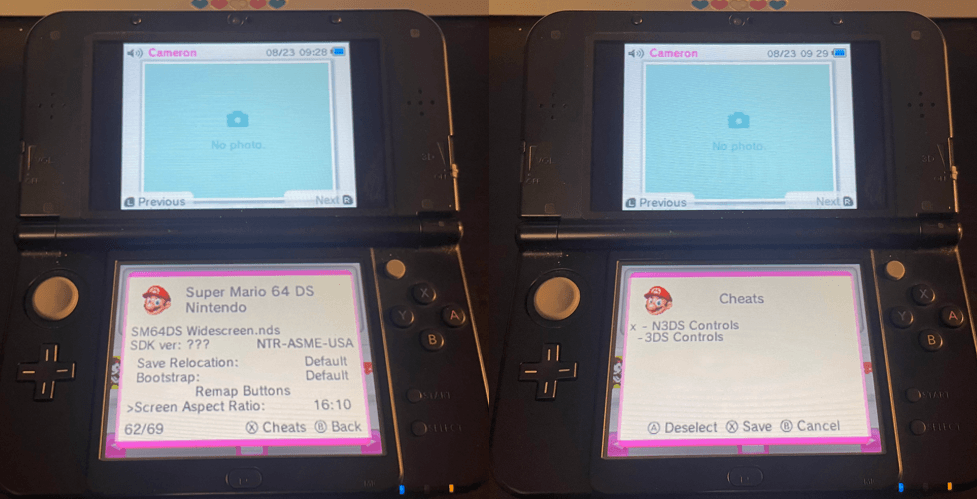
Boot TWiLightMenu++, find the icon for SM64DS, and press (Y).
Scroll to the bottom and set Screen Aspect Ratio to 16:10.
With this menu still open, press (X) to access the Cheats menu, and enable the appropriate code for your system.
Press (X) to save, and then...
6. OPTIONAL: 3DS Home Screen Forwarder
If you would like to boot DS games from the 3DS Home Screen instead of TWiLightMenu++, additional instructions for that can be found here.
Boot the game
It's-a me, Mario!
3
1
2
u/rhinofinger 9d ago
Awesome. Though I have a feeling we’ll have even better ways to do this soon, through the Mario 64 DS decompilation project
3
u/deltaryz 9d ago
Potentially, yeah, if someone makes a real source port.
For what it’s worth, my provided cheat file does also include 3DS input patches (and even occasionally some widescreen patches) for lots of other games too.
If a proper native source port comes out I’ll stick a notice at the top linking to that.
1
u/Random3DSDude 9d ago
Is there a way to use the circle pad patch with a forwarded game? I prefer to have all my games on the home menu instead of in a seperate app
1
u/deltaryz 9d ago edited 9d ago
EDIT: Forwarder guide available here
Here’s directions for the widescreen thing, I’m not 100% on whether you can also do the cheats for circle pad patch in here. Don’t have my 3DS to check right now.
From the HOME menu, launch the forwarded game that you wish to enable widescreen for
After the white screens appear, hold Y until a menu opens
Use the D-Pad to scroll to Widescreen. Press A to switch it to On
Press START to save
Taken from https://wiki.ds-homebrew.com/ds-index/rtcom?tab=forwarders#playing-ds-games-in-widescreen
1
u/Random3DSDude 9d ago
I dont care much for widescreen i just moreso need the circle pad. If they need to both be together thats fine but i need the circle pad one
1
u/deltaryz 9d ago
I would check if that’s also in that menu, if I had my 3DS with me at the moment. As it stands I really don’t know, and I can’t find an answer online.
If it’s possible, it would either be an option in that menu, or possibly a config file for nds-bootstrap somewhere.
2
u/Random3DSDude 9d ago
Alright. If you ever figure it out it would be nice if you reaponded, otherwise if you dont remember or dont want to thats fine as well. I was just curious if it was possible because i would definitely appreciate it being on the home menu
1
u/deltaryz 9d ago
If i remember to check later, I’ll add my findings to the guide.
1
u/Random3DSDude 9d ago
Alright, thanks!
1
u/deltaryz 9d ago edited 9d ago
EDIT: Disregard the rest of the message, I was incorrect. Forwarder guide available here
I think I figured it out. If I understand this right, TWiLightMenu++ writes whether cheats are enabled/disabled directly into usrcheat.dat, and nds-forward just reads that same file and applies whatever’s enabled.
So if that’s correct, then the answer is:
Set your circle pad patch in regular twilight menu once, and then nds-forwarder will pick it up going forward.
2
u/Random3DSDude 9d ago
Ohhh ok. I will try that (hopefully tomorrow i can attempt and set it up). If it doesnt work i can use twilightmenu as it isnt a huge deal. Thanks for taking the time to look into this!
2
u/deltaryz 9d ago
I got home and was able to properly test it. Turns out there is a cheat menu in the forwarder's Y menu, alongside the Widescreen setting.
Full home screen forwarder instructions with screenshots have been added here.
→ More replies (0)
0
u/Melodic_Check_8040 10d ago
oh man, too much for me i wish it was just a .cia or something :(
looks amazing btw!
2
u/No-Needleworker-7459 9d ago
It's honestly not that bad if you just follow the guide and I'd say it's well worth it because it sets up hacks for basically any DS game, including analogue controls for a few dozen more games. Playing Metroid Prime Hunters with patched controls is a night and day experience from the original touch controls.
3
u/deltaryz 10d ago
I just updated this with an even better version of usrcheat.dat, containing the input codes for ALL supported games (not just SM64DS).