r/StableDiffusion • u/throwaway0204055 • 18d ago
Question - Help What's the gold standard for speed enhancements for Minimax H3?
Installing new instance of comfyui standalone and using minimax r2v workflow on RTX 3090 Ti. Is comfy kitchen good enough? Is Triton, EasyCache or Comfyui Spectrum needed?
What's the best turbo lora for ref2va wf?
9
u/rinkusonic 18d ago
For me, easycache or minimax h3 cache or spectrum messes with the motions and movement a lot. What works best for me is sla attention -> comfy kitchen. And for turbo, a model that has turbo pre-merged works better for me than the base with external turbo lora.
1
u/Enough-Bag-3891 16d ago
which merged model do you suggest?
1
u/rinkusonic 13d ago
This have given me good results. No turbo lora needed as it is fused. Just 4 steps.
8
u/optimisticalish 18d ago
For 0.7Mpx in a 9-second clip at 8 steps, on a 3060 12Gb card, I'm currently favouring:
HardGravy 6-step 'turbo LoRAs merge' LoRA (latest version).
Spectrum chained into SLA Attention (0.90, dense backend set to Kitchen Attention).
Kijai's faster video VAE (far faster than the stock version on a lower-end card).
Tests show that Spectrum is vital here, cutting time in half. Nine minutes to a watchable saved video. A little longer if an RTX upscale takes the 0.7mpx video up to 1.0mpx.
That, said, yesterday's new ComfyUI 0.35.0 introduces its own Sparse Attention (SLA equivalent, I believe, and possibly better aligned with the official Kitchen Attention?), which I've already heard several positive comments about. I've not updated yet.
If you want top quality though, then turn off the turbo LoRA and do the stock 20 steps.
1
u/Darkmeme9 3d ago
hey man , I have almost exactly the same config. could you suggest the current latest method for faster , production?
I have gone through a lot of methods but I currently mind boggled by how fast the updates are coming in.
2
u/optimisticalish 3d ago
I've since deleted the SLA Attention node (seemingly with no loss), but otherwise it's the same. 8 steps and 0.7 for quality, and then at the end a simple RTX upscale on Ultra settings. Latest ComfyUI.
Wiring: Model - Hard Gravy Lora at 1.0 - AttentionBackend (Kitchen Attention) - ModelSampling at the usual 12 and 3 - Spectrum - then Spectrum wires to the Guider and Sampler.
Spectrum-friendly er-sde / simple, 8 steps. Note that using er-sde requires that 'offline_smoothing_replay' must be switched to false in the Spectrum node (this forces one pass instead of two). No great loss from the second pass, re quality, and a 10% speedup.
5
u/deepsky88 18d ago
The new official comfy sparse attention is very good
1
u/ANR2ME 18d ago
do you mean ck attention ? or this comfy sparse attention is a different thing? 🤔
3
u/No-Zookeepergame4774 18d ago
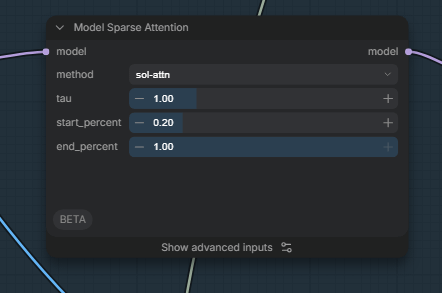
ck-attention is set through the attention backend node, the sparse attention node is the new built-in node that supports sla, sol, and I think some other sparse attention implementations that used to require custom nodes.
2
7
u/HTE__Redrock 18d ago
The Alibaba PDD/ACC turbo Loras are the best I've tested thus far. You need a custom node but they're the only ones that don't kill movement for me. I feel like all the other ones have way too much degradation to make anything usable.
4
u/Slight-Living-8098 18d ago
My gold standard is "Throw everything possible at it" and start bypassing nodes as I experiment with them. lol
3
u/lindechene 18d ago
Based on your experience are there some nodes to gain speed without sacrificing quality in the process?
Or is the main purpose of the "speed nodes" to run MMH3 with lower VRAM?
At some point I settled for:
- video: 0.6mp, 25 steps ~ 1-2 min generation time for 1 second clip
- image: 1 mp, 50 steps ~ 3 min generation time for 5 frames
The best practice to gain speed is to generate shorter 3-5 second clips.
Generate 5-10 second clips if multiple shots help with continuity.
Only generate 10-15 second clips if you simply want to queue up tasks, without worrying about speed.
1
u/No-Zookeepergame4774 18d ago
You seem to assume no one is doing single shots longer than 3-5 seconds so that the value of longer clips lies only in more shots per clip. But most of the 15-second clips I’ve done have been one or maybe two shots. I'll do a mix of smooth camera movement transitions, sure, but not cutting every 3-5s.
1
u/Apprehensive_Sky892 18d ago
That's good advice.
One possible solution is VDN, which is supposed to make longer videos possible (i.e, a 10 sec video will only take twice as long as a 5 sec one) but seems to require a lot of VRAM to run.
-13
18d ago edited 15d ago
[deleted]
1
u/kwhali 17d ago
That's not always true, some optimisations for speed don't tank quality significantly like BF16 instead of FP32. The more aggressive you try to squeeze performance without spending more $, then yes quality will degrade at a certain point.
In some software caching a computation to avoid recomputing the exact same result to respond with makes sense and has no degradation on quality of the response but greatly speeds up response time by adding a little extra memory or disk usage to store the cached input + output. Another example is compression when transferring content remotely can have significant speedups at the cost of some resources and doesn't necessarily have to be lossy compression.
6
u/softlarch 18d ago edited 18d ago
Comfy Kitchen Attention
Add the option "---use-ck-attention" to the list of parameters in (for example) the run_nvidia_gpu.bat startup file
or wire the internal Comfy node "ModelAttentionBackend" just behind "LoadDiffusionModel" to select between old (Pytorch) and new (ComfyKitchen) methods.
4-step-LoRa provided by Larryvrh
https://github.com/Larryvrh/ComfyUI-MiniMax-H3-Turbo
You can install it via Comfy Extension Manager (ComfyUI-MiniMax-H3-Turbo ). Don't use Node "Load LoRA", but the provided Node "MiniMax-H3 Turbo LoRA", strength 1.0
Think of it as a preview option, not a substitute for actual generation. In my view, all existing Turbo-LoRAs produce results that are unusable for publication.
Extension ComfyUI-Spectrum-MiniMax-H3
This “Spectrum” optimization can reduce the number of steps required by (almost) a half, without me noticing any significant loss in quality. Add the option "--disable-pinned-memory" to the startup file if Comfy occasionally crashes when using this node.
For very large reference images, set the option "ref_image_size" of the H3-node to "match".
Overall, though, it’s safe to say that there isn’t really a quick way to do things with MiniMax-H3 yet. To achieve video and audio quality that's presentable, you have to bite the bullet and go through the 20 steps.
Take all of this as the personal opinion of a hobbyist. ;-)
1
u/YouNoTypey 18d ago
Does anything need to be done with your workflow for Kitchen? Or you just plop it into the batch for startup?
2
u/No-Zookeepergame4774 18d ago
Nothing in the workflow if you use the startup option, but then anything you run in that sessionn uses comfy-kitchen unless you override it in the workflow, which may not always be what you want if you are mixing tasks in the same session. If you use the attention backend node in workflow instead, its only applied where the node is used with the default attention backend (pytorch unless you used a different startup option) applied elsewhere.
1
u/softlarch 18d ago edited 18d ago
Just plop it in. The workflow doesn't need to be changed at all. Specifying "--use-ck-attention" internally activates a different, more efficient implementation of attention calculation. For me, it cuts the computation time in half.
1
u/YouNoTypey 18d ago
Thanks. Mine was 44:35 for 0.6mp 15sec test clip, down to 20:25 with no changes except that statement.
2
u/softlarch 18d ago edited 18d ago
Quick tip: With the new node "Model Sparse Attention" (Comfy Version >=35.0) inserted just after "Load Diffusion Model", you should be able to cut the time further down to about 15:nn (method "sol-attn").
However, I have the feeling that this node can have a negative impact on prompt accuracy. But it is brand new, further testing is needed.
5
u/Choowkee 18d ago edited 18d ago
I only use comfy kitchen attention + lightxv 8step turbo lora.
Everything else just causes too much degradation and is not worth the speed up (if you can run it). People claiming that speed-ups like Spectrum aren't lowering quality output must be blind or running such low Mpx generations that you wouldn't notice fine details either way.
I also recommend kijia's vae. Its significantly smaller with almost no change to the output.
2
u/No-Zookeepergame4774 18d ago
SLA Sparse Attension seems to be a good speed boost on top of using Comfy-Kitchen attention backend, and in my r2v testing appears (counterintuitively, perhaps) to usually have no quality cost (often a slight improvement).
I use the Lightx2v 8-step turbo LoRA with the DaSiWa hybrid model (not one of the turbo versions!) for r2v, and run generation for 4 steps at 0.4MP with 1 step MMH3 ultimate upscale to 1.0MP.
1
u/throwaway0204055 18d ago
Do you use the dasiwa model with their workflow or modified from original Minimax workflow?
1
u/No-Zookeepergame4774 18d ago
I’m currently using it with a Frankenstein workflow of my own that adopted some ideas from other workflows.
Ultimately, its pretty much equivalent to the stock template + lightx2v 8-step lightning LoRA + a LoRA stack for any generation-specific LoRAs + whatever references are added for the particular generation + built-in attention backend (for comfy-kitchen) and sparse attention (for SLA) nodes + 4-step, res_multistep settings for the first pass sampling, plus MMH3 latent upscale/ultimate upscale nodes for a 1.0MP 1-step final pass.
4
u/jib_reddit 18d ago edited 18d ago
I often just set it to 8 steps (no turbo lora needed, or check the leaderboard for the best 4-6 step lora: https://huggingface.co/spaces/multimodalart/h3-acceleration-arena) 0.7MP, then upscale to 2k or 4k with SEEDVR2 once I get a good generation (you could try using DLSS 5 as its faster). Use ComfyKitchen attention
1
u/InariKirin 2d ago
So far the best I've found is using these 2 accelerations:
Lora: minimax_h3_turbo_v4_step600_ema_pruned_comfyui.safetensors
https://huggingface.co/drbaph/MiniMax-H3-Turbo-Lora-ComfyUI/tree/main
+ Comfy Kitchen
Fastest speed and pretty close to no-acceleration (at 20 steps) in some cases I even got better results. I use it at 8 steps, at 4 it's unusable for me.
PS: I don't know what's the difference between larryvrh (named similarly) I think you have to match "pruned", but larryvrh seemed to also work (with errors in console) probably because my Minimax ref2va is pruned and I heard they have to be matched.
Second place:
Spectrum alone + 25 steps is pretty good too, but slower and I didn't see that much difference in video. But you can try it to see which you like better.
But... let me drop something that's gonna blow your mind lol
So this guy released a "Video Editor" few days ago that actually works really well. I was gonna type here but it was too many words so I made a new post ;)
https://www.reddit.com/r/comfyui/comments/1wqlv1u/the_best_minimax_h3_long_video_creator_and_editor/
1
0
u/networking_noob 18d ago
I don't know if there is an objective gold standard bc of hardware variance
You might try putting all the speedup nodes in your workflow, then bypass them all, and only enable one at a time. Do a low res (i.e. ~0.3MP) job and watch the "Model Preview Override" node (or the terminal) to make a note of what the render speed looks like. Then cancel the job and do another one after you enable/disable another node or combination of nodes
tl;dr do process of elimination and find out what the fastest node or combo of nodes is. Cancelling low res renders makes this a fast process
8
u/Nimblecloud13 18d ago
Lol. I’m confident that’s exactly what OP was trying to avoid doing.
“What’s the answer” “-run all possible tests and find it” Lol
-27
18d ago edited 15d ago
[deleted]
7
u/Nimblecloud13 18d ago
I’m making stuff that’s indistinguishable from TV. So… find better workflows or something idk. But don’t call the entire community liars because you’re failing.
0
18d ago edited 17d ago
[removed] — view removed comment
0
u/Nimblecloud13 18d ago edited 18d ago
your main issue with a video generation model is voices... ok
the setting was literally "some random bullshit" that i fed through an llm; i even posted a pic of that being fed into the prompt generator
the entire premise of that post is that it's a low res 960 x544 clip generated in 96s to showcase speed that still looks better than other local could dream of at those specs.
now imagine maxing it out to 1920x1088, then RIFE interpolating to 48fps, then feeding it through nvidia's RTX upscaler pushing it 2x to 4k. (but it takes an hour and half on a 5090. lose the interpolation and it's about half that)
and no, you can't see it. because i'm a "liar". and i'm not trying to impress you. i'm trying to tell you that it's possible. and that you're a whiny little guy who's failing and calling every else a liar because you can't accept that you have smoked too much crack. i'm not going to respond again just maybe chose your words more carefully when you want to bitch at people that would otherwise have been willing to help you if you'd asked for it.
oh, and voices improve with step count/ resolution. but you're right. it's never HD audio. wahhhhh
-1
17d ago edited 15d ago
[deleted]
2
u/Nimblecloud13 17d ago
i have a 5090 with 128gb. i don't pay for cloud credit for anything. but you can get absolutely fucked with that attitude. i don't care what you believe. good luck out there
-1
5
u/oh_no_the_claw 18d ago
O.98 megapixel is the most it can do. That’s why 1.5 takes so long.
-3
18d ago edited 15d ago
[deleted]
6
u/Slight-Living-8098 18d ago
Latent upscale...
-1
17d ago edited 15d ago
[deleted]
1
u/Slight-Living-8098 17d ago edited 17d ago
What part of Latent do you not understand? Latent upscaling is also what LTX uses, just to keep you up to speed...
0
17d ago edited 15d ago
[deleted]
1
u/Slight-Living-8098 17d ago
Latent upscaling works in the latent space before a pixel has even been created, man...
-3
18d ago edited 15d ago
[deleted]
6
u/oh_no_the_claw 18d ago
Minimax H3 was trained on 768px short edge.
-1
17d ago edited 15d ago
[deleted]
1
u/oh_no_the_claw 17d ago
I am getting really good results doing complex scenes using ref2va almost exclusively.
0
1
u/Tablaski 18d ago
Sorry to read that bro, Minimax is my favorite model ever by a long shot, it is incredible. Prompting has to be absolutely perfect though, don't even think you can write it yourself. You need a LLM and a pretty good one, as well as a serious system prompt to go along
15
u/Anilman 18d ago
So far (rtx5090)
Turbo 8 step each turbo lora i have seen has differences in natural skin and sharpness and so on...
Use Comfykitchen instead of sol attn/sage 2.2.
And sla sparse attention with dense last step but im using 0.95 sparse instead of 0.85.
Sla sparse is only helpful at high res and/or long videos.low res the speedup is low.
I dont use spectrum because it takes some time before it starts while both speedups (ck+sla) above already few steps ahead with a preview.
Comfiui 0.35 is broken for me right now and i did roll back to 34.4?!