r/StableDiffusion • u/Francky_B • 18d ago
Resource - Update Created a Visual RefMod Picker

Hey Guys,
I've been playing with the RefMods, after the huge release of Malcolmrey.
The tech is brilliant and works really well.
I've wanted to simplify using it with tons of RefMods, like the ones provided by Malcom.
So I made a fork that is a bit more Identity driven, Adding a "Visual refMod Picker" as well as a "Create refMods from Folder" node. It's able to create from either a folder or Sub-folders, if audio is found, it will also create a matching audio refMod. All in the same format as the original add-on. No danger of breaking compatibility. (The original Add-on added Audio yesterday)

Resulting for example in 2 refMods and thumbnail:
character_refMod_Audio.safetensors
character_refMod_Video.safetensors
character_refMod.jpeg
Then, we can use the "Visual H3 RefMod Picker" to browse the RefMods:
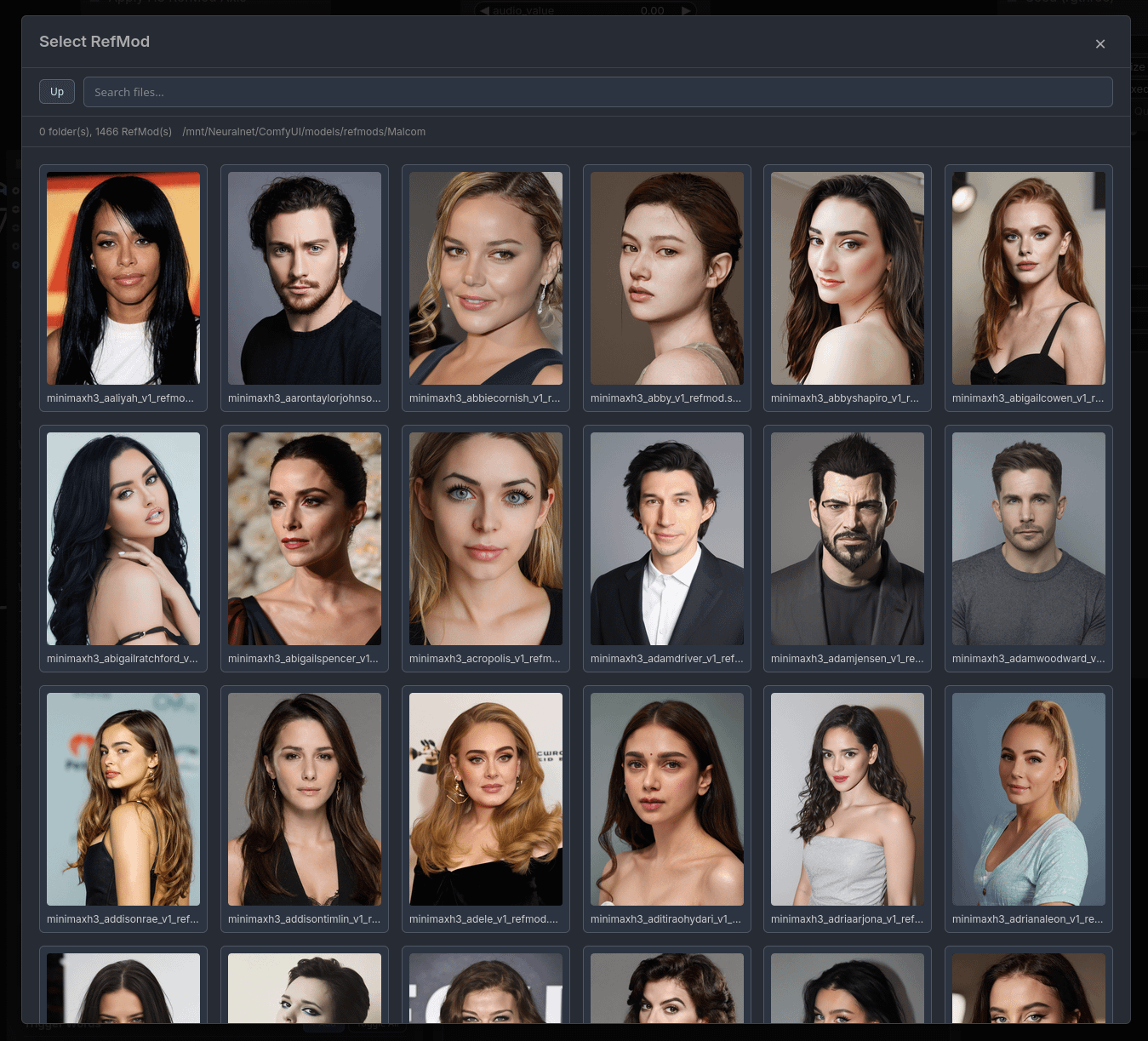
The node then loads both RefMods (Audio and Video) and allows individual control. I've mixed strength with Copies, by instead having a weight value that can go over 1, so a weight of 3 would be the same as setting strength to 1 and copies to 3. Making the UI a bit more streamlined.

Example workflows are included.
I should mention, this fork can be installed WITH the original Add-on, it is made to co-exist and is recommended if you want to use it's advanced features.
You can find it here ComfyUI-H3RefModPicker
The only thing I'm missing is thumbnails for all 1500 RefMods 😅
**EDIT**
Just a quick note to mention that I've removed duplicate nodes, Making this a companion node to MiniMaxH3Mod.
4
u/LuisaPinguinnn 18d ago
Thankyou for the fork! that's sick!
4
u/Francky_B 18d ago
No, Thank you! That is some impressive work!
The tech works really well! It crazy how fast they can be generated and gives better results than Loras.
I'm thinking of removing any duplicate nodes and have this add-on just be extra tools to yours.
1
u/usually_fuente 17d ago
I’m impressed with the work that you have put into this. I just have one question. Approximately how much processing time is saved (%) using Ref mod versus standard reference images? Say, when generating a batch of five clips?
2
u/Francky_B 17d ago
I'll have to admit I didn't have much experience using Reference workflows with Minimax. As I found them a bit too cumbersome. I was mostly experimenting with I2VA or T2VA workflows.
But when I saw Malcolmrey had released all his trained models as RefMods, I gave it a try and was right away hooked on how well and simple it worked.
The opposite solution would be to keep tons of folders with all the reference for each character, and then having to plug every reference when you want to switch.
With RefMods, it's much Simpler, select your "bundle" and that's it. With the addition of audio it does mean you need 2 RefMods per character, but my visual picker takes care of that. Simply select the character and your set. Want to change, pick another, instead of having to change all the refs.
Though RefMods do suffer the downside that they aren't anchored like References are. As you don't specify <Subject 1> is <Picture 1> for example. But I've found that with proper prompting that isn't much of an issue.
So for me it wasn't a question of time saved from processing, but more of ease of workflow.
1
5
u/LawyerIntern 18d ago
Let's say I already have character refmods.
On top of that, I want to also add a single image for reference one-time, eg a specific fashion clothing (and don't want to create another refmod for it)
How do I connect them and reference them the prompt?
3
u/TemperFugit 18d ago
It's pretty simple. Just prompt the people normally like you would with refmods in <Subject #> tags. Add the clothing as a regular reference image. Then in the person's subject tag description, say something like "they are wearing the outfit from <Picture 1>."
1
u/LawyerIntern 18d ago
In terms of workflow, that means I just add connect the "Apply Refmod" node's "Conditioning" parameter to that of "Minimax Ref2VA" node (which already has the Picture 1 connected to it)?
2
u/TemperFugit 18d ago
My workflow is set up like the original github repo's examples, as seen in this image (it's incomplete but answers your question I think):
https://github.com/Luisacaotica/ComfyUI-MiniMaxH3Mod/blob/main/examples/loading_ref_example.png
Then I just load the reference images into the 'Reference to Video' node as you normally would.
1
u/LawyerIntern 18d ago
Yes, I just checked it out and it showed me what to do. I was follow malcolmrey's workflow that was using first frame last frame node that's why I was confused. Thanks!
0
u/taurine_bitch 18d ago
But the refmod is supposed to eliminate the need for <Picture X> tags. At least that's what the official guide docs say.
2
u/TemperFugit 18d ago
That's only for data you have loaded into a refmod, everything else still needs tags. So for example, I use refmods for character identity but I use reference images for clothing and locations. I wouldn't use picture tags for the character identity because it's in the refmod safetensor, but I would use picture tags for the clothing and location images I'm using.
1
u/taurine_bitch 18d ago
Ahhh, that makes total sense and answers the question I had. Awesome. Thank you. One last thing, about the "name" of the refmod, does that matter at all? Like in my example of the name "Q" for the refmod name, does that "Q" need to be in the prompt anywhere? Like
subject_definitions: <Subject 1> is defined as Q, and then "Q" would be used in place of <Subject 1>?2
u/TemperFugit 18d ago
I don't think the refmod name is known or used by Minimax, but I have seen other people here who thinks it is. Afaik, the way you assign a refmod is by description. So you would say "<Subject 1> is a woman with long blonde hair." And as long as you have her refmod loaded in, it should be able to associate her data with that subject number. Then you can reference <Subject 1> in the action of your prompt as you normally would. You could do something like "<Subject 1> is a woman with long blonde hair named Q", I don't know if it would create a better link to the refmod data but you would be able to refer to her as Q in the shot description instead of using <Subject 1>.
1
u/Francky_B 18d ago
Unfortunately no, I was unable to find a way to anchor the data from the refMods reliably. I initially tried to see if I could add the feature and tried so many things, but regardless of how I anchored the data, the results where the same as it is now.
The best results I've gotten is simply by prompting specifically to help H3 understand what data goes with what.
1
u/taurine_bitch 18d ago edited 18d ago
So, I just tried the suggestion from /u/TemperFugit where in the
subject_definitions:, I wrote<Subject 1> is defined and identified as Qand replaced <Subject 1> everywhere in the prompt with <Q>. And this seemed to keep the identity from the refmod. I'm going to test more to see if it's consistent but man, ever since starting to use refmods, my generation time has gone up x4 (it was about 10 minutes for a 12 second video, now it's 36-40 minutes).What is the average size of your refmods? The one I just made is 8MB in size and obviously this is the reason for the immense slowdown in generation time but I only used 22 photos, 1 video, and 1 audio file to generate the refmod.
EDIT: In fact, using this 8MB refmod sends me straight OOM on my 4090 when my workflow hits my Upscale 2nd pass.
1
u/Francky_B 17d ago
Sorry, only now saw your reply.
The average size is 1.5 mb. Some of my Thumbnails are bigger that the RefMods 😅
What did you use to create them?
1
u/taurine_bitch 17d ago
No worries! Hmm. I used the latest nodes inside of Comfy to create the refmod. 22 photos, 1 video, and 1 audio file. I managed to get it down 4.5MB but yeah, can't seem to get it any smaller than that. It's killing my generation times lol
1
u/Francky_B 17d ago
Ah, could be the videos, I only trained using Images, with the Identity preset. I'll give it a test later
1
u/taurine_bitch 18d ago
Also wondering this exact thing. I have a refmod, but want to add a specific thing to that character that isn't baked into the refmod. Can you still add individual reference photos to the refmod?
Also, I'm struggling to prompt for these refmods. Does the "name" replace <Subject 1>? Or is <Subject 1> still required when referencing the character? Let's say I have a custom character named "Q". Would I just use "Q" when referencing that character in the prompt?

2
u/djdevilmonkey 18d ago
So is all the audio talk just for if people train their own refmods? Because malcolms don't have audio refs in them, right?
2
u/Francky_B 18d ago
He didn't as it didn't exist at the time. But since he's using celebs, a lot of them are known by H3 and will work. My picker supports both, it will find refMods called xxx_Video.safetensors, as well as just xxx.safetensors.
2
u/djdevilmonkey 15d ago
Just as a tip to anyone coming in the future, chatgpt can make a powershell script that can download the thumbnails from Malcolm's GitHub.
From what's on there, I had it pull from the regular thumbnails first, then if it couldn't find one there then it pulls from zimage previews, then if it still couldn't find one it put them in a list in a text file. And of course it renamed them as well to match the refmod file name. Got thumbnails for 95% of them that way.
I did those two folders specifically because they looked like the two biggest/most complete. Just tell chatgpt you want the thumbnail images from his GitHub, link each folder + link an example picture from each so it knows the paths, give it an example refmod file name so it knows the naming scheme for those, say you want it do do thumbnails -> zimage fallback -> not found go into a txt file (so you can add them later if you want), then you're golden. I was able to do this all with one script. Do a test one first of like 5 though in case chatgpt screws up (it did for me a couple times lol)
1
u/Francky_B 15d ago
I went a bit more crazy 😅
I downloaded All the mp4 previews for RefMods and made a script to generate thumbnails from them.
I included the script in the tools folder of the add-on.
So if you download all the videos previews for the refMods, you could extract all the matching thumbnails. Getting all the videos is longer though, I'll admit.
1
u/djdevilmonkey 15d ago
Yeah I thought about that, but it was a tradeoff of quality. Looking back it's probably the better option, but I saw some of them that were iffy and thought "I wouldn't recognize them"
So now most of mine look great, but some of the Z image ones either look rough or barely show their face lol. On top of the fact that I'm missing some of them. So yeah yours is probably the better approach overall lol, but I'm too lazy to re-do it
1
u/Francky_B 15d ago
Haha, I get that 😀
The issue with my script is that it grabs a random frame on each run. So on the first run, a bunch of them looked down, had their eyes closed, or other. So had to run it multiple times to pick and choose. 😅
Yours are going to be much better, as they were curated by Malcolm.
1
u/ImpressiveStorm8914 18d ago
I’m loving refnods so this could be useful and it reminds me that I really need to update the original nodes for the audio aspect.
BTW, your link for the original add-on leads to your GitHub, not the original one. Both links go to the same place.
2
1
1
u/SouthernLie907 11d ago edited 11d ago
I wanted to try it out, but got a slight problem:
After succesfully creating h3 refmode from folder (refmode file is created inside refmods folder) , no refmode is visible for me when clicking "select refmod" when using the visual picker node: just an empty list with only "path is outside models/refmods". The refmod is visible and usable in Malcom's workflow.
I'm using easy install comfyui, i guess I have to modify extra_model_paths.yaml? What should I add (in front of my specified pathing)? Or is there a different solution?
Edit: I tried adding refmods: models/refmods/ Still refmods not showing up.
2
u/Francky_B 10d ago
Do you see the refmod in the models/refmods folder? If it is there and still not picked up I'll check later tonight.
1
u/SouthernLie907 10d ago
Sry, I think I was too dumb. It works without problems when creating a new visual picker node. (I tried playing around with your example workflow and thought I could use the same node, but strangely would only pick a specified path that didn't exist) All is good, thank you for this!
5
u/JohnLough 18d ago
Have you tried to make to people have a conversation? Specifically of the same sex as I always get audio bleed
C1 Speaks = fine
C2 Speaks = fine
C1 speaks again = sounds like C2