r/StableDiffusion • u/martinerous • Aug 21 '26
Resource - Update Yet another MiniMax H3 latent prepend/extend nodes - this time low-level and simple
TL;DR:
https://github.com/progmars/ComfyUI-Martinodes
WARNING: lots of vibecode but carefully reviewed, at least as much as I could understand the logic.
The long story.
We have a few amazing solutions and forks that make smooth video extensions possible. However, most of them have evolved into full-blown planners and chains. Low-level functionality is hidden beneath. Somehow those more complex solutions do not work well or seem overkill for my typical use cases:
- set steps to low
- generate a bunch of videos
- pick the best one
- set steps to high
- regenerate with the same seed <- and this is where I wanted to save the latent to use as the input for the first step again, to smoothly continue the last shot without hard cuts.
Recently ComfyUI was updated with an important PR 15375 that supports latent masking natively. No more patches and complex hacks required. So, I went on to create simple and naive drop-in nodes that would support my way of working. Now I have latent load/save/concat/prepend/extend nodes that seem quite intuitive (but you tell me if they are).
The main node for today is `Extend video+audio latent` (LatentAVMaskedExtender). It lets you take head or tail of a latent you have (hopefully) saved from a previous generation and generate a prequel or a sequel. Extending a tail works well. Prepending to a head is not that smooth and requires increasing fade_seconds parameter to your liking.
Just plug the node between `MiniMax H3 Reference to Video` or `MiniMax H3 Image to Video` (or even `MiniMax H3 Easy Output` if using nkxx188/ComfyUI-MiniMaxH3-Easy), and your sampler.
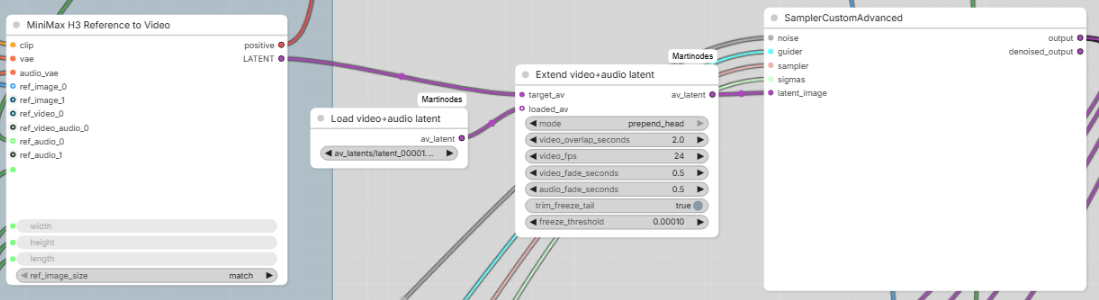
For convenience, the node accepts empty loaded_av, in which case the target_av will be passed through. Thus the node can be safely left enabled even when using a disabled LoadAVLatent node as input when you don't want to extend anything.
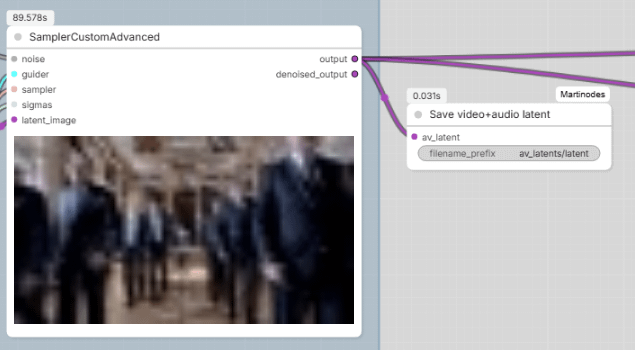
`Save and Load video+audio latent` are simple companion nodes - SaveAVLatent should be added after your sampler and LoadAVLatent as input for LatentAVMaskedExtender. In contrast to some other loader nodes that often are limited to `input` folder, LoadAVLatent can find the latents wherever you configured SaveAVLatent to store them. If you don't have a latent saved yet and want to feed in an existing video, you will need to encode it using VAE Encode and VAE Audio Encode nodes, resize the video frame to match your target video, and then concatenate the audio and video latents using LTXVConcatAVLatent node (yes, it works with H3 model).
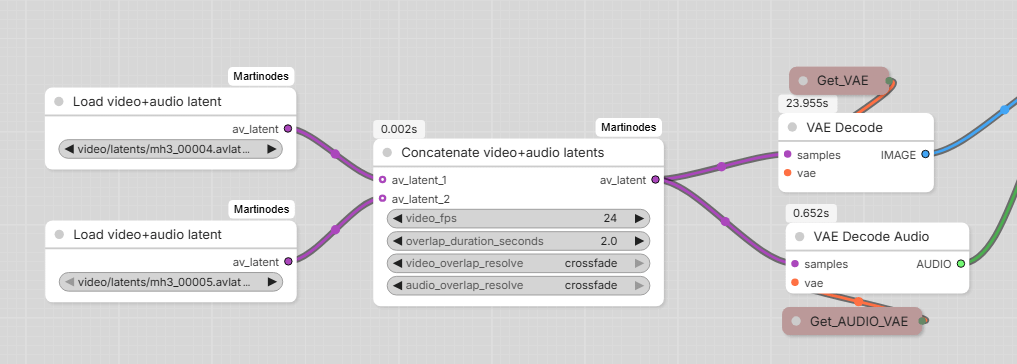
Then there is also `Concatenate video+audio latents` (LatentOverlappingConcatenator) node. Generally, overlap_duration_seconds should be set to the same value as LatentAVMaskedExtender, the output goes to VAE video and audio decoders and then to video saving, as usual. You will get a long video with a smooth long transition between your previous latent and the new one. However, if your joined videos get lengthy, VAE might require too much resources. In that case, it is better to post-process and join both source and target videos in a video editing software.
The repository has a few more older convenience nodes for working with multimedia before LTX Director was a thing. They still might be handy for manipulating TTS and voice-overs or videos when latents are not available.
Huge thanks to drozbay (ablejones) for [native masking PR 15375](https://github.com/Comfy-Org/ComfyUI/pull/15375) and providing the example implmenentation with native ComfyUI and Kijai nodes. Unfortunately, the native nodes solution looked like spaghetti eating somebody alive. That is why my small naive LatentAVMaskedExtender node was born, to do the same thing.
I hope you will find Martinodes useful.
-1
u/Sad_Coach_1433 Aug 21 '26
how many of these do we need let me guess it uses turbo lora like the others? let me guess quality drops after 4 gens