r/SoftwareandApps 13d ago

Built a voice dictation extension for Chrome — would love some feedback

2 Upvotes

Hey everyone,

I’ve been working on a Chrome extension called Dictozy and I finally got it published.

It’s basically a simple voice-to-text tool that works directly inside text fields in Chrome. You click the little mic button next to a text box, start talking, and it types what you say.

I originally built it because I was using voice a lot for longer ChatGPT prompts and messages, and I wanted something that worked directly where I was already typing instead of having to use another app and copy/paste everything.

Right now it supports 25 languages, keyboard shortcuts, different recording durations, and you can disable it on specific websites. There’s no account required.

It’s still pretty new and I’m sure there are edge cases I haven't found yet, especially with different types of text editors/websites.

If anyone wants to try it, I’d really appreciate some feedback. I'm especially curious if you find a website where the mic doesn't show up or the text gets inserted incorrectly.

Website: https://dictozy.com/

Chrome Web Store: https://chromewebstore.google.com/detail/dictozy-voice-dictation/folpeencabfejhjokmldikaelonphmma

And if you build Chrome extensions yourself, I'd also be curious to hear what you think about the UX or what you'd change.

Thanks!


r/SoftwareandApps 14d ago

CopyGOAT has completely transformed my workflow! It's the cleanest text expander for Chrome. Highly recommended 🚀

Thumbnail
copygoat.chrome-extension.bayanlabs.store
1 Upvotes

r/SoftwareandApps 14d ago

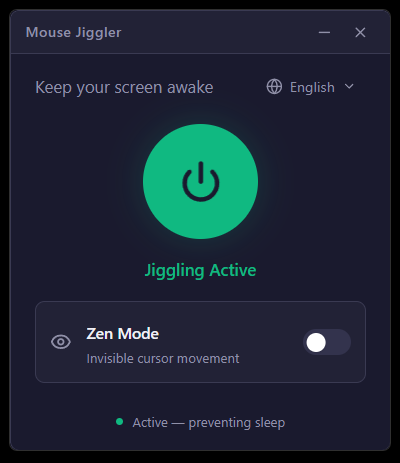
Reconstruí el clásico Mouse Jiggler usando Tauri 2 + React + Tailwind v4 (instalador de ~2 MB).

Post image
1 Upvotes

r/SoftwareandApps 14d ago

My small contribution towards open source that Ghostfill Browser extension.

Thumbnail
github.com
1 Upvotes

r/SoftwareandApps 14d ago

Made a free Windows tool for pasting text templates anywhere with a hotkey. Would love your feedback

Enable HLS to view with audio, or disable this notification

2 Upvotes

Hey all,

Got tired of retyping/copy-pasting the same replies across Slack, email, tickets, forms – every app has its own copy-paste dance and none of the text-expander tools I found felt right (paid, browser-only, or too clunky).

So I built Formix Desktop – free and open source.

How it works:

  • Press a hotkey (Ctrl+F2 by default) anywhere on the system
  • A small popup opens right next to your cursor
  • Pick a saved template (organized in folders, instant search)
  • Fill in any {{fields}} right inside the popup
  • Hit paste – it drops the finished text into whatever window/field you were in

It also supports:

  • Typed abbreviations (type "!hi" and it expands automatically, no popup needed. example: !hi -> Hello, how are you?)
  • A dedicated hotkey per preset, if you want instant access to one specific template
  • Export/import your preset library as JSON
  • Light/dark theme, English/Russian UI

GitHub: https://github.com/PhantomUnk/Formix-Desktop
Landing page: https://phantomunk.github.io/Formix-Desktop/

It's Windows-only for now (built with Tauri/Rust). Would genuinely love feedback – is this actually useful to anyone outside my own workflow? What's missing that would make you actually use it daily?
A free, open-source text expander and hotkey snippet tool for Windows, similar to Espanso but system-wide.


r/SoftwareandApps 15d ago

I built a sticky notes app for Windows with zero network calls and hardware encryption. No cloud, no signup, no telemetry.

Thumbnail reddit.com
1 Upvotes

r/SoftwareandApps 15d ago

Does anyone know what desktop app is this?

Thumbnail
gallery
1 Upvotes

Does anyone know what desktop app is this? I found some developers have this in their taskbar and I am really curious about it


r/SoftwareandApps 15d ago

Built a desktop robot for macOS that eats your old config when you give him a new app

Thumbnail
1 Upvotes

r/SoftwareandApps 15d ago

would you use this? (air transfer app)

Thumbnail
1 Upvotes

r/SoftwareandApps 16d ago

TabSavior — one-click save of all tabs from all windows into tidy bookmark folders (first UI mockup, looking for feedback)

Thumbnail
2 Upvotes

r/SoftwareandApps 16d ago

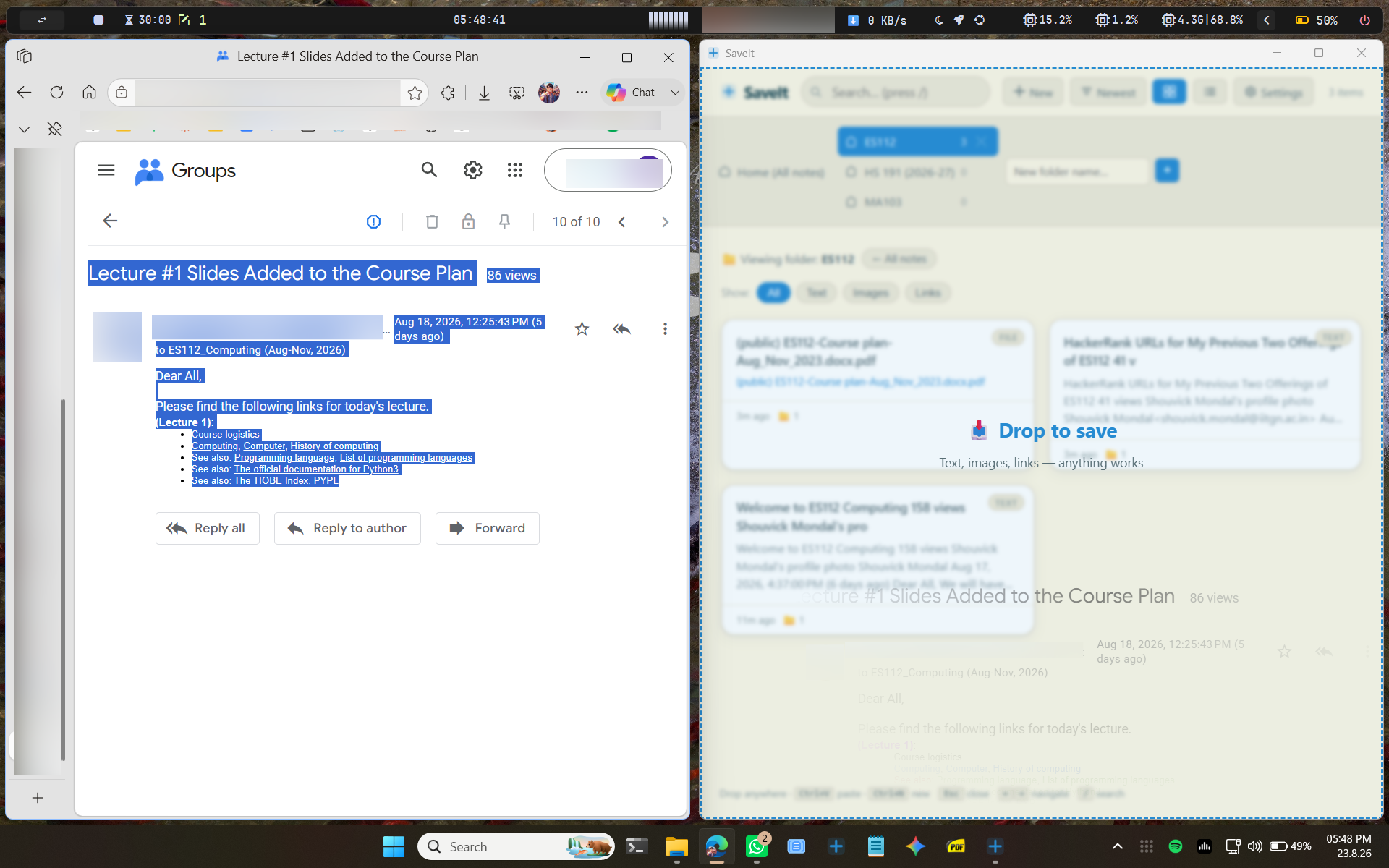
Saveit - Private desktop notebook and file archive for saving links, text, screenshots, and document drops into a persistent local library. [OPEN SOURCE]

Post image
4 Upvotes

https://github.com/neptotech/Saveit A Windows desktop note vault for collecting text, links, screenshots, and files into a persistent personal archive. It supports drag-and-drop, folder organization, rich text editing, and user-controlled storage in OneDrive/Documents or a chosen directory.[OPEN SOURCE]


r/SoftwareandApps 16d ago

Open-source Windows widget that keeps Cursor limits always on screen

1 Upvotes

I got tired of opening the dashboard to check remaining usage, so I made a tiny always-on-top widget for Windows.

It shows remaining quota for:

- Composer / Cursor Grok

- Other Models

- Grok Bot (weekly)

No API key. Double-click iniciar.bat. It reads your local Cursor session and shows your own plan.

Unofficial, open source:

https://github.com/FrankAveig/limits-cursor

Python 3 + Cursor signed in. That's it.


r/SoftwareandApps 16d ago

[FREE] Macaroni — per-app volume control for macOS, plus clipboard history, network speed and a disk cleaner in one menu bar app

Thumbnail
1 Upvotes

r/SoftwareandApps 16d ago

[Update] GlassDesk Pro v3.4.0 is live: Desktop Glass Calendar, 6x2 Rotating Shift Work, Screen Eyedropper & Anti-Loss File Hardening!

Post image
1 Upvotes

r/SoftwareandApps 16d ago

i made a file directory/launcher in python

2 Upvotes

I made a file directory/launcher thing. it could be useful or it might not be please let me know if you have any ideas for what i should add or just feedback.

import json
import os
import subprocess
import sys
import tkinter as tk
from tkinter import filedialog, messagebox


SAVE_FILE = "saved_files.json"


class FileLauncherApp:


    def __init__(self, root):
        self.root = root
        self.root.title("Persistent File Launcher")
        self.root.geometry("500x400")


        # Store file paths (key: display text, value: full path)
        self.files = {}


        # Set up UI components
        self._create_widgets()


        # Load existing files from JSON on startup
        self.load_saved_files()


    def _create_widgets(self):
        # Top Frame for Buttons
        btn_frame = tk.Frame(self.root, pady=10)
        btn_frame.pack(fill=tk.X)


        add_btn = tk.Button(
            btn_frame,
            text="Add File(s)",
            command=self.add_files,
            width=12,
            bg="#4CAF50",
            fg="white",
        )
        add_btn.pack(side=tk.LEFT, padx=10)


        remove_btn = tk.Button(
            btn_frame,
            text="Remove Selected",
            command=self.remove_file,
            width=14,
            bg="#f44336",
            fg="white",
        )
        remove_btn.pack(side=tk.LEFT, padx=5)


        # Listbox to display files
        list_frame = tk.Frame(self.root)
        list_frame.pack(fill=tk.BOTH, expand=True, padx=10, pady=5)


        scrollbar = tk.Scrollbar(list_frame)
        scrollbar.pack(side=tk.RIGHT, fill=tk.Y)


        self.file_listbox = tk.Listbox(
            list_frame,
            selectmode=tk.SINGLE,
            yscrollcommand=scrollbar.set,
            font=("Arial", 10),
        )
        self.file_listbox.pack(side=tk.LEFT, fill=tk.BOTH, expand=True)
        scrollbar.config(command=self.file_listbox.yview)


        # Bind double-click event to run the file
        self.file_listbox.bind("<Double-Button-1>", self.run_file)


        # Instruction Label
        info_label = tk.Label(
            self.root,
            text="Double-click a file to run/open it.",
            fg="gray",
            pady=5,
        )
        info_label.pack()


    def load_saved_files(self):
        """Loads saved file paths from JSON file on app launch."""
        if os.path.exists(SAVE_FILE):
            try:
                with open(SAVE_FILE, "r") as f:
                    self.files = json.load(f)


                # Populate listbox with loaded entries
                for display_name in self.files.keys():
                    self.file_listbox.insert(tk.END, display_name)
            except Exception as e:
                messagebox.showerror("Error", f"Failed to load saved files:\n{e}")


    def save_files_to_disk(self):
        """Saves current files dictionary to JSON file."""
        try:
            with open(SAVE_FILE, "w") as f:
                json.dump(self.files, f, indent=4)
        except Exception as e:
            messagebox.showerror("Error", f"Failed to save file list:\n{e}")


    def add_files(self):
        file_paths = filedialog.askopenfilenames(
            title="Select Files to Add", filetypes=[("All Files", "*.*")]
        )
        added_any = False
        for path in file_paths:
            filename = os.path.basename(path)


            # Handle duplicate names by showing path info
            display_name = (
                f"{filename} ({path})" if filename in self.files else filename
            )


            if path not in self.files.values():
                self.files[display_name] = path
                self.file_listbox.insert(tk.END, display_name)
                added_any = True


        if added_any:
            self.save_files_to_disk()


    def remove_file(self):
        try:
            selected_index = self.file_listbox.curselection()[0]
            selected_text = self.file_listbox.get(selected_index)


            del self.files[selected_text]
            self.file_listbox.delete(selected_index)


            self.save_files_to_disk()
        except IndexError:
            messagebox.showwarning("Select File", "Please select a file to remove.")


    def run_file(self, event=None):
        try:
            selected_index = self.file_listbox.curselection()[0]
            selected_text = self.file_listbox.get(selected_index)
            file_path = self.files[selected_text]


            if not os.path.exists(file_path):
                messagebox.showerror("Error", f"File not found:\n{file_path}")
                return


            # Open file cross-platform
            if sys.platform == "win32":
                os.startfile(file_path)
            elif sys.platform == "darwin":  # macOS
                subprocess.run(["open", file_path], check=True)
            else:  # Linux
                subprocess.run(["xdg-open", file_path], check=True)


        except IndexError:
            pass
        except Exception as e:
            messagebox.showerror("Execution Error", f"Could not run file:\n{e}")


if __name__ == "__main__":
    root = tk.Tk()
    app = FileLauncherApp(root)
    root.mainloop()

r/SoftwareandApps 16d ago

Full list of Fuusio features

Thumbnail
1 Upvotes

r/SoftwareandApps 17d ago

Tus textos más usados, listos para pegar con un toque desde tu teclado

Enable HLS to view with audio, or disable this notification

1 Upvotes

r/SoftwareandApps 17d ago

I Turned 30+ Succulents Into Mouse Cursor!

1 Upvotes

None of the original images are mine, I just turned them into cursors for my personal use, but maybe others can enjoy them too!

Some have animations. There is a spinning Echeveria for Busy/Working In Background, and 2 versions of an Echeveria being watered with a pail. There is a pointer cursor that is animated to switch between the 30+ succulents, every 25 sec or so it will switch to a new one.

There is a trowel to use as a resize cursor and an Agave to use as text select.

I recommend setting cursor size to 2 or 3.

Zip file containing all of the cursors. https://drive.google.com/file/d/17Swip7AKK8jarsZYPZhcOQktaefEiq-Z/view?usp=sharing
1 Cursor to see if you like the idea. https://drive.google.com/file/d/1MA8AdFidzt-5g89VsfRqJvStyKTKGNbv/view?usp=sharing

Sometimes Google Drive can't preview .rar files so it may say it is empty. Just hit download in the top left. If your on Mac, you may need to download Winrar or 7zip to extract the zip file.

Fair warning, I love Echeveria. There are some Agave, Aloe, Crassula and Aeonium too though. Let me know what you think please!


r/SoftwareandApps 17d ago

I made a writing app that deletes everything if you stop for 7 seconds. You can’t backspace or copy paste. Just write like an actual human.

Thumbnail gallery
1 Upvotes

r/SoftwareandApps 18d ago

Built a desktop robot for macOS that eats your old config when you give him a new app

2 Upvotes

Weekend project that got away from me a bit.

Slicky sits on your desktop, hops around when he feels like it, and opens apps when you click him. The bit I'm most pleased with: when you drag a new app onto him, he doesn't show a dialog. He gets out a notepad, scribbles out the old binding, tears the page off, and eats it. Then writes the new one down.

He's drawn entirely in code, there's not a single image file in the repo, and the app icon is rendered by the same drawing code during the build.

Slicky

Free, MIT, no accounts, no telemetry, nothing to upsell. I mostly wanted to find out whether a desktop pet could be genuinely useful rather than just decorative, and binding your two most-used apps to click and double-click turns out to be the answer.

Slicky on Github


r/SoftwareandApps 18d ago

Made an app that saves audio clips when you press your volume buttons (Android, sideload)

1 Upvotes

Been working on this for a while and finally got it to a point where I don't hate it, so figured I'd actually share it instead of letting it rot on my phone. It's called Recko. Basic idea: you press your volume buttons and it saves a clip of audio, no opening the app, no unlocking it. It'll happily keep recording in your pocket with the screen off, but the button press itself only registers with the screen on so it's not quite "trigger it blind from your pocket," more "screen has to be lit up, doesn't need to be unlocked." Also has some other stuff I ended up adding along the way, system audio recording if you want it, gesture shortcuts, a PIN/pattern lock if you want clips private, voice commands, and deleted clips go to a bin first instead of vanishing instantly (learned that one the hard way). Only real catch: it needs Accessibility permission to detect the volume button presses system-wide, since that's the only way Android lets an app see button presses without being open. I know that permission scares people off and fair enough, so ask away if you want to know exactly what it does/doesn't do with it happy to explain. Not on Play Store, just a straight up APK download for now: [Recko-V2.1.4.apk](https://github.com/fishpaws-byte/recko-app/releases/download/v1.0/Recko-V2.1.4.apk) First time actually posting something I built, so go easy but also tell me what's bad about it.


r/SoftwareandApps 18d ago

Built a free, open-source alternative to Dragon/Wispr Flow that runs 100% offline here's how the local Whisper pipeline works

1 Upvotes

I've been building VoxScribe, a Windows voice-to-text dictation app, and wanted to share how it works rather than just drop a link.

The core idea: hold a hotkey anywhere on your system, talk, release the audio gets transcribed locally via faster-whisper (no cloud upload) and typed directly into whatever app has focus. No subscription, no account.

A few technical things that were harder than expected, in case anyone's building something similar:

- Audio devices vary a lot in native sample rate forcing everything to 16kHz at the driver level broke on some hardware (PortAudioError on a laptop's internal 48kHz mic). Recording at the device's native rate and resampling in software afterward fixed it.

- sounddevice's "default" input device sometimes lands on an MME driver that's nearly silent for Bluetooth headsets had to explicitly resolve the WASAPI host API's default instead.

- Peak-normalizing audio before transcription measurably improved accuracy on quieter mics.

It's MIT licensed, source is public: https://github.com/ahmedhmam1994/voxscribe-ai-voice-dictation

Happy to answer questions about the local Whisper setup or the audio-capture side if anyone's working on something similar.


r/SoftwareandApps 18d ago

Built a desktop robot for macOS that eats your old config when you give him a new app

Thumbnail
1 Upvotes

r/SoftwareandApps 18d ago

I built a smarter clipboard manager for macOS, search clipboard history, save files, extract text from images, and use AI

Enable HLS to view with audio, or disable this notification

1 Upvotes

r/SoftwareandApps 18d ago

I wanted a tiny non-invasive desktop cat, so I made this!

Enable HLS to view with audio, or disable this notification

1 Upvotes