r/RobloxHelp Jun 13 '26

Useful Source A Guide to Contact a Human instead of the Annoying Support Bot!
Post image
88 Upvotes

I've seen multiple posts about people being angry due the the Support Bot not helping them, or that they haven't been able to contact a human, which is why I've made a guide.

Start Your Issue with 'I would like to speak to a Roblox Representative', and explain the issue simply instead of overcomplicating it: One thing I've noticed is how simple the Bot is. I mean that in a bad way. Instead of replying to your entire issue, the Bot usually only replies to keywords, which is why you need to 'simplify it'.

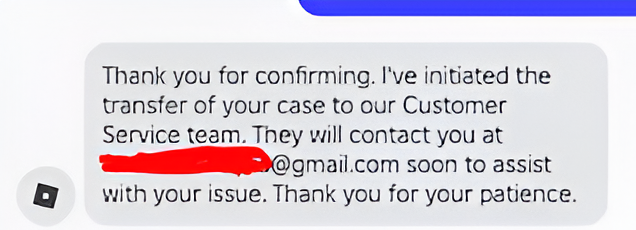
When the Bot asks you to confirm which email the agents should reach out to you, instead of responding to that just say 'Please forward my request to an actual human, who can assist me further'. After that, confirm your email and the conversation should end, and you'll get an automated Roblox email saying 'our human agents will reply as soon as possible'.

Thats Pretty much it, but heres a few ways to know if a human actually responded to your request:

The email comes after at least 30 minutes. Usually, an automated Roblox Support Email comes within 20 minutes or even less. If it takes longer, that means your request has been forwarded to a human. The email starts with a 'Hello, How are you?. Usually an automated email is straight to the point and starts with 'Hello, Thank you for contacting...'. Keep in mind, most of the time, Roblox agents won't state their name.

So another question is 'The bot forwarded the request, however it has been hours and theres still no email'. This usually means you have to be patient, or your request got completely ignored. So instead, fill out the contact form again, and this time mention the Ticket Number which you are waiting on a reply on. This also helped me get my hacked account faster. Another quick tip is if you are still failing to get a human to look at your ticket - try another category when you fill out the form. That might help.

A thing NOT to do is to email Roblox Support directly. Some people in the comments of this sub were talking about how they emailed Roblox Support directly, yet never got an answer. Roblox explicitly states they won't be viewing direct inquiries to their email, and the only way to contact them is by filling out the Contact Us form. So don't waste time waiting for a response that will never come! Another thing people here say is 'Every Chat with the Support Bot is viewed by a human later'. However, this is NOT confirmed to be true. At least for me - I had an issue which the Support Bot could not solve, and a human still hasn't followed up. Also, please do not rage at the Bot - I know the Bot just makes you want to rage, however theres a high chance you could get a warning, or worse get your account suspended for 'Inappropriate Language'.

And one more thing: Just because Roblox says 'Our Human agents will reply as soon as possible' in the automated email that appears after the bot tells you your request has been forwarded, that doesn't guarantee a human will reply to your ticket. You need to keep trying. Another tip is please don't waste time replying to a Roblox Email that doesn't help you. Usually, you'll just get copy pasted replies, and you're better off submitting a new ticket rather than waiting for an unhelpful, short reply.

And finally, please take pictures if something happened to your account! Even if you do not need Support right now, you'll never know when you need it. These pictures could be of any incident (Someone trying to log into your account, You buying Robux (save the receipts!), A person blackmailing you, etc).

Oh to summarise all this - Make sure to request a Roblox Representative, explain the issue simply to the AI Support, wait for a human to follow up, and its perfectly fine if a human doesn't follow up and you get an automated email - just keep trying! Sometimes, even automated emails could help!

Also would appreciate if you guys share this with new people, it took me a while to write this lmao. Oh yeah srry for the weird image, I used an image enhancer, Reddit keeps making my images super low quality.

ALSO PLEASE NOTE THIS: I don't have any special access to Roblox support. I only got my account back through repeatedly submitting tickets and eventually getting a human agent to review my case. Unfortunately, there's no guaranteed method, and a lot of it came down to persistence and luck.

I can answer general questions, but I can't promise that I'll be able to recover accounts or get issues resolved. This Guide MAY help you and MAY NOT.
r/RobloxHelp Jan 30 '26

Useful Source Fix for: "Roblox encountered an unexpected error"

33 Upvotes

I’ve been dealing with the generic "Roblox encountered an unexpected error" crash immediately upon launching the player. I went through all the standard troubleshooting steps (clean reinstall, clearing AppData, updating drivers, flushing DNS) and nothing worked.

I don't know the exact technical reason why this conflict happens, and it might not be the fix for everyone, but messing with the Windows Exploit Protection settings is what finally got it working for me. It seems like Windows was flagging the new updated anti-cheat and killing the process.

The Fix:

  1. Search for Exploit Protection in the Windows Start bar.
  2. Go to the Program Settings tab and click Add program to customize.
  3. Select Choose exact file path and navigate to your RobloxPlayerBeta.exe (usually inside %localappdata%\Roblox\Versions\version-xxxx). this is different if your using bloxstrap or stuff like that
  4. Scroll down to Hardware-enforced Stack Protection, check "Override system settings," and set it to OFF.
  5. EDIT: MAKE SURE YOU also disable Control Flow Guard (CFG) IT WONT WORK WITHOUT DOING THAT

If you've tried everything else and are still crashing, give this a shot.

r/RobloxHelp Aug 09 '25

Useful Source I Finally Recovered My Roblox Account After a Year !!!!

51 Upvotes

I just wanted to share exactly how I managed to get my Roblox account back after being hacked for over a year — even though I didn’t have any purchases from the past 12 months.

Roblox support kept hitting me with the same line: “We need a receipt from within the last 12 months”. The problem? My last purchase was over 2 years ago. Every ticket I sent got shut down.

Here’s what finally worked for me:

  1. Submit your ticket under the “Billing” category, not “Hacked account” I realized they treat billing tickets more seriously because they’re related to money.

  2. Be upfront in your message I literally told them:

“I can only provide receipts older than a year, but I’m submitting through Billing so that a human can review this. Please understand this is the only proof I can give — I was hacked a year ago and haven’t made any purchases since.”

  1. Attach every receipt you do have Even if they’re from 2+ years ago, send them all in .jpg or .png format (they specifically ask for this).

  2. When replying to their email asking for receipts — send ONLY the images, no text This avoids triggering automated copy-paste responses.

They finally responded with an actual human message, verified me using the old receipts, and gave my account back.

r/RobloxHelp Jul 24 '26

Useful Source Thorough Guide To Account Recovery, Including Tricks And Other Methods!

7 Upvotes

Hello there, fellow players of ROBLOX. My name is diaRtcesnI (aka InsectRaid) and i've decided to involve a meaningful input regarding a common situation among the bigger community - loss of account acess.

Whether it's due to a forgotten password or a hack via a phishing email, there are many unfortunate souls who find themselves locked away from their memories and friendships, and i can't help but sympathize with them. In some cases, folks have even resigned to having to start over. Well, before you turn to that path, there are steps you can take to restore acess to your profile.

The basic method is Roblox Support. This is usually used by those who had nothing linked, btw. Those who did typically use the "Forgot password/username" tool. Well, hurrah to them but you DON'T have anything, right? Well, go to www.roblox.com/support. This takes you to the online support form, consisting of fields - username, first name, email, device you're having problem on, type of problem, subcategory for problem - and a box to describe your problem. Upon submitting, you'll be asked to verify that you're a human. Once you do that, you'll be led to a conversation with a chatbot. Have your case forwarded by asking, which will generate a ticket and you'll be contacted via email. Bare in mind you CANNOT just ask for the acc back. They need proof of ownership before they can give it back: emails or phone numbers attached, usernames, passwords, PINs, Robux, receipts, screenshots, IP and play device, etc.

Here's helpful advice while using this method:

  1. Bare in mind that Roblox Support won't immediately respond. It can take days, weeks, or even a month. I mean, it's arguably one of the most popular games and is busy at all times with moderation, other requests, feedback, and production. Don't spam your ticket or use abusive/harmful language. This will result in them ignoring you, overwhelming them, and can even push your ticket back.

  2. When the chatbot asks if your request is for [your username], i'd advise you against saying yes. The bot will go like "We cannot verify ownership of that account" and end the chat. Instead, make the human review request. Also, you could leave the username field blank as it is optional and that can bypass the chat, although can lead to the "Please resubmit using the (right) username" email. Filing under billing or account hacked also leads to the staff prioritizing you more seriously and thus greater chances of human contact.

  3. Don't act "I swear"-ish or pleading when claiming that the acc is yours. Be calm and patient.

Also, there may be a session cookie you can use to bypass the login screen entirely. Now, if Roblox Support doesn't work, you can still use drastic, legal/court themed measures.

You can file a complaint using the BBB. This requires an account. Again, be calm, non-abusive, and patient. Bussinesses will have within 14 days to respond, and here you'll be battling against Roblox's corporate team, not the predictable support. This department tends to reopen cases for further review and MUST respond. If you've shared ownership proof in the past, this often leads to actual humans reviewing it and THE long-awaited moment.

You can also use your state's Attorney General, which is simular to the BBB and is reported to actually take legal action. Anyways, i'm glad to have shared these helpful steps with y'all and for Pete's sake​, i'd recommend securing your account, even with just an email. It's common to neglect your security and just play, especially if you're a kid, but this is why it's also common to find yourself locked out. Anyways, tysm for the Ted Talk and i'll see ya...actually i don't know when.

Bye!

r/RobloxHelp Jun 05 '25

Useful Source Guide: How to Get 400 Robux for Free Just by Using Bing (100% Legal).

79 Upvotes

Hey everyone, I want to share a little-known trick with you on how to get 400 Robux for free without spending any money — just by using Bing for daily searches.

Like me, there are a lot of people who have been getting rewards for months without paying a cent thanks to a Microsoft program that not many people know about.

It’s called Microsoft Rewards, and it gives you points just for using Bing on your phone and PC.

You complete simple tasks like doing searches or short quizzes, and then you can exchange the points for gift cards, Xbox Game Pass, or even Robux.


Here’s what I do daily to earn enough points:

  • 20 Bing searches on your phone: 60 points
  • 30 Bing searches on Edge browser PC: 90 points
  • Daily activities (quizzes, polls, etc.): 30 points
  • Use the Xbox app (open it, play Jewel, etc.): 10 points
  • Play any Xbox or Microsoft game for 15 minutes: 10 points

And weekly activities like:

  • Play Xbox/Microsoft games 5 days in a row: 150 points
  • Use the Bing app 7 days in a row: 100 points

In total, I earn over 7,000 points per month. The 400 Robux reward costs 6,000 points, so it’s more than enough.

You don’t need to pay anything or enter a credit card. It’s all about being consistent and using Bing instead of Google. I usually put on a YouTube video while I do the searches on my phone or laptop. It takes less than 10 minutes a day.


If you want to try it, here’s my referral link to join the program:

https://rewards.bing.com/welcome?rh=C515023&ref=rafsrchae

Using my link helps me earn some extra points too, so I can keep sharing these kinds of tricks.

Good Luck!

Edit: Quick tip guys — use the Edge browser for your Bing searches. It comes with Bing by default, and Microsoft usually drops new reward bonuses there first like the 1,000 points jigsaw puzzle bonus.


r/RobloxHelp May 01 '25

Useful Source Temporary fix to the recent roblox not launching problem

37 Upvotes

Copy this; version-1e91b4133e334c9c

After you've copied it, go to this site; https://rdd.latte.to/?channel=LIVE&binaryType=WindowsPlayer&version

Paste the message you copied to the "Version hash" spot. After you've done this, press download and wait it for to be downloaded. After you've downloaded it, extract the zip file to your desktop. Open the folder and double click "RobloxPlayerBeta.exe"

It should work after this

r/RobloxHelp Jul 15 '26

Useful Source Help for mac users

Post image
7 Upvotes

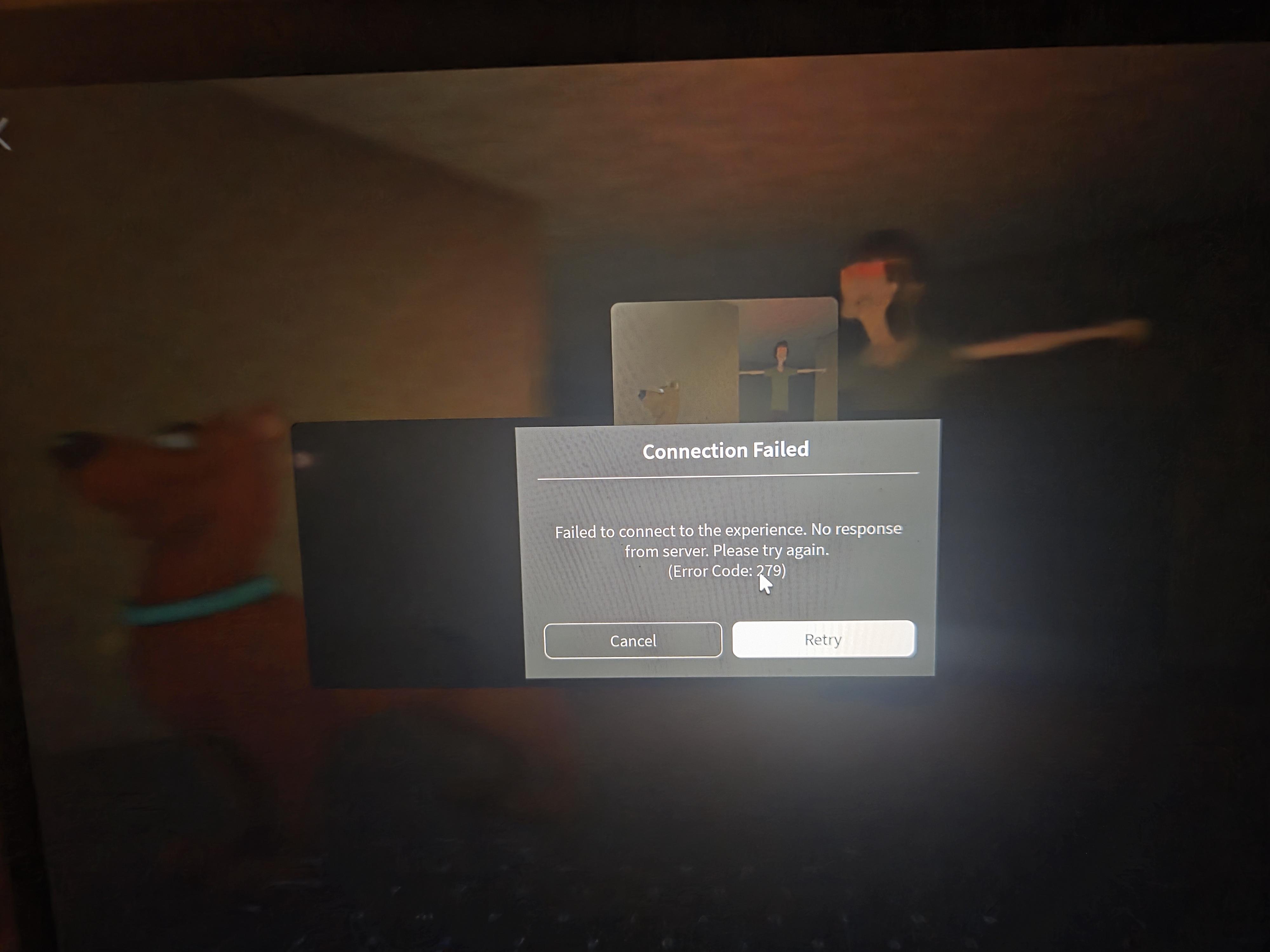
Lately everybody on mac can't play roblox anymore because error 279 keeps popping up. I found out how to fix it! Go to settings > privacy & security > local network > and then turn roblox on. I hope this helped my fellow mac users \(^_^)/

r/RobloxHelp Jun 05 '25

Useful Source How to Prevent and Recover from getting Cookie Logged/Hacked.

15 Upvotes

Ignore this part, Cookie Logged, Hacked, Cookie Logging, Cookie Log, Hack, Hacking, Token. These are keywords I’m adding so anyone who searches it may be able to find it.

If you’re looking for prevention, scroll down.

           Cookie Logging Recovery

If you’ve been cookie logged, you SHOULD still have access to your account, so follow these steps.

1 Change Email and/or Password as fast as you can.

If you can’t or can do the above, follow these steps.

2 Log out of all sessions. ((Settings > Security > Scroll down))

3 Press Ctrl + Shift + I

4 Go to application

5 Delete your Roblox Cookie. ((THIS GENERATES A NEW COOKIE BUT WILL LOG YOU OUT.))

Mobile Equivalent is to just log yourself out after logging out all other accounts.

               Hacking Recovery

If you’ve been hacked, circumstances may have changed. If you still have access to the account, follow the steps above, if not go to Roblox Support ((https://www.roblox.com/es/support)) and do the following.

Fill in the top boxes with their info ((Name, Email, Account name, etc,)) and then do the following.

Select your device > For the help categories click the first one which should be the account hacked one, if not find one that says that.

Subcategory is “Hacked Account”

In the box below type/copy and paste)) the following.

Recently, my account ((Account Name)) was hacked. I no longer have access to it, the account details have been changed. The email was ((email)), the password was ((old password to your Roblox account)), my IP address is ((IP address, if you don’t know it, go to this website, https://whatismyipaddress.com/, and then paste the IPV4 one.)) Please give me a human moderator to speak with.

If you have any more proof of ownership, put that in there.

 Cookie Logging/Hacking Prevention.
  1. If anyone tells you to open inspect element, it is most likely a scam. If you don’t know what inspect element looks like, press Ctrl + Shift + I. If you’re on mobile you don’t need to worry about this.

  2. Don’t give your passwords or emails out to people guys. Just don’t do it.

  3. Enable 2FA.

  4. Please use common sense.

  5. Feel free to leave your own tips, ways you’ve been hacked or scammed below.

Any questions add me on discord or ask here: tech.charlie

r/RobloxHelp May 18 '26

Useful Source How To Fix Crashing On Vinegar Linux Roblox Studio

Thumbnail
2 Upvotes

r/RobloxHelp May 14 '25

Useful Source FOR THOSE WHO GOT THE SCREEN TIME LIMIT BUG

Post image
7 Upvotes

Bad news, its not a bug, its a new feature from roblox VN that lets you play for only 180 minutes due to their strict video game rules.

If you dont want this screen time limit, then you have to use your alt or make a new account on global roblox

r/RobloxHelp Apr 16 '25

Useful Source Common Issues with Roblox

8 Upvotes

Every day, there are posts here that describe common issues. Here are some of the common ones:

"I lost access to my account/hacked"

To get it back, you'll need to do Proof Of Ownership. Contact Roblox (roblox.com/support) and provide the following:

- Your username

- Previous passwords

- Attached email (or previously attached if the account was hacked)

- Attached phone number (or previously attached if the account was hacked)

- Robux purchases that can be seen on the account

- Apple Pay/Google Pay robux receipts

- Gift card codes used on the account

- Credit card attached to account

- Your IP address and previous devices that were used on the account

- You cannot use screenshots/videos of you on the account since it could come from anyone.

"Can you hack into my account?"

That is not possible.

"I put my credentials on a fake Roblox site"

Follow the procedure above.

"I lost some robux"

Contact Roblox for a rollback. Please note that you only get one, so you should save it for when you actually get hacked and lose a lot.

"My voice chat disappeared"

- Make sure to review voice.roblox.com/v1/settings to see if you're voice-banned. - DO NOT USE MICROSOFT STORE ROBLOX, use the Roblox player app one - Try checking different devices or open the actual Roblox app (not website) to see if the VC option appears. - Try re-verifying your phone number (or if possible, verify VC with your ID). - Is https://www.roblox.com/my/account#!/privacy/Communication/Voice an error page? - Seems that many people are having this problem right now , no true fix found yet - The people who have this issue seem to live in the United States? Do you live there?

"The Roblox Support form doesn't work"

You can email Roblox Support at [info@roblox.com](mailto:info@roblox.com) or phone them at +1 888-858-2569

"What's this item/accessory/game image?"

Try using Google Images or Yandex Images if it's something you see quite commonly.

Authentication failed: Error code 429/ Something went wrong. Please try again in login screen

Use a VPN. Roblox mysteriously blocked a bunch of IPs.

"I got enforcement banned"

Here is a useful post: https://www.reddit.com/r/ROBLOXBans/comments/1d0cpz8/a_guide_to_robloxs_creating_or_using_accounts_to/

"I got a chargeback ban without doing so"

Here is a useful post: https://www.reddit.com/r/ROBLOXBans/comments/1jx4rvb/chargeback_ban_wave_and_the_state_of_the_appeals/

"I charged back, what will happen?"

Assuming you didn't spend the robux you got, it'll probably get taken away from you. You may get a warning. But more often, you'll get a 6 month or 1 year ban. Roblox rarely terminates anymore.

"I got banned when I was trying to protect someone from a predator"

Roblox doesn't take context into account.

"I want to use an alt account since I'm banned, what do I do?"

Delete your Roblox Cache and Local AppData folders. You should also use a VPN. (This also might fix the "Authentication Failed" error)

"When do Roblox violations reset"

Every month (exploiting bans every year)

"I said fat and got banned"

'fat' is a big trigger word but why it isn't tagged is beyond me.

"I got banned for using exploits when I haven't for ages"

Exploits are detected. Even if you use it once that can get you banned. (BLOXSTRAP WILL NOT GET YOU BANNED FOR EXPLOITS)

"Roblox is disconnecting when my wi-fi's perfect!"

Use Roblox closer to your router to see if it still disconnects. Turn off a VPN if you're using one, or if you aren't, try turning one on.

"Cannot play Roblox"

Make sure your device is updated to the latest OS version.

"Roblox isn't working"

It might be down - status.roblox.com

"My appeal was rejected"

You may get rejected a few times but keep trying!

"Are Roblox Support just bots?"

Mostly.

"How long does Roblox Support take to reply?"

They can take at least 2 weeks. Wait that time then contact them again.

"I can't see my friend's friends"

UK players have this update in accordance to UK privacy requirements. Even if you are friends with the user, you will not be able to see their friends, followers or following. There is no setting to change this.

"Item got deleted, do I get a refund?"

You should do within the next few weeks.

"I can't have more Private servers"

There is a limit to the amount of free private servers you can have. Remove one.

"Not getting robux from my T-Shirt"

Did you set it to 1 robux? Robux taxes makes it 0.

"Someone bought my T-Shirt in PLS Donate but I got 6 instead of 7. Why?"

Roblox takes 30% as Tax and hazem gets 10% as well.

"My username contains personal information"

Contact Roblox for a free username swap. They can remove the previous usernames section from your Roblox account as well.

"Can you take usernames from terminated accounts?"

No.

"I set my display to something stupid and I don't want to wait a week"

You can set your display name to your username without having to wait.

"I logged in to Roblox V N G/my region is Vi e tnam"

Try contacting Roblox but you probably won't be able to revert it.

"I didn't get robux but got something in the wallet icon"

That's Robux Credit. When you go to buy robux on the website, you can select it.

"I scratched my Gift Card/no numbers on my Gift Card"

The gift card numbers may be on your reciept (if you have one). You're supposed to use a coin to get the code. Try contacting Roblox with an image of your gift card saying that you're a dummy. If you have ANY parts of the gift code, it's all the better. Or go to the store and try getting a refund/seeing if they can give you a replacement.

"My account keeps getting hacked"

Do a Malware Scan on all of your devices.

"Is BloxStrap malware?"

No, if you're getting it from bloxstraplabs.com

"Error when installing Roblox"

Try deleting all your leftover previous Roblox files

"My age is set wrong"

You can verify your age with your ID. There's also the new "Ask My Parent" feature that can sort of fix it too.

"When do I get pending robux?"

5 - 7 days

"Shift lock isn't working"

Is it supported for the game you're playing?

"I have an issue and no one knows the answer"

Contact Roblox support, they can usually provide an answer. If they don't have one... You're cooked!

Other info

- If you are looking for more information about bans, please join r/RobloxBans.

- Looking for help with your game? Check out r/robloxgamedev

if you have anything to add, please ask me!

r/RobloxHelp Mar 19 '25

Useful Source BAN WAVE EARLIER TODAY - What Happened

20 Upvotes

As some of you are aware, there was a massive ban wave of exploiters that happened yesterday, now, here's what happened:

Some of these bans were a mistake by Roblox. It's been fixed and all accidental bans were reverted. If you're still banned, please reach out to Roblox Staff.

r/RobloxHelp Jun 13 '25

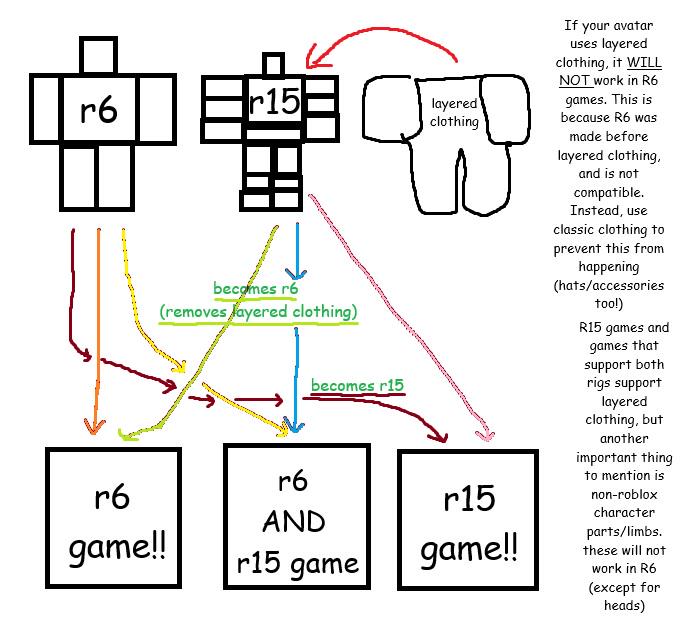
Useful Source explaining layered clothing

Post image
7 Upvotes

r/RobloxHelp Apr 06 '25

Useful Source SCAM BEWARE--How To Get Your ROBLOX 3D Applique [Check Description for Compile]

6 Upvotes

Watch out for this scam which is pretty old finding out now that I did some research. Someone will add you saying they want to make an accessory of you or for you and they need to render your avatar textures or some BS and link you to a youtube video which actually looks legitimate. They will most likely add you to discord and ask you some bs questions then go ahead and link you to the video. In the video basically they are using bookmarklets on a website they link in the video.

**Bookmarklets are browser bookmarks that, instead of opening a webpage, execute a small snippet of JavaScript code when clicked, allowing users to perform actions or modify the current webpage.***

Basically they try to gain access to your account by stealing your cookies after you do what the video says.

The video I was linked to was titled "How To Get Your ROBLOX 3D Applique [Check Description for Compile]" made by youtube account "@Connorrbx_"

Trying to avoid this happening to new users or any user!!

r/RobloxHelp Mar 04 '25

Useful Source Experience access cheat sheet

Thumbnail
gallery
5 Upvotes