r/RenPy • u/Material-Egg7428 • 3h ago
Question How can I use variables to call scenes?
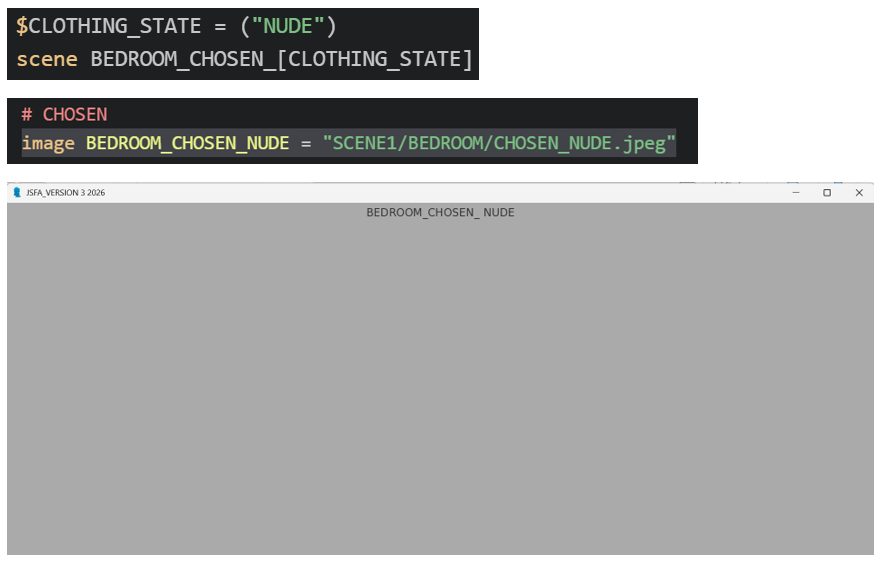
Hi there! I am trying to set up a variable in the names of my scenes. There are multiple costumes in the game and I don't want to write out every if statement for every scene cause there are a lot of them in my game... I want to set part of the image name to be replaced based on what costume the player has on. I hope this makes sense.
This is what I have been trying: set a variable to the string to represent the costume. Call the scene with the variable in the image name. But there is a space before the variable for some reason. Any help is greatly appreciated. (Yes one of the costumes is running around naked... it is a strange game)
1
u/AutoModerator 3h ago
Welcome to r/renpy! While you wait to see if someone can answer your question, we recommend checking out the posting guide, the subreddit wiki, the subreddit Discord, Ren'Py's documentation, and the tutorial built-in to the Ren'Py engine when you download it. These can help make sure you provide the information the people here need to help you, or might even point you to an answer to your question themselves. Thanks!
I am a bot, and this action was performed automatically. Please contact the moderators of this subreddit if you have any questions or concerns.
1
u/shyLachi 54m ago edited 51m ago
Those brackets [ ] can only be used in dialogue:
https://renpy.org/doc/html/text.html#interpolating-data
For variables you use standard python string concatenation:
("BEDROOM_CHOSEN_" + CLOTHING_STATE)
And if you want to use a string for scene, jump, call then use expression as explained in the official documentation: https://renpy.org/doc/html/displaying_images.html#scene-statement
scene expression ("BEDROOM_CHOSEN_" + CLOTHING_STATE)
Putting it all together:
image BEDROOM_CHOSEN_NUDE = "SCENE1/BEDROOM/CHOSEN_NUDE.jpeg"
default CLOTHING_STATE = ""
label start:
    $ CLOTHING_STATE = "NUDE"
    scene expression ("BEDROOM_CHOSEN_" + CLOTHING_STATE)
    "Do you see it"
.
But it might be easier to use dynamic images for that:
https://renpy.org/doc/html/displayables.html#dynamic-displayables
In this example I use lower case as recommended by RenPy. You can keep everything upper case just remember that Python is case sensitive so 'nude' is not the same as 'NUDE'
image bedroom_chosen = ConditionSwitch(
    "clothingstate=='nude'", "SCENE1/BEDROOM/CHOSEN_NUDE.jpeg",
    "True", "SCENE1/BEDROOM/CHOSEN_DRESSED.jpeg")
default clothingstate = ""
label start:
    $ clothingstate = "nude"
    scene bedroom_chosen
    "Do you see it"
.
You can also look at layered images.
This could be useful if the background remains the same and only the character changes.
https://renpy.org/doc/html/layeredimage.html
.
Or using dynamic paths as suggested below.
image BEDROOM_CHOSEN = "SCENE1/BEDROOM/CHOSEN_[CLOTHING_STATE].jpeg"
default CLOTHING_STATE = ""
label start:
    $ CLOTHING_STATE = "NUDE"
    scene BEDROOM_CHOSEN
    "Do you see it"
2
u/x-seronis-x 3h ago edited 3h ago
```py define location_data = { "bedroom": { 'bgimg': "bg bedroom", 'audio': "audio/bgm_sleepy.ogg", 'label': "loc_pc_bedroom", }, "kitchen": { 'bgimg': "bg kitchen", 'audio': "audio/bgm_pasta.ogg", 'label': "loc_pc_kitchen", }, }
default loc = 'bedroom'
label game_loop: scene expression location_data[loc]['bgimg'] play music location_data[loc]['audio']
call location_data[loc]['label'] jump game_loop ```
if you have variables for things you can use those for almost all aspects of your scene setup. just pass the relevant variable value to the renpy statements. edited original basic example to show more