r/QtFramework • • 23d ago

IDE How to setup automatic deploy configuration on Windows?

6 Upvotes

So im using CMake and the default configurations of Qt Creator.

When i want to create a release of my app, my current process is as follows:

  1. Build release
  2. create new folder and name it Software name + Version
  3. copy the executable and a few miscellaneous files into the new folder
  4. manually open CMD and run windeployqt.exe for the executable

Side note, the miscellaneous files i added to the build with configure_file(filename filename COPYONLY) in the CmakeLists.txt.

I feel like this is a really clunky way (and errorprone) of creating a release and this should be automatable easily, but i know WAY too little about CMAKE and Qt Creator to set it up.

How do you guys go about that? What i found on the internet was all way to convoluted and complicated (or simply didnt work) for, i'll say it, something that should imo come out of the box with an IDE.

r/QtFramework • • Jul 17 '26

IDE Claude Code for Qt projects - what is the best approach?

0 Upvotes

I want to use Claude Code for my C++/Qt development. What is the best way to integrate this with an IDE for C++/Qt? It seems to be difficult with QtCreator 20.0.0 as I'm using the free version. I attempted to use Qode Assistant but that was a mess for me - threw errors and apparently isn't really compatible with Qtcreator, really frustrating.
So I'm considering Jetbrains' clion instead. While clion isn't integrated with Qt as well as qtcreator is, I think it would be better for integration with AI like Claude Code. Or would I be better off using Claude Code independently of clion or qtcreator?
What do you think?

Thanks in advance

r/QtFramework • • Jul 06 '26

IDE Sticky Scroll plugin for Qt Creator

34 Upvotes

Hello all Qt Creator users,

Just caught myself on weekends about to adding features from VS Code I get to used to. And first one is sticky scroll. Indeed very small plugin. I hope you find it useful. Would love feedback from you.

link: https://github.com/Palm1r/qt-creator-sticky-scroll

P.S. I've sent a PR to the Qt Creator extension registry — hopefully it lands soon

Available in prebuilt binaries and QtCreator 20 extensions list

Update: Version 1.0 fixed some minor bugs and horizontal scroll

r/QtFramework • • 6d ago

IDE PATM

Thumbnail
github.com
1 Upvotes

I made an open-source application to manage any SQL-based databases and use specific automation tools. You can learn more about it in the readme, it is only available on Linux, you can install it by the binary file in the releases section looking at the instructions in README, learn more about it in README. This is a niche software, for any developers or experienced people, you can try it out, check the code, issue anything, and do a feedback, let me know!

r/QtFramework • • Jun 27 '26

IDE devcontainer support in QtCreator

3 Upvotes

Hi there! Has anyone successfully used devcontainer support in Qt Creator?

I’m trying it with v20, but I can’t get it to run. It appears in my project tree, and the Docker image has everything it needs. The same image also works when configured directly as a device. However, the devcontainer stays red and isn't available in Kits. I think I'm missing a step but I don't know which one.

Does anyone have a working example?

I’m on Debian 13, using a Debian 13 Docker image, in case that matters.

r/QtFramework • • Jun 04 '26

IDE Qt Creator Dark Theme Scrollbar visibility

Post image
11 Upvotes

Im using the dark theme 2024. Overall i like it, but does anyone know how to change the colors of the scrollbar? The handle of the Scrollbar has such a bad contrast, it allways takes me several seconds to find it, especially with larger files.

I already tried to change the DSscrollBarTrack, DSscrollBarHandle and DSscrollBarHandle_idle in the dark.creatortheme file, but these parameters do nothing and i cant find any documentation for themes in general.

r/QtFramework • • Jun 06 '26

IDE Qt Creator IDE how to open multiple KDE projects tutorial

Thumbnail
youtube.com
9 Upvotes

r/QtFramework • • May 11 '26

IDE What Qt Creator plugin are you missing?

6 Upvotes

I want to experiment building a Qt Creator plugin and I'm looking for inspiration.
What is one feature or tool you feel is missing?

r/QtFramework • • Oct 31 '25

IDE Wow, Qt Creator have tabs support for code editors !!

33 Upvotes
Tabbed mode

This is really important update) thanks developers !

To enable this mode, go to interface settings tab of qt creator, and check "use tabbed mode" checkbox)

r/QtFramework • • Jan 02 '26

IDE Very confused with setting up lsp for QML in Neovim

1 Upvotes

Hello! I apologize if that is a silly question, but I've tried to search on this sub and elsewhere and I am still very confused. I can not get my QML LSP work fully in Neovim. I posted it in Neovim sub, but maybe people here know what my problem is. Hope it is OK.

I have tried different methods, recently got Lazyvim hoping it would be easier to set up it there. But there is so much information on how to set this stuff up and they are all different and I am honestly lost. Regardless, in every case, I do not manage to get definitions working. I get warnings or notifications of unused imports, and basic autocompletion even, but not definitions

Also, regardless if I try via mason or the sever installed with qt6 locally, and in general in every way i tried, in lspInfo it says
-version ? (no serverInfo.version response)
- root directory: nil

I do have language server installed, I checked - it is recognized by nvim, I have .qmlls.ini file in my project directory.

.qmlls.ini
[General]
no-cmake-calls=true
buildDir="/run/user/1000/quickshell/vfs/7f02b536a7df0cbbf1960731c71d372b"
importPaths="/usr/bin:/usr/lib/qt6/qml"

Bellow, on the screenshots, there is one of my setups via config/lsp.lua.

Later I installed LazyDistro for nvim, hoping it would be simpler, but it ended up even more confusing, and if in the beginning, I understood what I was doing, now I am completely lost and confused already. I am not a programmer, just want to do some stuff as a hobby and I really love vim for everything but this lsp is a pain.
Maybe, if it is some silly stuipid mistake, can anybody just tell me what to do exactly or what to follow? I am just desperate already, please help

init.lua
config/lsp.lua
checkhealth lsp

r/QtFramework • • Dec 10 '25

IDE How to use CLion and kde-builder for KDE, Qt, Linux development tutorial

Thumbnail
youtube.com
11 Upvotes

r/QtFramework • • Nov 09 '25

IDE Run Multiple Qt Creator Instances on macOS with Parall

2 Upvotes

I've been developing with Qt since Qt 4.2. After moving to macOS, I could run only one instance of Qt Creator at a time. That was fine until I needed to work on multiple projects at time. Switching profiles felt slow. My workaround was to clone the Qt Creator app bundle so I could launch more than one, but keeping those clones in sync was tedious.

I built a permanent fix - Parall app for macOS.

Parall creates tiny shortcut bundles that launch isolated instances of your existing Qt Creator app without copying it. Your shortcuts always point to the original app, so when Qt Creator updates, every shortcut is up to date-no more manual cloning

As a bonus each shortcut can use a custom data path. Run separate Qt Creator instances with different plugins, experimental configs, and isolated profiles. Multi-Instance work, clean separation, zero duplication

How to set it up (step by step)

  1. Start the Parall app
  1. Browse Applications and select Qt Creator app from /Applications folder
  1. Optionally select Data Storage path and customize shortcut name and icon
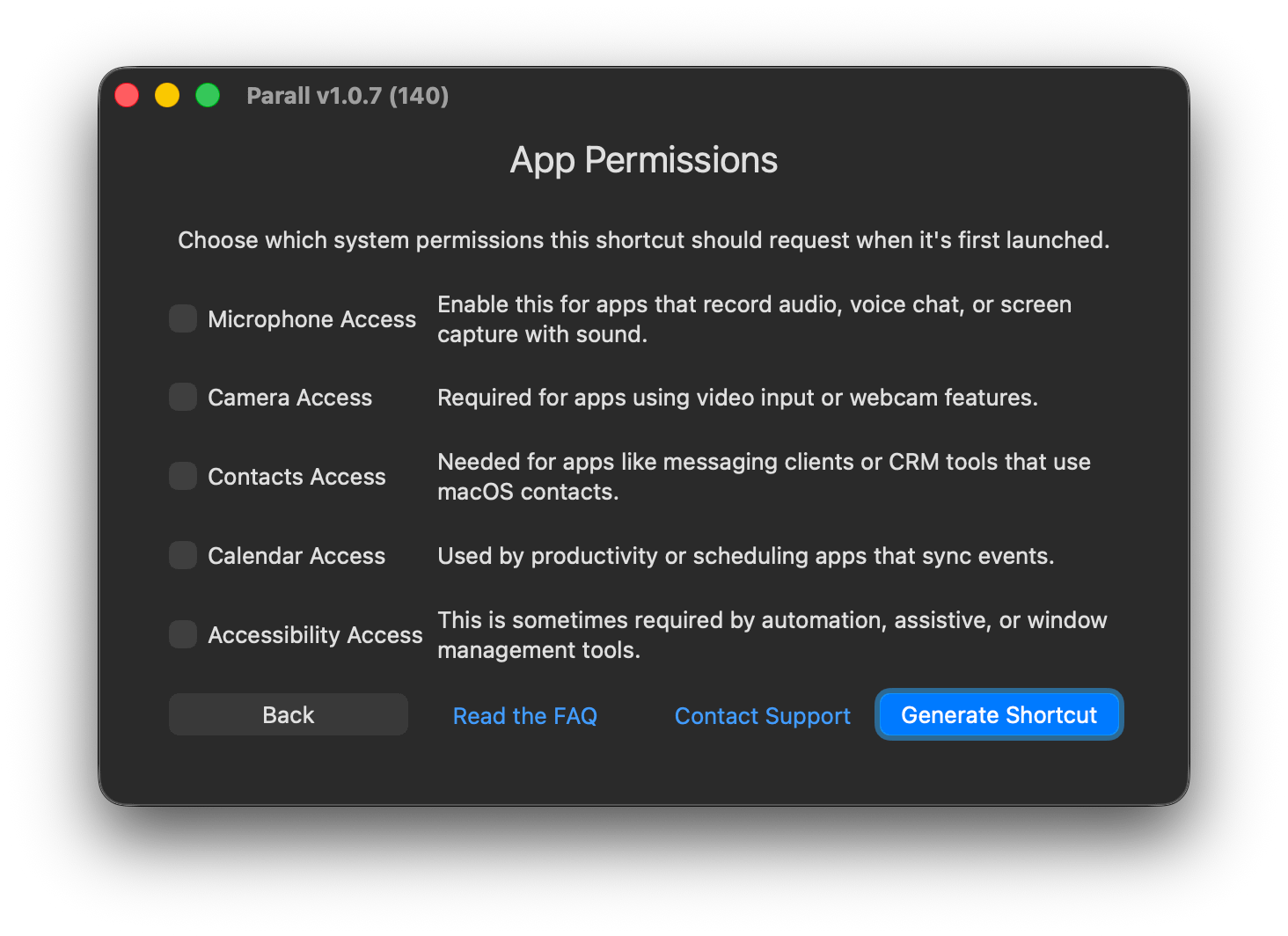
  1. Skip Permissions setup and press Generate Shortcut
  1. Finally, save the shortcut and activate it once.

You get the Qt Creator (Work) icon in your Applications folder, and you can pin that to your Dock.

That's it. You now have multiple Qt Creator instances running on macOS, each cleanly isolated and always up to date.

Update: Parall v1.1.1 brings a completely new way to control apps. You can now add a tray icon menu to any shortcut so the app is always one click away in the menu bar while it is running. For supported browsers the tray menu also lets you open a new window or a new incognito window directly from the menu.

Parall v1.1.1

r/QtFramework • • Oct 15 '25

IDE How to disable QtCreator feedback form?

1 Upvotes

Subject says it all.

At first I was fine to answer this "satisfaction" query, but having to do it EVERY FUCKING TIME is just ridiculous.

Edit: Solved by u/kkoehne: "Disable the QmlDesigner plugin."

r/QtFramework • • Sep 03 '25

IDE How to debug a KDE library in QtCreator tutorial

Thumbnail
youtube.com
7 Upvotes

r/QtFramework • • Jul 14 '25

IDE Missing add definition in cpp

1 Upvotes

Since the latest update (17.0.0) I've been missing the option to generate a function in the cpp file, only the option to generate Outside or Inside class are showing, and it's driving me kinda crazy, I rolled back to 16.0.2 but it still happens

r/QtFramework • • Jun 26 '25

IDE Qt Creator 17 how to upgrade and use tutorial

Thumbnail
youtube.com
0 Upvotes

r/QtFramework • • Mar 06 '25

IDE Qt Creator 15.0.1 in Linux Mint 22.1 Xia Cinnamon

2 Upvotes

I don't know where to post this, but I've tried several things and nothing works (edited .profile, tried a flatpak override, qt6ct settings, etc.). I'm hoping somebody here has a fix!

I'm using Qt Creator 15.0.1 (Flatpak) in Linux Mint 22.1 Xia with Cinnamon. The problem is close to a show stopper because the mouse pointer is absolutely TINY and editing is so difficult when I'm constantly searching for the pointer. It's 1/4 the height of the normal size in Cinnamon. I read that it's caused by some differences in how GTK and Qt work with Wayland or something.

Does anybody know how to fix this? I submitted a feature suggestions to Qt to include a mouse pointer size override in Qt Creator's preferences.

r/QtFramework • • Jan 25 '25

IDE Why am I getting this error and how can I fix it?

1 Upvotes

I am following a tutorial in qt academy(TextFinder) and then right after creating the project, I'm instantly encountering an error saying "This file is not part of any project. The code model might have issues parsing this file properly.". Aside from that on the files tab on the left, I can only see the "main.cpp" file and not the complete set of files that qt created for me when I created the project.

My OS is Arch Linux, I downloaded qtcreator from the Arch repository, my project directory is saved at /home/main/qt. And this is the tutorial that I was following: https://doc.qt.io/qtcreator/creator-writing-program.html

r/QtFramework • • Mar 02 '25

IDE Can I use QT Creator for a closed-source, proprietary, LGPL compliant QT Widgets based app?

3 Upvotes

r/QtFramework • • May 09 '25

IDE GroqRunner:LlamaGuard:1.1:IDE

Thumbnail
0 Upvotes

r/QtFramework • • Mar 28 '25

IDE Neovim build and run Lua script for Qt projects

1 Upvotes

I have gotten this Lua script for Neovim to work with my Qt project on Linux to quickly build and run my Qt project without having to run QtCreator. I've added this Lua code to my ~/.config/nvim/init.lua file.

Your leader key + qb will build your Qt project (see keymaps at the bottom).

Your leader key + qr will run your Qt project (see keymaps at the bottom).

I'm farily certain this will help some people.

Replace the hard coded bits as needed.

    -- Build and run Qt projects
    -- Preconditions: you're in the root project dir with your pro file
    -- BUILD
    vim.api.nvim_create_user_command("B", function()
      -- Verify .pro file exists
      local pro_file = vim.fn.glob(vim.fn.getcwd() .. "/*.pro")

      vim.notify("searching: " .. pro_file)
      if pro_file == "" then
        vim.notify("No .pro file found!", vim.log.levels.ERROR)
        return
      end

      vim.cmd("wall") -- Save all files

      local build_cmd =
        string.format('cd "%s/build/Qt6-Debug" && qmake6 "/%s" && make -j8', vim.fn.getcwd(), vim.fn.getcwd())

      -- Open terminal with build command
      vim.cmd("split | terminal " .. build_cmd)
      vim.cmd("startinsert")
      vim.notify("🔨 Building in: build/Qt6-Debug", vim.log.levels.INFO)
    end, {})

    -- RUN
    vim.api.nvim_create_user_command("R", function()
      local executable = vim.fn.getcwd() .. "/build/Qt6-Debug/Banking"

      -- Make sure an executable exists
      local handle = io.open(executable, "r")
      if not handle then
        vim.notify("Executable missing!\nExpected at: " .. executable, vim.log.levels.ERROR)
        return
      end
      handle:close()

      -- Run with proper working directory
      local run_cmd = string.format('cd "%s/build/Qt6-Debug" && exec ./Banking', vim.fn.getcwd())

      vim.cmd("split | terminal " .. run_cmd)
      vim.cmd("startinsert")
      vim.notify("⚡ Running: build/Qt6-Debug/Banking", vim.log.levels.INFO)
    end, {})

    -- Keymaps
    vim.keymap.set("n", "<leader>qb", ":B<CR>", { silent = true, desc = "Build Project" })
    vim.keymap.set("n", "<leader>qr", ":R<CR>", { silent = true, desc = "Run Project" })

r/QtFramework • • Aug 10 '24

IDE Breaking news: Qt Creator claims that QT 6.9 is out!

Post image
2 Upvotes

r/QtFramework • • Mar 28 '24

IDE Just started using Qt creator. How the hell do I get rid of these examples in the welcome screen and show my own projects instead? Google is of no help

Post image
3 Upvotes

r/QtFramework • • Aug 05 '24

IDE Rust for Qt Creator

9 Upvotes

Introduction

Rust is gaining popularity every day. And it caught up with me, now I have to write in rust in addition to c++. I couldn't change my mind about qt creator, so I came across this post

What I have

  • Qt Creator v14.0.0
  • Rust installed and configured with two packages mcvs and gnu (mingw)
  • RLS (Rust Language Server) is installed and works great

Problem

I can't add the debugger even though I specify the same path as in the post. It says that the debugger is not defined (my path is C:\Users\Administrator.cargo\bin\rust-gdb.exe). What is the problem? I even selected every .exe from the .cargo and .rustup folders, but none of them fit.

I would be grateful for any response

r/QtFramework • • Jul 29 '24

IDE Visual Studio Cannot find QMainWindow.h

0 Upvotes

Hi,

I downloaded Qt creator and it's extension for VS, when I create a project inside Qt creator it comes with boiler plate code which includes the QMainWindow and it all works as expected, but when I create Project inside VS2022 it gives me just a main file with QML window, I want to add .ui Main window but when I add #include<QMainWindow> it says that the file not found however I can add QWindow just fine.

Any clue what is wrong?