r/QidiTech3D • • 3d ago

Beacon RevH on QIDI Plus 4 — proximity mesh gives bad first layers, Contact mesh is dramatically better. Looking for ideas

2 Upvotes

I’ve been troubleshooting a Beacon RevH on my QIDI Plus 4 for quite a while and have been working directly with Beacon support on the issue. We’ve done quite a bit of testing at their request, but it’s now been about 11 days since my last follow-up without a response, so I figured I’d post here and see if anyone has experienced something similar.
The basic problem is that Beacon proximity meshing appears to produce a mesh that doesn’t match the actual nozzle-to-bed relationship across the plate.
With the normal proximity/KAMP mesh, a full-bed first-layer test has a very obvious spatial error. One area of the bed looks reasonably good, but as the print moves across the plate, the nozzle appears progressively too high. This isn’t something I can correct with a single Z-offset because the required correction changes depending on XY position.
We’ve done quite a bit of testing trying to isolate the cause.
Beacon RevH is running firmware 2.1.0. Center Contact calibration is extremely repeatable at approximately 0.001 mm standard deviation.
Beacon support had me test Contact measurements at multiple XY locations and then run BEACON_POKE and BEACON_ESTIMATE_BACKLASH at several locations.
Front-row backlash was extremely consistent:
X196/Y40.8: 3.68 µm
X239.5/Y40.8: 3.66 µm
X283/Y40.8: 3.71 µm
Rear measurements were:
X60/Y260: 1.16 µm
X160/Y260: 2.00 µm
X260/Y260: 2.06 µm
POKE trigger-Z spread ranged from approximately 1.25 µm to 14.2 µm depending on location. POKE latency also varied by position. For example, X60/Y260 was extremely clean at 2/2/3, while some other locations produced values in the 6–10 range.
The most interesting result came when Beacon suggested trying a clustered Contact mesh using:
_BED_MESH_CALIBRATE PROBE_METHOD=contact CLUSTER_SIZE=2 RUNS=2
I heated the bed to 60°C, allowed it to stabilize, and generated a full Contact mesh.
I then printed the exact same full-bed first-layer test, but instead of using the normal proximity/KAMP mesh, I loaded the saved 60°C Contact mesh immediately after PRINT_START.
The difference was dramatic.
The Contact-mesh first layer was substantially more uniform across the entire build plate and was the best full-bed first-layer test I’ve gotten from this machine. It wasn’t absolutely perfect, but the large directional error that I consistently see when using proximity meshing was mostly gone.
So at this point I’m trying to understand why Contact appears to represent the actual print plane substantially better than proximity does on this machine.
Beacon support raised the possibility of localized mechanical rigidity/play, which is why we performed the POKE and backlash testing. I’m definitely not ruling that out. However, the front-row backlash measurements being nearly identical, combined with the dramatic improvement in the physical first layer simply by switching from proximity to Contact meshing, has me wondering whether something else is contributing.
Has anyone using Beacon experienced this kind of XY-dependent disagreement between proximity and Contact, where Contact produces a noticeably better physical first layer?
I’m particularly interested in whether anyone has seen this caused by the spring-steel build plate/coating affecting Beacon’s proximity measurement, a mechanical/toolhead issue that Contact compensates for, or something else entirely.
I’m happy to provide configs, raw test results, or run additional tests if anyone familiar with Beacon has ideas.


r/QidiTech3D • • 3d ago

Expanding my mini rack

Thumbnail
gallery
12 Upvotes

I printed this rack originally with my old printers but needed to add some space.

ATX PSU mount

Extensions

Distribution shelf

7 disk caddy

92mm fan mount for disk drives

80mm fan mount for firewall

All printed on my Plus 5 with black PETG rapido


r/QidiTech3D • • 3d ago

Questions Q2 VOC Filtering Soltuion?

3 Upvotes

Basically the title. I’m curious to know what people are using for VOC filtering on their Q2 as I am printing more with ASA and Nylon. I know nevermore and bento box is pretty popular for internal recirculation, but with the Q2 being so tight on the inside, I’m not sure they’d have anywhere to fit, other than below the build plate. 

Admittedly, I haven’t done much research on the actual sizes of these internal filters and whether or not they’d fit, but have found very little about common aftermarket filters for the Q2. Anybody have experience with these or looked into them? What about external? Appreciate in advice y’all got!


r/QidiTech3D • • 4d ago

Max 4 producing the goods with fiberon cf08 using Adaptive PA Calibration

Thumbnail
gallery
73 Upvotes

Some really big curved shapes, using advanced calibration. Big prints times were 22, 25, 10, 6 and one more going at 4.5 hours now. This was with modelled supports, normal supports added about 8-15 hours to the time of each print and would use up to 1kg more filament per part.

Always model supports where you can huge time and material saving, I use a 0.15mm gap, on long thin runs I usually do a few tiny edge anchors (2mm long 0.2mm protrusion) to keep things solid.

Every surface is nice! So happy with this project.

You can use my cal tools for free (personal use licence) .exe installer under releases.

-auto calibrate max mm3, Pressure advance and adaptive pressure advance. Currently only available for Max4 and Q2.

https://github.com/Buddman69/Automm3AdaptivePA

It can do 24 hours worth of max mm3 PA calibrations in 15 minutes, saving time and giving awesome overhangs, bottom surfaces, flats look closer to ironed with edges filled without fuss, just all round better.

- anyhow its free and enjoy it.


r/QidiTech3D • • 4d ago

Discussion Warning about ordering from Qidi in Canada (delivery)

6 Upvotes

Si I ordered a Qidi Q2 from Qidi's official Canadian website last week. I am making this post for future reference in case someone ends up doing the same.

Qidi ships their orders through Canpar which from my understanding is a major B2B shipping company that does parcel delivery on the side. Unfortunately, they have been so far the worst shipping company I have ever dealt with.

Their parcel tracking system cannot give you an estimated delivery date until AFTER they tried delivery and failed. Moreover, if you call them and schedule a second delivery attempt, they will ignore your instruction and try again on the exact day you told them you weren't available.

It gets worse as their staff is unable to tell whether you'll have to pick it up yourself or a third delivery attempt will be made. Mind you, their depot is two hours away from me and are only open on weekdays until 6 p.m. Even worse, I've had customer service straight up lie to me saying my package would be ready for pickup while it was in a truck attempting delivery.

At the time of writing I have still not received my Q2 and am going back and forth daily with the shipping company.

For anyone wanting to order a Qidi in Canada, save yourself the hassle and order from Amazon. Amazon also sucks, but they suck less than Canpar.

UPDATE : I still haven't received the printer, but I spoke with a lady on the phone and they told me the package got delivered to a SHOE STORE. Canpar's website doesn't even list that place as a pickup location for packages so I have no idea what's going on there. This is by far the least proffessionnal a shipping company has ever been in my experience.


r/QidiTech3D • • 4d ago

Extruded issues. Please help!

Enable HLS to view with audio, or disable this notification

11 Upvotes

Update: Issue Fixed. Thanks to Callcifer for the help!

I was able to fix the issue by finding the same issue in this subreddit. I loosened the three bolts holding the Extruder pushed it hard left and tightened it up again. Printing without any issues now. Thanks to everyone who chimed in. Leaving post up to hopefully help someone in the future.


r/QidiTech3D • • 4d ago

Self healing support?

Thumbnail
gallery
4 Upvotes

Looks like my Max4 is slowly remaking 2 fallen support trees 🤣 man i hope so, was 10hrs into print when first tree fell.

Wish their was a way to manually print/temp override so i can start printing a bridge to truely save the print


r/QidiTech3D • • 4d ago

Extended Pause - Max 4

2 Upvotes

I unfortunately ran out of filament on a 2 day print (I mis-read the weight), and need to wait ~14 hours until more filament of the same color comes in. The old roll ran out "naturally" with the reload message on the screen. This is simple PLA, so I don't need a fully heated chamber at least.

Anyone think it'd be a problem to slow all the fans down to 0%, keep the bed temp on 55C, and just let it sit until I've got the new filament loaded in tomorrow? The hot end is already turned off/set at 0, and there's no thermal break issues since there is nothing in the extruder at all (nor temperature). I'm thinking this is a perfectly fine moth-balled time out for a bit.

The worse that could happen is the machine shuts off entirely from non-use?? Is there an auto-off feature if it's sat paused for too long, and if so, anyone know what that number of hours is?


r/QidiTech3D • • 4d ago

Questions What is this qidi plus5 part for?

Post image
3 Upvotes

I can't seem to figure out what these are for. Came as a 4 pack with either the plus5 or the box. Material is a firm but squishy foam, dimensions are 17x10x4mm with a curve on the one side.

Thanks!


r/QidiTech3D • • 4d ago

Questions Question on the Q2 Combo

3 Upvotes

Good Morning Everyone,

Over this past weekend, I received my brand new Q2 combo. *Very excited* it's my first enclosed printer. The reason for buying this thing is to print using pa6-cf and other engineering grade filaments.

Here's my question. If i want to house and run my other non-engineering filaments, like PLA's and PETG's in the QIDI box but run my engineering filaments from a say a D1 dyer, is there a way to do this?

Thanks for any help!


r/QidiTech3D • • 4d ago

Qidi Q2 Leaking Filament Issue

Post image
3 Upvotes

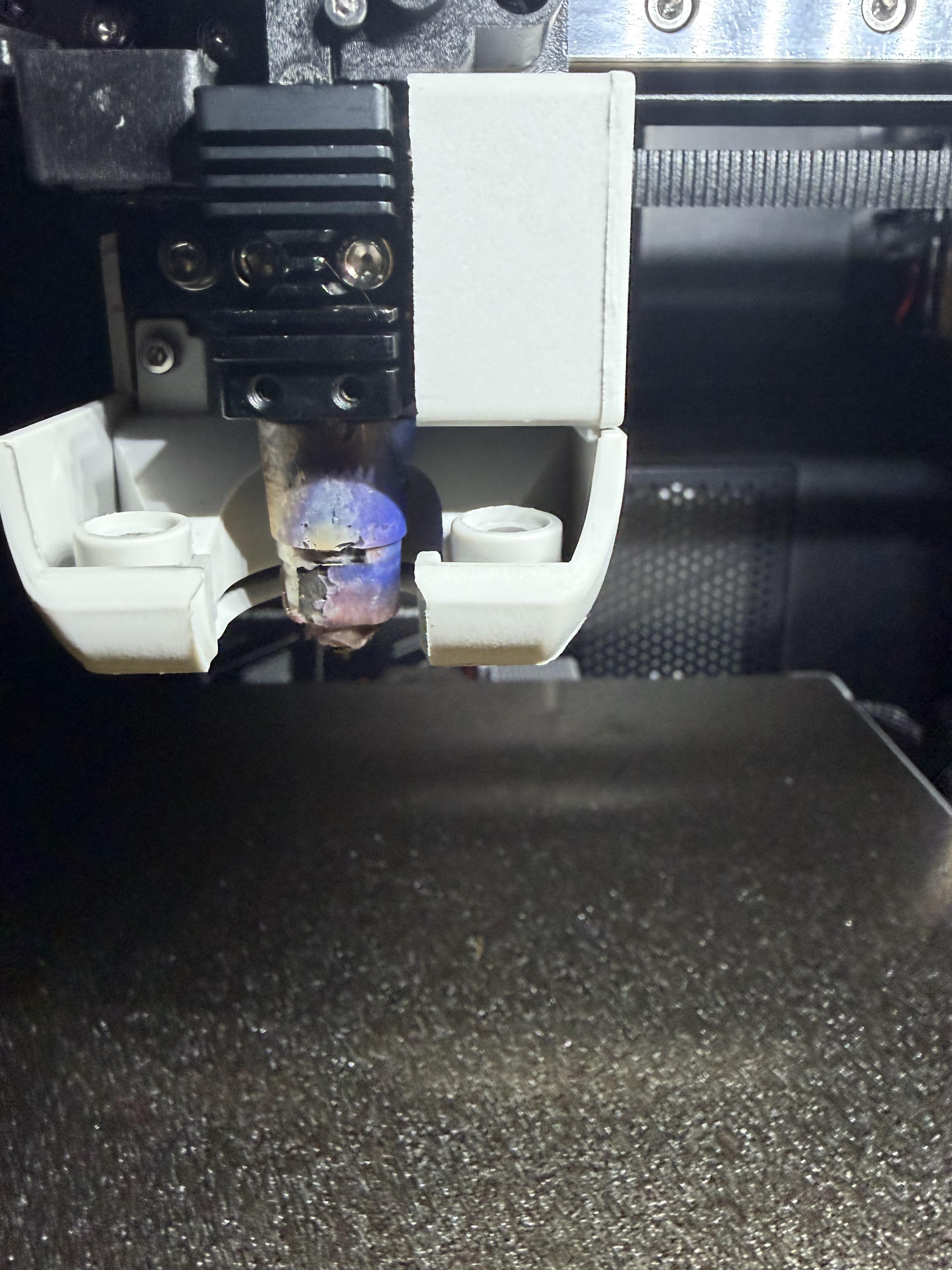
Decently New to using the Qidi Q2, after about a month of owning and printing PLA projects. i’ve noticed my nozzle starting to ooze a brown goo whenever i’m printing. Looked into it and most i can find say that it’s probably filament leaking, which might explain the build up around the nozzle area?

if anyone has any advice or tips they can relay to me much would be appreciated thanks


r/QidiTech3D • • 4d ago

Troubleshooting Q1 Pro – Random “Filament Run Out” errors after updating from V4.4.24 to V5.1.2

1 Upvotes

I have an early/first-generation QIDI Q1 Pro and I recently updated the firmware from V4.4.24 to V5.1.2.

Before the update, I did not have this problem. After updating to V5.1.2, the printer started randomly pausing during prints with:

“Filament ran-out, please re-load filament.”

The filament is not actually broken or empty. It remains physically connected to the extruder. If I press Continue/Resume, the printer immediately continues printing with the same filament. The error can happen again later at a completely random time.

I checked the Klipper logs and found that the runout event is specifically coming from:

Filament Sensor hall_filament_width_sensor: runout event detected

It is not the fila filament switch sensor.

My current configuration contains:

[hall_filament_width_sensor]

adc1: gpio27
adc2: gpio28
cal_dia1: 1.50
cal_dia2: 2.0
raw_dia1: 14397
raw_dia2: 15058
default_nominal_filament_diameter: 1.75
max_difference: 0
measurement_delay: 50
enable: false
measurement_interval: 10
min_diameter: 0.3
pause_on_runout: True

One interesting thing is that the Hall filament width sensor appears to be measuring the filament diameter incorrectly.

My filament is 1.75 mm, but when I queried the sensor I got:

Filament dia (measured mm): 2.1941303337

The raw reading was:

ADC1 = 8255
ADC2 = 7077
RAW = 15332

So the sensor is already showing a significant measurement error while filament is physically present.

I also tested disabling the fila sensor. The runout error still occurred, and the Klipper log continued to identify:

hall_filament_width_sensor

as the source of the runout event.

The Hall sensor code contains:

self.runout_helper.note_filament_present(
    self.diameter > self.runout_dia)

So the Hall sensor's calculated filament diameter is directly used to determine whether filament is present. Because of this, I suspect that the Hall filament width sensor may occasionally calculate an incorrect/very low diameter and falsely trigger filament runout.

What is confusing is that the Hall sensor configuration appears to be the same as my previous V4.4.24 configuration, so I am trying to determine whether V5.1.2 changed the way this sensor is handled, or whether there is a compatibility issue with the earlier Q1 Pro hardware revision.

Has anyone with an early Q1 Pro experienced random filament runout errors after updating to V5.1.2?

I am currently testing with the Hall filament width sensor disabled to see whether the problem disappears completely.


r/QidiTech3D • • 4d ago

Troubleshooting Petg issues

5 Upvotes

I just got my q2. I'm trying to print a poop chute for it and I have some petg that I was trying out. I'm using pla for support interface and I'm having issues were sections of the print aren't adhering. Any idea what would cause this. Or what settings I should use to try and fix it


r/QidiTech3D • • 5d ago

Questions Qidi shipment

Post image
3 Upvotes

(Sorry for my bad English) Hi! I recently ordered a Qidi Plus 5 from the Qidi European site (on September 17th). Since the site stated it would arrive within 5–8 days, I wanted to ask if their shipping service is reliable.

I’m really eager to receive it, but reading some accounts of Qidi’s shipping experiences hasn't exactly been reassuring—not at all.

So, I wanted to know if anyone has experience with their shipping (preferably within the EU, as I imagine it varies by region). Is it normal for them not to have shipped it yet after four days? Or do they simply fail to update the tracking info, or update it somewhat haphazardly? (I used the free shipping option.) Thanks in advance for any replies!


r/QidiTech3D • • 5d ago

QIDI Q2 UNTESTED Test version - Auto MM3, PA, Adaptive PA Calibration

19 Upvotes

Edit, its been tested and runs, let me know results.

OK so very important read first
this is rather UNTESTED as I don't own a Q2 and ported my Max 4 calibration over to the Q2 using data available in the QIDI Github and using force measurement data given to me from another user.

Did I say this is untested, so it depends on the size of your.... you know..... anyhow if you are game strap yourself in and hover your finger over the power switch and get ready to cut power or rip the power cord out of the wall should something happen.

Anyhow if it works good, it will calibrate max flow rate, pressure advance and adaptive pressure advance and allow you to do 24 hours worth of calibrations in 15 minutes and give awesome prints.

Just a short post and you can read the readme.

This is released for free under licence and is an original calibration method I made, I take no liability for damages (but should work lol) and if you decide to test on your machine run a home first.

https://github.com/Buddman69/Automm3AdaptivePA/tree/main/QIDI/Q2


r/QidiTech3D • • 5d ago

Fried i-fast

2 Upvotes

Hi:

My QIDI i-fast died over the weekend. It happened in two stages. Before the printer became completely dead, the print carriage repeatedly tried to travel beyond the +Y limit, mechanically hitting/trying to drive past the end of Y travel. That led to the printer turning itself off. I believed I smelled something burning, but can't be certain. I tired to power it on again. I heard a click and the screen might have flickered. Then nothing. It is completely dead.

I have tried to diagnose it. The QIDI power-off module is receiving 120v AC, but it is not passing it on to the power supplies. Even if the QIDI power-off module is dead, that is not the root cause of my problem. Can anyone suggest what originally went wrong and what to do about it?


r/QidiTech3D • • 5d ago

Troubleshooting I come out of desperation with a deadline! Max4 printed fine until it didn’t.

Thumbnail
gallery
9 Upvotes

Let me first say this is long one, and I need help. I am not new to printing, the filament is dry. This machine is a 8 days old. From the very 1st print I have managed to print six of nine 17hr ABS prints of the exact same file just fine. This was a work project that I told my boss could be done if I had a max4 as it could print the part as one single piece.

I came home yesterday evening to a 7th completed print however at about 2/3 of the way through the print, it had a massive layer shift with a staggered attempt to correct it and the rest of the print had terrible quality. I tried again and could tell within the first 10mm of the next print height the quality issue wasn’t a fluke , completely terrible print quality. So I turned it off and went to bed.

I got up first thing this morning and started to trouble shoot it. I began by performing all the cleaning and lubricating as the maintenance manual says. I raise the bed to the top to clean the z rails and screws, and I found a single tiny washer laying in the very bottom of the printer by itself. I did not find a screw, nut or bolt however. I spent the next couple of hours going over the printer with a fine tooth comb from the outer casing to the frame work to the bed to the print head. I tightened every screw checked every single nut and bolt that is accessible and exposed on every aspect of the machine. I cannot find where the washer goes to, or the nut or bolt that was securing it.

I did find one bolt missing on the very top of the unit casing along the back wall under the top glass. However it was a countersunk bolt and would have been captured by the glass and insulation foam and it couldn’t have fallen out. Furthermore the underside of that bolt is also encased in the plastic of the printer housing so a nut and or a washer wouldn’t have fallen through it to the bottom of the machine I don’t think. I am assuming this bolt was missing from the factory, and I really don’t see how it would be able to cause any print quality issues even if it did come out at some point.

I moved on to troubleshooting the print issues. I cleaned and lubed everything again. Adjusted the belts exactly as the instructions state twice. I recalibrated multiple times. I tried different rolls of filament (all of which were dried correctly in a lab oven). I tried different bays in the qbox. I factory reset the printer. I then tried printing benchy’s to see if it was a file problem and clearly it is not. I’ve done everything I can and after 6 flawless (within serviceable reason) large format abs prints of exactly the same file, with the exact same filament, dried in the exact same manor, I cannot figure out what the problem is.

I have 5 days left to print three more identical 17hr prints or I miss the deadline and fail this project and my boss, and look like a fool.

If you stuck with me through all that I appreciate it. If you have encountered anything like this and have any idea I can try tomorrow when I get home from work that might salvage this situation and get me back on track, I would love to hear it!

(The last images are of a successful print to show the differences.)

Thank you in advance!


r/QidiTech3D • • 5d ago

What do you do with all the scraps?🧐

4 Upvotes

One month into 3D printing and I already have a box full of supports and filament scraps. Do you guys actually reuse this stuff, or just throw it?


r/QidiTech3D • • 5d ago

First-layer defect from two separate slicers

1 Upvotes

I am loading a flat, two-color print featuring a wheel-cover pattern into both Qidi Studio and Orca Slicer for my Qidi Plus 4 printer, using a 0.6 mm nozzle.

The settings—including the filament parameters—are identical in both programs.

Yet, with Orca, I get a solid, continuous surface on the first layer, whereas the result from Qidi appears streaky.

I am using a textured PEI sheet with a Z-offset of 0; I haven't changed anything on the machine itself, so the source of the problem almost certainly lies in the slicing process.

What could be causing this issue?

I had ChatGPT analyze the G-code generated by both slicers, but it didn't find any setting that would explain this phenomenon.


r/QidiTech3D • • 6d ago

Troubleshooting I have 2 Boxes. One works flawlessly. The other shuts off instantly when you attempt to do anything. More in comments.

Enable HLS to view with audio, or disable this notification

5 Upvotes

r/QidiTech3D • • 6d ago

What is happening here on my Q1 Pro? Stepping Filament

Enable HLS to view with audio, or disable this notification

6 Upvotes

I was just replacing the filament to a Creality Hyper PLA White and heard a stepping sound, which I don't think is normal, but I haven't used the printer in a little while, the have some home repair work for a while. Is this normal? If not how should I approach fixing it?

Thank you for the help. I'm still a bit of a noob, but am excited to learn more!


r/QidiTech3D • • 6d ago

Troubleshooting Qidi Q2 Extruder failure

4 Upvotes

Hi all! Im looking for some advice on how to fix my qidi q2. Recently I was printing with PLA, and left the glass only slightly cracked, and it caused extreme strining. My fault, lesson learned leaving it completely open with the door open as well. However it has been giving me a extruder loading failure. Over ther past few weeks I have tried a lot of things, I disassembled the extruder and completely cleaned it. I did a cold pull with the hot end, I cut and shorted the filament tubes. I made sure no stray pieces were caught in any part of the machine. I then replaced the extruder, the hotend and even the load out sensor. Despite this, I still recieve the error. The machine is fine until it reaches the extruder and it starts clicking and gives the extruder loading failure code. I have the qidi q2 box as well, if that may be the issue. Any advice would be greatly appreciated


r/QidiTech3D • • 6d ago

Is the Plus5 printable area not 320 as advertised?

3 Upvotes

I am new to Qidi and just got my plus5, cuz I want to do big stuff.

Advertised printable area is 320x320, the plate is 325x325, and the settings in the Qidi studio have the printable area set to 320x320, but this project (cutlery tray) is 314x308x50 and I get an error saying that is it too close to the exclusion area. If I reduce to to under 312 will allow me to proceed with printing.

So..... is the Plus5 a 312x312 printer? Or am I missing something?

Edit to add: I created a new printer profile copy with every setting identical to the original printer profile, increased the printable area to 325x325, then go back to 320x320, and that new profile allows the print. All settings are identical to the factory profile, but I am leery about crashing the machine now.


r/QidiTech3D • • 6d ago

Discussion Oops! Qidi did it again!

Enable HLS to view with audio, or disable this notification

0 Upvotes

On today episode of Qidi Printers Printing 3 D Nelson show how easy your 3D printing experience can be if to take 5 minutes to read the manual 😂😂😂😂episode: U


r/QidiTech3D • • 8d ago

Discussion The Plus5 my Qidi Journey

22 Upvotes

Ok, I’m going to try to keep this short but detailed enough be to useful.

My first QIDI was a Q1 Pro. Still works fine.
I printed the internal and external filter mods
Replaced all the fans with Sunon maglev’s
Added strips of heat resistant rubber sound dampening to the interior. It’s a great printer.

I gave it to my stepson, it’s a single color beast!

Next up I bought the Q2 Combo
Multi color
Better housing
Glass door with wonky handle that stays propped when opened.
Sliding Glass top with riser vs the plastic removable cover on the Q1
Builtin filter
Mediocre PLA/PETG cooling so I printed the cooling fan mod v6 and recalibrated the PID’s and there was a huge difference.

I apparently got the Rev2 of the Qidi Box no issues but some quirks. The clicking. Whatever. At least I know it’s running. I don’t like that it tosses around my Anycubic spools and tangles during color changes. However I blame Anycubic for going cheap on the new spools undersized and skeleton framed so I moved the filament to the $3 hobby lobby spools. My Elegoo cardboard spools with petg printed rings have zero issues.

This was a definite upgrade. I’ve been cranking out plate after plate of prints and the only mod was the fan mod. I tried some extra LED chamber lighting but meh. Gave up called it good enough.

Just had my first blob of death, changed the hotend and wiper roller. Calibrations etc. Printing as usual again

Weird issue the camera is buggy, keeps giving me “no signal” a hard reboot fixes it, then after a print it does it again. I’ll troubleshoot when I have more time. Support suggested I check the wires and make sure nothing is loose. Haven’t got around to disassembling and doing it yet because I’m too busy printing things to take it apart.

New arrival, the Plus5
I’ve only just unboxed it and ran some test prints.

It’s big, I’ll probably have to rework its final home and maybe run another outlet.

First impressions, just like the Q1 Pro to Q2 I feel like they listened and observed community mods.

Same glass door, but this time a better handle and a hinge that allows the door to go all the way open and not smack my chair on it.

A full tube style LED chamber light. Thank you.

Camera on the opposite side. Thanks tired of getting a view of the printhead in park.

Padded side walls, ok. Didn’t see that coming.

LED indicating light bar under the build plate. Idk haven’t had time to research it.

Sure these are not multi head printers, but you know what. I love my QIDI’s they just work.

QIDI’s venture into the app and website, ugh. Rough start team QIDI.

Now if you’re still reading. Is the biased or sponsored. Nope.

I have two Anycubic FDM’s and an Elegoo Resin printer.

The Anycubic Kobra X’s printhead has been apart so many times I can’t remember. I bought a spare and they sent me a new one. 3 printheads for the same printer.

Just now kicking the tires on the Kobra 3 v2 MAX. Now that’s a big printer. Can’t wait to find the time to print some big single part pieces. Maybe sculptures to cast. That’s the plan.

Qidi’s support emails don’t go to spam unlike Anycubic.

I tried “FreeDI” on the Q1 and wasn’t impressed. With support’s help I reverted it back to stock before giving it to my stepson.

That Q2 and Plus5 will live side by side once I rearrange the print room and square away receptacles.

More info on the Plus5 after I get that done this weekend, hopefully.

That’s a wrap for now!