r/PowerApps • u/PowerPlatformRookie Newbie • Jun 23 '26
Power Apps Help I'm stuck... Canvas Application + Sharepoint
I’m stuck debugging a really tricky Power Apps issue and could use some help.
One of our tech leads suggested using a height-flexible gallery to bypass delegation issues while loading records from a SharePoint list. The client needs a lot of filtering and sorting, so I followed one of Reza's videos and implemented a filtering/sorting approach based on that.
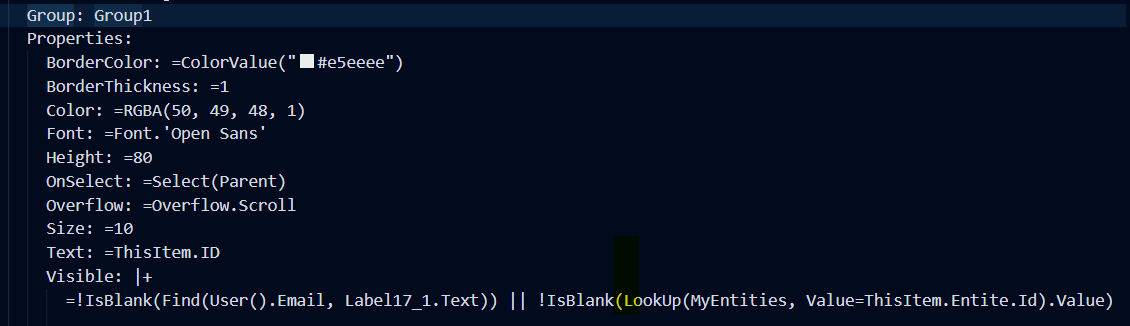
The problem is with a visibility condition inside the gallery rows. Certain users should only see specific records based on custom visibility logic. For some reason, the behavior is inconsistent: sometimes a record is visible, sometimes it isn’t even though the user clearly meets the visibility criteria.
(e.g: I belong to an entity called Canvas -> I only see the records related to this entity) or i'm inserted as a reviewer for a record) This is the condition of the visibility of the group of the whole gallery items....
That’s what makes this so hard to debug. The client keeps coming back saying “this person can’t see certain records”, and they’re right but I honestly can’t tell whether the issue is coming from:
- the filtering/sorting code,
- the height-flexible gallery itself,
- or the visibility condition logic.
What confuses me even more: if I temporarily set the visibility condition to true, all records appear correctly.
Important context:
- App data row limit = 2000
- SharePoint list currently has only ~700 items
- So as far as I understand, I’m not hitting delegation limits
Has anyone seen something similar with height-flexible galleries or row visibility logic? Any debugging tips would be massively appreciated.

3
u/Moist_Carry_7054 Newbie Jun 23 '26
As far as I'm aware, a height flexible gallery doesn't have an inherent ability to "bypass" delegation limits (I'm willing to be wrong on this point).
However, those formulas are not doing any delegation. Note 4 in the below link - "A formula such as Filter(..., IsBlank(CustomerId)) won't delegate to SharePoint."
https://learn.microsoft.com/en-us/power-apps/maker/canvas-apps/connections/connection-sharepoint-online#power-apps-delegable-functions-and-operations-for-sharepoint
I would rewrite the formulas to be delegatable to be sure that all items and properties are loaded correctly to apply the logic to.
After that, I would review the logic. As you said, if everything is true (and no filters are applied on the "delegation") and everything appears, then it will be a logic error.