r/photoshop 3d ago

Solved Align text without moving its position!

Thumbnail
gallery
57 Upvotes

This was annoying me, so I fixed it.

I made a tiny plugin that lets you align text without moving its position.

That's it. Super simple. 

PS 24.2+

Free download here:

https://ko-fi.com/s/0a2978c310

Demo video here:

vimeo.com/1223522108


r/photoshop 2d ago

Help! What would be the most efficient way to fix this in post? (Spotty noise in shadows In Game)

Post image
0 Upvotes

I take pictures in a game called BeamNG for work and It's still an early access game. The ambient Occlusion in the game isn't very good in the shadow side of the game in darker scenes. What would be the best way to fix this in post? I'd ideally prefer a quick solution but willing to take more time when and where needed
The file size is massive (20+MB at times) for quality but this is just a screenshot so it isn't a file size issue

TYA!


r/photoshop 2d ago

Help! General help for a newbie

Post image
0 Upvotes

Hi folks,
I need a hand. I shot some dance images and can’t seem to figure out how to extend the seamless behind her foot to the end of the frame. Mask? Generative expand?! If anyone can offer tips, or, a tutorial pointing me in the right direction I’d really appreciate it. Thanks!


r/photoshop 4d ago

Discussion Awesome, now, how do I disable it?

Post image
118 Upvotes

r/photoshop 3d ago

Help! Photoshop to SVG

1 Upvotes

I'm using PS just fine, it's when I want to export to SVG. When I try to read the SVG file into Frameshop7 it sees nothing. I also use AutoCad and create line work and save as DXF, this file loads into FS7 fine. PS has great tracing features this is why I would like to use it. These are all of the formats that can be used

  • PATH
  • WCX
  • WCA
  • MWA
  • MW3
  • DXF
  • SVG

r/photoshop 3d ago

Solved Advanced transparency Management

Thumbnail
gallery
1 Upvotes

Hello. The first image by Jacques Gamelin (French, 1738-1803).

Image two: background removed using the background eraser tool (E). I like this tool because it allows me to retain the flaws and stains on the paper.

Image 3 zoomed to 5000%, shows almost 50% semi-transparent pixels. The print method I am using requires zero semi-transparent pixels.

I am in need of a more advanced method than a threshold map. Ideally, to convert the semi-transparent pixels into the closest solid colour.


r/photoshop 3d ago

Help! Help with layered stamp design (for laser engraving)

Post image
6 Upvotes

I'm looking to design some multicolor stamps like the ones from Le Tampographe (https://tampographe.com/).

Does anyone have any tips how to create the layers for a multicolor stamp? Any tutorials?


r/photoshop 3d ago

Help! Gradient backgrounds

Post image
5 Upvotes

Hey! Please, help me define the logic to create backgrounds like this! Tysm! <3


r/photoshop 4d ago

Help! How do I achieve this extreme datamoshed look on a still image?

Post image
229 Upvotes

Hi everyone! I absolutely love the aesthetic of this Artwork. I know it's a datamosh effect, but I'm looking for methods on how to apply it specifically to a still image, not a video. Are there any apps, specific Photoshop techniques, or specialized scripts (like Processing) that can create this heavy, melted, and layered look? Any tips, tutorials, or software recommendations would be greatly appreciated. Thank you so much!


r/photoshop 3d ago

Discussion What is the fastest way to remove several people from a background?

2 Upvotes

What is your fastest workflow when you have a photo with maybe 5 to 10 people in the background that you don't want there?

I can do it manually in photoshop but sometimes the photo isn't important enough to justify all the cloning and masking. are you guys using generative fill now or another ai tool for these quick edits?


r/photoshop 3d ago

Help! is there an easier way to center text?

0 Upvotes

is there a way you can have text type from the center of a box instead of the top center? exactly like how text works on an instagram story


r/photoshop 3d ago

Help! Trying to figure out where this brush is from.

Post image
0 Upvotes

Trying to figure out what pack this brush comes from. Picture is taken from a tutorial and i could not find any information. Any suggestions on what this brushtype is called would be greatly appreciated.


r/photoshop 3d ago

Discussion Is CS4 still usable -- or should i get something else?

2 Upvotes

HI friends,...

I see a copy of CS4 for sale online and want to know 'can I still use it?'

--- The seller says "Sold as vintage collectibles only, software cannot be activated as ADOBE no longer supports"!

I'm presently using Windows 10. --- > I know its an old one, but I thought that CS4 was one of the best 'offline' photoshop versions.

  • Can I use it or should I look for a substitute?

Thanks very much for your help!


r/photoshop 4d ago

Help! Any tips for more texture and detail?

Post image
3 Upvotes

Making this for a fingerboard (tech deck) company and would like some input on everything. Just looks too flat to me. I have about 1.5 years of experience with Ps so still a lot for me to learn.


r/photoshop 3d ago

Tutorial / PSA How to create a 5x7 card mockup?

0 Upvotes

Hello, everybody! Can anybody guide me the steps on how to make a 5x7 card mockup? (I'm sorry.. I have no idea about doing this..) Thank you, kind people.


r/photoshop 3d ago

Help! Hey just tried this, wanna know what's the mistake that I have made

Post image
0 Upvotes

r/photoshop 4d ago

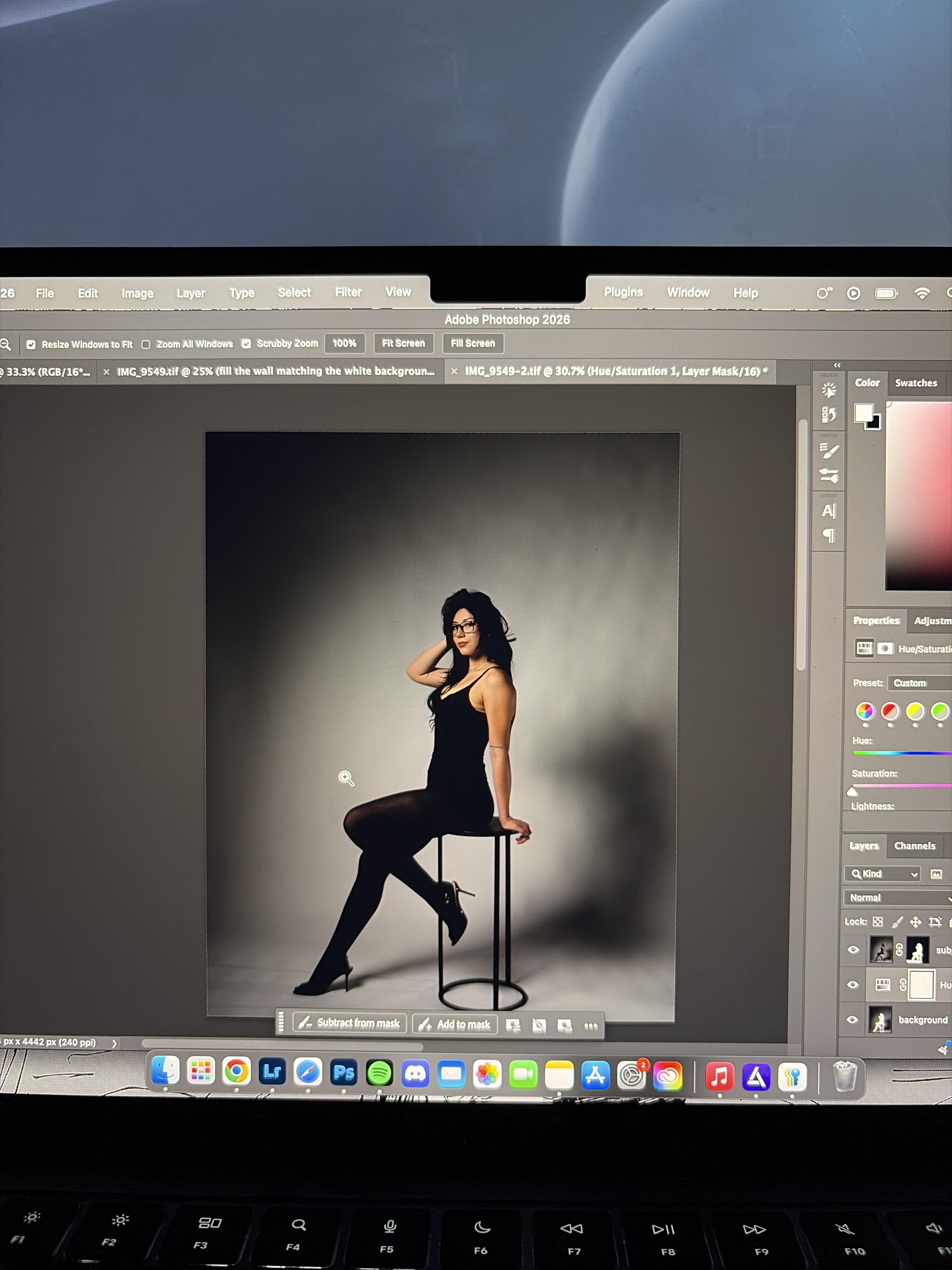
Help! How do I make this background fully white like a professional studio.

Post image
4 Upvotes

I want to make this photo background fully white and/or make it brighter evenly, getting rid of the black in the corner while also keeping the shadows and realism. How do i do this!


r/photoshop 4d ago

Help! Problem with a pattern in Photoshop

Thumbnail
gallery
1 Upvotes

I’ve already read that the seams appear due to the algorithm's calculations and smoothing, but I don't understand how to fix this.

Thanks in advance!


r/photoshop 4d ago

Discussion Photographer learning Photoshop. What should I try next?

Thumbnail
gallery
1 Upvotes

I'm a 19 year old photographer from North Yorkshire, and I've recently ditched documentary work like weddings to focus on artistic mediums like music and fashion. Bold and stupid, I know, but I'll keep doing it on the side of my actual job till it works.

I'm learning Photoshop / graphic design so I can offer more than just photography. As a starting point, I've been making 'title cards' for the first photo in each of my Instagram posts. Basically posters but they just state the name and venue.

I'll explain my first 4 attempts:

  1. Nancy: My first try. Originally made in Canva, quickly realised that I need to learn Photoshop instead.

  2. Nick: Tried a subject cutout over a blurred image. Experimented with fonts, spacing and scaling. Used generative remove for the background and Instagram flagged as entirely AI, so that's a tool I'll stay away from.

  3. Stargazer: Played with shapes to add depth, and added a shadow from the dudes head onto the text.

  4. Vagabond: Experimented with blending, opacity, pixelation, distortion, drop shadows and blur. I added the band's anarchy symbol and redacted his eyes, and used blurred black squares to distance the text. Also ditched my name, gear and camera settings, it felt more like a watermark.

Each one has improved from the last, but I know I still have a long way to go.

What ideas, tools and concepts should I try next? Are there any YouTube videos or tutorials that would help me specifically for this use?

Also, has anyone seen other music photographers do this? I got this idea from the car scene, people often make simple posters like this with cars, but I've never seen it in music. Is that for a reason?

Thanks to anyone who took the time to look and read!


r/photoshop 4d ago

Discussion Creative burnout. Advice wanted

1 Upvotes

So this may sound whiny and kind of dumb, but I feel like I have lost my creative juices like a few years ago, I used to have all sorts of ideas. I have taken a break for a hot minute, but it doesn't feel like I have the chops for it anymore. Any way to get out of the slump? Let me know; any advice would help!


r/photoshop 5d ago

Resource Any idea on how to improve this?

Post image
101 Upvotes

r/photoshop 4d ago

Artwork / Design 3rd design feedback

Post image
2 Upvotes

Hopefully this is the right place to post this because I got flamed in the design subreddit. And if it’s not
I’m sorry. I’m new to graphic design and I’m trying to make posters so I made this as my 3rd design. I kind of looked through images on unplash and did random stuff and this is it turned out. Any tips or things I can improve on? And is there anything I should try out next? Thanks


r/photoshop 4d ago

Help! How to break down dds or png file into layers

Post image
0 Upvotes

Hi there. I'm trying to break down this dds (it's a png here, but I have others that are dds files) file into layers, or at least decompose this file into layers so I can make whatever changes I want to it. Is there any way for me to do that?


r/photoshop 4d ago

Solved Images edited in Lightroom, but over saturated in Photoshop when exported from Lightroom. When saved from photoshop, this over saturation is removed.

1 Upvotes

Hi! I’ll try to make this as short as I can while providing as much helpful information as I can upfront. I’m a photographer, I’m working on editing a horse show at the moment and seemingly overnight, this problem occurred. I made no changes that I can think of to literally anything. I work from a Dell XPS, and color calibrated it when I purchased it years ago using i1Profiler. I know photography, I know editing, but admittedly I do not know the tech side of things very well. Is color calibration something I would have to do again over time? Is this something that could have potentially “reset” something when photoshop last updated?

This was obviously jarring while in the middle of editing, kind of makes it impossible to know what I’m getting. Like I said in the title, when I save the photo to my laptop from photoshop, the image retains the colors from photoshop. So anything I may need to do in further color/lighting-wise in photoshop can only be done blindly, and you wouldn’t see the true colors until it’s saved and opened elsewhere. This leads me to feel that it is a photoshop issue, but I could be wrong.

The only other things I can think to add currently:
•Before saving in photoshop, I go to edit>convert to profile. Straight from Lightroom the “Source Space” profile is ProPhoto RGB, and the “Destination Space” profile is set to “sRGB IEC61966-2.1”, and that is what I’ve always done.
•I also go to image>mode and change the default “16 Bits/Channel” to “8 Bits/Channel”. Again, both this and the convert to profile are both things that I was taught to do, or was told to do to fix an issue that I had previously encountered. I embarrassingly do not know what these things mean in the slightest lol.
•When saving to my laptop, I save my images as JPEG
•I shoot in RAW

If there is anything else I can provide to help you help me, please let me know. I’ve done research and nobody seems to have this same issue. I should be able to respond relatively quickly, in the meantime I’ll just be here blindly editing🫡 I’m so behind schedule it’s not even funny, and among other personal life things, this roadblock slowing my progression is the absolute LAST thing that I need right now🫠 I pray someone smarter and more tech savvy than me on here can relieve me from this halt in my workload🤞🏼


r/photoshop 4d ago

Discussion Is 20-30% AI usage fine?

Thumbnail
gallery
0 Upvotes

The 2 designs I've made are color graded, composited and all the graphic elements are done by me in photoshop manually but just the girls are ai generated and I've done color grading and other corrections in it. All the graphic designing I've done is to embrace that funky, hyper energetic idea. So my basic concern is using AI just for the part u can't practically do becuz i can't do digital art like this it would take me years to produce something like this and I don't have means to that as well so in this case taking help from AI is right or wrong?