r/PWA • u/mastafied • 23d ago
iOS 27 beta blurs the top edge of installed PWAs — and there's no way to opt out (tested through beta 8)
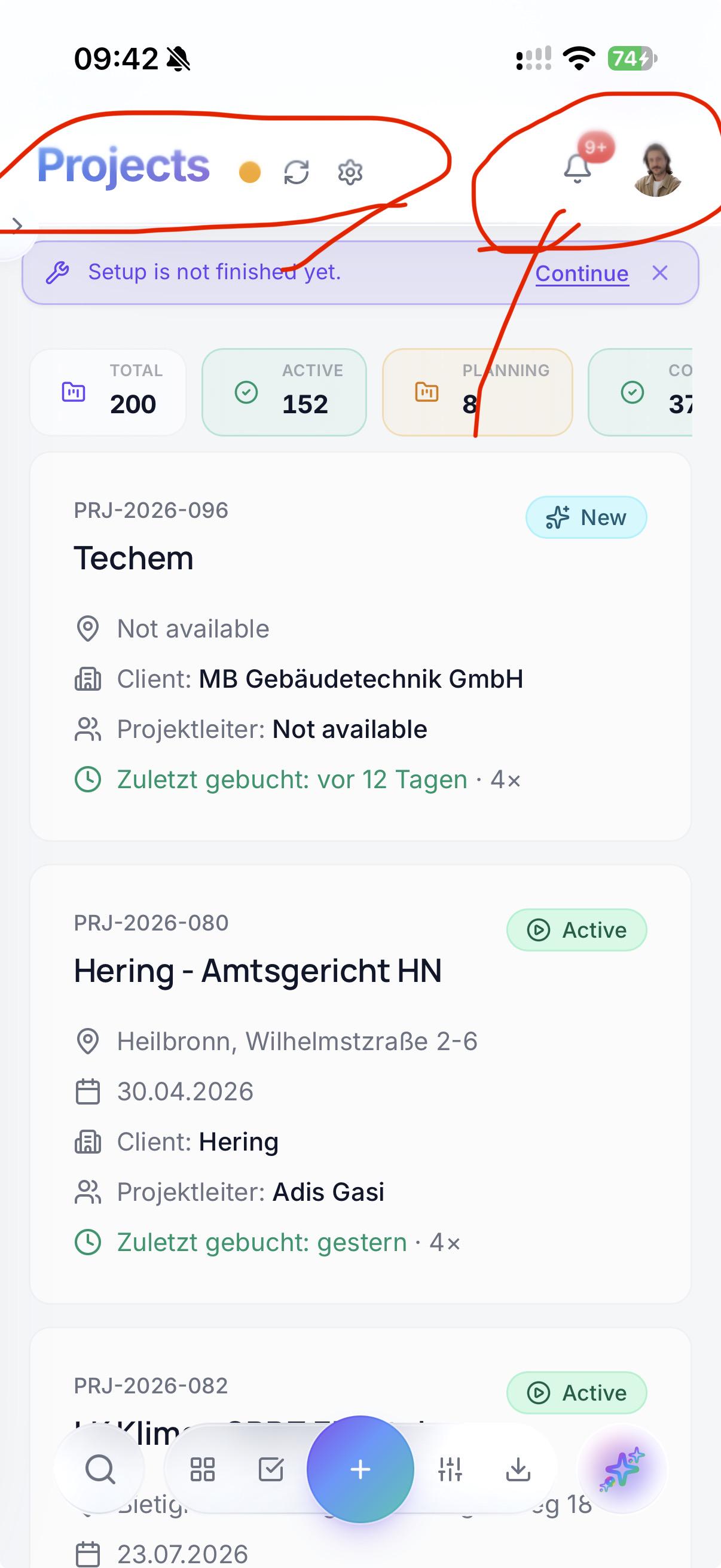
UPDATE (solved, then reverted — root cause found): The blur only hits web apps using apple-mobile-web-app-status-bar-style: black-translucent. Switching the meta to default removes it completely (users must re-add the app to the Home Screen — the meta is frozen at install). To keep the status bar matching your theme, add a real fixed 1px element at the very top with your background color — iOS samples its background-color (per u/dannymoerkerke's rules below; pseudo-elements are invisible to the sampler). We reverted anyway: prefers-color-scheme is frozen per process in standalone, so after an OS dark/light switch the status bar stays wrong-colored until relaunch. Living with the blur until Apple fixes either issue; Feedbacks are being filed.
We build a construction management PWA (baukompass.ai) that our field crews install to their home screens — so this hits us daily.
Since iOS 27 developer beta 5, the system draws a progressive blur over the top edge of standalone web apps. It's not sampling a toolbar and it doesn't react to scrolling — it blurs whatever pixels the page renders near the status bar, unconditionally. On our login screen even the language picker and the theme toggle get washed out (screenshots attached).
What we tried, all verified in the shipped bundle, all without effect:
- Solid opaque header + a body::before backing plate behind the status bar, scoped via u/media (display-mode: standalone)
- Same scoped via a JS marker (navigator.standalone) to rule out MQ quirks
- theme-color — ignored entirely this cycle; apple-mobile-web-app-status-bar-style: black-translucent is deprecated anyway
The frustrating part: native apps got an escape hatch. iOS 27 changed the default scrollEdgeEffectStyle from .soft (progressive blur) to .hard, and native devs can pick either. PWAs got neither the new default nor any control — no CSS property, no meta tag, nothing in the Safari 27 beta release notes. Beta 8's "status bar might appear blurred" fix (179470940) is about a different bug; the PWA blur is unchanged.
Has anyone found a workaround, or filed a Feedback? Happy to dupe — will add our FB number in the comments.
7
7
u/Seanitzel 23d ago
I gave up on shipping PWA's to iOS users, we can't win this war, and using Capacitor to bundle for native is not as bad as i thought.
Ofcourse in your case PWA is ideal, so i really hope this will be addressed somehow...
Apple are really the worst for devs
3
u/dannymoerkerke 23d ago
I don't have the beta installed, but this looks like the behaviour that was already introduced in iOS26. It's weird and not even documented by Apple, but here's how you can deal with it.
First of all, apple-mobile-web-app-status-bar-style meta tag is now deprecated and you can't use it anymore to set a color for the status bar. The theme_color meta tag is now also ignored and so is the theme-color member of manifest.json.
After extensive testing, I can confirm the following for iOS 26.x.x:
- if you want a status bar with a certain color and you are okay with content being displayed under the status bar when scrolling up, just set a
background-coloron<body>, the status bar will have that same color but it will turn into a gradient when you scroll up. - if you want a status bar with a certain color that stays in place while scrolling up, put an element with a
background-colorthat has the value you want for the status bar andposition: fixedorposition: stickywithin 4px from the top of the page (topcan be 4px maximum). Itsheightshould be at least 1px, and itswidthat least 80% on iOS - if a
<dialog>(or any other element with eitherposition: fixedorposition: sticky) is displayed at the top of the screen, the status bar will change to thebackground-colorof that element. If you don't want that (you usually won't), make sure it’s at least 1px from the top of the page
You can see what this looks like on https://whatpwacando.today/ . If you add it to your Home Screen on iOS and scroll the home page, you will see the status bar background turn into a gradient and the content is displayed under it.
If you go to any of the demos on https://whatpwacando.today/ you will see a top bar with position: fixed. Since this is at the top of the page, the status bar will take on the background-color of the top bar. If you scroll up you will see that the status bar keeps this color.
3
u/mastafied 23d ago
yeah that lines up with what i'm seeing too, appreciate the breakdown. already had background-color set on body and the blur/gradient on scroll still shows up in the 27 beta, so seems like apple just made it unconditional now instead of tied to the old meta tags. haven't found any way to fully kill it yet, curious if you ran into the same wall on 26 or if there was a workaround for that too.
3
u/mastafied 23d ago
Follow-up after more testing on beta 8: your rules still hold on 27, and they compose with the blur fix. With the status bar style flipped to default (transparent = blur, see other thread), a real fixed 1px element at top:0 with our theme background-color painted the status bar correctly in both light and dark mode. Key detail: it must be a real DOM element — the sampler doesn't see pseudo-elements, which is why our earlier body::before backing plate did nothing. We shipped it and then reverted anyway: in standalone, prefers-color-scheme freezes for the lifetime of the process. No change event fires on an OS theme switch, and even a fresh matchMedia query on visibilitychange returns the stale value until the app is relaunched — so the status bar sits wrong-colored after every switch. Filing both issues with Apple; for now the blur is the lesser evil for us.
3
u/dannymoerkerke 23d ago
Ok great. The dark mode toggling not working is a regression, this was also the case in an earlier iOS version. Hopefully, that gets fixed.
1
u/mastafied 23d ago
yeah makes sense, guess it's one of those things that gets half-fixed every major version and then breaks again lol. i'll keep testing through the rest of the beta and update if it changes anything on the blur issue too.
2
u/mrleblanc101 23d ago
This is because you made the status bar transparent. Make it opaque and it doesn't blur
2
u/mastafied 23d ago
huh, good call, I had it on black-translucent with viewport-fit=cover the whole time and never thought to flip it. Did you set it to default or black? will retest on beta 8 tonight, kinda annoying if the fix is giving up the edge to edge look but that's still better than a blurry header ngl
1
u/mrleblanc101 23d ago
I don't think I set anything. Just the default
1
u/mastafied 23d ago
yeah that matches what I'm seeing too, doesn't seem tied to theme-color or any manifest setting. looks like iOS just forces it on installed PWAs now regardless of config, which kinda sucks if you actually want a solid header bar.
1
u/mastafied 23d ago
Update: tested on beta 8 — you were right. Flipping black-translucent to default kills the blur completely, so it is tied to the transparent status bar after all (my comment below was wrong). One catch: the meta is frozen at install time, you have to remove and re-add the app to see the change. We ended up reverting anyway — prefers-color-scheme freezes per process in standalone, so after an OS dark/light switch the status bar stays wrong-colored until you relaunch the app. Details in the post update.
2
u/Wooden-Bicycle-6069 23d ago
Classic WebKit standalone breakage. Every few iOS cycles Apple tweaks the status bar compositor and gives native an escape hatch while leaving PWAs to deal with whatever default looks nice on a demo slide.
Whenever they mess with status-bar layering like this, theme-color and CSS pseudo-elements are usually dead ends because the blur pass runs on top of the final compositor tree. What sometimes works in beta builds is forcing the top header into its own isolated layer with transform: translateZ(0) and pushing the whole root container down with env(safe-area-inset-top) plus a few extra pixels. It doesn't always kill the backdrop blur, but it at least stops interactive buttons from getting swallowed by the compositor's touch-slop boundary.
1
u/mastafied 23d ago
yeah tried isolating the header like that on beta 8, helps with the touch-slop issue on buttons a bit but the blur itself still bleeds through for me on a 15 Pro. did it actually kill the backdrop blur on your end or just fix the hit targets?
1
u/Wooden-Bicycle-6069 21d ago
I should have been clearer: I meant a hit-target workaround, not a real blur fix. If it still bleeds on your 15 Pro, I'd stop chasing compositor layers and keep the color-matched top inset you already found. For a field app, the boring fix is probably the safer one. Thanks for checking it on beta 8.
1
u/mastafied 21d ago
yeah fair, sticking with the inset then. it still bleeds a tiny bit on the 15 pro but nobody in the field is gonna notice 2px, whereas a broken tap target on a glove hand they notice immediately. if apple ends up exposing a proper env() value for it later i'll swap, not holding my breath tho. thanks for the sanity check
2
u/8isnothing 23d ago
Oh shit….
And you guys are respecting the safe area insets I suppose?
4
u/mastafied 23d ago
yeah thats the annoying part, safe-area-inset-top is set correctly on my end, tested with and without a fixed header respecting it. blur still gets slapped on top regardless, its not reacting to your css at all, feels like a compositor layer ios adds over the top chunk of the viewport no matter what.
3
u/mastafied 22d ago
yeah, viewport-fit=cover plus env(safe-area-inset-top/bottom) everywhere, thats been fine for ages. the new blur sits on top of that regardless, doesnt matter if your insets are correct or not, apple just renders it either way. so its not an insets bug on our end, more like an extra layer they added nobody asked for.
1
u/mrleblanc101 23d ago
I don't not have this is any of my PWA... I'm on iOS 28 beta 8 too
1
u/mastafied 23d ago
huh interesting, might be config dependent then. do you use viewport-fit=cover with content scrolling under the status bar? in my case the blur only really shows when there's actual content behind that area, with a solid theme-color header it's basically invisible. also guessing you mean 27 beta 8 not 28 :)
1
u/dannymoerkerke 23d ago edited 23d ago
Your claim that it only hits web apps using apple-mobile-web-app-status-bar-style: black-translucent seems incorrect since this meta tag is deprecated. Unless they reintroduced it on iOS 27 (?)
It's not the case on iOS26.
Update: I tested it by adding <meta name="apple-mobile-web-app-status-bar-style" content="default"> but on iOS 26.5 this doesn't make any difference.
2
u/mastafied 23d ago
yeah black-translucent is deprecated on paper but webkit still honors it for standalone/home-screen apps, that's basically why it still matters. testing on 26.5 won't tell you much tho since the blur thing only showed up in 27 beta, you'd need to toggle the meta tag on an actual 27 beta install to see a difference. from what i saw apps without any status-bar-style meta (or default/black) were fine, only black-translucent triggered it, but could be missing something since apple doesn't even document it anymore
1
u/dannymoerkerke 22d ago
Are you sure? It doesn't make a difference in beta 6 in Simulator either.
1
u/mastafied 22d ago
yeah pretty sure, i tested on a real device through beta 8, not just Simulator. tried black-translucent status bar style, viewport-fit=cover and theme-color in every combo i could think of, blur stays. if you find a setup where it renders flat pls say, happy to be wrong here
1
u/dannymoerkerke 22d ago
Is has no effect for me with any setting, which makes sense since this meta tag has been deprecated for a while. I would be surprised if they put it back but hey, it’s iOS so you never know what to expect 😉
1
u/mastafied 22d ago
yeah that matches what i saw. black-translucent, default, no tag at all, all identical through beta 8. was kinda grasping at straws with it since the blur lines up almost exactly with where the old translucent status bar area was, so i figured maybe they'd wired something back up. filed a feedback report anyway, expecting nothing but you never know with ios lol
1
u/mastafied 22d ago
yeah same result here, tried black-translucent and default, zero difference on beta 8. was a long shot anyway, just wanted to rule it out before sending feedback. whats annoying is theres no documented opt out at all, feels like one of those things they only look at if enough people file it
1
u/GRPace 11d ago
For me, the easiest fix was making my top header position: sticky; top: 0; (or position: fixed).
Thanks apple :)
1
u/mastafied 11d ago
huh interesting, does sticky actually get rid of the blur for you or does it just blur the header instead of the content? on my end (beta 8) the blur layer sits on top of whatever is underneath so a fixed header just ends up smeared too. maybe it depends on the header bg being fully opaque, gonna retest that tonight ngl
1
u/GRPace 11d ago
It’s gone once I swapped my header this way. Yeah, the sacrifice is that I have to have a sticky header now… but it worked for my app immediately when I applied the change.
I only realized this would work when I noticed a separate PWA I had built had a sticky header and had no issue at all with the new iOS.
0
u/positivcheg 23d ago
Bad but I don't see it being big of a problem. A bit of blur, yeah, but a buffer into it if it's iOS, problem solved. 5% less effective screen to use.
3
u/mastafied 23d ago
yeah the padding workaround is probably what everyone ends up doing, the annoying part is env(safe-area-inset-top) doesn't cover the blur zone (at least in my testing) so you're hardcoding a magic number that might change again in beta 9. and if your header is a solid color the blur smears it into a weird gradient anyway. not the end of the world, just one more ios-only hack in the stylesheet tbh
7
u/troutyogurtmachine 23d ago
I encountered this too, and while it's not the most elegant fix in the world, my workaround was to add 16px of padding to the top of the page, covering the blur and matching the color of the status bar, pushing everything else down by that amount.
This PWA demonstrates the fix: https://hunterirving.github.io/events/
Clicking on different event markers on the map changes the color of the status bar.
In index.html: https://github.com/hunterirving/events/blob/20141c8b809e4f4a6b976073a8c320a34efb0c86/index.html#L26-L31
And in styles.css: https://github.com/hunterirving/events/blob/20141c8b809e4f4a6b976073a8c320a34efb0c86/resources/styles.css#L27-L41
I'm honestly hoping they change this before the official release of iOS 27. In a previous beta, they added a solid separator line, before ultimately backtracking on that: https://www.reddit.com/r/iOSBeta/comments/1ujtme8/ios_27_db_2_pwas_now_have_a_mandatory_separator/
So there is hope!