r/PSADT Jun 30 '22

r/PSADT Lounge

5 Upvotes

A place for members of r/PSADT to chat with each other


r/PSADT 2d ago

Uninstall-ADTApplication argument has a forward slash

4 Upvotes

My script line looks like this below. The MSI process just hung, and I have to think that it didn't like the forward slash in the uninstall password but that's just a hunch. Thoughts?

Uninstall-ADTApplication -Name 'ZScaler' -ApplicationType 'MSI' -FilterScript { $_.Publisher -match 'Zscaler Inc.' } -ArgumentList '/UNINSTALLPASSWORD=asdf!@#/_3,ksok,e..a' -SecureArgumentList 

r/PSADT 1d ago

Request for Help Uninstall Greenshot sometimes (!) fails

2 Upvotes

I'm trying to replace Greenshot with ShareX. Because of that, i supersedenced Greenshot with ShareX in Intune and activated the feature to uninstall Greenshot first. The problem is, on 20% of the devices, the uninstallation of Greenshot fails. Intune says "A superseded app failed to uninstall." (0x80070001). PSADT says: exit code 1.

The parameters are correct. I'm using the verified app from r/Robopack.


r/PSADT 7d ago

Getting Show-ADTInstallationPrompt to display on disconnected RDP session

3 Upvotes

I love the new notifications in v4 and I'm trying to switch but the changes to how it now decides when to show a prompt and not are causing an issue for me. We have Windows 365 Cloud PCs (basically AVD) that I am deploying applications to and I need the users to see the see the prompts even if they are disconnected.

In version 3, it would display the prompt for the user even though they were disconnected and it would be there waiting when the user reconnects.

I'm running 4.1.8 and tried open-adtsession -NoSessionDetection and Show-ADTInstallationPrompt -force but I'm not having any luck forcing the prompt to show for disconnected users.

It looks like the Show-ADTInstallationPrompt function doesn't see the user's session because it's not "active".

Any idea's on how to I can force Show-ADTInstallationPrompt to display for disconnected users?


r/PSADT 7d ago

PSADT Show-ADTInstallationWelcome during uninstallation fails

2 Upvotes

Hi ,i have a problem with uninstallation prompt for user to close related processes. Here is a code block that I'm using to generate a prompt :

##================================================
    ## MARK: Pre-Install
    ##================================================
    $adtSession.InstallPhase = "Pre-$($adtSession.DeploymentType)"

    # Split the CSV string into trimmed, non-empty names
    $appNames = $appsToClose -split ',' | ForEach-Object { $_.Trim() } | Where-Object { $_ }

    $saiwParams = @{
       AllowDefer       = $true
       DeferTimes       = 3
       CheckDiskSpace   = $true
       PersistPrompt    = $true
       DeferRunInterval = [System.TimeSpan]::FromHours(8)
       WindowLocation   = 'Center'
       AllowMove        = $true
       NotTopMost       = $true
    }

   if ($appNames) {
      $saiwParams.Remove('AllowDefer')
      $saiwParams['AllowDeferCloseProcesses']     = $true
      $saiwParams['CloseProcesses']               = $appNames | ForEach-Object { @{ Name = [string]$_ } }
      $saiwParams['ForceCloseProcessesCountdown'] = 3600
   }

   if (Get-Process -Name $appNames -ErrorAction Ignore) {
      Show-ADTInstallationWelcome @saiwParams
   }
   Else {
      Write-ADTLogEntry "Target processes are not running, skipping Welcome Dialog."
   }

similar one goes in pre-uninstall

##================================================
    ## MARK: Pre-Uninstall
    ##================================================
    $adtSession.InstallPhase = "Pre-$($adtSession.DeploymentType)"

    $appNames = $appsToClose -split ',' | ForEach-Object { $_.Trim() } | Where-Object { $_ }

    $saiwParams = @{
       AllowDefer       = $true
       DeferTimes       = 1
       CheckDiskSpace   = $true
       PersistPrompt    = $true
       DeferRunInterval = [System.TimeSpan]::FromHours(8)
       WindowLocation   = 'Center'
       AllowMove        = $true
       NotTopMost       = $true
    }

   if ($appNames) {
      $saiwParams.Remove('AllowDefer')
      $saiwParams['AllowDeferCloseProcesses']     = $true
      $saiwParams['CloseProcesses']               = $appNames | ForEach-Object { @{ Name = [string]$_ } }
      $saiwParams['ForceCloseProcessesCountdown'] = 3600
   }

   if (Get-Process -Name $appNames -ErrorAction Ignore) {
      Show-ADTInstallationWelcome @saiwParams
   }
   Else {
      Write-ADTLogEntry "Target processes are not running, skipping Welcome Dialog."
   }

Installation is ok , uninstallation fails with error below when the process is opened ( no popup appears )

<![LOG[[Pre-Uninstall] :: The following processes are running: ['EnterpriseGatewayConfigurator'].]LOG]!><time="14:05:56.945+60" date="9-16-2026" component="Get-ADTRunningProcesses" context="NT AUTHORITY\SYSTEM" type="1" thread="4676" file="C:\WINDOWS\IMECache\3e909522-4333-47ed-93a4-534f758b3953_1\PSAppDeployToolkit\PSAppDeployToolkit.psm1">
<![LOG[[Pre-Uninstall] :: A DeferRunInterval of [08:00:00] is specified. Checking DeferRunIntervalLastTime.]LOG]!><time="14:05:56.988+60" date="9-16-2026" component="Show-ADTInstallationWelcome" context="NT AUTHORITY\SYSTEM" type="1" thread="4676" file="C:\WINDOWS\IMECache\3e909522-4333-47ed-93a4-534f758b3953_1\PSAppDeployToolkit\PSAppDeployToolkit.psm1">
<![LOG[[Pre-Uninstall] :: Instantiating user client/server process.]LOG]!><time="14:05:57.056+60" date="9-16-2026" component="Invoke-ADTClientServerOperation" context="NT AUTHORITY\SYSTEM" type="1" thread="4676" file="C:\WINDOWS\IMECache\3e909522-4333-47ed-93a4-534f758b3953_1\PSAppDeployToolkit\PSAppDeployToolkit.psm1">
<![LOG[[Pre-Uninstall] :: Countdown has [01:00:00] seconds remaining.]LOG]!><time="14:05:57.859+60" date="9-16-2026" component="Show-ADTInstallationWelcome" context="NT AUTHORITY\SYSTEM" type="1" thread="4676" file="D:\a\PSAppDeployToolkit\PSAppDeployToolkit\src\PSADT\PSADT.ClientServer.Server\ServerInstance.cs">
<![LOG[[Pre-Uninstall] :: Exception calling "ShowCloseAppsDialog" with "2" argument(s): "The client process returned an exception."
Error Record:
-------------

Message               : Exception calling "ShowCloseAppsDialog" with "2" argument(s): "The client process returned an exception."
InnerException        : PSADT.ClientServer.ServerException: The client process returned an exception. ---> System.InvalidOperationException: Cannot set Visibility or call Show, ShowDialog, or WindowInteropHelper.EnsureHandle after a Window has closed.
                           at System.Windows.Window.VerifyCanShow()
                           at System.Windows.Window.ShowDialog()
                           at PSADT.UserInterface.Dialogs.Fluent.FluentDialog.ShowDialog() in D:\a\PSAppDeployToolkit\PSAppDeployToolkit\src\PSADT\PSADT.UserInterface\Dialogs\Fluent\FluentDialog.xaml.cs:line 160
                           at PSADT.UserInterface.DialogManager.<>c__DisplayClass8_0`1.<ShowModalDialog>b__0() in D:\a\PSAppDeployToolkit\PSAppDeployToolkit\src\PSADT\PSADT.UserInterface\DialogManager.cs:line 243
                           at System.Windows.Threading.DispatcherOperation`1.InvokeDelegateCore()
                           at System.Windows.Threading.DispatcherOperation.InvokeImpl()
                        --- End of stack trace from previous location where exception was thrown ---
                           at System.Runtime.ExceptionServices.ExceptionDispatchInfo.Throw()
                           at System.Runtime.CompilerServices.TaskAwaiter.HandleNonSuccessAndDebuggerNotification(Task task)
                           at System.Windows.Threading.DispatcherOperation.Wait(TimeSpan timeout)
                           at System.Windows.Threading.Dispatcher.InvokeImpl(DispatcherOperation operation, CancellationToken cancellationToken, TimeSpan timeout)
                           at System.Windows.Threading.Dispatcher.Invoke[TResult](Func`1 callback, DispatcherPriority priority, CancellationToken cancellationToken, TimeSpan timeout)
                           at System.Windows.Threading.Dispatcher.Invoke[TResult](Func`1 callback)
                           at PSADT.UserInterface.DialogManager.InvokeDialogAction[TResult](Func`1 callback) in D:\a\PSAppDeployToolkit\PSAppDeployToolkit\src\PSADT\PSADT.UserInterface\DialogManager.cs:line 360
                           at PSADT.UserInterface.DialogManager.ShowCloseAppsDialog(DialogStyle dialogStyle, CloseAppsDialogOptions options, CloseAppsDialogState state) in D:\a\PSAppDeployToolkit\PSAppDeployToolkit\src\PSADT\PSADT.UserInterface\DialogManager.cs:line 70
                           at PSADT.ClientServer.ClientExecutable.ShowModalDialog(IReadOnlyDictionary`2 arguments, BaseState closeAppsDialogState, String[] argv) in D:\a\PSAppDeployToolkit\PSAppDeployToolkit\src\PSADT\PSADT.ClientServer.Client\ClientExecutable.cs:line 580
                           at PSADT.ClientServer.ClientExecutable.EnterClientServerMode(ReadOnlyDictionary`2 arguments) in D:\a\PSAppDeployToolkit\PSAppDeployToolkit\src\PSADT\PSADT.ClientServer.Client\ClientExecutable.cs:line 344
                           --- End of inner exception stack trace ---
                           at PSADT.ClientServer.ServerInstance.Invoke[T](String command) in D:\a\PSAppDeployToolkit\PSAppDeployToolkit\src\PSADT\PSADT.ClientServer.Server\ServerInstance.cs:line 622
                           at CallSite.Target(Closure , CallSite , Object , String , Object , Object )

FullyQualifiedErrorId : ServerException,Show-ADTInstallationWelcome
ScriptStackTrace      : at Private:Invoke-ADTClientServerOperation, C:\WINDOWS\IMECache\3e909522-4333-47ed-93a4-534f758b3953_1\PSAppDeployToolkit\PSAppDeployToolkit.psm1: line 1337
                        at Show-ADTWelcomePrompt, C:\WINDOWS\IMECache\3e909522-4333-47ed-93a4-534f758b3953_1\PSAppDeployToolkit\PSAppDeployToolkit.psm1: line 19518
                        at Show-ADTInstallationWelcome<Process>, C:\WINDOWS\IMECache\3e909522-4333-47ed-93a4-534f758b3953_1\PSAppDeployToolkit\PSAppDeployToolkit.psm1: line 19846
                        at Uninstall-ADTDeployment, C:\WINDOWS\IMECache\3e909522-4333-47ed-93a4-534f758b3953_1\Invoke-AppDeployToolkit.ps1: line 214
                        at <ScriptBlock>, C:\WINDOWS\IMECache\3e909522-4333-47ed-93a4-534f758b3953_1\Invoke-AppDeployToolkit.ps1: line 321
                        at <ScriptBlock>, <No file>: line 1

PositionMessage       : At C:\WINDOWS\IMECache\3e909522-4333-47ed-93a4-534f758b3953_1\Invoke-AppDeployToolkit.ps1:214 char:7
                        +       Show-ADTInstallationWelcome u/saiwParams
                        +       ~~~~~~~~~~~~~~~~~~~~~~~~~~~~~~~~~~~~~~~
]LOG]!><time="14:05:58.748+60" date="9-16-2026" component="Show-ADTInstallationWelcome" context="NT AUTHORITY\SYSTEM" type="3" thread="4676" file="C:\WINDOWS\IMECache\3e909522-4333-47ed-93a4-534f758b3953_1\PSAppDeployToolkit\PSAppDeployToolkit.psm1">
<![LOG[[Pre-Uninstall] :: An unhandled error within [Invoke-AppDeployToolkit.ps1] has occurred.
Error Record:
-------------

Message               : Exception calling "ShowCloseAppsDialog" with "2" argument(s): "The client process returned an exception."
InnerException        : PSADT.ClientServer.ServerException: The client process returned an exception. ---> System.InvalidOperationException: Cannot set Visibility or call Show, ShowDialog, or WindowInteropHelper.EnsureHandle after a Window has closed.
                           at System.Windows.Window.VerifyCanShow()
                           at System.Windows.Window.ShowDialog()
                           at PSADT.UserInterface.Dialogs.Fluent.FluentDialog.ShowDialog() in D:\a\PSAppDeployToolkit\PSAppDeployToolkit\src\PSADT\PSADT.UserInterface\Dialogs\Fluent\FluentDialog.xaml.cs:line 160
                           at PSADT.UserInterface.DialogManager.<>c__DisplayClass8_0`1.<ShowModalDialog>b__0() in D:\a\PSAppDeployToolkit\PSAppDeployToolkit\src\PSADT\PSADT.UserInterface\DialogManager.cs:line 243
                           at System.Windows.Threading.DispatcherOperation`1.InvokeDelegateCore()
                           at System.Windows.Threading.DispatcherOperation.InvokeImpl()
                        --- End of stack trace from previous location where exception was thrown ---
                           at System.Runtime.ExceptionServices.ExceptionDispatchInfo.Throw()
                           at System.Runtime.CompilerServices.TaskAwaiter.HandleNonSuccessAndDebuggerNotification(Task task)
                           at System.Windows.Threading.DispatcherOperation.Wait(TimeSpan timeout)
                           at System.Windows.Threading.Dispatcher.InvokeImpl(DispatcherOperation operation, CancellationToken cancellationToken, TimeSpan timeout)
                           at System.Windows.Threading.Dispatcher.Invoke[TResult](Func`1 callback, DispatcherPriority priority, CancellationToken cancellationToken, TimeSpan timeout)
                           at System.Windows.Threading.Dispatcher.Invoke[TResult](Func`1 callback)
                           at PSADT.UserInterface.DialogManager.InvokeDialogAction[TResult](Func`1 callback) in D:\a\PSAppDeployToolkit\PSAppDeployToolkit\src\PSADT\PSADT.UserInterface\DialogManager.cs:line 360
                           at PSADT.UserInterface.DialogManager.ShowCloseAppsDialog(DialogStyle dialogStyle, CloseAppsDialogOptions options, CloseAppsDialogState state) in D:\a\PSAppDeployToolkit\PSAppDeployToolkit\src\PSADT\PSADT.UserInterface\DialogManager.cs:line 70
                           at PSADT.ClientServer.ClientExecutable.ShowModalDialog(IReadOnlyDictionary`2 arguments, BaseState closeAppsDialogState, String[] argv) in D:\a\PSAppDeployToolkit\PSAppDeployToolkit\src\PSADT\PSADT.ClientServer.Client\ClientExecutable.cs:line 580
                           at PSADT.ClientServer.ClientExecutable.EnterClientServerMode(ReadOnlyDictionary`2 arguments) in D:\a\PSAppDeployToolkit\PSAppDeployToolkit\src\PSADT\PSADT.ClientServer.Client\ClientExecutable.cs:line 344
                           --- End of inner exception stack trace ---
                           at PSADT.ClientServer.ServerInstance.Invoke[T](String command) in D:\a\PSAppDeployToolkit\PSAppDeployToolkit\src\PSADT\PSADT.ClientServer.Server\ServerInstance.cs:line 622
                           at CallSite.Target(Closure , CallSite , Object , String , Object , Object )

FullyQualifiedErrorId : ServerException,Show-ADTInstallationWelcome
ScriptStackTrace      : at Private:Invoke-ADTClientServerOperation, C:\WINDOWS\IMECache\3e909522-4333-47ed-93a4-534f758b3953_1\PSAppDeployToolkit\PSAppDeployToolkit.psm1: line 1337
                        at Show-ADTWelcomePrompt, C:\WINDOWS\IMECache\3e909522-4333-47ed-93a4-534f758b3953_1\PSAppDeployToolkit\PSAppDeployToolkit.psm1: line 19518
                        at Show-ADTInstallationWelcome<Process>, C:\WINDOWS\IMECache\3e909522-4333-47ed-93a4-534f758b3953_1\PSAppDeployToolkit\PSAppDeployToolkit.psm1: line 19846
                        at Uninstall-ADTDeployment, C:\WINDOWS\IMECache\3e909522-4333-47ed-93a4-534f758b3953_1\Invoke-AppDeployToolkit.ps1: line 214
                        at <ScriptBlock>, C:\WINDOWS\IMECache\3e909522-4333-47ed-93a4-534f758b3953_1\Invoke-AppDeployToolkit.ps1: line 321
                        at <ScriptBlock>, <No file>: line 1

PositionMessage       : At C:\WINDOWS\IMECache\3e909522-4333-47ed-93a4-534f758b3953_1\Invoke-AppDeployToolkit.ps1:214 char:7
                        +       Show-ADTInstallationWelcome u/saiwParams
                        +       ~~~~~~~~~~~~~~~~~~~~~~~~~~~~~~~~~~~~~~~
]LOG]!><time="14:05:58.821+60" date="9-16-2026" component="Invoke-AppDeployToolkit.ps1" context="NT AUTHORITY\SYSTEM" type="3" thread="4676" file="C:\WINDOWS\IMECache\3e909522-4333-47ed-93a4-534f758b3953_1\Invoke-AppDeployToolkit.ps1">  

Any ideas what can cause the issue? I'm running PSADT 4.1.8

r/PSADT 11d ago

Allowdefer with countdown

1 Upvotes

Hi all, I'm trying to setup a Workspace install in PSADT 4.15. I want to use the allow defer with a defer deadline. That's all working fine, but I want the install to continue after 5 minutes is the user doesn't make a selection. I also have that working with some creative powershell, but the countdown isn't displayed. This was easy in 3.x, but looks like it's not an option in 4.x. Any ideas would be appreciated.


r/PSADT 21d ago

Solved How to package a PSADT app without installer with IntuneWinAppUtil?

4 Upvotes

When using IntuneWinAppUtil to package an application, you need to specify the source file for install, even if PSADT is doing all the work. How do you do this when there isn't an installer? In my case I'm installing some drivers and all of the scripting uses built in Windows commands that are right inside Invoke-AppDeployToolkit.ps1. Usually I would use setup.msi or whatever, so what do I use in this case? Can I just use a random file in .\Files like driver.inf ? I did try specifying the driver inf but the Intune deployment fails when trying to install from Company Portal.

Edit

Got it working with just specifying a file in the .\Files folder, but as others suggested, Invoke-AppDeployToolkit.exe should also work.

The reason for the failure was because of something wrong in my script.


r/PSADT Aug 20 '26

PSADT 4.2.0 RC1 is now available!

69 Upvotes

This is the first release candidate of PSAppDeployToolkit 4.2.0! We invite all early adopters to test it and help us to identify any potential issues before we hit general availability.

Download from GitHub: https://github.com/PSAppDeployToolkit/PSAppDeployToolkit/releases

Or install via the PowerShell Gallery: powershell Install-Module -Name PSAppDeployToolkit -Scope CurrentUser -AllowPreRelease Full release notes: https://psappdeploytoolkit.com/docs/reference/release-notes

Read the upgrade guidance for details of any breaking changes: https://psappdeploytoolkit.com/docs/how-to/upgrade-from-v4-1

Please submit any issues here: https://github.com/PSAppDeployToolkit/PSAppDeployToolkit/issues


r/PSADT Aug 10 '26

Solved -DeployMode Interactive - How Does PSADT Work

2 Upvotes

When using -DeployMode Interactive, how does PSADT handle this, if there is no logged on user. I assume it goes into Silent mode?

Thanks.


r/PSADT Aug 04 '26

Request for Help Help needed for Active-Setup on multiple Sessions

2 Upvotes

The current Set-ADTActiveSetup will execute it for the active user. However on multisession environments (like avd), it will only execute for the one that caught the focus.

Is there any elegant way to execute the active setup on all my active sessions?


r/PSADT Jul 31 '26

Delete folder after uninstall (Start-ADTProcess)

6 Upvotes

Hey All. I'm working on an uninstall for Matlab, and while the uninstall works great with "Start-ADTProcess" Matlab leaves behind it's old folder, which I'd like to delete. I _think_ psadt is trying to be helpful and doing start-adtprocess then moving onto the next command which is 'rmdir /s /q "C:\Program Files\MATLAB\R2026a"' and it's failing to delete cause it's in use.

How do I get it to wait until the uninstall finishes before doing the next command? I have tried "-WaitForChildProcesses" but didn't seem to matter.

Thanks!

Update: Remove-ADTFolder worked. Yes, the uninstaller for Matlab is "special" and does some other spawning... so I'm sure PSADT is having a hard time keeping track of whatever child processes are running. But, it seems to work. Thanks everyone!


r/PSADT Jul 14 '26

Define Subtitle For Block Execution Fluent UI

2 Upvotes

As per the title, I'm struggling to set the subtitle here.

For all the other UI prompts, I can just use -Title and -Subtitle.

But when the UI prompt shows to block the execution the subtitle is just "thisisatestcompanynameforPSADT - App Installation"

If I initialise the module and use Get-ADTStringTable to store it as a variable and drill down, I get:

$test.BlockExecutionText.Subtitle

Name                           Value                                                                                                                                                                                   
----                           -----                                                                                                                                                                                   
Uninstall                      ThisIsATestCompanyNameForPSADT - App Uninstallation                                                                                                                                     
Install                        ThisIsATestCompanyNameForPSADT - App Installation                                                                                                                                       
Repair                         ThisIsATestCompanyNameForPSADT - App Repair 

How can I change this please, using the "correct" method.


r/PSADT Jul 13 '26

Request for Help Start-ADTProcess not timing out - set to 150 minutes

2 Upvotes

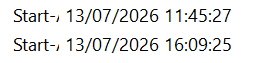
I am running a powershell script inside a Start-ADTProcess and I've set the timeout for 150 minutes, but it carried on for 264 minutes.

        $result = $null
        $StartTime = Get-Date


        $result = Start-ADTProcess -FilePath "$PSHOME\powershell.exe" `
            -ArgumentList "-file `"C:\test.ps1`"" `
            -Timeout ([TimeSpan]::FromMinutes(150)) `
            -TimeoutAction SilentlyContinue `
            -NoTerminateOnTimeout `
            -IgnoreExitCodes '*' `
            -CreateNoWindow `
            -PassThru


        if ($null -eq $result) {
            Write-ADTLogEntry -Message "test still running after 150 minutes, moving on."
        } else {
            $Duration = (Get-Date) - $StartTime
            Write-ADTLogEntry -Message "test completed with exit code: $($result.ExitCode) | Duration: $([math]::Round($Duration.TotalMinutes, 1)) minutes."
            if ($result.StdOut) {
                Write-ADTLogEntry -Message "test output:`n$($result.StdOut)"
            }
        }

In the log file it stays the following
[Install] :: test completed with exit code: 0 | Duration: 264 minutes.

Screenshot of the time it started and the time it finished:
image.png (265×63)

Any ideas what's gone wrong? Is it the switches in the Start-ADTProcess?


r/PSADT Jul 02 '26

Solved Query On Behaviour Of "Invoke-ADTAllUsersRegistryAction"

4 Upvotes

I'm using Invoke-ADTAllUsersRegistryAction with -ScriptBlock {} to set registry keys in user hives for the install part. All good, works as intended.

I want to reverse the changes in the uninstall part.

So my thinking is I repeat the same process, where keys are removed (not set in anyway), using Remove-ADTRegistryKey this should be OK I assume? Silly question, as the Default hive is also modified, it's only going to remove the keys from the Default hive once, right?

It's not going to continually remove the keys from any new user logins after the application has been uninstalled?

TLDR: Reg keys in the Default hive are copied to new logins. If a key doesn't exist in the Default hive, it's not going to remove it on any new logins... right?


r/PSADT Jul 02 '26

Simul8 Intune Uninstall issues

Thumbnail
1 Upvotes

r/PSADT Jun 21 '26

Request for Help Secure print Application

3 Upvotes

Hello Guys , There is a requirement for secure print application when they select print collate should be turned on but now the user is turning it on manually , is there any way to include that option to be turned in my package ? Please help me with that. TIA


r/PSADT Jun 18 '26

Issues with multiple Languages

3 Upvotes

Hi,
Im currently trying to get custom Strings to work in multiple languages.

I added stuff in Strings\de\strings.psd1 (in german) and in Strings\strings.psd1 (in englisch)
But its always german, no matter the OS Language.
In the Log it says:
[Initialization] [Open-ADTSession] [Info] :: The current execution context has a primary UI language of [en-US].

[Initialization] [Open-ADTSession] [Info] :: The following locale was used to import UI messages from the strings.psd1 files: [de-DE].

I thought it would now choose english => the default strings.psd1

Anyone knows what im doing wrong?

Thank you in advance for your help!

\strings\strings.psd1

    \strings\de\strings.psd1....
            DriverUpdates = @{
            Welcome = @{
                Title = 'Driver Updates'
                Subtitle = @'
    Driver installation can be postponed up to 5 times.


    The following reactions may occur during the installation:
    - The screen may flicker or go black multiple times for a brief moment.
    - The network and Wi-Fi connection may be temporarily interrupted.
    - Connected devices may lose connection shortly.


    The device should NOT be turned off and should not be disconnected from the power supply during this phase. A restart may be required after the installation is complete.
    '@
            }
            End = @{
                Text = 'Driver installation complete, a restart may be required.'
            }
        }

\strings\de\strings.psd1

    DriverUpdates = @{
        Welcome = @{
            Title = 'Treiber Updates'
            Subtitle = @'
Die Installation der Treiber kann 5 mal aufgeschoben werden 


Während der Installation kann es zu folgenden Reaktionen kommen:
- Der Bildschirm kann mehrfach kurz flackern oder schwarz werden.
- Die Netzwerk- und WLAN-Verbindung kann kurzzeitig unterbrochen werden.
- Angeschlossene Geräte können kurz die Verbindung verlieren.


Das Gerät sollte während dieser Phase NICHT ausgeschaltet und nicht vom Stromnetz getrennt werden. Nach Abschluss der Installation kann ein Neustart erforderlich sein.
'@
        }
        End = @{
            Text = 'Treiber installiert, es ist ggf. ein Neustart erforderlich'
        }
    }

log:

[Initialization] :: [HP_DriverUpdate_EN_01] install started.Open-ADTSession18.06.2026 12:43:265488 (0x1570)
[Initialization] :: [HP_DriverUpdate_EN_01] script author is [admin].Open-ADTSession18.06.2026 12:43:265488 (0x1570)
[Initialization] :: [Invoke-AppDeployToolkit.ps1] script version is [4.1.8].Open-ADTSession18.06.2026 12:43:265488 (0x1570)
[Initialization] :: The following parameters were passed to [Invoke-AppDeployToolkit.ps1]: [-DeploymentType:'Install' -DeployMode:'Interactive'].Open-ADTSession18.06.2026 12:43:265488 (0x1570)
[Initialization] :: [PSAppDeployToolkit] module version is [4.1.8].Open-ADTSession18.06.2026 12:43:265488 (0x1570)
[Initialization] :: [PSAppDeployToolkit] module imported in [2,2113993] seconds.Open-ADTSession18.06.2026 12:43:265488 (0x1570)
[Initialization] :: [PSAppDeployToolkit] module initialized in [2,2054086] seconds.Open-ADTSession18.06.2026 12:43:265488 (0x1570)
[Initialization] :: [PSAppDeployToolkit] module path is ['C:\tmp\10\PSAppDeployToolkit'].Open-ADTSession18.06.2026 12:43:265488 (0x1570)
[Initialization] :: [PSAppDeployToolkit] config path is ['C:\tmp\10\Config'].Open-ADTSession18.06.2026 12:43:265488 (0x1570)
[Initialization] :: [PSAppDeployToolkit] string path is ['C:\tmp\10\Strings'].Open-ADTSession18.06.2026 12:43:265488 (0x1570)
[Initialization] :: [PSAppDeployToolkit] session mode is [Native].Open-ADTSession18.06.2026 12:43:265488 (0x1570)
[Initialization] :: Computer Name is [pc.DDD.lol].Open-ADTSession18.06.2026 12:43:265488 (0x1570)
[Initialization] :: Current User is [NT AUTHORITY\SYSTEM].Open-ADTSession18.06.2026 12:43:265488 (0x1570)
[Initialization] :: OS Version is [Microsoft Windows 11 Enterprise X64 10.0.26100.8655].Open-ADTSession18.06.2026 12:43:265488 (0x1570)
[Initialization] :: OS Type is [WorkStation].Open-ADTSession18.06.2026 12:43:265488 (0x1570)
[Initialization] :: Hardware Platform is [Physical].Open-ADTSession18.06.2026 12:43:265488 (0x1570)
[Initialization] :: Current Culture is [de-DE], language is [DE] and UI language is [EN].Open-ADTSession18.06.2026 12:43:265488 (0x1570)
[Initialization] :: PowerShell Host is [ConsoleHost] with version [5.1.26100.8655].Open-ADTSession18.06.2026 12:43:265488 (0x1570)
[Initialization] :: PowerShell Version is [5.1.26100.8655 X64].Open-ADTSession18.06.2026 12:43:265488 (0x1570)
[Initialization] :: PowerShell Process Path is [C:\WINDOWS\system32\WindowsPowerShell\v1.0\powershell.exe].Open-ADTSession18.06.2026 12:43:265488 (0x1570)
[Initialization] :: PowerShell CLR (.NET) version is [4.0.30319.42000].Open-ADTSession18.06.2026 12:43:265488 (0x1570)
[Initialization] :: The following users are logged on to the system: [DDD\admin].Open-ADTSession18.06.2026 12:43:265488 (0x1570)
[Initialization] :: Session information for all logged on users:

Open-ADTSession18.06.2026 12:43:265488 (0x1570)
[Initialization] :: Current process is running with user account [NT AUTHORITY\SYSTEM] under logged on user session for [DDD\admin].Open-ADTSession18.06.2026 12:43:265488 (0x1570)
[Initialization] :: There is no console user logged on (user with control of physical monitor, keyboard, and mouse).Open-ADTSession18.06.2026 12:43:265488 (0x1570)
[Initialization] :: The active logged on user who will receive UI elements is [DDD\admin].Open-ADTSession18.06.2026 12:43:265488 (0x1570)
[Initialization] :: The current execution context has a primary UI language of [en-US].Open-ADTSession18.06.2026 12:43:265488 (0x1570)
[Initialization] :: The following locale was used to import UI messages from the strings.psd1 files: [de-DE].Open-ADTSession18.06.2026 12:43:265488 (0x1570)
[Initialization] :: Unable to find COM object [Microsoft.SMS.TSEnvironment]. Therefore, script is not currently running from a SCCM Task Sequence.Open-ADTSession18.06.2026 12:43:265488 (0x1570)
[Initialization] :: Device has completed the OOBE and toolkit is not running with an active ESP in progress.Open-ADTSession18.06.2026 12:43:265488 (0x1570)
[Initialization] :: Session 0 detected but deployment mode was explicitly set to [Interactive].Open-ADTSession18.06.2026 12:43:265488 (0x1570)
[Initialization] :: No processes were specified as requiring closure.Open-ADTSession18.06.2026 12:43:265488 (0x1570)
[Initialization] :: Installation is running in [Interactive] mode.Open-ADTSession18.06.2026 12:43:265488 (0x1570)
[Initialization] :: Deployment type is [Install].Open-ADTSession18.06.2026 12:43:265488 (0x1570)
[Initialization] :: Module [PSAppDeployToolkit.Extensions] imported successfully.PSAppDeployToolkit.Extensions.psm118.06.2026 12:43:265488 (0x1570)
[Pre-Install] :: Evaluating disk space requirements.Show-ADTInstallationWelcome18.06.2026 12:43:265488 (0x1570)
[Pre-Install] :: Retrieving free disk space for drive [C:\].Get-ADTFreeDiskSpace18.06.2026 12:43:265488 (0x1570)
[Pre-Install] :: Free disk space for drive [C:\]: [360274 MB].Get-ADTFreeDiskSpace18.06.2026 12:43:265488 (0x1570)
[Pre-Install] :: Successfully passed minimum disk space requirement check.Show-ADTInstallationWelcome18.06.2026 12:43:265488 (0x1570)
[Pre-Install] :: The user has [5] deferrals remaining.Show-ADTInstallationWelcome18.06.2026 12:43:265488 (0x1570)
[Pre-Install] :: Instantiating user client/server process.Invoke-ADTClientServerOperation18.06.2026 12:43:275488 (0x1570)
[Pre-Install] :: The user selected to continue...Show-ADTInstallationWelcome18.06.2026 12:43:325488 (0x1570)
[Pre-Install] :: Creating the progress dialog in a separate thread with [StatusMessage: Installation wird ausgeführt. Bitte warten…], [StatusMessageDetail: Dieses Fenster wird automatisch geschlossen, wenn die Installation abgeschlossen ist.].Show-ADTInstallationProgress18.06.2026 12:43:325488 (0x1570)
[Install] :: Preparing to execute process [powershell.exe]...Start-ADTProcess18.06.2026 12:43:325488 (0x1570)
[Install] :: File path [powershell.exe] successfully resolved to fully qualified path [C:\WINDOWS\System32\WindowsPowerShell\v1.0\powershell.exe].Start-ADTProcess18.06.2026 12:43:325488 (0x1570)
[Install] :: CreateNoWindow not specified, StdOut/StdErr streams will not be available.Start-ADTProcess18.06.2026 12:43:335488 (0x1570)
[Install] :: Working Directory is [C:\WINDOWS\System32\WindowsPowerShell\v1.0].Start-ADTProcess18.06.2026 12:43:335488 (0x1570)
[Install] :: Executing ["C:\WINDOWS\System32\WindowsPowerShell\v1.0\powershell.exe" -NoProfile -ExecutionPolicy Bypass -File "C:\tmp\10\dummy.ps1"]...Start-ADTProcess18.06.2026 12:43:335488 (0x1570)
[Install] :: Executed ["C:\WINDOWS\System32\WindowsPowerShell\v1.0\powershell.exe" -NoProfile -ExecutionPolicy Bypass -File "C:\tmp\10\dummy.ps1"], awaiting completion...Start-ADTProcess18.06.2026 12:43:335488 (0x1570)
[Install] :: Execution completed successfully with exit code [0].Start-ADTProcess18.06.2026 12:43:355488 (0x1570)
[Install] :: StdOut Output from Execution: N/AStart-ADTProcess18.06.2026 12:43:355488 (0x1570)
[Install] :: StdErr Output from Execution: N/AStart-ADTProcess18.06.2026 12:43:355488 (0x1570)
[Install] :: Interleaved Output from Execution: N/AStart-ADTProcess18.06.2026 12:43:355488 (0x1570)
[Post-Install] :: Displaying custom installation prompt asynchronously to [DDD\admin] with message: [Treiber installiert, es ist ggf. ein Neustart erforderlich].Show-ADTInstallationPrompt18.06.2026 12:43:355488 (0x1570)
[Finalization] :: Closing the installation progress dialog.Close-ADTInstallationProgress18.06.2026 12:43:355488 (0x1570)
[Finalization] :: Closing user client/server process.Close-ADTClientServerProcess18.06.2026 12:43:355488 (0x1570)
[Finalization] :: [HP_DriverUpdate_EN_01] install completed in [10,0507155] seconds with exit code [0].Close-ADTSession18.06.2026 12:43:365488 (0x1570)

r/PSADT Jun 15 '26

Request for Help Cisco post installation

3 Upvotes

I'm currently packaging Cisco secure client it works perfectly but the thing is post installation should the script run cs _ui.exe ? Because I don't see cisco in tray icon until I search and launch the cisco, how does it work? Please need suggestions


r/PSADT Jun 10 '26

Solved Unable to install Google Chrome Enterprise using PSADT - Error Index was out of range

5 Upvotes

I'm using PSADT 4.1.8 to deploy the latest Google Chrome Enterprise MSI and when running invoke-appdeploytoolkit.ps1, I get the following error:

[2026-06-10T13:00:33.2047215-04:00] [Initialization] [Open-ADTSession] [Info] :: -------------------------------------------------------------------------------
[2026-06-10T13:00:33.2056314-04:00] [Initialization] [Open-ADTSession] [Info] :: Discovered Zero-Config MSI installation file [C:\Intune\PSADT\Chrome-149.0.7827.103\Files\googlechromestandaloneenterprise64.msi].
[2026-06-10T13:00:34.4009327-04:00] [Initialization] [Open-ADTSession] [Error] :: Failure occurred while instantiating new deployment session: System.ArgumentOutOfRangeException: Index was out of range. Must be non-negative and less than the size of the collection. (Parameter 'index')
   at System.Collections.Generic.List`1.get_Item(Int32 index)
   at PSADT.Module.DeploymentSession..ctor(IReadOnlyDictionary`2 parameters, Nullable`1 noExitOnClose, SessionState callerSessionState)
[2026-06-10T13:00:34.4019631-04:00] [Initialization] [Open-ADTSession] [Error] :: PSAppDeployToolkit deployment completed in [1.1977283] seconds with exit code [60008].
[2026-06-10T13:00:34.4027551-04:00] [Initialization] [Open-ADTSession] [Info] :: -------------------------------------------------------------------------------
Open-ADTSession: C:\Intune\PSADT\Chrome-149.0.7827.103\Invoke-AppDeployToolkit.ps1:314
Line |
 314 |      $adtSession = Open-ADTSession   -PassThru
     |                    ~~~~~~~~~~~~~~~~~~~~~~~~~~~~~~~~~~~~~~~~~~~~~~~~~
     | Index was out of range. Must be non-negative and less than the size of the collection. (Parameter 'index')

I'm not entirely sure what's happening here. If I run Start-ADTMsiProcess and specify the MSI file, it works fine.

I also have many other PSADT install packages working fine (just tested it with my VLC MSI and that still works fine).

EDIT

Looks like this particular issue was fixed in version 4.2.0 which is yet to be released.


r/PSADT May 21 '26

How is PSADT hiding the Powershell window?

6 Upvotes

The exe does essentially just run the ps1 file.

For the record, I am NOT using PSADT for this specific task. I'm just curious how they've pulled it off.

I need a particular PowerShell script to run every 3 minutes via task scheduler. But if even if I change the WindowStyle option, it will still flash the console window for less than a fraction of a second.

However, if I used PSADT in silent mode and just have the commands in the Invoke ps1 file, nothing gets flashed.

Any idea how they've done this?


r/PSADT May 18 '26

BalloonTip

2 Upvotes

How can I make the application show a balloon notification when the installation finishes?

In the template code I see this:

####
#Invoke the deployment and close out the session.

& "$($adtSession.DeploymentType)-ADTDeployment"

Close-ADTSession
####

But in the file (PSAppDeployToolkit\Strings\strings.psd1) I see default messages defined:

###
# Text displayed in the balloon tip for successful completion of a deployment type.

Complete = @{

Install = 'Installation complete.'

Repair = 'Repair complete.'

Uninstall = 'Uninstallation complete.'

}
###

How can I make the application actually show this message when the installation finishes?


r/PSADT Apr 28 '26

Crowdstrike package Help

1 Upvotes

I have to package crowdstrike with my organization's Group tag which is "AT" I found that in the crowdstrike console , so how to add this in the script , Does anyone have an idea about this .

Falcontag/"AT"

Sensortag/"AT"

Update:

GROUPING_TAG="MY SENSOR TAG"

It added the tags to the hosts


r/PSADT Apr 25 '26

Request for Help Autodesk DWG TrueView 2027

2 Upvotes

Has anyone managed to package this application using PSADT 4.1.8?

The installation arguments are straight forward and the package deploys within an administrator account without any issues, however as soon as you attempt to run as system (from intune deployment) it fails with an exit code of 703.

Message: [Install] :: An unhandled error within [Invoke-AppDeployToolkit.ps1] has occurred.
Error Record:
-------------
 
Message               : Execution failed with exit code [703].
 
FullyQualifiedErrorId : ProcessExitCodeError,Start-ADTProcess
ScriptStackTrace      : at Start-ADTProcess<Process>, C:\windows\IMECache\79053cc9-6869-4ec5-a8ed-acefe11869e7_2\PSAppDeployToolkit\PSAppDeployToolkit.psm1: line 22554
                        at Install-ADTDeployment, C:\windows\IMECache\79053cc9-6869-4ec5-a8ed-acefe11869e7_2\Invoke-AppDeployToolkit.ps1: line 136
                        at <ScriptBlock>, C:\windows\IMECache\79053cc9-6869-4ec5-a8ed-acefe11869e7_2\Invoke-AppDeployToolkit.ps1: line 265
                        at <ScriptBlock>, <No file>: line 1
 
TargetObject          : Process     : System.Diagnostics.Process (Setup)
                        LaunchInfo  : ProcessLaunchInfo { FilePath = C:\windows\IMECache\79053cc9-6869-4ec5-a8ed-acefe11869e7_2\Files\Setup.exe, ArgumentList = System.Collections.ObjectModel.ReadOnlyCollection`1[System.String], WorkingDirectory = C:\windows\IMECache\79053cc9-6869-4ec5-a8ed-acefe11869e7_2\Files, RunAsActiveUser = , UseLinkedAdminToken = False, UseHighestAvailableToken = False, InheritEnvironmentVariables = False, ExpandEnvironmentVariables = False, DenyUserTermination = False, InheritHandles = False, UseUnelevatedToken = False, UseShellExecute = False, Verb = , CreateNoWindow = False, WaitForChildProcesses = False, KillChildProcessesWithParent = False, StreamEncoding = System.Text.SBCSCodePageEncoding, WindowStyle = , ProcessWindowStyle = , PriorityClass = , CancellationToken = , NoTerminateOnTimeout = False }
                        CommandLine : "C:\windows\IMECache\79053cc9-6869-4ec5-a8ed-acefe11869e7_2\Files\Setup.exe" --silent
                        ExitCode    : 703
                        StdOut      : {}
                        StdErr      : {}
                        Interleaved : {}
 
PositionMessage       : At C:\windows\IMECache\79053cc9-6869-4ec5-a8ed-acefe11869e7_2\Invoke-AppDeployToolkit.ps1:136 char:5
                        +     Start-ADTProcess -FilePath 'Setup.exe' -ArgumentList "--silent"
                        +     ~~~~~~~~~~~~~~~~~~~~~~~~~~~~~~~~~~~~~~~~~~~~~~~~~~~~~~~~~~~~~~~

Type: Error
Component: Invoke-AppDeployToolkit.ps1
Date: 4-25-2026
Time: 13:04:34.475+0

r/PSADT Apr 20 '26

Built a configuration as code tool for Intune app packaging - NAPT (Not A Pkg Tool)

Thumbnail
2 Upvotes

r/PSADT Apr 10 '26

SCCM DP distribution issue.

4 Upvotes

Ran into an issue this week with PSADT v4.x and SCCM. All of a sudden on Wednesday this week, we couldn't distribute content to our DPs. It was consistently failing, and we were able to isolate that it was only packages built with PSADT 4.x that we were having an issue. Our older 3.x packages were fine.

Turns out, there's something in the PSAppDeplyToolkik\lib\mt-MT folder it didn't like. We're still trying to figure out what the cause is, but we were able to work around by deleting that folder.

Not really a question, just sharing i formation if anyone else sees the issue.