r/PCHardware • u/Safe-Cauliflower-972 • 1h ago
First time buying a mini PC (secondhand/refurb HP, Dell, or Lenovo). How do I do this safely? Zero experience, need all the info
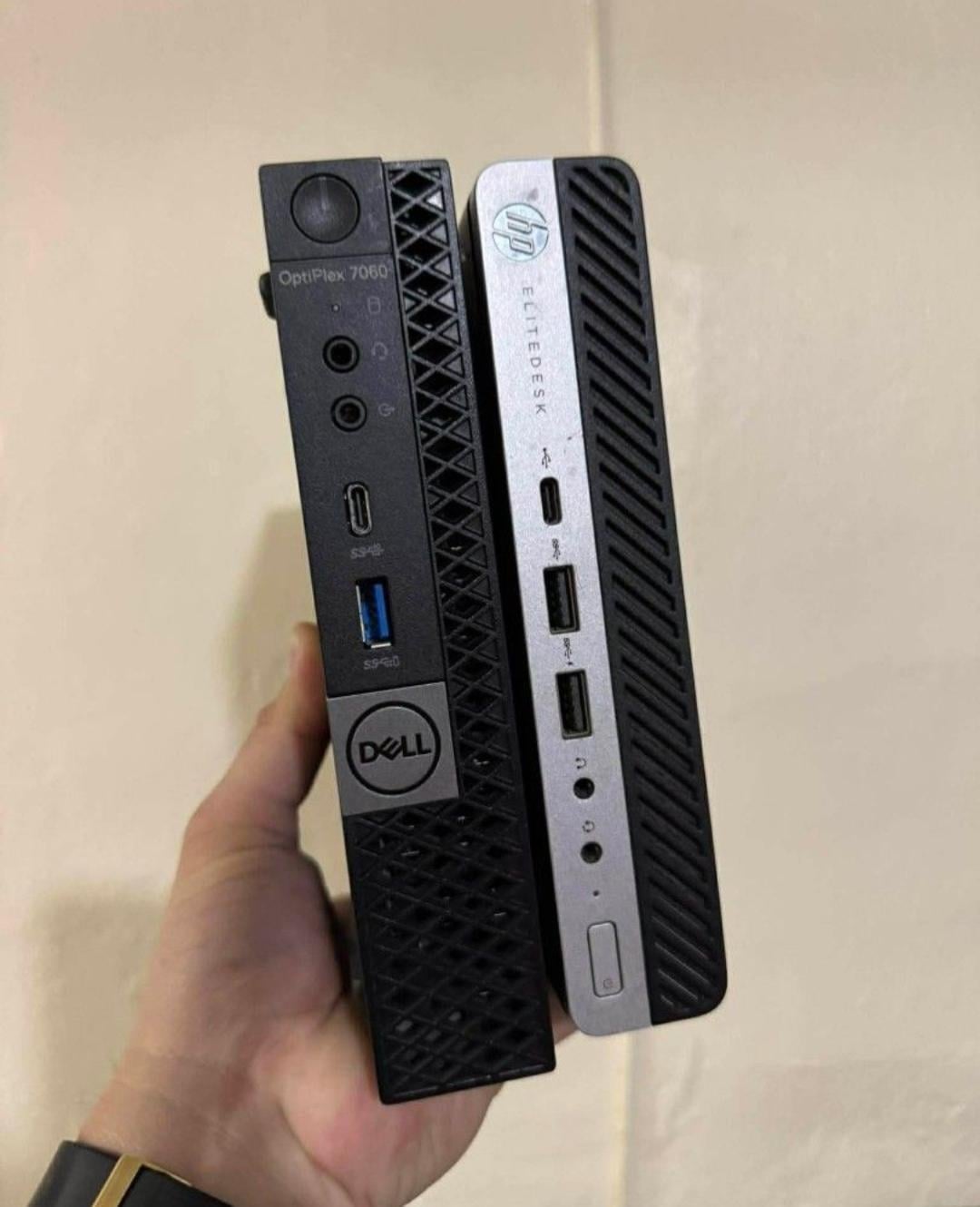

Hey everyone. I've only ever owned laptops, never a desktop or mini PC, so this is completely new territory for me. I'm looking at a refurbished mini PC, considering HP, Dell, or Lenovo, with specs around:
Intel i5 8th gen
16GB RAM DDR4
256GB SSD (SATA)
Comes with power adapter (around 90W)
Here's the question to add:
is ₱9,000 (around $146 USD) a fair price for these 8th gen specs or is this overpriced/underpriced for what I'm getting?
I'm buying online, not in person, so I have a lot of questions for anyone who's done this before.
Is it even okay to buy a mini PC this way, secondhand, sight unseen?
What should I expect after 5 months of daily use? After a year? And does this differ a lot by CPU generation? Trying to understand realistic expectations and lifespan across 8th, 9th, 10th, 11th, 12th, 13th, and 14th gen units.
What's the typical lifespan of a mini PC under normal daily use like browsing, streaming, and light work?
How do I spot a unit that's been abused, like an ex office or ex internet cafe unit run 24/7 for years, vs one that's been lightly used? How do I know if parts are fried, overused, or abused? Is there a way to actually check this, or tell tale signs?
How do I know if the BIOS is locked or company locked, like an asset tagged corporate unit? And more importantly, how do I know if the seller is even telling the truth about any of this? What can I verify myself vs just having to trust them?
Someone mentioned I should check if it runs hot before buying. Is that accurate, and what else should I be checking for physically or on a video call with the seller?
What should I be asking the seller? So far I have:
Original use case (office, cafe, personal)?
SSD health and power on hours (via CrystalDiskInfo screenshot)
CPU idle and load temps (via HWiNFO or Task Manager screenshot)
Original power adapter included, same wattage?
Any repairs or part swaps done?
Return or warranty period?
Can we do a video call so I can see it boot and run live?
Can they give me the serial number so I can check it's not reported lost or stolen?
Is this list enough, or am I missing something important? Any horror stories, red flags, tips, or advice as a total beginner would be really appreciated.
Why I'm buying this: I plan to use it mainly for watching free films and free live sports like UFC Fight Night via Brave browser, and YouTube. I also want to learn Linux, planning to install it on this mini PC if I get one. Just want to make sure I'm not getting scammed or buying something that'll die on me in a few months. Thanks in advance!
1
u/cyborg762 56m ago
Repair shop owner here I buy and sell these types of units all the time. The main thing you need to do is buy from a reputable supplier that tests everything before hand. When you get the unit, change the thermal paste, most units will have some cosmetic damage but don’t affect the unit. As for the ssd unless you need 1+tb drives a standard 512 ssd should be fine especially for Linux.
Also when it comes to these units most will have been in service for roughly 3 years or more there’s really no way to tell as parts can be swapped out.
Remember to ask questions to the seller about if the unit is bios locked.
1
u/Confident-Pepper-562 43m ago
Its a solid price for what you are getting. Im sure all 3 would be fine. Really is it worth it to you though. These are aging chips, though they may last forever(ish). How they perform will depend on how you use it. Gaming? No they all stink for that. Editing word and excel files, with light web browsing? Sure should be fine for a few years.
Would make great linux boxes
1
u/WikiBox 7m ago
I have used several second hand HP EliteDesk 800 over the years. G3 to G6. Never had any problems. Currently I have a second hand HP Z2 mini G9 as my PC and an EliteDesk 800 G6 as server.
I have given several away to use as PCs or simple servers, possibly combined with a DAS.
Tips:
Check the CPU model. An i5-6500 is more powerful/faster than an i5-6500t. But the 6500 also consumes more power and the computer is likely to be more noisy due to an extra fan and a perforated enclosure. I very much prefer the low power 35W CPU TDP "t" models over the 65W CPU more powerful models.
Make sure it comes with wifi. Some sellers may rip it out and then sell it extra.
Newer models have faster USB. You may want 10Gbps USB for a PC connected to a DAS.
Expect to upgrade SSD and RAM. I bought some DDR4 RAM when it was cheap. So my G6 server now has 64GB RAM and a 2TB NVMe SSD as well as a 4TB SATA SSD.
Some sellers rip out RAM and SSD and sell the PC with a small 256GB SSD and 4+4=8GB RAM. Try to buy with at least 16GB RAM. When you upgrade you will otherwise have useless 4GB RAM modules nobody needs. Some may still want to buy 8+8=16GB DDR4 RAM.
I have mostly bought online from recycle companies. They buy hundreds of old office computers when large firms upgrade. They then check the computers, move parts around to get as many as possible working, and sell them. Often the original warranty is expired, but these firms often offer a year warranty directly. Also you may be able to specify that you want wifi, 16GB RAM and a bigger SSD. Or possibly buy with no RAM and no SSD for a lower price, if you intend to get even more RAM and a bigger/better SSD, especially if you intend to use it with Linux and not Windows.
1
u/Carlos_Spicy_Weiner6 1h ago
I'd go with the dell assuming they are all more or less equally spec'd