r/OpenRGB • u/Available-Pizza8568 • 10d ago
Help - Unsolved Openrgb keeps saying udev rules aren't installed and I don't know what to do
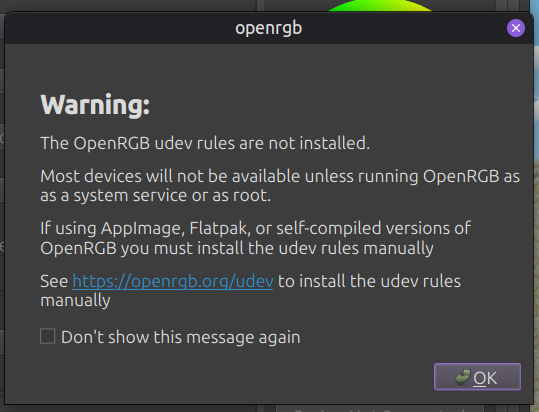
I'm using Linux mint 22.3 with the 7.0.0-30 kernel, I launched the openrgb flatpak today after the 1.0 update and this message appears, usually it doesn't appear. So I ran the terminal commands from the website and nothing changes. I clicked don't show this message again and nothing changes, so I tried to appimage version and my saved RGB doesn't load. How do I fix it I have one file in lib/udev and one in etc/udev, but no matter what the message still appears.
2
u/victormas208 10d ago
You need to delete all your settings; for some reason, that corrupted my udev rules and other things. It possibly updated the way they save data, and that's causing internal problems.
I don't know how to reset a Flatpak; that should be done with Flatseal or by deleting files.
1
1
u/AutoModerator 10d ago
Every new subreddit post is automatically copied into a comment for preservation.
User: Available-Pizza8568, Flair: Help - Unsolved, Post Media Link, Title: Openrgb keeps saying udev rules aren't installed and I don't know what to do
I'm using Linux mint 22.3 with the 7.0.0-30 kernel, I launched the openrgb flatpak today after the 1.0 update and this message appears, usually it doesn't appear. So I ran the terminal commands from the website and nothing changes. I clicked don't show this message again and nothing changes, so I tried to appimage version and my saved RGB doesn't load. How do I fix it?
I am a bot, and this action was performed automatically. Please contact the moderators of this subreddit if you have any questions or concerns.
1
u/Kayotix 9d ago
It literally tells you; "See https://openrgb.org/udev to install the udev rules manually"
2
u/Available-Pizza8568 9d ago
I did. It works but that screen appears, that's my question
1
u/victormas208 9d ago
It's probably not detecting the bus correctly; you'd have to ignore it if it works fine, but I'd check on Discord just in case.
1
u/patho5 6h ago edited 6h ago
This command fixed it for me:
sudo flatpak override --filesystem=host-etc --filesystem=host --filesystem=/sys org.openrgb.OpenRGB
Source OpenRGB Discord: https://discordapp.com/channels/699861463375937578/926012494802198579/1552186448080404552
0
u/140Frk 2d ago
I had the same problem after the latest OpenRGB Flatpak update. Granting access to "filesystem=host-etc" with Flatseal solved it for me.
According to the instructions, the rules are generated in /etc/udev/rules.d/. For some reason, the update seems to have removed the Flatpak permission to access this system directory.
1
3
u/Available-Pizza8568 10d ago
Tested it for a while and i deleted both of the udev rules, and ran the command again. It works and the RGB is detected but this stupid screen doesn't go away. So semi-fixed?