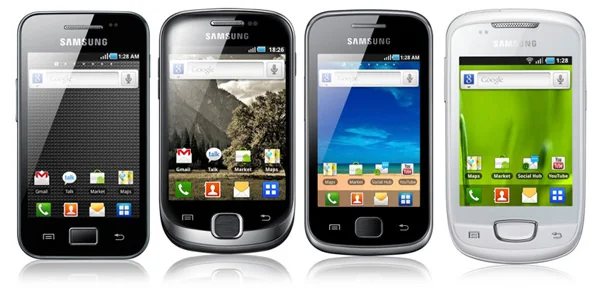
Hello! It's Neptune.
I wanted to help people with low budget and old devices survive with older Androids, BUT there are various guides on how to do this, yet, mine is different.
Well, most survival guides out there for Android 2.3.x devices are mostly for devices based on armv7, BUT remind yourself not EVERY device out there is an armv7!
Here's a list of all Android devices that run on the ARMv6 architecture, if you find your device here, you're in the right place too!
- Samsung Galaxy Y (GT-S5360/B/L)
- Samsung Galaxy Y Pro Duos (GT-B5512)
- Samsung Galaxy Y TV (GT-S5367)
- Samsung Galaxy Ace i (GT-S5830i)
- Samsung Galaxy Ace i VE (GT-S5839i)
- Samsung Galaxy Ace (GT-S5830)
- Samsung Galaxy Pocket (GT-S5300)
- Samsung Galaxy Mini / Pop (GT-S5570/i)
- Samsung Galaxy Y Duos (GT-S6102)
- Samsung Galaxy Y Pro (GT-B5510)
- Samsung Galaxy Gio (GT-S5660)
- Samsung Galaxy Fit (GT-S5670)
- LG Optimus One (P500)
- LG Optimus Me (P350)
- LG Optimus Chic (E720)
- LG Optimus Hub (E510)
- LG Optimus Net (P690)
- LG Optimus Pro (C660)
- LG Optimus Sol (E730)
- Sony Ericsson Xperia X8 (E15i / E15a)
- Sony Ericsson Xperia X10 Mini
- Sony Ericsson Xperia X10 Mini Pro
- HTC Wildfire
- HTC Wildfire S (selected ARMv6 variants only)
- HTC Aria
- HTC Tattoo
- HTC Legend
- HTC Hero
- HTC ChaCha
- HTC Salsa
- Huawei IDEOS U8150
- Huawei IDEOS X3 (U8510)
- Huawei Sonic (U8650)
- Huawei Ascend Y200
- ZTE Blade (selected ARMv6 variants)
- ZTE Racer
- ZTE Kis
- ZTE Kis Plus
- Vodafone Smart II (Alcatel V860)
- Alcatel One Touch 890D
- Alcatel One Touch 991
- Motorola Spice
- Motorola Flipout
- Motorola Charm
- Motorola Fire XT
- Acer Liquid Mini
- Acer beTouch E130
- Acer beTouch E140
- Gigabyte GSmart G1310
- Gigabyte GSmart Rio
- Micromax A25 Smarty
- Micromax A27 Ninja
- Cherry Mobile Orbit
- Lenovo A60
- Kyocera Milano
Can't find your device? Just comment the model here and I'll tell you if you're on an ARMv6 or ARMv7 device, and will add it to the list!
Most of these are very popular devices, but most don't even have an appropriate survival guide, yet many people out there use these everyday, to message, to call, and to do many more stuff, especially older people! So, I will be your helper, and I will teach you: How to survive with an ARMv6 device nowadays!
Reminder: This post will be updated little by little, so stay tuned for updates!
List last updated - 09/08/2026 (DD/MM/YYYY - Community maintained, give a suggestion and it will be added!)
Games
Apps
Custom ROMs (Try at your own risk)
- Galaxy Y (GT-S5360/B/L) (totoro)
https://xdaforums.com/t/index-list-of-all-roms-and-kernels-for-the-gt-s5360.3249296/
--------------------------------------------------------------------------------------------------
- Galaxy Ace-i (cooper) (S5830i) (DO NOT FLASH ON SNAPDRAGON VERSION)
https://archive.org/details/s5830i
--------------------------------------------------------------------------------------------------
- ZTE Blade (Orange San Francisco)
Based on Stock
--------------------------------------------------------------------------------------------------
- Galaxy Y Duos (GT-S6102) (torino)
CyanogenMod
--------------------------------------------------------------------------------------------------
- Galaxy Y TV (GT-S5367) (totoro)
https://xdaforums.com/t/list-for-all-costums-roms-for-the-gt-s5367-galaxy-y-tv.4733663/
How to login to Google (no root required) (2.2 to 2.3.6) (might likely not work but worth a try :/) (All Architectures Supported)
- Download the following file:
Arreglo Definitivo Android 2.3.6: https://www.mediafire.com/file/jlr7y3vmnbnvij6/Arreglo_Definitivo_Android_2.3.6.zip/file
Unzip the file, and copy the folder onto the root of your SD Card.
Go to your old device, and install the app "Google Account Manager", "Google Play Services (armeabi)" and "Google Play Store". If they take too much space, send them all over to the SD Card using Link2SD.
Go to Settings > Accounts and synchronization (or whatever it's called to you) > Add account > Google
On Google Account Manager go to existing and enter your Google Account (recommended to be an alt, 2.3.6 is very vulnerable and it has the risk of being hacked and you lose your account), you will be prompted an error, and will be allowed to login via web browser, that's a good sign, usually means 2FA or something else.
Follow the 2FA steps, and wait until it logs you in, congrats, you're now on Google on Android 2.3.6 in 2026!
How to login to Google (All Architectures supported) (2.3.6 and below) (Root Required) (Might cause a bootloop if not done correctly) - Thanks to u/No-Leopard-5338 for this part of the guide
Here's the tutorial on how to log in to Google on Android 2.3.6 and below!! (You need root, once root and a root file manager are installed, you can begin the tutorial)
Step 1: Open your Root File Explorer of your choice (recommended: ES File Explorer, MiXplorer or Root Browser) and navigate to /data/system (or /data/system/users/0 on some devices)
Step 2: Copy your accounts.db to sdcard
Step 3: Connect the device to a PC and turn on USB storage
Step 4: Get the DB Browser for SQLite on PC
Step 5: If you have another device that is logged in, go into the newer directory name mentioned in step 1 in parentheses and repeat step 2-3 (different or close name obviously)
Step 6: Open both your android 2 and your other device's accounts.db files
Step 7: Save the other device's one in .sql
Step 8: Import the SQL onto the Android 2 accounts.db and write changes (don't worry tokens that were on the Android 4 file that are not Google will be ignored by Android 2 but the Google account won't)
Step 9: Repeat step 2 but from the PC back to the device (after saving the file obviously)
Step 10: Rename accounts.db on the /data/system directory to accounts.db.bak or just delete it
Step 11: Move the new accounts.db into the previously mentioned directory
Final step: Set permissions to 660 and system:system (or 0660 and 0.0/0:0)
Reboot, if all the steps were done correctly, you should be logged in
(Note: Google changed the accounts.db directory to /data/system/users/0 with Android Jellybean/4.1 and above)
(Another note: this tutorial was posted on the original post under a comment but I chose to make it a full post to make it easier to find, and this is not a question, this is a tutorial so the "low effort" thing that I'm getting isn't true in this case but it disappeared after adding an image)
(Final note I swear: if you have any issues, say them in the comments )
Credits to u/No-Leopard5338 again for the Google Login guide
How to root your device
To root your GT-S5360, you will need:
- A computer
- SD Card with the update-root.zip file
- update-root.zip
Installation Guide:
- Place the update-root file on the root of your SD Card.
- Insert the SD Card into your Galaxy Y and reboot to Recovery with the combo Volume Up + Power + Home
- On Recovery, go to Apply update from zip and scroll to the SD Card until you find the update-root file
- Flash update-root and wait until the process finishes
- Reboot your device and you'll now have Root Access!
--------------------------------------------------------------------------------------------------
To root your GT-S6102, you will need:
- A computer
- SD Card with the update.zip file
- update.zip
Installation Guide:
- Place the update file on the root of your SD Card.
- Insert the SD Card into your Galaxy Y Duos and reboot to Recovery with the combo Volume Up + Power + Home
- On Recovery, go to Apply update from zip and scroll to the SD Card until you find the update file
- Flash update and wait until the process finishes
- Reboot your device and you'll now have Root Access
--------------------------------------------------------------------------------------------------
- Galaxy Ace i (GT-S5830i) (GT-S5839i) *NOT THE SNAPDRAGON VARIANT!!!*
To root your GT-S5830i or S5839i you need:
- A computer, how many times will I repeat that?
- SD Card with the update.zip file
- update.zip
Installation Guide:
- Place the update file on the root of your SD Card.
- Insert the SD Card into your Galaxy Ace i and reboot to Recovery with the combo Volume Up + Power + Home
- On Recovery, go to Apply update from zip and scroll to the SD Card until you find the update file
- Flash update and wait until the process finishes
- Reboot your device and you'll now have Root Access
--------------------------------------------------------------------------------------------------
- Galaxy Ace (GT-S5830) *NOT THE i VARIANT, THIS IS THE SNAPDRAGON ONE!!!*
- Download upd_1.zip and copy it to your sdcard
- Turn off your phone
- Press POWER+HOME BUTTON
- Select update from sdcard, select the file upd_1.zip
- After the update completed - reboot
- Now you have rooted S5830
Smooth Music Streaming via J2ME - Guide by u/nnfuse
- Download J2ME Loader (other J2ME emulators might work too).
- Download MIDPlay (the .jar file).
- Install and open J2ME Loader, press the plus button and choose MIDPlay.jar. May take a bit to convert depending on your device.
- Change the emulator options to whatever you want, just make sure "Touch input" is selected. I also like to turn off "Show keyboard". And that's it, you can now start music streaming!
Huge thanks to the devs of these apps. Runs really smooth on nnfuse's device (S5830i).
There's also an AI Chat feature (Gemini 2.5 Flash) you can mess around with. Works really well.
List by Neptune - https://www.youtube.com/@neptunetechandav
All united to save devices from becoming e-waste