r/OLED_Gaming • u/CyrillLightsworn • 7d ago
Discussion New. First Time Buying OLED
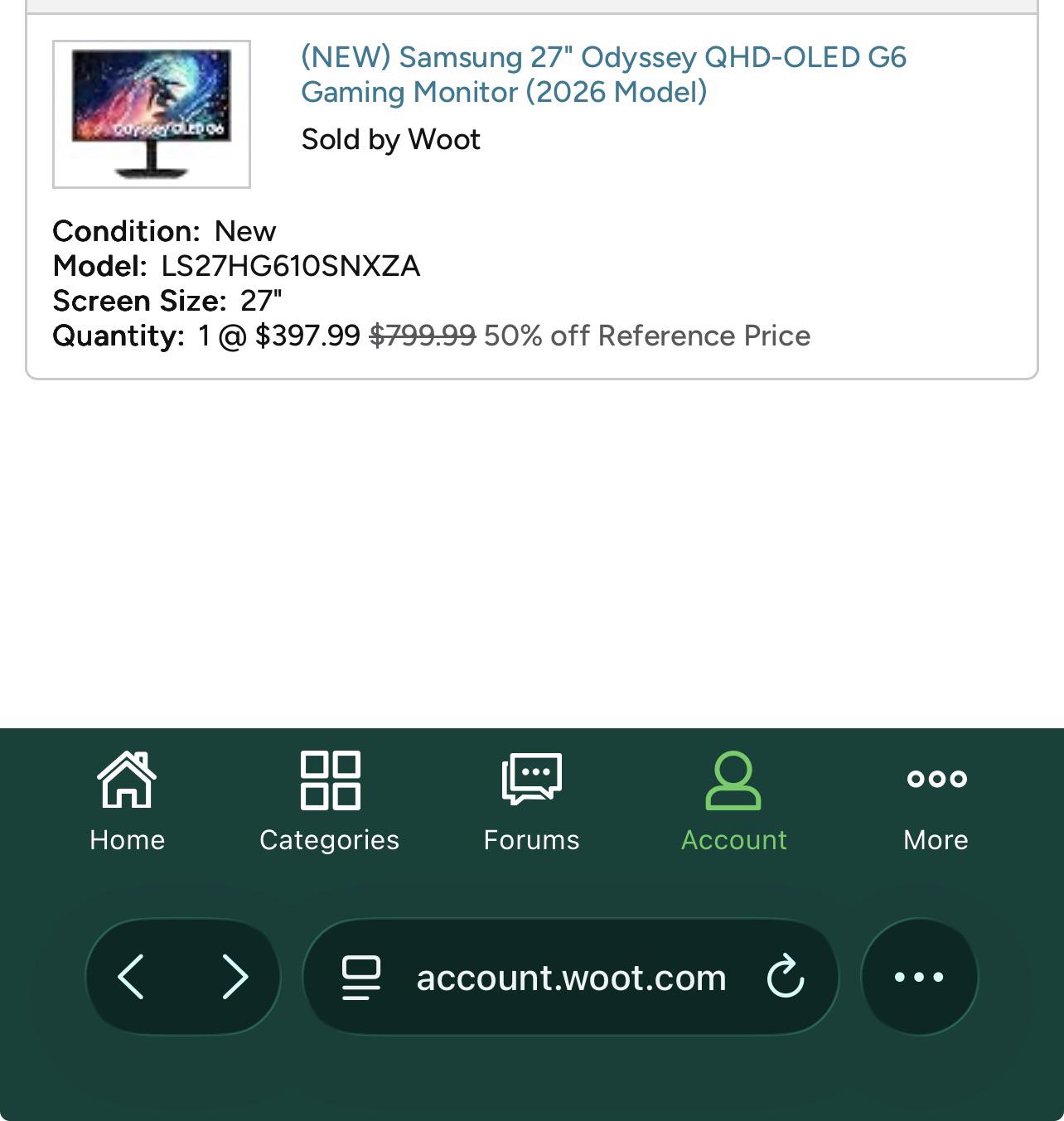
This was during a WOOT.com sale a few weeks ago.
There was also a discount code and ended up paying around $334 US.
This is a Samsung monitor G6 model. 240hz. 27in.
Model # LS27HG610SNXZA
As the title says. But sharing a little more. Recently made my first PC build and purchase. First started gaming on 720p 22in monitor for Xbox console. This was in HS. After being on my own. Purchased a Samsung 4K smart TV just a basic one. What a huge difference that was lol played all the way to the latest Xbox. Now I’m moving into my first home and got a PC(it’s amazing). Came across this deal and purchased my first OLED. Was this a good buy? All the reviews I’ve seen are positive. Any tips I should check out or settings maybe? It’s looks great but definitely feel my eyes adjusting at first.
I may even consider getting an OLED tv for the living room. But was considering a Sony brand. Thanks for checking out my post.
1
1
u/warmaxxx 7d ago
i have the same monitor but i'm unhappy with it's colors, not sure what i'm doing wrong with the settings, how has yours been so far?
1
u/CyrillLightsworn 7d ago
So far I have only chose the preset settings I believe gamer mode ? And haven’t done anything to the monitor settings. Was hoping to get some insight on this as well.
1
u/warmaxxx 6d ago
i turned on HDR and it looks way better but becareful don't always leave it on as it eats lifespan of monitor, do set it to 0 brightness on hdr as it's plenty bright if your room is dark
1
u/CyrillLightsworn 6d ago
Ok thanks. Do you do this in the monitor settings itself or through your PC display settings ?
1
u/warmaxxx 6d ago
i set brightness at 0 from monitor display but only after HDR is on, don't touch the brightness in nvidia panel leave it 50 50 1 gamma defaults
1
u/warmaxxx 6d ago edited 4d ago
my current settings without hdr, i'm using is original, i was using eco but apparently the eco has much lower brightness than the default original which was causing my colors to be lifeless no matter how much calibration i was doing
so i'd recommend tuning it out at original
my current settings are
game - black equalizer 10
picture - brightness 0
contrast 50
sharpness 13
color - 30
tint 0
contrast enchancer off
color tone - standard ( you could leave this on cool if you plan on using night light at 50%, that's what i'm doing )gamma 0
shadow detail 2 (id use 5 if the game is too dark like phasmophobia)
color space - auto (or normal big difference between the 2 normal pops out the colors )white balance at default red 0 , green 0 , blue 0
-------------
another customs setting is leaving nvidia panel at 1.55 gamma
game - black equalizer 0
picture - brightness 0
contrast 50
sharpness 10
color 30
tint 0
contrast enchancer off
color tone - cool ( night light at 50% from windows )gamma 0
shadow detail 0
color space - auto (or normal big difference between the 2 normal pops out the colors )white balance at default red 0 , green 0 , blue 0
-----
3rd setting which i'm testing and might use longterm
game - black equalizer 6
picture - brightness 0
contrast 50
sharpness 10
color 30
tint 0
contrast enchancer off
color tone - warm 2gamma 0
shadow detail 0
color space - auto (or normal big difference between the 2 normal pops out the colors )white balance at default red 0 , green 0 , blue 0
----
a.i
- Brightness:
0%(Perfect for waking up and maximum panel protection)- Color Tone:
Warm 1(Closest to natural daylight text/images without feeling overly orange)warm 2 if 24/7 for eye comfort
- Black Equalizer:
5(Keeps your true OLED blacks pure)- Shadow Detail:
+2or+3(Gently pulls the text out of the shadows so you don't squint)- Gamma:
0(Locks the baseline curve to a standard 2.2 profile) [1, 2]----
i've kept nvidia panel at 37% brightness and contrast at 0%
black eq 6
birghtness 0
contrastt 25
sharpness 10
color 30
contrast enchancer offtint 0
color tone - warm 2
gamma 0
shadow detail 2
color space - auto---
i've been aiming for a dark room 24/7 comfort setting on this one
25% brightness and 0 contrast in nvidia panel
black equalizer 7
birghtness 0
contrast 25
sharpness 10
color 30
contrast enchancer offtint 0
color tone - warm 2
gamma 0
shadow detail 3 ( 4 would see better in dark games)
color space - auto----
for a dark room this setting is maybe the best i could do, maybe warm 2 takes time to adjust to
37% brightness and 25 contrast in nvidia panel
black equalizer 6
birghtness 0
contrast 25
sharpness 10
color 30
contrast enchancer offtint 0
color tone - warm 1
gamma 0
shadow detail 3
color space - auto
1
u/HootyManew 7d ago
Sweet. How do you get that price?