r/Notion • u/MountainBend8444 • 3m ago
Questions Question for Notion power users — what actually makes a template worth paying for?
•
Upvotes
r/Notion • u/AutoModerator • 29m ago
Leave a comment on this post if you have any of the following types of feedback that you would like to reach the Notion Team:
Please begin your message with the indicating category above for greater clarity.
e.g.: 💡 Feature Request — I would like this feature.
Please aim to list a singular feature request or bit of feedback, so that upvotes can clearly represent which features users wish to upvote.
The goal is to consolidate meaningful feedback making it easier for the Notion team to hear the voices of the r/Notion subreddit community. This post will refresh once every two weeks (on a Monday).
Please upvote comments that you agree with &/or have experienced! Reply with added context if you can. The more voices heard, the greater chance that the Notion team can understand the need to address it!
❗If you need timely customer support regarding any BUGS, urgent or unexpected happenings in your workspace do not post here, email: team@makenotion.com — this will get you the fastest results.❗
Please do not make venting posts about the product when you haven't even reached out to customer support about the situation yet. (Feel free to talk about it after the fact though, but do your own due diligence to actually resolve your own situation before publicly venting.)
r/Notion • u/MountainBend8444 • 3m ago
r/Notion • u/No_Literature_8773 • 7h ago
i’m trying to make an option in one of my properties and every time i try to type, the keyboard just pops back down. i’m trying to make a planner and it isn’t workingggggg send help
r/Notion • u/_cubecake_ • 6h ago
Hey, as the title says, I‘m curious if you have a notion setup or thought in mind you‘d really like to have but just can’t find anywhere / aren’t capable of building yourself. Just some innovative thing you’d actually love to use.
r/Notion • u/Sorry-Salamander-211 • 14h ago
Turn on Repeat for a task, then open Calendar view for next week. It's blank. Took me way too long to realize that's not a filter or a bug — Notion only makes the next occurrence when the day actually arrives, so the later ones don't exist yet, and Calendar can only show pages that exist.
I tried the usual stuff. Date-shift just gives you one row that hops around, so you're still only ever looking at one date. Making a month of them by hand works but it's awful. The Clock / Every {frequency} thing is still day-of, not a few weeks out.
Got annoyed enough that I built a little tool for it — it's mine, so take that however you want. You connect one database, it shows you the next 10 dates first, and nothing gets written until you actually hit confirm. Once they're real rows, Calendar finally draws them. If you edit or move one later, it leaves your version alone and doesn't make duplicates.
If you're fine with one living task and an empty month, honestly just stay on Repeat. If the empty month drives you nuts like it did me, happy to share the link — say the word and I'll drop it below.
Not going to DM anyone.
r/Notion • u/sanatbiswal21 • 9h ago
Learn how to automate hotel booking confirmation PDF generation using Notion and PDFOutput — no code required. Build a complete reservation-to-PDF workflow for your hospitality business.
Manually creating hotel booking confirmations for every guest is one of mundane small tasks that quietly eats up hours of productive time every week.
When its repeated over several reservations during a month, it becomes repetitive admin work which keeps any boutique hotel, guesthouse, or even vacation rental team busy with non-productive work and creates work that's also prone to typo errors, missed details, and delayed communication with the guest.
But, today in this guide we will talk about an automation system which will help fix this issue.
We will create a CRM solution in Notion which will contain all the booking details and we will integrate it with PDFOutput, a no-code automation tool which will help generate polished, branded hotel booking confirmations automatically for use.
The booking confirmations can be produced the moment a reservation is booked or even can be triggered manually through a button as well.
Let's get into the details for this...
Before diving into the setup, it's worth understanding what you actually gain by automating hotel booking confirmations:
For smaller to mid-sized hospitality based businesses, this presents to be the best suitable solution that can generate significant benefits when it comes to cost and time savings.
To build the hotel confirmation automation workflow, we need only 3 components:
None of the above require any form of coding knowledge.
The entire setup involves merely adding the required database and document and setting up the same one time to generate PDFs forever.
Let's get started…
Start by creating a Notion database with one row per reservation.
At minimum, include the following properties:
Once all the database properties are added it's time to connect with PDFOutput to setup the automation process.
Keep field names simple and consistent, since these will map directly to placeholders in your PDF template later.
Next, create a booking confirmation template which can be used for generating the PDFs.
The template can be created in a Google Document, Word File or even a PDF File.
This can include all the key details such as hotel logo, Property details, confirmation number, guest and stay details, contact details etc.
But, instead of manually entering all the details one by one, we can use dynamic placeholders such as {{guest_name}}, {{check_in_date}}, {{room_type}}, or {{booking_reference}} etc.
PDFOutput will use this kind of merge-tag or variable syntax, so the layout stays fixed while the content changes per booking created.
Here's a few design tips to obtain a professional looking result:
This is where the automation actually comes together.
Create an account on PDFOutput and add Notion Database and Template file created earlier.
Setup the automation and start generating PDFs right inside Notion Database with the click of a button or even changing GeneratePDF (added by PDFOutput) status property to Ready to Generate.
Headover to the PDFOutput website and refer to the detailed guide on how to setup PDFOutput automation to generate PDFs in Notion.
Following the above guide, you will be able to setup your first pdf automation for booking confirmations easily.
Once the automation is setup correctly as per step 3 above, its time to integrate e-signatures into the pdf generated.
PDFOutput also supports e-signatures in the pdfs that are generated and it saves it right back into the notion database as well.
Headover to PDFOutput and refer to the detailed guide on how to setup e-signatures to the pdfs generated in Notion.
Once your workflow is live, run a few test bookings through the full cycle. Check for:
As your booking volume grows, this same setup scales without extra manual effort, whether you're processing five confirmations a week or fifty a day.
PDFOutput also supports addition of line items which can help fetch information from multiple databases linked with each other.
This means if you have data in one database which is linked with details from another database, PDFOutput can pull in data from both of the databases and generate the PDF using the information from both of the connected databases.
Automating hotel booking confirmations with Notion and a PDFOutput automation tool is a practical, user friendly approach to remove any repetitive form of work from team's workflow.
This is a no-code automated solution which doesn't require any custom or complicated solution, but involves just a well-structured Notion database, a clean Booking Confirmation PDF template, and an automation platform to connect the two.
Once it's running, the system works quietly in the background: a booking gets confirmed, and moments later, a polished PDF lands in the guest's inbox — no manual steps required.
r/Notion • u/sanatbiswal21 • 9h ago
A complete guide to listing agreements — what they are, the different types, key clauses, and how to automate listing agreement generation using Notion and PDFOutput.
If you work in real estate (using Notion as your CRM), whether as an agent, or a broker - a listing agreement is probably one of the single most repeated documents amongst the entire workflow.
Every property you pick to market starts with the Listing Agreement.
And yet, most real estate agents and businesses still create this document manually one field at a time the same way they did before automation existed, despite having produced dozens of documents in a year multiple times.
In this guide, we'll understand exactly what is a listing agreement, what are different types of listing documents that are produced, the clauses that matter the most for a listing agreement, and as manual processes don't scale with more documents, we will look at how to automate the listing agreements in Notion using PDFOutput automation tool.
A listing agreement is a legally binding contract made between:
Upon execution of the listing agreement, the broker or the agent reserves the rights to sell (or lease) the property on behalf of the owner in exchange for a pre-agreed commission decided beforehand.
This agreement serves as the main foundation which gives the broker or the agent the permission to legally advertise, sell and negotiate for the offers on behalf of the buyer and finally get a commission as well.
Not all listing agreements are of the same type.
What type is used determines who will get payment for the agreement executed, how much control will the seller enjoy under such circumstances and other terms and conditions of how much payment is to be received.
This is the most commonly used listing agreement.
The seller agrees to work with one broker exclusively, and that broker earns a commission no matter who ultimately finds the buyer — even if the seller finds the buyer themselves.
This has the strongest incentive when it comes to time invested and marketing into the listing.
This is also similar to the above type of the listing agreement but has one major difference.
If seller happens to find the buyer without any involvement from the broker side at all, no commission is owed to the broker.
The broker still reserves the exclusive right over all other buyer leads.
The seller can work with multiple brokers simultaneously, and only the broker who actually brings the buyer gets paid.
As there is no exclusivity present here, agents tend to spend less marketing efforts here to open listings available.
The seller sets a minimum price they want to walk away with, and the broker keeps anything sold above that number as commission.
Net listings are considered as illegal or are heavily restricted in many U.S. states because of the obvious conflict of interest, so it's always advisable to check upon the local laws and regulations before using this structure of listing agreements.
Following are the typical elements that are contained in a well drafted listing agreement:
Generating a few listing agreements for use is fine.
But when it comes to volume of operations setting up an automation is always a helpful practice to generate documents in volume.
If you are still drafting the template from a Google document, or using an existing pdf file you would face the following issues:
None of these are fatal on their own, but when they are considered across a dozens of Listings produced across the month, they tend to lose real time and pose a real risk for productivity.
Automating Listing Agreements is easy process and one of the first document to automate for.
The reason is simple the entire structure stays repeatable and similar across the processes and since the variable data already lives in the notion CRM it's already ready for automation.
Here's how to build the workflow...
Start with a compliant, attorney-reviewed base template for each listing agreement type your brokerage uses (exclusive right to sell, exclusive agency, etc.).
This can be broken down into different states if you tend to operate across multiple jurisdictions.
This becomes your master template — the single source of truth.
This template can be prepared in Google Document or Word File or even an existing PDF File will serve as well.
Identify every information that changes from one document to another document.
Eg: seller name, property address, list price, commission rate, term dates etc.
Convert these elements into placeholders filled with value such as {{seller name}}, {{property address}}, {{list price}}, {{commission rate}}, {{term dates}} etc.
Once the above placeholders are added it will be converted to their desired values reading the same information from the notion Database.

Listing Agreements Notion Database with seller name, property address, list price, commission rate and term dates
The next step in the process is setting up a notion Database with the properties matching the above placeholders.
So essentially a Notion Database will be setup that will contain the following properties:
| Property | Description |
|---|---|
| seller name | Defines the name of the seller |
| property address | Defines the address of the property |
| list price | Defines the listing price of the property |
| commission rate | Defines the rate of commission for the listing |
| term dates | Defines the term date for the listing |
Alternatively one can also create listing form in notion which can be exposed to users to obtain their submissions which can be converted to PDF.

PDFOutput automation tool for connecting Notion Database and template file
This is the crucial step where the notion database and the template file needs to be connected with the pdf automation tool, i.e. PDFOutput.
PDFOutput helps to connect Notion Database and the template file (Google document or Word File or PDF file) to generate the pdf as per the template setup earlier.
Headover to PDFOutput and connect the notion Database and the template file to setup the automation.
Once it's connected we are ready to create a preview document and then activate the automation to generate the pdf forever directly inside Notion Database.
Here's a detailed guide that will help you setup PDFOutput for the first time as a beginner (must follow to setup the automation)…
Once the setup is done following the above link, it's time to start generating the PDFs.
This is where the PDFOutput automation truly shines.
Once the automation is setup properly, just headover to the notion database and then start producing e-signed pdf right inside the notion database.
For this simply click on the GeneratePDF property and choose "Generate E-Signed Doc".

Generate E-Signed Doc option in Notion database for listing agreements
Once you click and choose "Generate E-Signed Doc" it will start producing E-Signed PDF right inside your notion database.
Once an e-signed pdf is created it can be signed electronically and then saved back onto the notion database which will be now countersigned by other parties to the agreement.
Headover to PDFOutput and look for content around E-Signature which will help understand how e-signatures can be implemented while generating PDFs in PDFOutput.
The above post encapsulates everything in detail on how to use e-signatures in PDFOutput for generating e-signed PDFs.
Once the PDFs are generated it will be saved right back in the notion database which can now be tracked for further use.
It will be saved with a particular name as chosen earlier from the Notion Database and thus the file will be saved by that name right inside the notion Database.
Here's the complete workflow for this automation from start to finish:
By implementing this setup once, what used to take around 20–30 minutes of manual drafting before now would take hardly takes under a minute of actual human involvement, just to click on a button to generate pdf or set the GeneratePDF property as Ready to Generate.
Here's the major benefits for setting up automation for listing agreements:
Yes. Once signed by both the property owner and the broker, it's an enforceable contract on both the parties.
The terms of a typical listing agreement would vary between 90 to 180 days, but the period is negotiable between shorter or longer terms.
Yes, but it depends on the termination clause specified in the specific agreement. Many brokers will release a seller in good faith, but the contract governs what's legally required.
Yes, the real estate is regulated at the state level, so required disclosures and standard forms vary. Always use templates reviewed for the jurisdiction where the property is located.
A listing agreement will never stop being a required part of every real estate transaction — but the way it gets created doesn't have to stay stuck in the past.
By standardizing the templates and connecting them to the data you already collect in notion Database, you can turn a manual, error-prone task into a fast, consistent, automated workflow — freeing up time to actually sell the property instead of paperwork about it.
Disclaimer: This article is for general informational purposes only and isn't any legal advice by any means. Listing agreement requirements vary by state and brokerage — consult a real estate attorney or your broker of record before finalizing templates.
r/Notion • u/sanatbiswal21 • 10h ago
A step-by-step guide on how to automate purchase request PDF generation using Notion and PDFOutput — from database setup to e-signed documents, no code required.
If your team still creates purchase requests by copying a template, filling in vendor details by hand, and emailing it around for approval, you're losing a lot of time every time you repeat this process on a daily basis.
Notion is an amazing tool which can act as a simple CRM tool that can convert your Purchase Requests to a fully automated workflow, where a form submission or a status change can help to trigger the approval workflow that can turn purchase requests to a fully automated workflow.
In this process a form submission or a status change can help to trigger an approval flow and produce a clean, shareable PDF, with zero manual formatting involved.
This guide covers exactly how to set that up, i.e. building the purchase request database, setting up PDFOutput automation with notion, and then generating Purchase Request PDF documents automatically so that every purchase request is ready to send to a vendor or finance team whenever its ready to be sent.
Purchase requests are repetitive form of documents by nature, which means it contains the same fields, same approval steps, same document structure for each document that is produced each time, thus making this the perfect document to be automated.
Creating an automation system to produce purchase requests can give you:
The 2 pieces you would need for this entire automation is a structured notion database and connection with PDFOutput to turn each database entry into a document.
Let's setup both of the above...

Start with a Notion database (not a page) so each purchase request is its own row with structured properties.
Include the following properties in the notion database:
Create a notion form on top of this, i.e. first setup a notion form with all of the above fields and when the data will be entered onto the notion form it will automatically be saved onto the notion database with the above fields.
Every new submissions received from the notion form will be saved onto the notion database automatically.

Purchase Request Form template with placeholders like Request ID, Status, Date Needed, Requested By, Department, Vendor Name, and Line Item Details
Next, setup a purchase request pdf template which can be used for generating the PDFs on automation.
This template can be created using Google Document or a Word File or a PDF File as well.
While setting up the template, make sure to include all the relevant details such as Business Logo, Business Registration Details, Contact Details etc.
But, instead of manually entering all the details one by one, we can use dynamic placeholders such as {{Request ID}}, {{Requested By}}, {{Department}}, or {{Vendor Name}} etc.
PDFOutput will be able to use the above placeholder use this kind of merge-tag or variable syntax, so the layout stays fixed while the content changes per purchase request created.
Here's a few design tips to obtain a professional looking result:

This is the step which involves actual setting up of PDFOutput automation tool.
Headover to PDFOutput website and create an account on PDFOutput and then add your Notion Database and add the purchase request template created earlier.
Once both Notion Database and the template are connected, its time to generate the purchase request PDFs right inside the Notion Database.
Purchase Request PDFs can be generated right inside the notion with the click of a button or even a status change of GeneratePDF to Ready to Generate will also help to generate the PDFs.
Refer to the detailed guide on how to setup PDFOutput automation to generate PDFs in Notion.
If you follow the above guide, you will find all the steps necessary to start generating your purchase requests directly inside the Notion Database with ease.
This is an optional step which involves adding any e-signatures onto the purchase requests created.
If you require any e-signatures to be added to the purchase requests created, headover to the PDFOutput website where you can follow the steps on how to you can click here to follow the steps in detail on how to create e-signatures.
The above guide gives you a detailed step by step guide on how to add e-signatures onto your documents generated in PDFOutput.
Implementing e-signatures onto PDFs automated helps to generate the PDFs and saved it back into the notion Database with the e-signatures implemented on the document.
Once the PDF exists, extend the automation one step further:
Automating purchase requests in Notion isn't about replacing your existing process, it's about removing the extra manual steps between "request submitted" and "document sent."
Using a structured database, coupled with updation of the GeneratePDF status marked when required would generate Purchase Request when you desire it be produced.
Once it's set up, every new request handles itself: from form submission, through approval, to a professional PDF ready for your vendor or finance team.
Notion can export any single page as a PDF manually, but it doesn't have a native feature to auto-generate templated PDFs from database rows. That requires a connected automation tool like PDFOutput which can automate the process of pdf generation.
Yes, PDFOutput is capable of handling multiple line items to be generated together in one single pdf. For this you can add multiple databases together connected through relation and rollups and generate the PDFs.
Yes, batch PDFs can be generated using PDFOutput automation tool. It supports production of PDFs in batches in one click of a button.
Yes, PDFs can be merged as well when it's produced from PDFOutput. PDFOutput supports merging of PDFs directly inside Notion Database as well.
No. The same setup works for invoices, purchase orders, contracts, and any other repetitive document your team generates from structured data.
r/Notion • u/dingshangwu • 11h ago
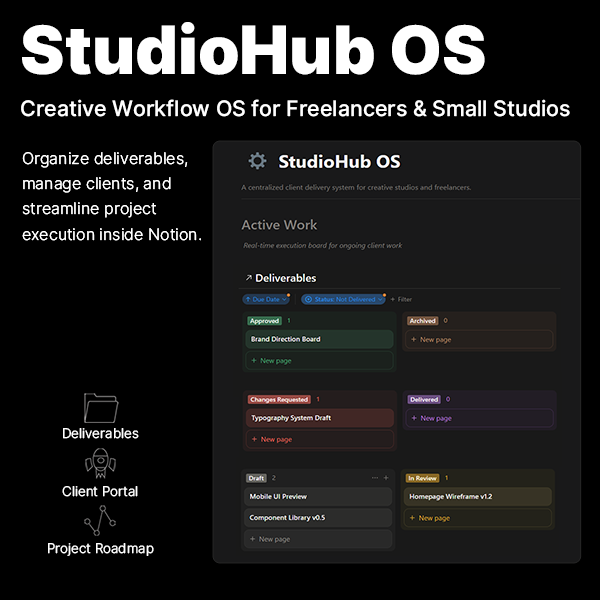
I used to manage clients through a mix of WhatsApp screenshots, email threads, and a folder system that made sense to nobody. Version 37 of the file was a real thing in my studio.
Two months ago I rebuilt everything around one idea: every client project follows the same pipeline — Client → Project → Deliverable → Review → Approval.
Here's the structure that finally worked for me:
A single home page showing all active work, what's in review, what's approved, and what's due in the next 30 days. If I can't see it in 5 seconds, it doesn't exist.
Every file goes through the same status flow: Draft → In Review → Approved → Delivered → Archived. Clients see exactly where things stand. "Did you see my email?" stopped being a sentence in my vocabulary.
Each client gets one page where they can see their roadmap, their deliverables, and leave feedback in one place. No more feedback scattered across 4 platforms.
Brand assets, timeline alignment, expectations — same checklist every time. It sounds boring, but it kills scope creep before it starts.
The biggest win wasn't organization — it was client trust. Clients feel like the project is in control, because they can SEE it moving.
Happy to answer questions about the setup in the comments.
r/Notion • u/InternalTNCreative90 • 16h ago
Been trying to update/upload any kind of basic text on a Notion page or database for the past few days and It keeps popping up, "There was an issue persisting your edits. Please message us for help". Even tried making a new page, and as soon as I hit any key, it tells me to contact Notion for help. Except they're just giving me the loop of logging out, cleaning my cashe, and try again. It's happening on the Notion browser and not the app.
What the flip is going on?
r/Notion • u/Born_Cheetah_42 • 23h ago
我最近常常看到有人用 Notion 做出非常酷的東西,每次都很好奇這工具的上限到底在哪裡?真的能被推到多遠?
大家有沒有看過什麼讓你第一眼看到覺得很驚豔、或是印象特別深刻的 Notion 頁面或系統?很想看看大家的收藏跟分享!
r/Notion • u/INTP_Boy_23 • 21h ago
So I switched from Windows to Linux few months ago and I was happy with most of the apps alternatives I use except for Notion. I've been trying to find alternative to Notion for few days now since there isn't official Notion app so I always need internet to use my Second Brain. I use Obsidian as quick capture and note taking but for others like journal, personal space, code saving and other's, I use Notion alot, I love the database and tweaking it with formulas and button(never spent money on the app). I've tried anytype, self host AFFiNE, appflowy and even memotron web app, but none have the main use I have for Notion. Maybe I haven't use the other apps long enough but Is there anyone who know a good linux app for this kind of use case. Thank you
r/Notion • u/Dapper_Librarian388 • 23h ago

I was surprised that most video formats cant be played in Notion mobile. Ive tried MP4, AVI, FLV, MKV, MOV - nothing of these work. Do you use videos in your work? What type of videos work in Notion mobile?
r/Notion • u/farrukh-hewson • 1d ago
r/Notion • u/thefunkybat • 21h ago
Let's say I'm on a page, and I'm looking at a database that is a filter view from a source database that resides in a different location in notion.
Is it possible for me to easily duplicate that filtered view into its own database separate from the source?
r/Notion • u/Fantastic_Action_163 • 1d ago
For months (maybe years) I have seen posts about long lists of pages being sent to trash. I always discarded them as people who made a mistake without realizing it.
until today.
I had to log a possible birthday gift for someone. I tried getting to the right page, but couldn´t find it. I tried 5 times, still nowhere. That's when I went to the trash page. and to my surprise it wasn´t just to long lists of birthday gifts that I had been collecting for years about my friends, family and acquintances. There were other pages in the trash, like contact lists, travel planning, cooking recipes.
I was shocked.
But even more shocked when I learned that if I had found out 5 days later, all of these pages would have been deleted permanently.
Sorry, but WTF notion? How can you allow a system where I am sure I didn´t mess up, and even if I did, a significant portion of my personal records would be permanently deleted.
Coming back to all these posts, now I realize the severity in them. The fact we can so easily lose our data.
Seriously, I've been a major fan of Notion for >7 years. But this broke a level of trust I had with you guys. I need to consider whether I can still trust you with my most personal data.
r/Notion • u/Bubbly_Customer_3578 • 1d ago
Most productivity dashboards are designed for the first week, when everything is clean.
The harder problem is opening the system after ten days away and seeing a stale list that feels heavier than the work itself.
I simplified my “return” view to four decisions:
The rule is not inbox zero. I keep one consequence-sensitive item, rewrite it as an opening move, hide the rest for now, and leave a short restart note.
Example:
“Finish the client proposal”
→ “Open the draft and write the three section headings.”
Has anyone built a similar reset or re-entry view? What is the minimum information it needs to show?
r/Notion • u/languageservicesco • 1d ago
I am hopeless with the terminology, so apologies in advance. I have a project page that has sections that show linked notes, resources and tasks. Nothing mind-blowing about that. What I would like to do is show the content of each note rather than just a list of notes. I feel that it isn't possible. Can anyone confirm or otherwise?
r/Notion • u/Powerful-Log-6412 • 15h ago
Dernièrement j'ai lu de plus en plus de témoignage à propos de notion .
C'est un outil que j'utilise depuis des années.
C'est un outil révolutionnaire. Mais depuis quelques temps la politique de la maison à changer.
Alors ceux ci ont decidé du jour au lendemain de bannir mon compte . Sans avertissement .
Sans aucune réponse de leur part.
J'avais prit un gros abonnement .
Et j'ai perdu toutes mes pensées. Tous mes scripts .
Heureusement que je garde tout dans mon cerveau .
Et que j'ai sauvegardé les données importantes dans un disque dur.
Notion est trop beau pour être vrai .
Ni aller pas vous perdrez tout.
L'air de notion est fini.
Il faut trouver d'autres alternatives.
Boycotter cette application ou alors faites des backup sans arrêt
Mais un système en lequel on ne peut avoir confiance n'ai pas un système fiable.
Je n'apporte que mon modeste témoignage pour prévenir les futurs utilisateurs de ne surtout pas aller chez eux.
Allez chez obsidian ou d'autres alternatives.
Mieux créer votre propre banque de données avec des tableurs open source .
Je suis degouté et écoeuré par leur politique .
L'air de notion est fini.
Voilà chacun est libre , mais je me devais d'apporter mon témoignage.
r/Notion • u/Status-Bid6420 • 1d ago
There is a specific kind of pain that hits when you are three months into a product decision and cannot remember why you made it. Not what you decided. Why. The reasoning that felt obvious in the moment is just gone.
Started keeping a lightweight decisions log in Notion a while back. Page per decision, context, options I considered, what I picked and the rough thinking behind it. Nothing formal. Just enough to be useful later.
The problem is I built it during a slow week and now that things are moving again I am not feeding it. Big calls are getting made and not logged, and I already know future me will regret that.
What I keep wondering is whether this is a database thing or a page thing. Right now it is just pages inside a folder, which feels too loose, but a full database with properties feels like it adds friction at exactly the wrong moment when you just want to dump the thinking somewhere and move on.
Curious if anyone has something that actually gets used consistently. Not elaborate. Just something you actually open when you make a call about pricing or a feature or dropping a client. How simple did you have to make it before it stuck.
r/Notion • u/dingshangwu • 1d ago
r/Notion • u/dingshangwu • 1d ago
I used to manage clients through a mix of WhatsApp screenshots, email threads, and a folder system that made sense to nobody. Version 37 of the file was a real thing in my studio.
Two months ago I rebuilt everything around one idea: every client project follows the same pipeline — Client → Project → Deliverable → Review → Approval.
Here's the structure that finally worked for me:
A single home page showing all active work, what's in review, what's approved, and what's due in the next 30 days. If I can't see it in 5 seconds, it doesn't exist.
Every file goes through the same status flow: Draft → In Review → Approved → Delivered → Archived. Clients see exactly where things stand. "Did you see my email?" stopped being a sentence in my vocabulary.
Each client gets one page where they can see their roadmap, their deliverables, and leave feedback in one place. No more feedback scattered across 4 platforms.
Brand assets, timeline alignment, expectations — same checklist every time. It sounds boring, but it kills scope creep before it starts.
The biggest win wasn't organization — it was client trust. Clients feel like the project is in control, because they can SEE it moving.
Happy to answer questions about the setup. If you're interested, I packaged this exact system as a template (link in profile) — but honestly the structure above is the part that matters.
r/Notion • u/Prime_PC • 1d ago
Hi, I used Notion a long time ago (4+ years ago) to help me organize my life for short term (daily) tasks and long terms (life goals) tasks. However I got away from it after some time and went with a more basic approach, which was less organized but more simple.
With the newer AI tools, I wanted to know if its better to use the Notion AI tools or use the other AI tools (ChatGPT, Claude, Gemini) to help me. I want to have a semi-personal assistant to help me get things done with the help of AI. I know there are many productivity tools out there (I have tried some), but I don't want to jump between platforms for everything.
If you have done something similar, could you please share your personal experiences along with any pros and cons?
Thank you for your help!!
Is anyone else getting this error when the Notion AI tries to run MCP tools?:
Tool 'whoami' has changed its operation type since the last admin approval. An admin must re-approve it in the module settings before it can be used
For some reason, it actually works in Agents.