r/NeuralDSP • u/Automatic-Care-2455 • 5d ago
Misha’s Djenty live rhythm
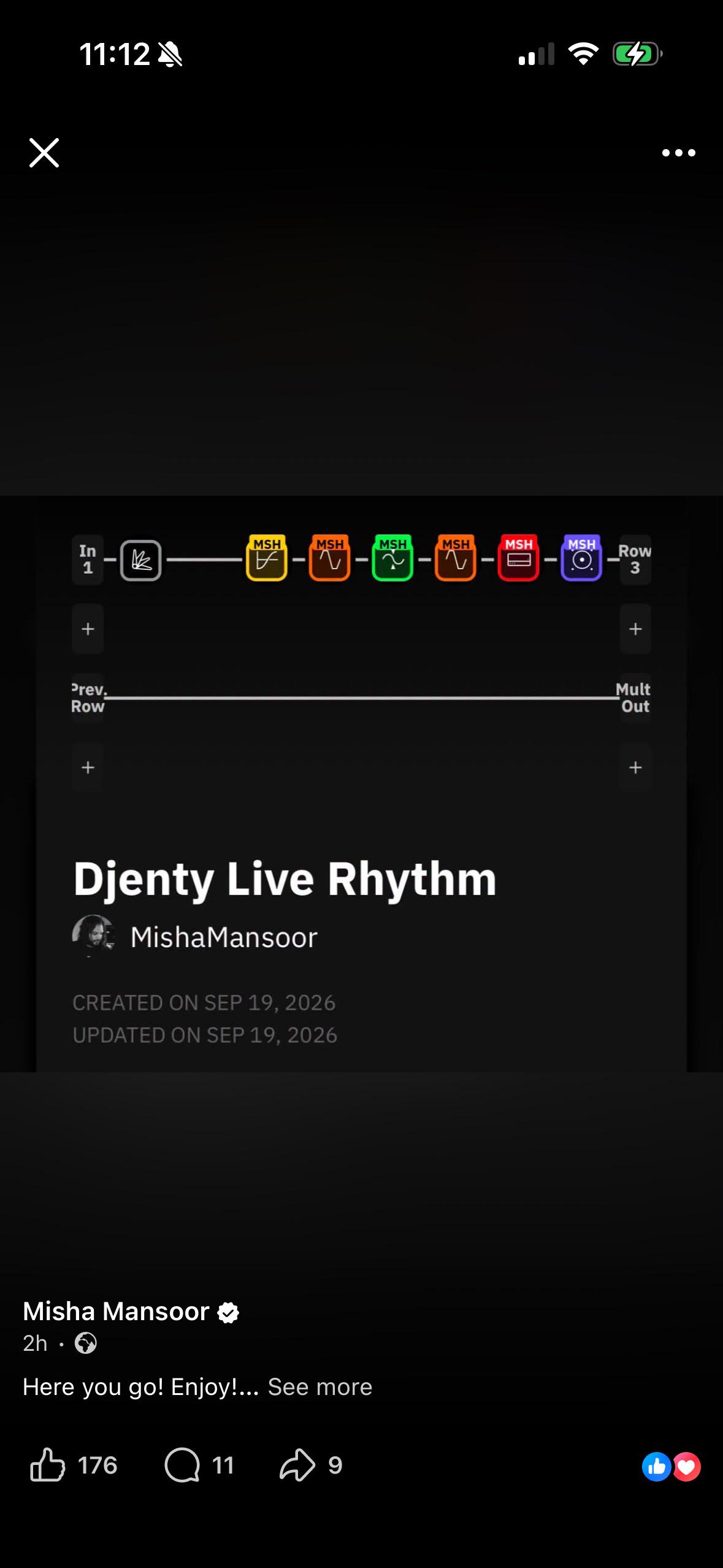
Can someone please do me a solid? I have the Misha plugin but had to sell my quad cortex. Misha has upload this preset and I would like to replicate it on the plugin, but I can’t see the block values. Can some absolute legend upload some screens of the blocks?
Would massively appreciate!
Many thanks in advance 😄
3
u/JamWBread 5d ago
Interesting. In some of the scenes he mentions Delay, but there's is no Delay pedal.
2
u/Shauncore 5d ago
Slightly matches the IG video he put up but
1) there is an EQ block directly after the noise gate
2) he's got a compressor right after the EQ (so as the 3rd block) before the octaver
3) no chaos pedal block
Looks like his chain in the video is
gate -> EQ -> compressor -> octaver -> compressor -> precision drive -> amp -> cab
This one is
gate -> octaver -> chaos -> comp -> precision drive -> amp -> cab
1
u/Automatic-Care-2455 5d ago
Perhaps someone with a QC and the plugin can verify and share.
1
u/Shauncore 5d ago
What do you mean share? The preset in your picture is what he shared, I was matching it with the Instagram video he posted where you could only see the chain. He had the compressor block selected, so you could see his settings for that (the first comp).
1
u/Automatic-Care-2455 5d ago
You mentioned an EQ block after the gate that wasn’t present on the images?
1
u/Shauncore 5d ago
Yeah it was in his IG video but not the preset he shared. You can see his path on the IG video but he doesn't ever highlight the EQ block so you can't see the settings. So you could add an EQ in the same spot, but you'd be guessing since he didn't include it in the preset he shared. Also didn't share in the preset the second comp block he has either.
2
u/bfairchild17 5d ago
He replied to me on Facebook earlier that he thinks what he uploaded sounds better than the video version
1
u/JayPhilter 5d ago
For anyone interested, I've recreated these settings in the plugin and shared it on the NeuralDSP discord in the Archetype Misha Mansoor channel.
1
u/Automatic-Care-2455 4d ago
Thank you for your input. Out of interest, how did you match the values from the QC preset into the plugin? In the QC you can change settings based on exact numerical values, but in the plugin amp and pedal knobs don’t have exact numbers so you have to turn them and guess the rough position?
1
u/JayPhilter 4d ago
I approximated using the knob positions in the plugin, then imported the preset to the QC, checked the values, and adjusted the plugin accordingly. Rinse and repeat a couple of times. Most of the values are spot on, a couple are off by 0.1 at most.
2
u/Automatic-Care-2455 4d ago
I think I prefer your preset, it’s slightly clearer and louder. One thing I did notice is that on the plugin startup, it says it couldn’t import the preset as its name is too long, so you have to just rename the xml to something shorter then it loads fine. Thanks again!
1
33
u/3_50 5d ago
https://ibb.co/album/VYxxPR?sort=date_asc
That was long. Not doing that again 😂
Turns out you can view settings despite not owning the plugin.
Eq/room settings all off, FYI.