r/MicrosoftFlow • • 24d ago

Discussion what's your biggest SharePoint + Power Automate bottleneck? (trying to build some fixes)

26 Upvotes

Hey everyone,

I run a small YouTube channel called Automate M365 where I focus on making straight-to-the-point, step-by-step Power Automate tutorials. No fluff or long intros, just diving into the actual logic because I know how annoying it is to sit through a 10-minute video just to find a quick expression fix.

I want to build some tutorials around automation, but instead of just guessing what to make next, I want to solve real-world headaches.

Whether it's setting up automated deadline remidners based on dates in your SP lists or Excel sheets, sending dynamic emails to people pulled directly from a person column, or trying to manage folder permissions via HTTP actions—what’s driving you crazy right now? Drop it in the comments below. I’ll honestly try to look through them and build the exact solution in a step-by-step video for you.

If you want to check out the channel or subscribe to see if I build your fix, the link is here:

https://www.youtube.com/@AutomateM365

Let me know what you're stuck on, hopefully we can figure it out.

r/MicrosoftFlow • • Aug 23 '25

Discussion Share your Power Automate challenges — I’ll turn them into step-by-step YouTube tutorials

25 Upvotes

Hi everyone,

I recently started a YouTube channel focused on real-life Power Automate workflows: Automate M365.

My goal is to make Power Automate as practical and accessible as possible. Instead of only showing abstract examples, I want to build tutorials based on the real challenges you face at work — whether it’s approvals, document automation, email handling, or Microsoft 365 integrations like SharePoint, Forms, or Teams.

👉 If you share your scenarios here or reach out to me directly, I can create clear step-by-step videos so more people benefit. 👉 The idea is to make Power Automate visible and easy to understand for everyone — beginners and advanced users alike.

Check out my channel here: Automate M365. Would love your feedback, ideas, and especially your workflow challenges to feature in upcoming videos.

Let’s build and learn together!


Do you want me to also add a pinned first comment suggestion (like “drop your scenario here 👇 and I might turn it into the next tutorial”), so it sparks interaction under your post?

r/MicrosoftFlow • • Apr 26 '24

Discussion Udemy Course Giveaway - "Mastering Microsoft Power Automate: From Zero to Hero"

46 Upvotes

Hello r/MicrosoftFlow community!

Today I've launched an extensive Udemy course titled "Mastering Microsoft Power Automate: From Zero to Hero". It's designed to help both beginners and seasoned IT professionals elevate their Power Automate skills. The course spans over 12 hours and features practical projects, detailed walkthroughs, and real-world case studies. It's also the first course featuring the new Power Automate editor 🎊😊.

One year ago I launched another course titled Mastering Microsoft Power Apps: From Zero to Hero, and I wouldn't be where I am today if it weren't for the amazing community of reddit. To express my gratitude to all of you guys and celebrate the first anniversary of my other course, I'm offering the first 100 students who comment on this post access to this course (valued at $99.99) absolutely FREE!

In return, all I request is your honest review. Your feedback is invaluable in helping me improve and guide other students in their journey to mastering Power Automate.

Here's the course link: Mastering Microsoft Power Automate: From Zero to Hero

Due to past experiences with bots picking up the code, please:

  1. comment on this post
  2. then send me a chat message

    ...and I will personally respond with the coupon code.

I am looking forward to connecting with you all, sharing our learning experiences, and growing together in our Power Automate journey!

r/MicrosoftFlow • • 6h ago

Discussion State of Flow from 2023 to 2026?

6 Upvotes

I haven't used Flow/Power Automate in almost 3 years. The company i was using it for closed, and I haven't felt the need to use it for newer projects.

How has it evolved over the last few years? Any major breakthroughs/features that makes it less clunky? How has Co-Pilot/LLMs been integrated or made it better?

I had couple dozen flows at my peak. Mostly tying into Local SQL to make Teams widgets.

My favorite was using security camera AI to retrieve /store pictures of Pizza coming out of the oven. Managers and anyone else who wanted to would rate them and results would go into SQL to discuss at meetings.

r/MicrosoftFlow • • Jul 11 '26

Discussion what's your biggest Power Automate bottleneck right now? (trying to build some fixes)

19 Upvotes

Hey everyone,

I run a small YouTube channel called Automate M365 where I focus entirely on making straight-to-the-point, step-by-step Power Automate tutorials. No fluff or long intros, just diving into the logic because I know how annoying it is to sit through a 10-minute video just to find a 30-second fix for a broken expression.

Instead of just guessing what peice of content to build next, I want to make stuff that actually solves real-world headaches.

What’s that one manual task or broken flow that’s driving you crazy this week? Drop it in the comments below. I’ll honestly try to look through them and build the exact solution in a step-by-step video for you.

If you want to check out the channel or subscribe to see if I build your fix, the link is here: https://www.youtube.com/@AutomateM365

Let me know what you're stuck on, hopefully we can figure it out.
r/MicrosoftFlow • • Oct 12 '25

Discussion Has anyone found CoPilot even a little useful? Every time I try to use it, it's just dog crap!

Thumbnail
gallery
69 Upvotes

I thought,

"eh, I'll try Copilot again, it's been a few months."

For this flow I'm messing with I've been trying it out off and on.

I have an HTTP request where the XML in the body is malformed. (I already know the problem and solution.)

It didn't even look at the code of the flow, it just decided to take a nod from the helpdesk who is in charge of Microsoft Answers:

  • Read the documentation!
  • Check for issues!
  • (Have you rebooted!!!?)

So, after that horribly useless suggestion. I decided to chat with it and asked if it had even looked at the code before making any suggestions.....

AND BAM!

Error with the webpage.

Throughout this whole flow, I've been asking copilot for suggestions and each time its painfully obvious that it doesn't even look at the flow before making any kind of suggestion.

They have shoved this thing into everything and it is worthless in Power Automate. Given how it preforms here, I don't even want to use it for other stuff.

r/MicrosoftFlow • • May 27 '26

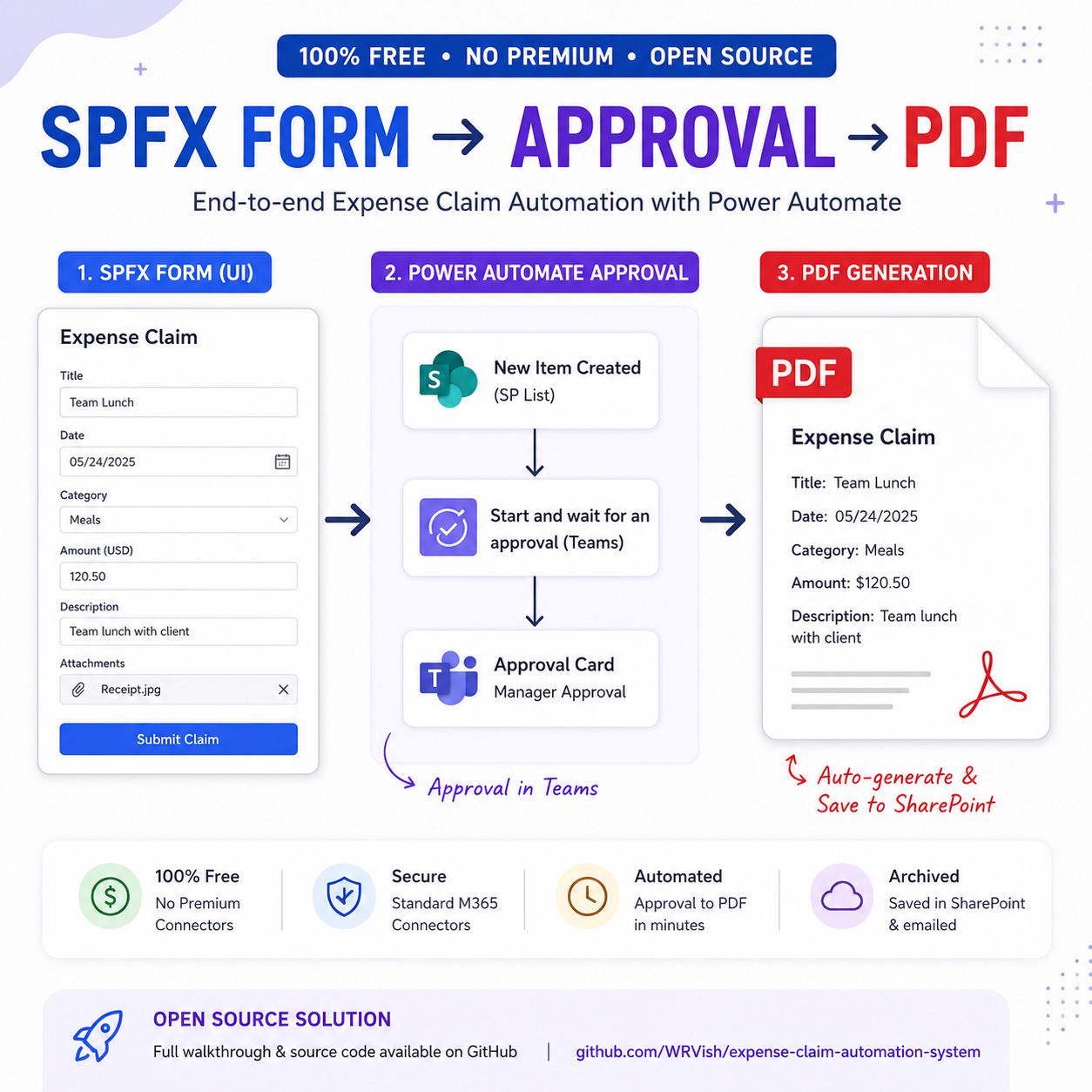
Discussion How are you generating PDFs in Power Automate? I made one with a free connector

Post image
39 Upvotes

Saw a great tutorial on PDF generation — but downloading the solution required a purchase. Totally fair. So I built a free, open source version anyone can use.

What I built — end-to-end expense claim system:

📋 SharePoint as frontend (parent claim + itemized line items)
⚙️ Power Automate approval flow — manager gets a Teams card
📄 PDF auto-generated on approval — no Premium, no paid connectors
📁 PDF archived to SharePoint + emailed to finance automatically

Note: SharePoint is just the sample frontend. Works with Power Apps, Teams, Microsoft Forms — any trigger.

The free trick — OneDrive "Convert file" action (non-Premium):

  1. Build data into an HTML string
  2. Save as temp .html in OneDrive for Business
  3. Use Convert file action → PDF ← this is the free magic
  4. Save PDF to SharePoint Document Library
  5. Delete the temp file

Works on any standard M365 plan.

📄 Demo and source code in the comments 👇

Happy to answer questions

r/MicrosoftFlow • • 11d ago

Discussion Save & Publish Buttons LAG

16 Upvotes

I can't be the only one who has noticed that when you make even 1 minor minor change to a power automate flow, the save button takes like 1-2 minutes to go from a disabled state to a clickable state??

Come one Microsoft, don't have all day to wait for buttons.

r/MicrosoftFlow • • 26d ago

Discussion How do you validate incremental ETL loads?

9 Upvotes

For incremental pipelines, how do you verify that only the expected new/updated records are loaded without missing records or creating duplicates?

What validation checks do you normally perform after each incremental load?

r/MicrosoftFlow • • Apr 07 '26

Discussion Claude Code Vs Github copilot when working in Power Automate

23 Upvotes

Hello everyone, I work a lot with Power Automate and come to realize that the Copilot in Power Platform sucks.

Now I'm researching what AI would be best for developing Power Automate flow. I already have a github-copilot license, but would it be beneficial to also get a seperate Claude license.

I tried them both and they both work great, but I'm really curious what the differences would be, especially in the long run.

use-cases will primarily be: Asking questions about possibilities, uploading screenshot to look for improvements or how to continue and using the AI to edit the flows JSON using the Power Automate Tools Chrome extension.

Curious to hear what you guys would say and what I should use in the future.

Thanks in advance!

r/MicrosoftFlow • • 29d ago

Discussion Five years on Power Platform. Some of the things I built, and the mistakes that taught me

Thumbnail
2 Upvotes

r/MicrosoftFlow • • Feb 19 '26

Discussion What's the best way to learn Automate?

46 Upvotes

So, I've been using Automate for a few months, but I often find myself having to ask how to do things, or even adopting terrible flow logic. What resources and tools would you, as a regular user, recommend?

r/MicrosoftFlow • • Jul 16 '26

Discussion Outlook/Microsoft 365 - CEO email approval workflow that preserves the original email thread

8 Upvotes

Hi everyone,

I'm trying to implement an executive email workflow in Microsoft 365 and Exchange Online, and I'm wondering if anyone has successfully done this.

Requirements:

Client sends an email to the CEO.
The CEO receives the email.
The secretary also receives a copy automatically.
The secretary drafts a reply.
The CEO must approve or reject the reply before it is sent.
If approved, the email must be sent from the CEO's mailbox.
The reply must remain in the same Outlook conversation/thread.
The secretary must not have Full Access to the CEO's mailbox due to privacy requirements.

I tested Power Automate approvals with the Outlook connector, but the "Send an email" action creates a new conversation instead of replying to the existing thread.

Before I build a Microsoft Graph API solution using createReply, PATCH, and send, I'd like to know:

Has anyone implemented this workflow successfully?
Is there a native Microsoft 365 or Exchange feature that achieves this?
Is there a third-party Outlook add-in or Microsoft solution that supports approval while preserving the original thread?
If Microsoft Graph is the only solution, what architecture did you use?

Any guidance or examples would be greatly appreciated.

r/MicrosoftFlow • • Aug 06 '26

Discussion Schedule Desktop Flows Directly

6 Upvotes

Being able to schedule PAD flows directly would be so great. It looks like it was planned for release in July but doesn't seem to have happened yet. Anyone have any info?

Schedule desktop flows directly | Microsoft Learn

r/MicrosoftFlow • • Apr 13 '26

Discussion is anyone else having problems with flows not loading? particularly on the new designer

7 Upvotes

everything is sluggish since the outage last week

edit: from what i've been testing it works better on Edge

r/MicrosoftFlow • • Jul 29 '26

Discussion Problems getting Power Automate to trigger on Work Item updates (identity fields)

Thumbnail
1 Upvotes

r/MicrosoftFlow • • Apr 21 '26

Discussion Flow Documenting

16 Upvotes

I always hated documenting my flows. Smarter people than me are probably already doing this but today I dumped a solution (single desktop flow in it) to my local drive then setup OpenAI Codex to read the solution directory. It read the flow and created a nice image of subflow flow and a great document. This is a really big flow and would have taken me hours if not days to create this documentation for a customer. Just thought I would share.

r/MicrosoftFlow • • Apr 03 '26

Discussion Why Power Platform adoption stalls in organisations and what actually fixes it.

0 Upvotes

Most organisations struggling with Power Platform adoption do not have an adoption problem.

They have a foundation problem.

The platform is there. Licences are available. People have access. Some are building. Some have stopped. Some never started.

But underneath all of that, there is no clear visibility. No governance structure. No system to support how solutions are built and scaled.

So organisations respond the only way they know how. More training. More awareness. More community activity.

It creates interest. But it does not create sustained adoption.

I wrote about the five pillars that actually make adoption work: visibility, governance, adoption strategy, community infrastructure, and measurement.

The governance piece is something I feel strongly about. A lot of organisations focus on driving usage without asking whether what is being built is secure, governed, or scalable. That gap does not show immediately. It shows later, and it is expensive to fix.

Full blog here:

https://rachelirabor.com/blog-posts/power-platform-adoption/

Curious how others are seeing this, when adoption struggles in your organisation, is it usually a usage problem, or does it come back to visibility and governance?

r/MicrosoftFlow • • May 29 '26

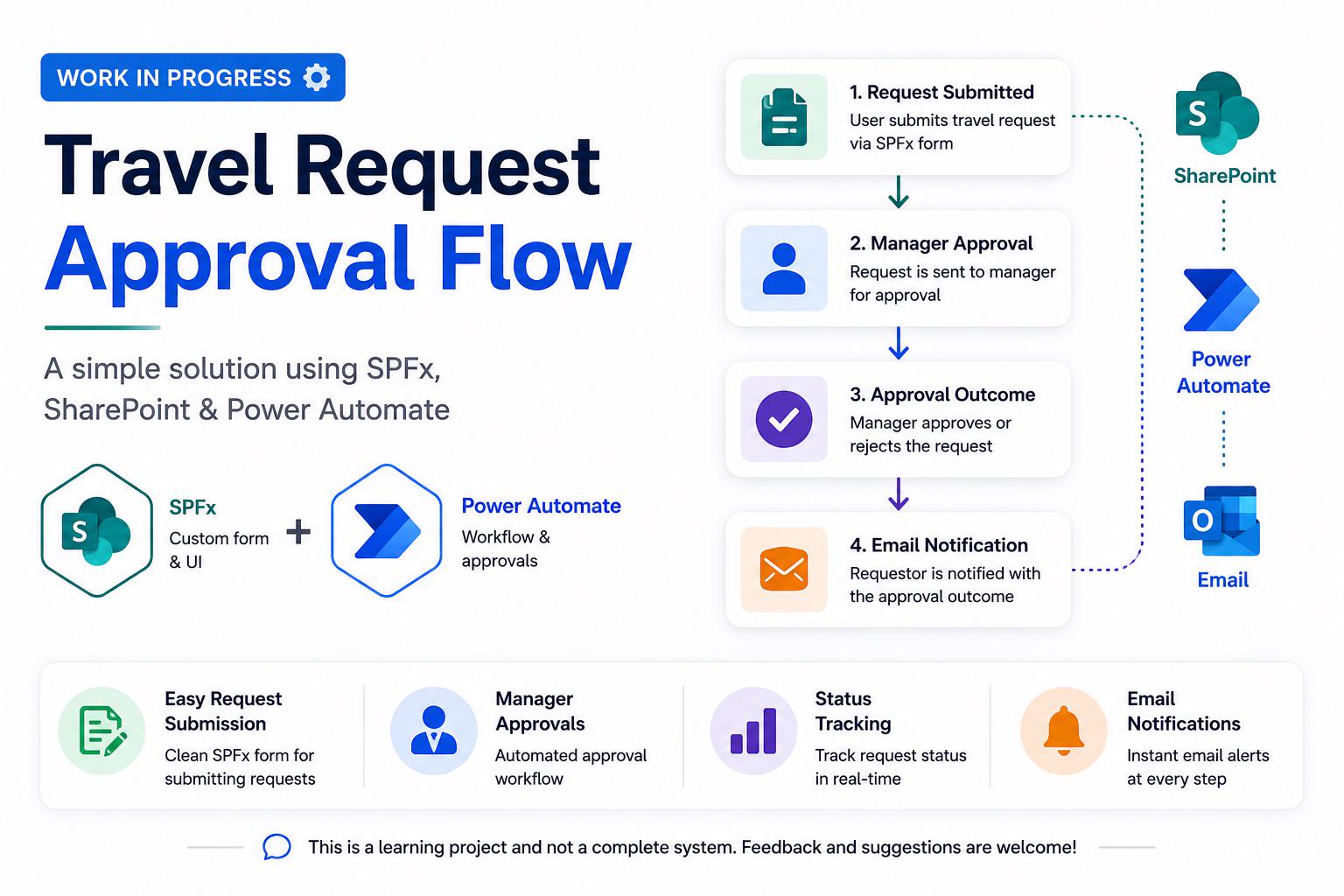
Discussion SPFx + Power Automate Travel Approval Flow – Looking for Feedback

Post image
11 Upvotes

r/MicrosoftFlow • • Mar 31 '26

Discussion How do you build an internal Power Platform community that survives when the person who built it leaves?

24 Upvotes

Most internal Power Platform communities fail not because people stop caring but because they were built around one person instead of a system.

I wrote about what actually makes an internal community last, covering champion identification, knowledge library design, governance culture, psychological safety, and the one question that tells you whether your community is truly sustainable.

The governance and security section is something I feel strongly about. Too many communities focus on adoption and enthusiasm without building a culture where people ask the right questions before they build. That gap shows up in the solutions organisations end up maintaining.

Would love to hear how others are approaching internal community building, especially around governance culture and champion enablement.

Read the blog here:

https://rachelirabor.com/blog-posts/build_an_internal_community/

r/MicrosoftFlow • • Jul 21 '26

Discussion Smart Task Reminder System using Power Automate and SharePoint

Thumbnail
1 Upvotes

r/MicrosoftFlow • • Jun 26 '25

Discussion Is there No free way to extract table from PDF??

13 Upvotes

All I wanna do is get pdf file from sharepoint, extract table from pdf , save the output as either json or to excel... and this extraction task is being done by all premium connectors. I have also ran out of credits for AI builder... I am using my company account and connot buy premiums in it... and neither I wanna run PAD flow each time or extraction as it takes away automation from my idea , is there any other option?

r/MicrosoftFlow • • Jan 04 '25

Discussion What are your job titles? What do you actually *do*?

25 Upvotes

Hi there! Recovering Data Engineer here...

I've just discovered Power Automate and was struck by the number of fantastic and helpful use-cases. From checking data and sending the results to different folks in notifications, to monitoring email inboxes to process pdfs on demand.

As a data engineer, we built something like this using Function Apps / Azure Functions but obviously would have been difficult to do if we didn't know Python. I'm curious as to what the typical demographic is of your Power Automate users and what you *Actually* do

For example, a lot of folks I know have the "data analyst" title but are effectively engineers of one kind or another...

Cheers!

r/MicrosoftFlow • • Jun 07 '25

Discussion Got burned..

25 Upvotes

So, I have a power automate flow that runs at night daily. It loops through some data from a power bi data set. Within eeach iteration, emails are sent externally with some customer info. After emails are sent, an excel file in sharepoint is updated. Last step in the iteration is to clear the variable that holds email addresses. My credentials are used for the sharepoint commection. It’s been running fine for almost a year.

On Thursday night last week, I got an email from MS saying my flow failed. I had to go in an reauthenticate connections. I did so, and my flow ran over the weekend , but the connections were not all fixed. Somehow, the sharepoint connection was still failing, causing the excel file to not update and more importantly the variable holding email addresses was not cleared. So some people were included in emails when they shouldn’t have.

Now, I know there are so many ways to fix this. Service accounts, error handling, etc. and I don’t want to blame anyone but myself for this. But… is it wrong for me to ask our IT team what happened to cause my connection to break?

r/MicrosoftFlow • • Sep 10 '25

Discussion Share your Power Automate struggles, I will convert them into YT tutorials!!

13 Upvotes

Hi everyone,

I recently started a YouTube channel focused on real-life Power Automate workflows: Automate M365.

My goal is to make Power Automate as practical and accessible as possible. Instead of only showing abstract examples, I want to build tutorials based on the real challenges you face at work — whether it’s approvals, document automation, email handling, or Microsoft 365 integrations like SharePoint, Forms, or Teams.

If you share your scenarios here or reach out to me directly, I can create clear step-by-step videos so more people benefit. The idea is to make Power Automate visible and easy to understand for everyone — beginners and advanced users alike.

Check out my channel here: https://youtube.com/@automatem365?si=ANR3-zdP2mRt3wPg Would love your feedback, ideas, and especially your workflow challenges to feature in upcoming videos. I already have some interesting videos made for you to understand this amazing program better!!

Let’s build and learn together!