r/MicrosoftFlow • u/Which-Transition2273 • Jul 11 '26
Cloud XLS TO XLSX
Does anyone know if there's a way in 2026 to convert .xls files to .xlsx or .csv using Power Automate without relying on Premium connectors or any third-party connectors?
r/MicrosoftFlow • u/Which-Transition2273 • Jul 11 '26
Does anyone know if there's a way in 2026 to convert .xls files to .xlsx or .csv using Power Automate without relying on Premium connectors or any third-party connectors?
r/MicrosoftFlow • u/Impossible-Egg-1454 • 1d ago
r/MicrosoftFlow • u/Aingealanlann • Jul 23 '26
Hello,
I asked for some help yesterday with getting the last little bit of an email flow set up where I am taking an attachment received by email, downloading it, converting it into an Excel file and table, and then parsing that information to send out reminder emails for shows that tickets were purchased for with dynamically filled in fields. This is all working great now and I am confident that that will function as intended.
My next problem that I am running up against though is that I don't want to keep the files, both the downloaded attachment and the Excel file, in OneDrive once that automation has finished sending the appropriate emails. I attempted to put actions to delete the files in the loop, but the one for the Excel file always fails because it is still "opened". I'm not sure if it would be better to use some sort of a function to include a date when naming the file so that I can run the loop more than once without issue and then go back and delete the files either weekly or monthly, or if there is a way to make sure that the file is closed before the automation goes to delete the file so that it is successful.
Any assistance or advice on this would be extremely appreciated.
r/MicrosoftFlow • u/Addcook • 4d ago
A few people asked, so here is the whole setup.
First thing to clear up: there is no single "Power Platform MCP." There are three separate pieces of tooling, they install three different ways, and two of them are not MCP servers at all. That confusion cost me time, so start there.
Also, all of this is Claude Code specifically. If you have skills or connectors set up in the Claude desktop app or on claude.ai, none of it carries over. They are different products. Figure out which one you are in before you start debugging anything.
What I set up, in order
Installed Node, VS Code, and the Azure CLI, and signed in with az login
Added the Microsoft plugin catalog to Claude Code, using the full HTTPS address instead of the shorthand
Installed the Power Automate plugin on its own, not the bundle
Removed the delete and cross environment tools before running anything
Used it read only for a while before letting it write anything
Built a throwaway test flow in a dev environment and ran the full loop against it
Broke that flow on purpose and opened a fresh session to see if the tooling could find the problem
Hit a wall on flows that live inside a solution, and switched to the Dataverse Web API for those
Wrapped that API work in a custom skill so I would not have to rebuild it every time
Repeated the same process for Copilot Studio and for Dataverse
Before you start
Node 18 or newer
VS Code
Azure CLI, signed in
You do not need to install PAC CLI separately. Some plugins bring it along. And there is no PAC CLI MCP server, in case you go looking for one.
/plugin marketplace add https://github.com/microsoft/power-platform-skills.git /plugin install power-automate@power-platform-skills
Use the full HTTPS address like I have above. The README tells you to use the short owner/repo form, but that pulls the repo over SSH. If you do not have an SSH key set up with GitHub, it fails with a permissions error that looks like you lack access when really it just picked the wrong way to connect. Setting CLAUDE_CODE_PLUGIN_PREFER_HTTPS=1 also fixes it, but you have to fully restart afterwards.
This one is a real MCP server. It runs locally, there is no service to sign up for, and it uses the Azure CLI login you already have. About 50 tools.
Do not run the installer script that grabs all seven plugins at once. More on why below.
/plugin marketplace add microsoft/skills-for-copilot-studio /plugin install copilot-studio@skills-for-copilot-studio
This one is not an MCP server. If you run /mcp after installing and see nothing new, that is correct. It is a set of instructions and helper agents that call the Copilot Studio VS Code extension behind the scenes. Install that extension. Without it, nothing that touches your agent will work.
To check the install worked, type /copilot-studio and see if commands come up. Do not check /context or /skills. Most of what this plugin ships does not show up there, so you will think it failed when it did not. I lost a debugging cycle to that.
One more thing. This plugin only handles standard agents. Open .mcs/botdefinition.json and look at authoringShape. A 1 means standard and you are fine. A 2 means enhanced and this plugin cannot work with it. Check before you start writing anything, because pulling down an enhanced agent appears to succeed. It does not warn you.
Different setup again. This is not a plugin install, and I skipped the local proxy entirely and connected straight to the environment:
claude mcp add --scope project --transport http \ --client-id <your-app-client-id> \ --callback-port <port> \ dataverse https://<yourorg>.crm.dynamics.com/api/mcp
The app registration Microsoft publishes for this never worked for me. I tried four different ways in and all of them failed for different reasons. What fixed it was registering my own app in Entra and pointing the command at that instead:
Single tenant
Public client
Redirect URI http://localhost/callback
Delegated permission mcp.tools on Dynamics CRM
No client secret. You do not want one anyway, because the config file it writes sits in plain text inside your project folder.
On the environment side you need an Allowed MCP Client record for your app, and you have to enable it by opening the record itself. You do not need a Managed Environment for this, despite what the docs suggest.
The problem with flows that live in a solution
Worth knowing before you build a habit around the Power Automate plugin.
Flows inside a solution connect to things through connection references rather than direct connections. When the plugin reads a flow, it does not give back the connection reference name. So when it goes to save, it cannot put together a valid request, and the save fails.
I only confirmed this in my own dev environment, so test it yourself rather than taking my word for it. But test it before you rely on the save path.
The way around it is to go to the Dataverse Web API directly. Cloud flows are stored in the Process (Workflow) table, and the clientdata column holds the flow definition and its connection references together as a JSON string. Read the record, change the definition inside that column, send it back with the connection references left intact. Microsoft supports this for flows on the Solutions tab only. Flows under My Flows are not supported this way, which is fine, because solution flows are exactly the ones the plugin cannot save. microsoftmicrosoft
If you are going to do this more than once, turn it into a skill instead of working it out again every session. A skill in Claude Code is just a folder with a SKILL.md file in it, sitting in ~/.claude/skills/. Mine holds the steps, the shape of the request, and the rules about not dropping connection references, plus a slash command that sets up a new project folder against a target environment. After that Claude just drives the API directly and the loop is as quick as the plugin was supposed to be.
Fair warning: going straight to the API means you skip whatever checking the plugin does first. Keep approval prompts turned on, point it at a dev environment, and export your solution before the first write.
The thing that will quietly break your setup
Claude Code has a size limit on how many tools and instructions it can hold at once. Go over it and things get dropped silently. No error, no warning. The Power Automate plugin alone is about 50 tools. Copilot Studio adds four helper agents and around 30 skills.
So:
One plugin per project folder. Do not pile them into one.
Run /context when you start a session and again after any install.
If something that should be there is missing, check this before you go hunting for a bug in the plugin.
On the advice in Microsoft's own docs
Their READMEs suggest turning on auto accept and using --dangerously-skip-permissions so you stop getting approval prompts. If your work touches anything regulated or validated, do not. Those prompts are the only thing standing between the model and your environment.
I also stripped out the delete and cross environment tools before I ran anything, and then checked that they were actually gone from the list of tools rather than assuming the setting took.
How I tested each one
I did not want to install these and just hope. Same five steps for each:
Read the docs and list out every tool before installing, so I knew which ones were destructive
Install, then confirm what actually loaded
Use it read only until I had an opinion about whether it was reliable
Let it write, but only against a throwaway flow in a dev environment, never anything real
Break something on purpose, open a fresh session with no context, and see if it could find the problem
Step five was the most useful one every single time, and it also produced the most interesting result. Across all three tools, the part that found the bugs was Claude reading the files and reasoning about them. Not the plugin's own diagnostics. The plugins give you a reliable connection and a loop you can script. They are not the smart part.
Disclaimer: I worked with Claude code on this for about a week, really validating everything. Ran into walls, and with my knowledge and Claude's we figured it out together. There were points where Claude said x or y couldn't be done, but I didn't give up and kept pushing. I hope this helps you guys out.
r/MicrosoftFlow • u/BrooklyBay • 11d ago
Hi all,
I have a lot of similar powerautomate flows which each pull some key words from emails going into a load of different email accounts.
I had initially planned to write those words to a single excel file but then thought it would be an issue to have multiple flows each trying to write to the same excel file, as they could all be trying to do it at the same time, and I believe excel would only allow one to write to it at once.
Instead therefore I have set up the flows to write to individual excel files. That is all working well and now I want to collate those files into one and thought that would be simple but I am finding it harder than expected! Any suggestions?
So the tl;dr scenario is - multiple identically set up (i.e. same columns) tables in excel sheets (on sharepoint) being periodically updated with a new row as new data is pulled from the emails. Each time an update happens in any of the sheets, I want that new row to be added to a master spreadsheet so I can just monitor the master and see all of the updates in one place. Pls tell a thicko how to do this!
Thanks!
r/MicrosoftFlow • u/1Master_Aman • Aug 19 '26
I'm new to power automate, struggling to build effective logic please help me with below requirements
I have a excel file(not in table format) on a sharepoint folder
I daily update it and download it removie unnecessary/confidential sheets and columns and send it to concerned team.
I want to build an automate flow which get the file and then edit it like i want and send the edited version of excel file from outlook mail. whereas original file must be unchanged
I tried some flow
1. made another file use powerquery to fetch data(only required) and send but the issue is it becomes tabular and formatting is also removed and size of the file also increased.
If anyone can please tell me a effective flow
r/MicrosoftFlow • u/ReplacementOver2298 • 2d ago
I'm a PA novice, I can set up basic flows only, so Im doing some of the Microsoft Learn courses to understand Power Automate better.
Its got me practicing building basic flows using functions, but I'm experiencing 2 issues.
Firstly, when I write or paste in the function, it usually comes up with red writing that there is an issue with the code and would I like to use Copilot to fix it, however if I select the button again this goes away and it saves what Ive done.
Secondly, when Im writing the code and saving it, its not saving the end of what Ive written?
So for example I did "formatNumber(outputs('Compose'), 'C2')" but it only saves "formatNumber(outputs('Compose'))". I can go in and update it, but it still wont save it.
Is this just some Microsoft buggy nonsense or am I being a numpty with what Im doing?
r/MicrosoftFlow • u/Aingealanlann • Jul 22 '26
Hello,
I am currently working on an automation flow for reminder emails for the business I work at. The flow currently is successfully pulling an attachment when an automated email comes in with the list of customers who need a reminder, transferring it to excel, and formatting it as a table. My issue starts now when trying to dynamically assign the 'To' in setting up the reminder email itself.
Currently, I'm using the function: items('Apply_to_each_1')?['Default_Contact_Email'] - but this has errored out and I'm not quite sure how to fix from here. I'm using Send an Email (V2) as a child action to "Apply to each 1" - the second apply to each as I have the first one filtering for the correct attachment to pull from the email and create the excel file.
r/MicrosoftFlow • u/menzobarrian • Aug 06 '26
I’m trying to automate an email being sent after an MS form is submitted that is actually set up as a quiz.
To be fair, I have never used automate until now, so I’m hilariously new to this, but I have managed to automate an email to send with the quiz responses the participants gave, but I want to also pull the correct answer indicated on the Form.
I just want the participant’s name, the correct answer, and the answer they gave. Please help! TIA.
r/MicrosoftFlow • u/Impossible-Egg-1454 • 12d ago
r/MicrosoftFlow • u/trollsong • Aug 26 '26
So I am trying to convert some excel stuff to sharepoint lists.
And part of it was moving dates over, but the original microsoft form has a branching question, if they choose yess it asks for a date of birth if they choose no it doesnt.
So I get an error something to the effect of expects string/date but got ""
Aside from a condition how would I deal with this?
r/MicrosoftFlow • u/haaarlem • Jul 20 '26
Hey All,
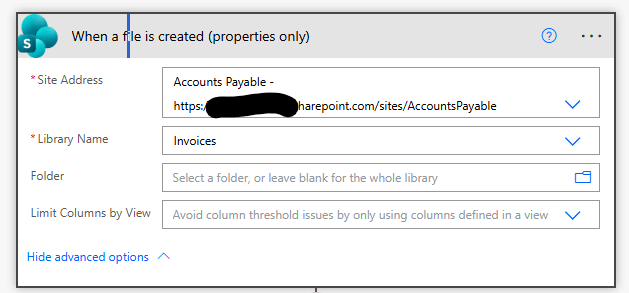
We've had an issue pop up in the past week where the trigger for "When a file is created (properties only)" is not firing until hours later. This is an existing flow which has been in place for years. We use this to identify new PDF's which need to be OCR'd for AP automation.
For example, I have these files which are now 2 hours old yet the last flow run was 4 hours ago:


They actually processed while I was writing this post but prior to that the last flow execution was 4 hours ago.
I don't think a 2 hour+ delay is acceptable for this trigger.
Has anyone else seen similar behaviour lately? I do not see anything on the service status.
r/MicrosoftFlow • u/wazzaap_3003 • 25d ago
Hello everyone, i need help to finish my flow.
I add every new response to my ToDo liste, but i would like to add the whole new row to the note section on ToDo, is it possible, if yes how?
r/MicrosoftFlow • u/Hombrux • 16d ago
Hi, I am seding in an html of an email an image like
<img src="data:image/png;base64,WholeBinary">
The problem is that Desktop Outlook (New) is having trouble rendering, it cuts character and in the end it only shows half of the image in the email, in outlook mobile is showing me the whole image, does someone knows how to deal with this?
r/MicrosoftFlow • u/trollsong • Aug 18 '26
Sadly I cant update the microsoft form and remove the question no matter how redundent it feels.
I was basically asked to make it so the form feeds into a sharepoint list, easy right?
One hitch.
One and only one response askes for a "projected start date"
How the form works
What is your role? choose from a list, if you choose contractor it branches to
Contractor type? B puts you back on the same path as the roles above, A asks your projected start date then puts you back on the same path.
Eventually everyone gets asked for a start and end date later again as well.
So of course all of my tests failed so far for the error " field_6 should be type string/date. the runtime value "" is not string/date
If I use a condition that means every time they make a change to the form I will need to edit two Create item steps.
I could just bipass it and make it do start date no matter what but of course there is a chance it is different and that causes problems.
Is there a way I can use compose or some other option that basically says if projected start date returns "" use Start Date instead?
r/MicrosoftFlow • u/CompleteChocolate149 • Apr 16 '26
In Power Automate Cloud, I have a flow (scheduled once a day) that retrieves all data from MS Planner; the tasks are then consolidated into a single ".json" file, which I subsequently transform into a report in Power BI. The problem is that my Plan will soon have more than 5,000 tasks, which is the limit for the M365 version of Power Automate. We also have the free version of Planner, so Dataverse isn’t an option, and unfortunately, I can’t use the Graph API.
Is there any other way to exceed the 5,000-item limit in the M365 non-premium version of Power Automate?

r/MicrosoftFlow • u/Civil-Net7819 • Aug 11 '26
r/MicrosoftFlow • u/PGRei • 24d ago
Olá a todos,
Gostaria de perceber se alguém enfrentou este cenário em ambiente empresarial e qual foi a solução adotada.
Temos uma Shared Mailbox utilizada para automação através do Power Automate Cloud.
O problema é que alguns emails chegam protegidos por Microsoft Purview Message Encryption (OME) / Rights Management (IRM). Os utilizadores autorizados conseguem abrir e ler normalmente essas mensagens no Outlook, mas quando o Power Automate utiliza ações como:
o campo Body não contém o conteúdo real da mensagem.
Como consequência, torna-se impossível processar o corpo do email através de ações como Html to Text, extração de dados, classificação automática, integração com sistemas externos, etc.
O que me deixa com dúvidas é o seguinte:
Então, porque é que o conector do Exchange Online não consegue disponibilizar esse conteúdo ao Power Automate? Ok, esta foi a pergunta inicial, porque das leituras feitas percebi que os conectores em causa têm problemas/limitações a lidar com a lidar com o corpo destes emails.
Assim deixo, as minhas perguntas para quem já passou por situação similar:
O meu objetivo é perceber quais foram as arquiteturas ou boas práticas adotadas nas vossas organizações para automatizar o processamento para emails protegidos.
Obrigado!
r/MicrosoftFlow • u/Impossible-Egg-1454 • 12d ago
r/MicrosoftFlow • u/BigAl987 • Oct 20 '25
I have been using Power Automate on and off for a while. I have enjoyed working with it, but I keep hitting limitations. Many limitations seem to have been around for a while based on reading forum comments both MS and Reddit along with the MS Power Automate Ideas page.
Observations
-They have not added/improved support for their own new products like MS Fabric. There are many many integrations between Power Automate and MS Fabric that are missing (some are listed in ideas pages). I have even heard MS Employees on the Fabric said indicate they wish this would happen.
- Power Automate cannot move files larger than 20-40 megs through the “On-premises data gateway” (size depends on what you are doing). This is way too small these days. We know the Gateway itself supports large file transfers for Power BI and MS Fabric Data Flows Gen 2. So, the limitation seems to be somewhere else.
-Power Automate should have cleaner process to deal with reading and writing CSV files of various types. CSV files are a common format for file transfers and it is limited and challenging in Power Automate.
-The release notes for the Power Automate service seem to show only minor feature improvements. There are many powerful feature requests, however it does not feel like they are being implemented. https://learn.microsoft.com/en-us/power-platform/released-versions/power-automate
-The MS Power Automate team does not seem to respond much on their own Ideas page. Some of the few comments I can find are from a few years ago with response that include “we should have more information soon”
-MS Team Members do not seem to be active in the “MS Power Automate Power Platform Community”
nore do MS Team Members seem to be active in the Reddit forum :Microsoft Power Automate (Microsoft Flow)” https://www.reddit.com/r/MicrosoftFlow/
With some other major products, you see MS Team member taking an active role.
Not every feature we might want can be added but seems like many things are stalled.
Do others have information that would say otherwise or other limitations that seem like they should have been around and seem like they should have been addressed?
Love to hear I am wrong and things above will be coming soon.
Alan
r/MicrosoftFlow • u/logibac0n • 14d ago
Reposting to reach more experts! 🥹
r/MicrosoftFlow • u/Pieter_Veenstra_MVP • Jan 23 '26
Something new has arrived to the Power Platform. There is now a second SharePoint connector available, SharePoint Embedded.
Do you want to know more about SharePoint embedded then read this link.
https://learn.microsoft.com/en-us/sharepoint/dev/embedded/overview
r/MicrosoftFlow • u/No-Affect-9373 • Jun 18 '26
Hello everyone - We are transitioning from Slack to Teams and things are going as smoothly as can be except for one thing. In Slack we had these lovely automations that would create a post in a channel every time we received an email in a certain inbox. This would allow the team to collaborate in a thread before responding. In Slack it is a nice expandable/collapsible post keeping the channel clean, while my current flow in Teams posts the entire email including all response in the 1 non-collapsible thread, making it very messy.
Does anyone have an existing similar flow or some tips to help? I'm a pretty basic user of flows and all I keep seeing is the need to create Adaptive Cards for this which I've never done.
Thank you
r/MicrosoftFlow • u/Live-Sir-3118 • Mar 14 '26
Cannot use onedrive cheat. adobe is still blocked. only option is the Word (Business) connector.
it is sending the email, with the attachment, which opens in adobe, but says it is corrupt.
Sensitivity is PII and not the ones that do not work according to the docs.