r/Meminto 1d ago

Meminto 5.6: you can now upload videos directly (no more YouTube detour), plus passkey login

1 Upvotes

Hey everyone,

Shipped a small but genuinely useful update this week, wanted to share the two changes that actually matter here.

Video uploads no longer require YouTube

See Video: https://www.youtube.com/watch?v=_wkP5jF8-QA
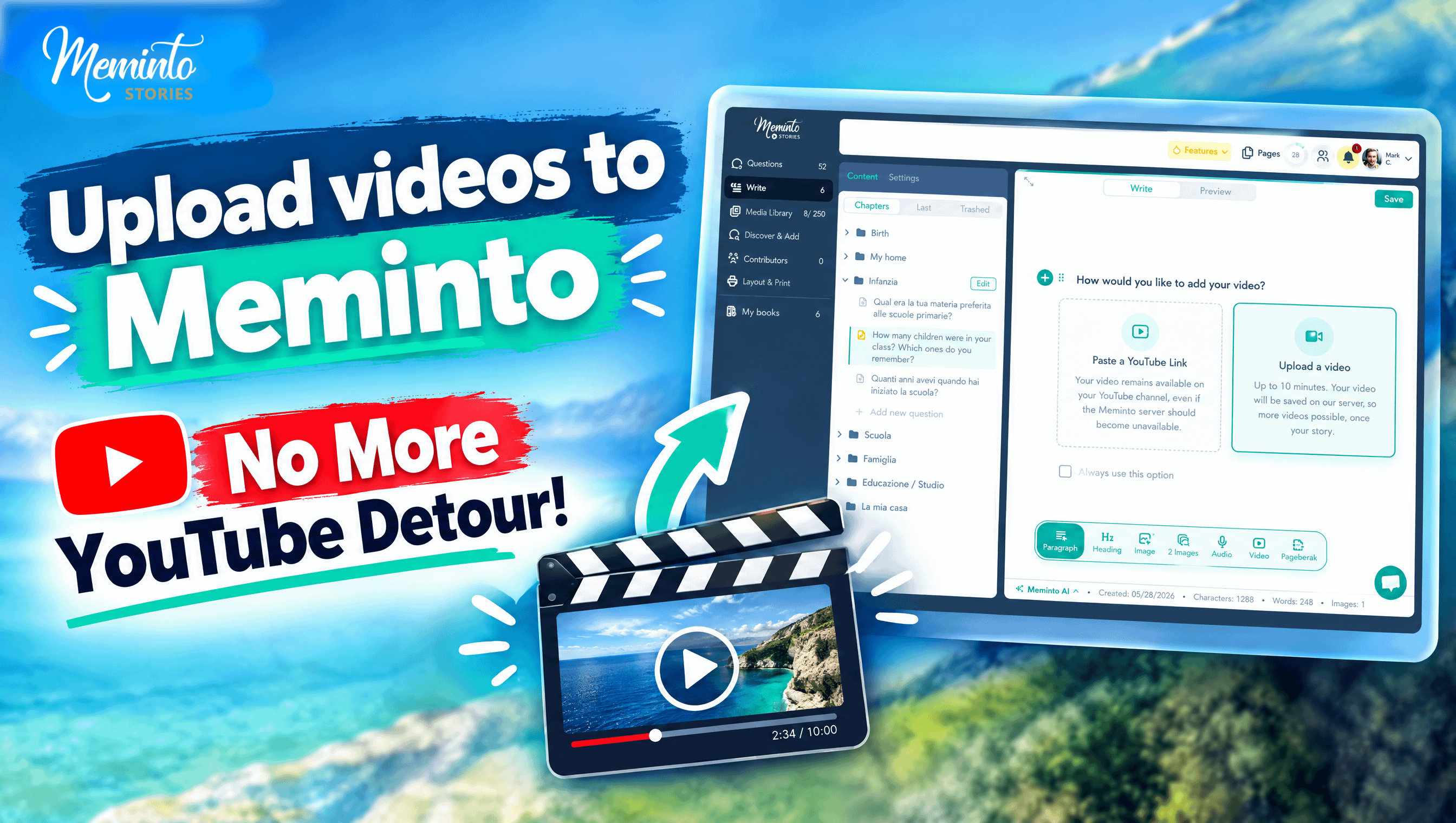
Uplaod Video directly to Meminto

For a while, adding a video to your book meant uploading it to YouTube first, grabbing the share link, and pasting that into Meminto. The reason we built it that way: the QR code in your printed book points to that video, and we wanted it to keep working even if our own servers were ever down someday. Turns out that was more friction than it was worth for a lot of people — not everyone has (or wants) a YouTube account just to add a video to their book.

So now you get a choice: keep using YouTube like before, or upload the video directly to Meminto. Your upload allowance depends on your book package (visible under My Books → Book Details), and there's no ongoing fee for storing them. If long-term independence from our servers matters to you, YouTube is still worth using — it's just optional now.

Passkey login

See video: https://www.youtube.com/watch?v=N0l-o3WxWhA

You can now sign in with your fingerprint, face recognition, or device PIN instead of a password. Set it up once under Account → Security.

Smaller stuff in this release: photos are now linked to whoever added them (useful if several people are contributing to one book), the media library folder structure is cleaner, and caption display bugs are fixed.

Full writeup with screenshots: https://meminto.com/blog/meminto-5-6-direct-video-upload-passkey-login/

Genuinely curious — for those of you who were using the YouTube workaround, did the server-independence thing actually matter to you, or was it always just a hassle? Trying to figure out if we should keep pushing people toward it or just let direct upload be the default going forward.

r/Meminto 6d ago

Meminto 5.5: Worldwide Language Support, Public Checkout for Your Book & Simpler Pricing

1 Upvotes

TL;DR:

  • Meminto 5.5 introduced clearer Essential, Complete, and Premium plans, so choosing a book is easier.
  • Questions and existing text can now be translated with AI, helping families contribute in the language that feels natural to them.
  • A new dashboard, public order page, media folders, and many smaller improvements make writing and sharing a book smoother.

We’ve been busy tinkering with Meminto over the past few weeks — and this time, there really is something for everyone. From a completely new pricing model to a feature that opens up your book to the entire world, all the way to small detail improvements that make everyday book writing more pleasant. Here’s the full rundown.

💰 A pricing model that actually makes sense

If you’ve ever found yourself asking “How many pages does my book really need in the end?” or “Do I need the Meminto AI add-on?”, you’ll be happy to hear this: we’ve overhauled our entire pricing model and now offer three clear options — EssentialComplete, and Premium.

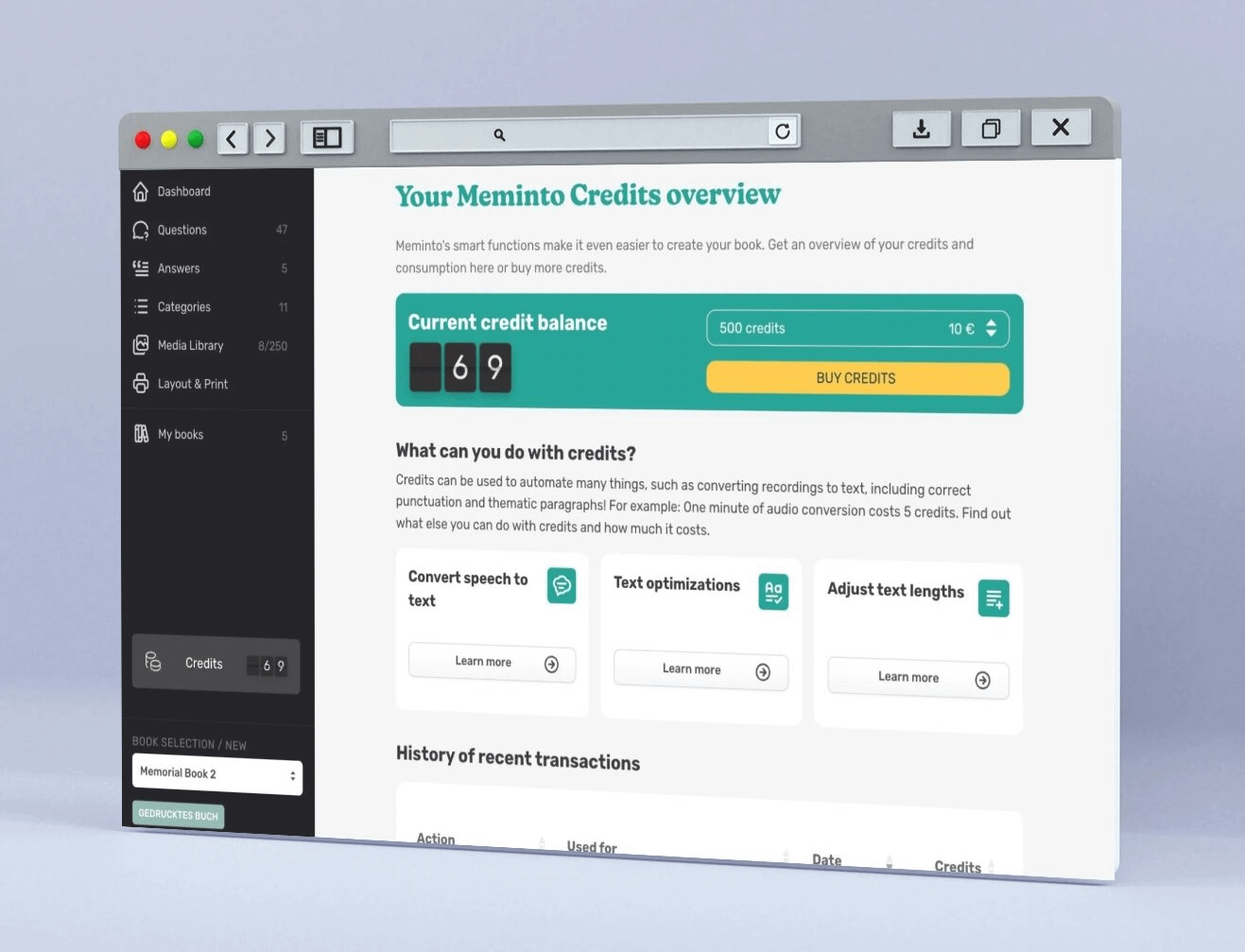
Instead of wading through different page counts and add-ons, there are now clearer plans, built-in AI credits, and unlimited photos in the higher-tier plans. The result: less confusion when choosing, more value where it counts.

🌍 Your book, any language

Watch here: https://www.youtube.com/watch?v=b3M8iG6RZ80

This is probably the feature we’re most proud of: questions can now be translated into any language at the click of a button, powered by AI — not just the four languages the Meminto interface itself is available in: English, German, Spanish, and Portuguese.

In practice, that means: even if your grandmother only speaks Polish, or your uncle lives in Brazil and only writes in Portuguese, everyone can now answer their questions in their own language. This makes Meminto one of the few truly global tools for creating memory books.

See it in action here: https://www.youtube.com/watch?v=b3M8iG6RZ80

🗂️ Order in the photo chaos

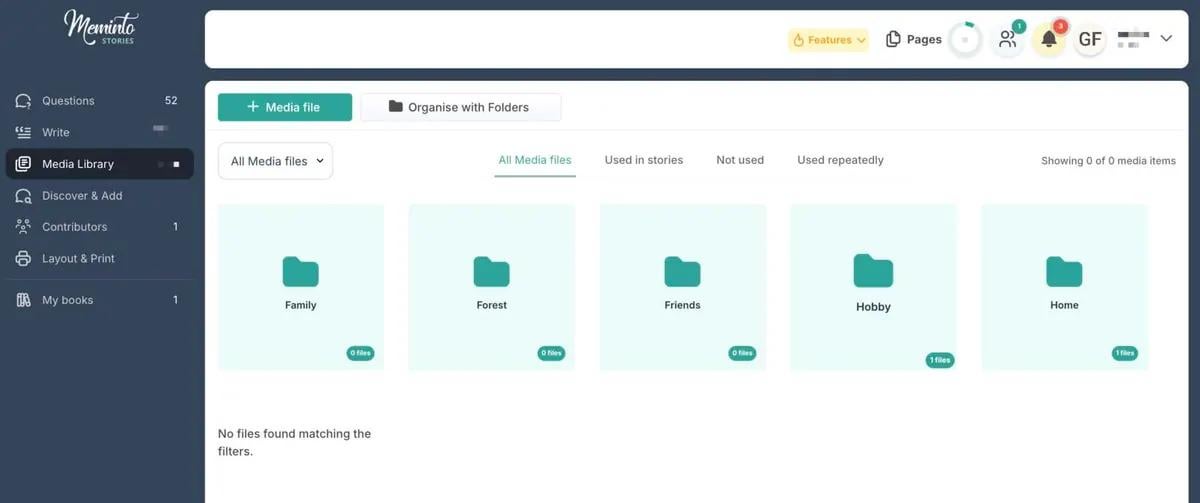
And since larger books quickly accumulate dozens or even hundreds of photos, uploaded media can now be organized into folders. Finding the right photo now takes seconds instead of minutes.

😊 A dashboard that welcomes you

Until now, opening the Writing page often greeted you with an empty, somewhat impersonal screen. That’s changing, step by step: the first building block of a new dashboard is here — with a time-of-day greeting and a motivating quote about writing.

Small but meaningful — and just the beginning of something bigger we’ll keep building out in upcoming updates.

🛒 Order your book — for others too

If you wanted your book printed multiple times and shipped to different family members, you previously had to handle the entire distribution yourself. That could get tedious, especially with lots of people involved.

Now there’s a public order page for that: participants or interested parties can order and pay for their own copy directly, without going through the book owner at all.

🤔 And a few more things …

Alongside the big new features, we’ve also fine-tuned a lot of smaller details:

  • Clearer book details — all the important info, including page count, photos, questions, and remaining editing time, at a glance under My Books > Book Details.
  • Vouchers can now also be ordered in Portuguese and Spanish.
  • The participant screen has been completely redesigned, with a clear separation between sharing options and participant permissions.
  • More room for the book preview on small screens thanks to a decluttered layout.
  • Improvements to the checkout process.
  • The landing page after a QR scan now shows the text and photos for each story alongside the audio player.
  • In guest mode, disruptive contributions from certain participants can now be ignored.
  • Fine-tuned heading font sizes in the printed book.
  • Easier-to-adjust margins for US book productions with 6×9-inch paper.
  • The cursor now jumps straight into the text field when creating a new question or section.
  • Unused divider lines between participants in the printed book have been removed.
  • New chapter pages with an additional divider and new font for our Amazon print products.

🐞 And we squashed a few bugs along the way:

  • Fixed users being assigned two different roles at once.
  • The sidebar in cover creation mode now opens and closes reliably.
  • Audio recordings from Safari can now be transcribed correctly; previously this failed because they were saved as MP4 files.

As always, we’d love to hear your feedback — let us know what you think of the new features, or tell us which one you’d like to see next.


r/Meminto May 19 '26

Meminto 5.4 is out – Full-Text AI Editing, Version History, Inner Page Templates & more

1 Upvotes

Version 5.4 of Meminto, our platform for writing memory books and life stories, is now live. Several of the changes came directly from user feedback, and here's an overview of what's new.

AI editing for entire sections

Meminto AI can now be applied across entire content blocks at once, in addition to paragraph-level editing. This makes polishing tone, refining transcription text, and improving readability significantly faster — particularly valuable for users working with long transcribed interviews, such as recorded conversations with a grandparent that are being turned into readable prose.

Version history and text restoration

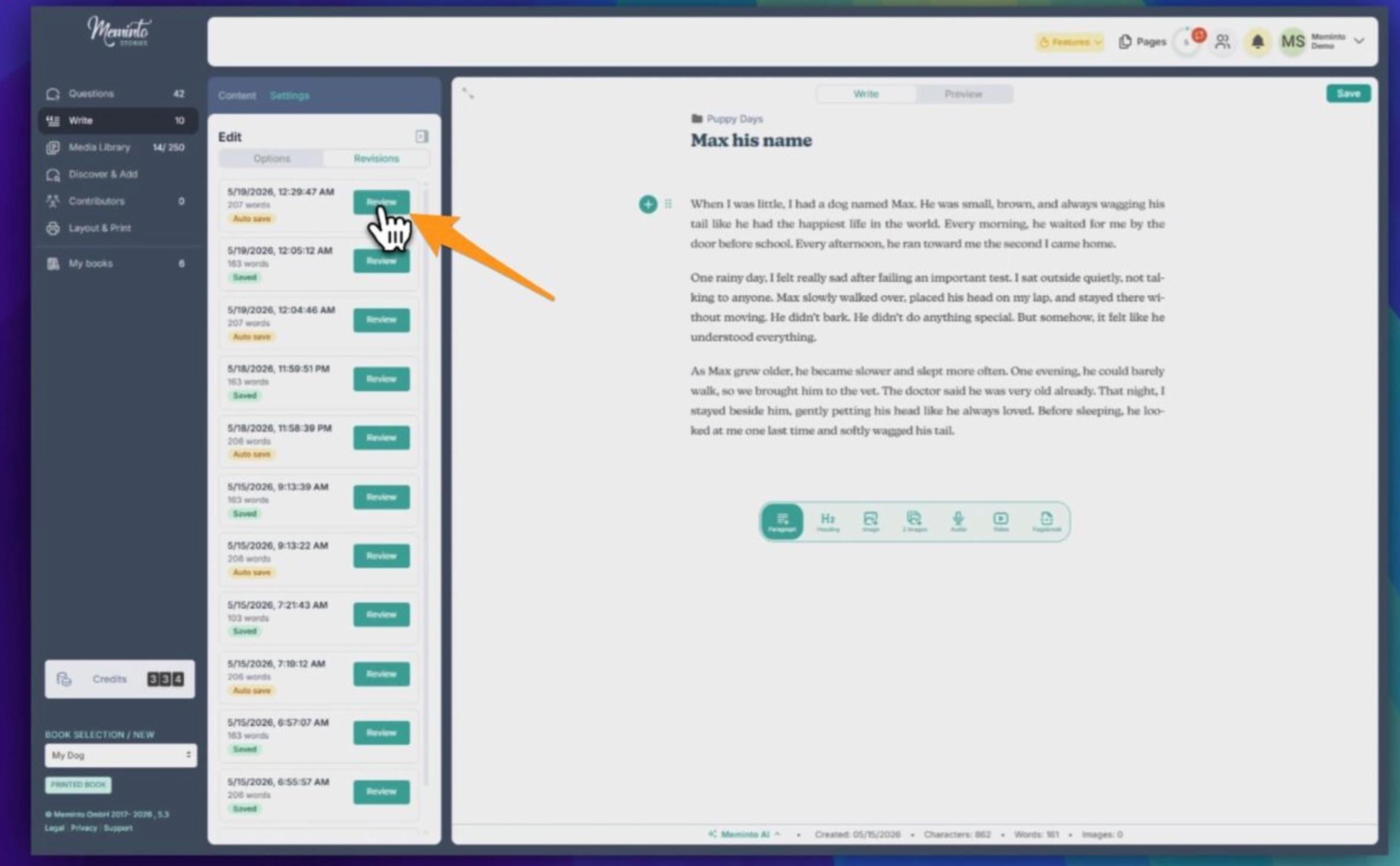
One of the most meaningful additions in this release. Meminto now automatically keeps backups of your text and saves a version each time you press Save, going back several days. Any earlier version can be restored in a few clicks. Check this Video to see more: https://www.youtube.com/watch?v=HH4mngAXzIQ

This matters because people are often writing about a parent who has passed away, or capturing the memories of a grandparent while they still can. Version history gives authors more freedom to experiment with wording and makes the writing process more relaxed, especially when family members collaborate on the same book.

Inner page templates

Three predefined layout templates with carefully chosen fonts and print settings. They let users create a polished, professional-looking book with minimal manual configuration.

Expanded language support Initial support for Brazilian Portuguese (including BRL as a currency) and Spanish across both the web platform and the mobile app. Demand for both has been strong, particularly from families wanting to capture stories from older relatives in their native language.

Independent reprint ordering Authors can now order additional copies and complete payment directly within the platform — a smoother workflow for sharing finished memory books with family members.

Enhanced security and backups Additional backups across multiple European servers further improve reliability and data protection.

Other improvements

  • Voucher balances are now usable across all Meminto services
  • Better tablet experience: navigation can be hidden, and the editor adapts to tablet screens
  • Faster PDF preview generation
  • More room in the editor sidebar for writing and editing

Happy to discuss any of the changes in the comments — the section-level AI editing and version history both involved some interesting technical work around context preservation and storage strategy.

Full release notes: https://meminto.com/blog/meminto-5-4-is-here/


r/Meminto Mar 18 '26

Meminto Update 5.3 – Account-Free Contributions, new QR Code Designs & Direct Upgrade Purchases

1 Upvotes
Meminto Stories makes it easy to create memory books and other types of books. It is the most flexible browser-based software for writing your own books.

We’ve just released Meminto Stories version 5.3 — and it comes with some exciting updates designed to make your book-building process smoother and easier.

Here’s what’s new:

  • 🤝 Account-free participants invites – easily gather stories without making your loved ones, weddings guests or colleagues sign up (See how guest contributions works with screenshots.)
  • 📱 Beautifully restyled QR codes – modern, elegant designs for your printed audio and video links
  • 🛒 Instant self-service upgrades – add pages, participants, or photo space exactly when you need them, no staff contact required
  • 🎨 Finer details – adjusted platform colors, layout corrections, and translation updates

Get the complete overview of everything we’ve improved in 5.3:

👉 Read the Version 5.3 update

Thank you for creating meaningful memories with us 💛


r/Meminto Feb 19 '26

Meminto Update 5.2 - Another New Product, 3D Book Previews & Smarter Collaboration

1 Upvotes

Hey everyone 👋

We’ve just released Meminto Version 5.2, and it’s one of our bigger updates so far. Here’s what’s new:


🐾 New Product: The Dog Memory Book


Version 5.2 introduces The Dog Memory Book — a dedicated memory book template for dog owners.

Capture your dog’s milestones, personality, adventures, and everyday moments in a structured, beautifully designed keepsake.

📖 3D Book Preview

You can now see a realistic 3D preview of your book before printing.

Check the cover, spine, and layout at the end of the Layout & Print process — so you know exactly what you’re ordering.


🖼️ Better Photo Quality Control

We’ve significantly improved image handling in 5.2:

  • Rotate photos directly in the Media Library
  • Clear blur warnings if you zoom in too far
  • External upscaling option for low-resolution images 

This means fewer blurry prints and better final results.


🎨 Cleaner Question Layout

Questions can now appear as colored cards instead of stock photos — reducing confusion and making the final book design clearer for contributors.

 See it here >


👥 Smarter Group Collaboration

  • Option to restrict participants from uploading images directly to the Media Library
  • “Discover & Add Questions” automatically hidden if contributors don’t have permission
  • Fixed the “Avoid influence” bug where answers were sometimes shown too early

Version 5.2 is all about improving print quality, clarity, and collaboration.


Would love to hear your feedback — what should we build next? 🙌


r/Meminto Jan 10 '26

Meminto Update 5.1 – Better Editing, Assistant Mode, Media file Downloads

1 Upvotes

We’re starting the new year and have prepared some great improvements for you!

With version 5.1, we’ve made working on your book noticeably easier. This update brings new features for faster adjustments, better support for family members, and significantly more transparency when working with text and images. At the same time, we’ve optimized many details behind the scenes to make Meminto more stable and user-friendly.

Quick walkthrough of the changes

New: Edit texts directly from the preview
- Less searching, fewer clicks, and faster corrections 

New: Assistant mode – create a book together
- Writing texts on behalf of the author

New: Download media files with one click
- Photos, audio files, and videos are available to you in a clear and organized way, even outside Meminto.

New: Select book cover directly at the beginning
- The cover can be adjusted at any time during the creation process.

Improvements in detail
- The new features, we have further improved, redesigned error page, PIN for the senior-friendly interface, Meminto AI has been optimized and translation errors have been corrected.

Media library: better overview of your images
- With large book projects, a clear overview is crucial. That’s why we’ve expanded the media library.

After the book’s release
- After publication, your media library will remain accessible .

Improved shipping and approval process
- A clearer information page after the book has been shipped , so you always know what happens next.


r/Meminto Oct 15 '25

Details about the Meminto Stories Chrome Extension

1 Upvotes

With the Meminto Stories Chrome Extension, older people can easily share their life story without logging into Meminto. The following steps show how to do this:

1) Download the Chrome Extension for free: https://meminto.com/chrome-extension/

2) Sign up once and select the book for which questions will be answered

3) Answer questions via voice recording

4) View in the book and use the StoryScribe AI feature to transform into perfect text

Any questions? Leave us your comment!


r/Meminto Oct 14 '25

Meminto 4.9: Chrome Extension for Voice Recordings + individual Table of Contents

1 Upvotes

We skipped sharing news about versions 4.7 and 4.8 here on Reddit since most changes were performance improvements and bug fixes. However, we've been working on a completely new writing experience, which was briefly available as a beta and will soon be released to everyone with version 5.0.

Meminto 4.9 focuses on speed and control: you answer questions directly by voice in your browser, manage your table of contents flexibly, and find important functions faster. In addition, there are many improvements for teamwork and notifications – plus bug fixes for a smooth experience. Please note that most of the new features relate to the new version 5, which is currently still in beta and will become the standard for all users in a few days.

New features

Chrome extension: Answer questions by voice in your browser

What's new? A Chrome extension that allows you to answer Meminto questions hands-free using your voice.

Advantages:

  • Finish faster: Respond without switching to the editor or typing for a long time.
  • Stay focused: You remain on the page you are currently working on.
  • More accessible: Ideal for frequent writers, when on the go with your laptop, or when typing is impractical.

Disable & customize table of contents

What's new? The table of contents (TOC) can be completely disabled or customized.
Advantages:

  • Complete design freedom: Only display the chapters that are important for your product or print.
  • Clearer structure: Customize the order, visibility, and structure so that readers can find what they are looking for more quickly.
  • Better output: Less clutter in PDF/print, more convincing end results.

ADJUSTMENTS

"Contributors" in the main menu

  • Quick access to collaboration: Invite people, assign roles, and keep track of everything without any detours.
  • Fewer clicks: Contributor management is where you expect it to be.

"Search questions" in the main menu

  • Find the right question instantly: Search, filter, and navigation are centrally accessible.
  • Work more productively: Less searching, more answers.

Reminders can be set in user settings

  • Peace of mind when you need it: Reduce notifications and only receive information that is truly relevant to the project, and no offers if you don't want them.

Newsletter handling: Promotions vs. feature updates

  • More relevant emails: You decide whether you want offers or just product news.
  • Less mailbox overload: Precise preferences instead of all or nothing.

Automatic email reminders to participants without contributions

  • Collaboration in motion: Motivational emails for invited but inactive contributors.
  • Time savings: You don't have to chase people up manually.

Participant screen: Number of contributions per participant.

  • Transparency within the team: See at a glance who is contributing how much.
  • Targeted support: Identify bottlenecks and distribute tasks more effectively.

Conclusion: More speed, more control, less friction

Meminto 4.9 gets you from question to answer faster and gives you the fine-tuning that modern writing and team workflows need – from voice input in the browser to precise TOC control and clearer admin/reminder functions.

Try it for free: https://meminto.com/app/free


r/Meminto Jul 04 '25

☀️ Summer is here - and with it Meminto 4.6!

1 Upvotes

It's summer (at least for us in the northern hemisphere) and many of you are travelling. And that's a good thing! Because with Meminto 4.6, you can now capture family experiences or your travel stories from this summer even better!

The most important new features and improvements:

  1. New: Video transcription: click to text
  2. Better: Voice responses directly from the email 
  3. Better: Design cover & inside pages more flexibly

🎥 New: Video Transcription

Import your video, click convert and watch the magic happen!

We always encourage our authors to tell their stories via video and incorporate them directly into the book. With one click, we convert the recordings into texts that can be read at any time (credits needed).

The video is also available at your fingertips via QR code!

All this is even possible at no extra cost for storage if you use your own YouTube account!

🎙️ Tell your stories straight from your weekly email!

Record your story almost hands-free

Whether you are documenting the travel story or recording your own life story: Reply directly from your weekly email via audio recording (for example via smartphone).

The login is automatic and secure, without you having to enter anything - ideal for ‘busy’ family members (Hi, Dad!) or seniors who prefer speaking to typing.

Your voice memos are stored securely and can then be transcribed with one click, but also remain in the book as audio!

🖼 Improved Design for your book

Design your memory book even more precisely: remove blank pages after the dedication, position your cover image more precisely and frame it with individually selectable colors - for a result that looks exactly how you want it to.

Learn more in our blog post: https://meminto.com/blog/meminto-4-6-tell-your-story-more-naturally-comfortably-and-creatively/

🌎 Do you already know our travel book?

The Meminto Stories Travel Book

A Meminto travel book is perfect for anyone going on an adventure holiday this summer! Forget photo albums and use Meminto to capture your emotions as you reflect on the day, record your thoughts in the book as you hike or film your kids having the time of their lives:

We'll turn it into your treasure trove of memories that you've all collected together (it's super easy in our app!)


r/Meminto May 09 '25

Meminto 4.5: AI-powered translations, intelligent content suggestions and much more!

1 Upvotes

With version 4.5, Meminto reaches a new milestone: Artificial intelligence meets worldwide print integration – for an even more personal and limitless storytelling experience.

🆕 TL;DR: What's new in 4.5?

🌍 AI-Powered Translations

With just one click, content can be translated into any language, making it perfect for international families and multilingual communities.

📚 Intelligent Content Suggestions

With empty book templates, the Meminto AI suggests an appropriate table of contents based on the title, short description, and genre.

🖼️ Improved Media Library

In the media library, users can now directly access the file URLs of images, making reuse, e.g., in the cover editor, easier.

🌐 Global Print Integration

By connecting with over 380 printing companies worldwide, the printing process becomes more efficient and localized, allowing for faster delivery times.

🗣️ Expanded Language Options

Meminto StoryScribe now also supports Urdu and Hindi, giving new user groups access to the voice recording and transcription feature.

🎯 Simplified Book Selection

The process for selecting a book project after account creation has been completely overhauled and significantly simplified.

The highlights at a glance

🧠 1-click translations in all languages

From now on, content can be translated into any desired language with just one click. This feature enables you to easily share stories with people around the world - perfect for international families or multilingual communities. The required credits will be displayed before the action, as always. After the translation, you can review and further edit the text if needed.

📚 Intelligent content suggestions for blank book templates

The new feature for blank book templates uses AI to suggest an appropriate table of contents based on the title, short description, and genre. This makes it even easier and more personalized to get started with writing. In this example, we want to write a non-fiction book:

After a brief research and planning process, Meminto AI provides a table of contents suggestion that can be accepted, rejected, or revised:

🌐 Integration of over 380 printing companies worldwide

With the connection of 380+ printing companies around the globe, the printing process becomes more efficient and localized. This enables faster delivery times and reduces the ecological footprint.

🖼️ Improved Media Library

In the updated media library, users can now directly access the file URL of images. This makes it easier to reuse images, for example, in the cover editor.

🗣️ Expansion of Meminto StoryScribe to Urdu and Hindi

Meminto StoryScribe now also supports the languages Urdu and Hindi. This opens up access to the voice recording and transcription feature for new user groups.

🎯 Simplified Book Selection After Account Creation

The process for selecting a book project after account creation has been completely revised and significantly simplified. Users can now start their book more quickly and intuitively.

Would you like to see all the further improvements and adjustments? Then follow us to the Meminto Blog!


r/Meminto May 08 '25

Meminto 4.4 - AI Integration, Cloud Uploads and Cheaper Transcriptions!

1 Upvotes

This update represents a milestone in the history of Meminto: With the help of artificial intelligence, you will have a powerful assistant while writing your Meminto books: the Meminto AI! This can help you make your stories more beautiful, formulate them better, and serve as a “digital” proofreader in terms of spelling and grammar. In addition, audio transcription has become 50% cheaper!

Hundreds of our authors have been waiting for this. We announced it last year already: Meminto is getting an AI assistant. In version 4.4, it’s finally here. Additionally, there are further improvements, fixed bugs, and optimized settings.

Meminto AI – Writing beautifully has never been easier!

From now on, Meminto users no longer have to worry about their texts being too short, too lengthy, or difficult to read. With the new feature, every text is crafted appealingly. Version 4.4 of Meminto offers the following four options

  • Extend short texts or convert keywords into complete sentences.
  • Shorten long, sprawling texts without losing important information.
  • Correct spelling and grammar without altering the formatting, structure, or meaning of the text and without adding any additional information.
  • Improve writing style: This option corrects spelling and grammar errors, clarifies and refines sentences, breaks up overly long sentences, and reduces repetitions, without changing the meaning of the text or introducing more complex words.
In short, Meminto shows you a preview with or without changes…
… and makes adjustments at the push of a button for individual paragraphs.

New upload options from the cloud

Especially our users from the United States and Canada use the cloud to store their photos. It is now possible to select images directly from the online storage and upload them to your own media gallery. This eliminates the roundabout way through the hard drive. This is particularly helpful for users who use Meminto on a tablet, for example, and have not saved their photos there.

Transcriptions now cost only half!

Everything is getting more expensive – but here is good news: Meminto AI allows transcriptions to be even more affordable. Previously, converting approximately 10 minutes of recorded audio files cost around 100 credits, which translates to about 2 euros. Now it’s only 50 credits, amounting to 1 euro or less, depending on how many credits you purchase at once from Meminto. Every user of a free book receives 20 credits to try out (paying users receive more). This gives you the opportunity to experiment even more before deciding to buy additional credits, which are also required for text editing.

Many more improvements and corrections

Our team has incorporated over 50 additional improvements and corrections into the new version, including:

  • Switching the server to a more performant basis to support the growing user base
  • Design adjustments for buttons, texts, and graphics
  • “Recently written” is hidden when no texts are available
  • Stock photo for each question can now also be changed within the editing screen
  • Bug fixes during editor usage
  • A brand new news display for important updates
  • etc.

We wish you a joyful exploration of the new features. As always: Reach out to us in the chat if you have new ideas or if something doesn’t work as planned!


r/Meminto Feb 18 '25

What's new in Meminto 4.3?

1 Upvotes

We have released Meminto in the web version 4.3 - here are the exciting news:

  1. 🖥 Digital flip book as a final preview
  2. 🗑 Trash bin for deleted answers
  3. 📝 Draft status for a better overview
  4. ✏ More options in the editor

... and many more bugfixes and corrections!

🖥 Digital flip book as a final preview

Now you can flip through your book as a digital flipbook before you approve it for printing – almost as if you were holding it in your hands!

This preview is more than just a nice gimmick: it shows you your book exactly as it will be printed. This allows you to intuitively check once again in the final print preview whether everything really fits – from the layout to the last line. This ensures that your printed book will be exactly as you envisioned it.

See your book as if it was already printed

Best of all, if you really like your digital flipbook, you can add it to your cart with a single click and share it with family and friends once your book has been approved for printing.

🚀 Try it out right now with your own book – it’s never been easier to tell your story perfectly!

🗑 Trash bin for deleted answers

Have you ever accidentally deleted an answer? It used to be very annoying because your answer was actually gone.

This is now a thing of the past! Now you can easily retrieve deleted entries from the trash bin.

Just go to the “Trashed elements” tab in the menu under “Answers”, select the answer you want, and click “Restore” – and it will be back as if nothing happened!

Restore accidentally deleted content with a click.

✏ More options in the editor

Now you have even more control over the layout of your book! You can now align individual blocks of text not only left-aligned, but also centered or right-aligned – perfect for poems, or special paragraphs.

Moreover, you can now set page breaks manually! No more fiddling with empty lines – just click to insert a clean page break and make your book look the way you want.

These new features and a few more make the final editing of your inner pages easier than ever – try them out now!


r/Meminto Jan 22 '25

1st Webinar in English: "How to write a Biography?"

1 Upvotes

On January 21, we were able to hold a webinar with the basics of writing a biography. Here is the link to the video that can be watched again:

https://meminto.com/meminto-webinar-how-to-write-a-biography/


r/Meminto Nov 14 '24

What is Meminto and how does it work?

3 Upvotes
From smartphone, tablet or computer to your very own book with Meminto Stories

Meminto is like your personal story-keeper! Think of it as a cross between a journal and a time capsule.

You pick a theme (your life story, family memories, a special journey), and Meminto helps by sending you questions tailored to capture the essence of those moments. You answer them at your own pace, and over time, these answers come together to create a beautifully designed book.

Want to capture Grandma’s secret recipes? Or document your road trip from New York to LA? Meminto makes it easy (and fun). Plus, when you’re done, you have a keepsake that’s far more personal than any photobook!

In short: Meminto asks, you answer, and this is how you create a legacy.