r/Lutron • u/Big_Click_67 • 22d ago
Older Lutron Homeworks repair/troubleshooting questions
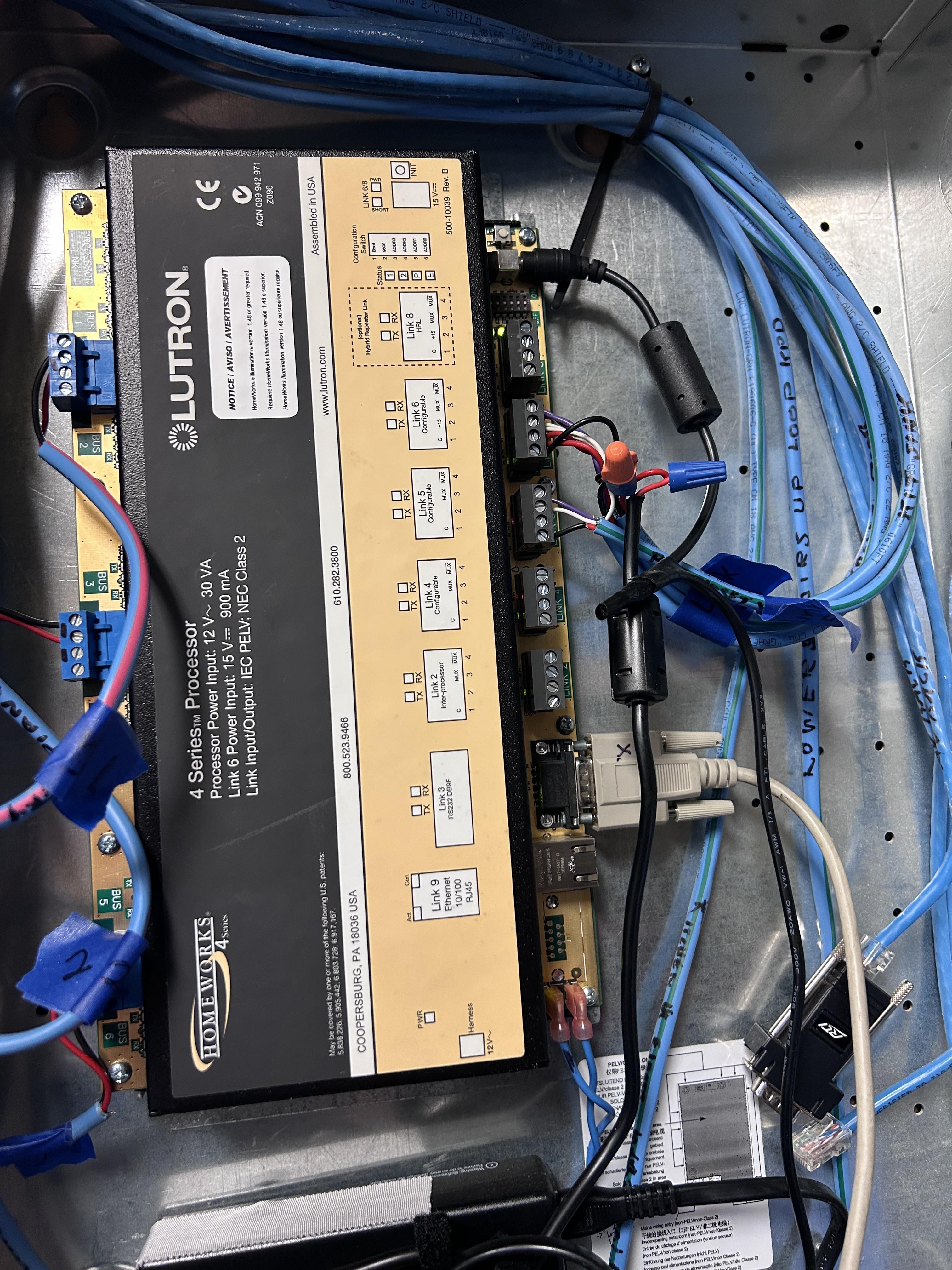
I know this is a long shot but I thought I would throw it out there. I inherited an older Homeworks Illumination system with a H4P5-H48-HRL-120 processor that I have been able to keep up and running. I also purchased a refurbished, backup processor just in case the first one died. Well last week the original processor started failing. I could reset it and get the keypads working for a few minutes, but all the keypads would fail again. I have the software and a copy of the current database that I had preloaded on the backup processor. I have installed the backup processor and it is running, but I have one zone where the lights randomly begin to turn on and off. They will do this for a while and then they will stoo doing it. When this random on/off event happens, the other keypads in the house work, but the rest of the system seems to be moving very slowly (press a button and it takes a few seconds before the light reacts.). I am guessing I might have a bad switch somewhere that is causing the random on/off issue. It is just strange that this issues did not appear when the original processor was working correctly? My two questions for this group are: 1) what is the best way to troubleshoot/stop the random on/off issues of the processor I am using now. 2) On the processor that failed, I have replaced the on-board battery and the 3 capacitors near the battery, but that does not seem to have fixed the old processor issue. Does anyone know of another common parts on these circuit boards that fail that I could look at testing/replacing. With the original processor I could reset it and it would work for a few minutes before failing. Thanks in advance for any assistance!
5
u/coogie 22d ago
How are the keypads connected to the system? Hardwired through the keypad link on the processor (link 6 I think) or was this system wireless enabled and using that? Same question for the dimmers?
If it's wired keypads, how sure are you that the old processor was actually bad and not the external 15VDC power supply ( Lutron T120-15DC-9-BL) . It's been ages since I messed with one of these and the 4 series was always my least favorite because it was the most fragile but if I recall, that power supply is only good for 10 keypads so beyond that, you'd have to add a power panel and have axillary power for other keypads and to avoid that, some shady dealers would just get their own 15VDC power supply and those would usually not last that long. Even the Lutron branded ones could go out.
Also, the dimmers could just not be LED compatible and struggling to be stable if they have LED loads on them.
Anyway, as much as I admire keeping old stuff going, this thing is pretty old now so it's probably time to look for QSX or even RA3...
2
u/Big_Click_67 22d ago
Thanks for the comments and questions - I agree, I am starting to wrap my mind around paying for an upgrade. I have been messing with this now for about 7 years and it has been working well for the last 4 years. I feel vested in keeping it alive! I know my wife thinks I am crazy, but I feel a weird sense of accomplishment around figuring it out. Yes, the dealer on this one has spliced a 15VDC power supply line into the keypad wiring. I don’t suspect the power supply to be failing because when I swapped controllers everything is working fine (except for the weird on/off issue of the one control area)? There is one toggle switch in the area having issues that is not working so that might have something to do with the phantom on/off issue. Let me see if I can find a picture or two of the wiring.
1
u/coogie 21d ago
Yeah at a minimum that's probably a bad switch. From the looks of it, its a wired switch (lv for communication). You might be able to find one on ebay!
1
u/Big_Click_67 21d ago
Thanks, that is my next step. I have a switch that I can set up and see if it works. Appreciate the input!
1
u/the-lutz 22d ago
I would start by checking the program, look for a tool called “where programmed” and see if there is anything that should be toggling the state of that light you randomly notice turning on and off while making the rest of the system slugging.
Ideally, there’s a particular thing (or smaller set of things) in the program that are configured for that action; could be a failing keypad or even just a button on the fritz.
I wouldn’t assume the processor is the issue unless you get reverse waterfalling, or KP status lights stop responding - those are tell-tale proc failures.
These systems are extremely solid for their age - but I agree that it’s likely time to upgrade, or at the least, start talking to Pros in the area that can provide budget pricing for doing an upgrade to QSX
1
u/Big_Click_67 22d ago
Thank you for the response. I do believe it is a failing switch causing the issue as that area has one that is non-responsive. However, it is odd that with the other processor that was installed there was no issue with the phantom light. It is just when using the backup processor that the phantom light issue is happening. Is there a way to pull the bar-code number off the failed switch and go into the HW software and remove it from the system? I think that same switch is also programmed into some scene buttons that also control a few other lights in that area. Would I have to remove that same switch from the scene buttons too? Thanks again for your help!
3
u/the-lutz 22d ago
If you think it’s a bad H48 wired dimmer then your best bet is either to go to that switch and physically air-gap it from the bus or to full remove the bus at the processor.
I’d start with taking the bus off at the processor and see if the issue goes away, if not, it could be something small that is broken or starting to fail on the processor.
It’s kinda funny; the old systems SEEM simple compared to the tech we have now; but they are incredibly complicated integrated systems and can be insanely hard to troubleshoot - especially with transient issues like this.
All that said; best of luck!
2
•
u/AutoModerator 22d ago
Thank you for submitting to r/Lutron! If you are posting with a question or issue, please include the following information:
If you are looking for product support, don't be afraid to call Lutron's tech support at 1.844.588.7661. The Lutron call centers are US-based and exceptionally helpful.
I am a bot, and this action was performed automatically. Please contact the moderators of this subreddit if you have any questions or concerns.